HTML to PNG API
POST an HTML file to /v2/convert/html/to/png, or /to/jpg, and the rendered page comes back as one image at the width you set. Static pages are drawn in process by an HTML layout engine; pages with scripts, and requests that use CropElement or Zoom, are captured by a full browser engine.
- Endpoint
- POST /v2/
convert/ html/ to/ png - Accepts
- html
- Sample timing
- 41 ms median of 5 runsHow we measure
- Request size
- Up to 10 MB on the Free plan or 25 MB on paid plans, file and fields together
Request and response
Every sample below ran against the API before this page was published. Set PDFCONVERSIONAPI_KEY to your key and run it as is.
curl -sS -X POST \
  https://api.pdfconversionapi.com/v2/convert/html/to/png \
  -H "Authorization: Bearer $PDFCONVERSIONAPI_KEY" \
  -F File=@social-card.html \
  --form-string ViewportWidth=1200 \
  --form-string CropHeight=630 \
  -o response.json

# FileData is base64. Save the first file in converted/,
# or print the JSON error.
if jq -e '.Files' response.json > /dev/null; then
  mkdir -p converted
  name=$(jq -r '.Files[0].FileName' response.json)
  jq -r '.Files[0].FileData' response.json \
    | base64 --decode > "converted/$name"
else
  cat response.json
fi
import base64
import os
import requests
key = os.environ["PDFCONVERSIONAPI_KEY"]
response = requests.post(
"https://api.pdfconversionapi.com/v2/convert/html/to/png",
headers={"Authorization": f"Bearer {key}"},
files=[("File", open("social-card.html", "rb"))],
data={
"ViewportWidth": "1200",
"CropHeight": "630",
},
timeout=180,
)
result = response.json()
if not response.ok:
raise SystemExit(f"{result['Code']}: {result['Message']}")
os.makedirs("converted", exist_ok=True)
for file in result["Files"]:
path = os.path.join("converted", file["FileName"])
with open(path, "wb") as out:
out.write(base64.b64decode(file["FileData"]))
print(path, file["FileSize"], "bytes")
import { mkdir, readFile, writeFile } from "node:fs/promises";
import { join } from "node:path";

const form = new FormData();
const file = "social-card.html";
form.append("File", new Blob([await readFile(file)]), file);
form.append("ViewportWidth", "1200");
form.append("CropHeight", "630");

const url = "https://api.pdfconversionapi.com/v2/convert/html/to/png";
const key = process.env.PDFCONVERSIONAPI_KEY;
const response = await fetch(url, {
  method: "POST",
  headers: { Authorization: `Bearer ${key}` },
  body: form,
});
const result = await response.json();
if (!response.ok) {
  throw new Error(`${result.Code}: ${result.Message}`);
}

await mkdir("converted", { recursive: true });
for (const file of result.Files) {
  const path = join("converted", file.FileName);
  await writeFile(path, Buffer.from(file.FileData, "base64"));
  console.log(path, file.FileSize, "bytes");
}
{
  "ConversionCost": 1,
  "ConversionTime": 0.041,
  "Files": [
    {
      "FileName": "social-card.png",
      "FileExt": "png",
      "FileSize": 205545,
      "FileData": "iVBORw0KGgoAAAANSUhEUgAA…"
    }
  ]
}
Response from our test run on 2026-11-03. ConversionTime shows the median of 5 runs. FileData is shortened here; the real response carries the whole file as base64.
The sample, converted
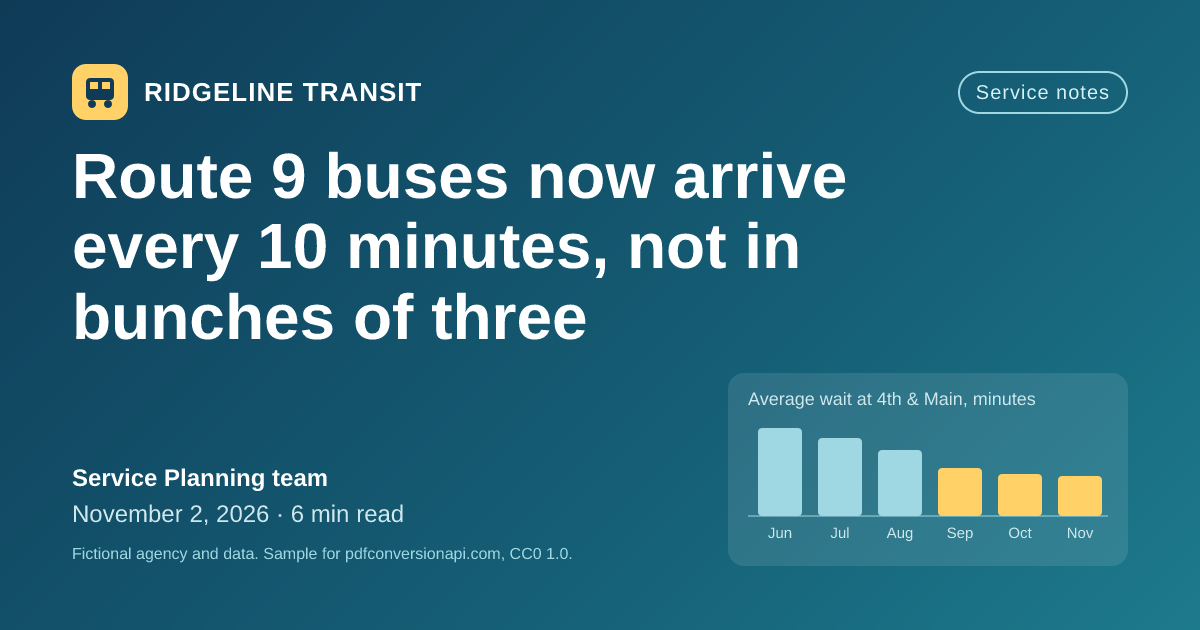
The same file the code sends. Download the input and the output and compare them yourself.
- Input
- social-card.html (3.7 KB)
- Output
- social-card.png (201 KB)
- Source
- Written for this site (fictional transit agency): HTML and CSS (CC0-1.0). How it was made
- Made by
- 2026-11-04, API build
9eeeb0640aba
Parameters
Send these as form fields next to the file. Names are case-insensitive. If you set one of the documented options below that we don't support yet, the request fails with a 400 that names it instead of returning a file made without it.
| Parameter | What it does |
|---|---|
ViewportWidthinteger, default 1366 | Width the page is laid out at, in CSS pixels. The image is this wide unless you crop, zoom or resize it.Values: 200 to 4000 (px) |
ViewportHeightinteger, default 1024 | Browser window height. A browser engine capture is at least this tall; the in-process engine ignores it and captures the content's own height.Values: 200 to 4000 (px) |
CropXinteger | Left edge of the area to keep, counted from the left of the page.Values: 0 to 16384 (px) |
CropYinteger | Top edge of the area to keep, counted from the top of the page. A crop that starts outside the page returns 400.Values: 0 to 16384 (px) |
CropWidthinteger | Width of the area to keep.Values: 1 to 16384 (px) |
CropHeightinteger | Height of the area to keep. It cuts and never pads: in the in-process engine, a page shorter than CropHeight comes out at its own height.Values: 1 to 16384 (px) |
CropElementstring | CSS selector. The image is cut to the border box of the first matching element. Captured by the browser engine; a selector that matches nothing returns 400. |
Zoomnumber, default 1 | CSS zoom applied to the whole page. Captured by the browser engine. Double ViewportWidth and set Zoom=2 for a sharp 2x image.Values: 0.1 to 10 |
TransparentBackgroundboolean, default false | Where the page paints no background, leave the PNG transparent instead of white. JPG has no transparency, so those areas are filled with white, or with BackgroundColor. |
BackgroundColorstring, default white | JPG only: the color that fills transparent areas when TransparentBackground=true. A value that is not a color returns 400.Values: #RRGGBB, R,G,B, white, black, red, green, blue, gray |
ImageWidthinteger | Resize the finished image to this width. Alone, the height follows the aspect ratio.Values: 1 to 20000 (px) |
ImageHeightinteger | Resize to this height. With ImageWidth too, the image is fitted inside both, keeping its shape: 600 x 600 turns the 1200 x 630 sample into 600 x 315.Values: 1 to 20000 (px) |
ScaleProportionsboolean, default true | With ImageWidth and ImageHeight both set, false stretches the image to exactly that size. Sent without a size, it is accepted and changes nothing. |
ImageQualityinteger, default 85 | JPEG quality for /to/jpg. Lower values give smaller files with more compression artifacts. ConvertAPI's default is 75; send ImageQuality=75 to match it.Values: 1 to 100 |
ColorSpaceenum, default default | gray writes one gray channel: the sample card drops from 205,545 to 80,865 bytes as PNG, and to 63,331 bytes as JPG. monochrome turns every pixel black or white (14,366 bytes): the card's dark gradient comes out solid black, with the text, logo and bars in white. rgb drops the alpha channel when every pixel is opaque: the card comes back as a 196,941-byte RGB PNG with the same pixels. With TransparentBackground=true the alpha stays. cmyk returns 400.Values: default, rgb, gray, monochrome |
ImageResolutioninteger | Only labels the file with a DPI: PNG gets a pHYs chunk and JPG a JFIF density. The pixels stay as the viewport and crop make them, so ImageResolution=144 still gives a 1200 x 630 card. Left out, the file has no DPI.Values: 10 to 800 |
HideElementsstring | CSS selector. Matching elements are hidden before the capture, for cookie bars, chat buttons or anything else you don't want in the picture. |
UserCssstring | Extra CSS added after the page's own styles, for example to swap a theme or bump a font size for the snapshot. |
CssMediaTypeenum, default screen | Which @media rules apply. Images use screen rules; if the page has @media rules and you ask for print, the capture is done by the browser engine.Values: screen, print |
JavaScriptboolean, default true | false draws a page that contains scripts without running them, in the in-process engine. |
UserJsstring | Script to run in the loaded page before the capture. Captured by the browser engine. |
WaitElementstring | CSS selector to wait for before the capture, so content a script adds late is in the image. Captured by the browser engine. |
ConversionDelayinteger, default 0 | Extra seconds to wait after load before a browser engine capture. Pages drawn in process are captured straight away.Values: 0 to 30 (seconds) |
FileNamestring | Name for the image, without the extension. Without it the image takes the uploaded file's name. |
StoreFileboolean, default false | Return a download link instead of the image data. The link expires after 3 hours. |
Not supported yet
Setting one of these to anything but its default returns 400.
| Option | What to do instead |
|---|---|
Url | Upload the HTML instead. Nothing is fetched while rendering, so embed images as data: URIs. |
AuthUsername, AuthPassword, Cookies, Headers | Only meaningful with Url. |
AdBlock | Use HideElements on the ad containers. |
CookieConsentBlock | Use HideElements on the consent banner. |
What carries over, and what doesn't
Kept
- The full height of the content: the in-process engine measures the page and captures all of it, so the sample card comes out exactly 630 px tall
- Linear gradients, rounded corners, flexbox and inline SVG, including the text labels in the sample's bar chart
- Text in every writing system the server fonts cover, including CJK and Arabic through the Noto families
- Transparency: with
TransparentBackground=true, anything the page leaves unpainted has alpha 0 in the PNG - Pixels close to a browser's: against the browser engine's capture of the same file, 1.1% of the sample's pixels differ in brightness by more than 16 of 255 levels, all of them on the edges of letters and shapes
Lost or not yet supported
- A font-family list in which nothing is installed falls back to Liberation Serif in the in-process engine, even when it ends in sans-serif or monospace. Put Arial, Helvetica or another installed font in the list; the browser engine handles the generic names.
- The in-process engine does not load
@font-facefonts,data:URIs included. A page that depends on a brand font only shows it when the browser engine does the capture. - The in-process engine sizes boxes as
box-sizing: border-boxby default, so fixed-width boxes with padding come out narrower than in a browser. The sample sets border-box itself, so both engines agree on it. - The in-process engine skips some browser defaults: links are neither blue nor underlined, a plain
hris not drawn, checkboxes are missing,border="1"on a table draws nothing, and CSS columns collapse into one. Style those in CSS, or addWaitElement=body, which has the browser engine do the capture (the image is then at leastViewportHeighttall). - There is no device pixel ratio setting.
ImageWidthresamples the finished capture, which softens text when enlarging; for 2x, lay the page out larger withViewportWidthandZoominstead.
Limits
- HTML is uploaded as a file;
Urlis refused, and images, style sheets and fonts referenced by URL are not loaded. - Captures stop at 16,384 px on a side and 100 million pixels. Longer pages are cut at that height rather than refused.
ImageWidthandImageHeightgo up to 20,000 px, and the resized image must stay under 100 million pixels;ImageWidth=20000on the 1200 x 630 sample returns 413.- On the hosted API, an HTML request (the file and all fields together) can be up to 10 MB on the Free plan or 25 MB on paid plans; a conversion can run for up to 120 seconds before the API returns 504.
Where teams use it
Social cards for posts and pages
Keep one HTML template for your Open Graph image, fill in the title for each post, and render it with ViewportWidth=1200 and CropHeight=630. The sample on this page is such a card, drawn by the in-process engine.
Pictures of HTML for places that can't show HTML
Chat messages, push notifications and some email clients drop styles or block HTML. Render the receipt, scorecard or status table to PNG and send the picture instead.
Snapshots of your templates in CI
Render each invoice, email or report template after a change and compare the PNGs with the last accepted set. Keep the viewport and crop fixed so the images stay the same size between runs.
Questions
Why is my image taller than my content?
The capture was done by the browser engine, which never captures less than the window height (ViewportHeight, 1024 px by default). The in-process engine captures the content's own height: a short page gives a short image. For the same size from both engines, give the outer element a fixed height in your CSS, as the sample card does (height: 630px), and set CropHeight to match: both engines then return 1200 x 630 for the card.
How do I get a sharp image for high-density screens?
Double the layout instead of the pixels: ViewportWidth=2400 with Zoom=2 lays a 1200 px design out at twice the size, and the text is drawn at that size. ImageWidth=2400 only resamples a 1200 px capture, so edges look soft. Zoom requests are captured by the browser engine.
Can I capture one part of the page?
Yes. CropElement takes a CSS selector and cuts the image to that element (the browser engine does this capture). If you know the coordinates, CropX, CropY, CropWidth and CropHeight cut a rectangle and work in the in-process engine too.
PNG or JPG?
PNG is lossless and can be transparent; the sample card is 205,545 bytes as PNG. JPG is smaller for photos and gradients: the same card is 99,494 bytes at the default ImageQuality of 85 and 79,818 bytes at 75. Text edges show compression artifacts as the quality goes down.
Can it screenshot a live website?
No. Url returns 400, and the renderer has no network access at all. Save the HTML in your own code, inline the images as data: URIs and the CSS in style elements, and upload that file.
Does the page's JavaScript run?
Yes, when the page has scripts it goes to the browser engine and they run before the capture. Use WaitElement with a selector your script adds when it is done, or ConversionDelay for a fixed wait of up to 30 seconds. JavaScript=false skips the scripts and draws the page as written.
Convert your first HTML file in a minute.