Markdown to PDF API
Send a .md file to POST /v2/convert/md/to/pdf and the PDF comes back in the response. The engine behind our Word conversions sets the Markdown as a document with Word-style headings and bordered tables, on the paper size, margins and font you choose.
- Endpoint
- POST /v2/
convert/ md/ to/ pdf - Accepts
- md
- Sample timing
- 26 ms median of 5 runsHow we measure
- Request size
- Up to 10 MB on the Free plan or 100 MB on paid plans, all files together
Request and response
Every sample below ran against the API before this page was published. Set PDFCONVERSIONAPI_KEY to your key and run it as is.
curl -sS -X POST \
  https://api.pdfconversionapi.com/v2/convert/md/to/pdf \
  -H "Authorization: Bearer $PDFCONVERSIONAPI_KEY" \
  -F File=@postmortem.md \
  -o response.json

# FileData is base64. Save the first file in converted/,
# or print the JSON error.
if jq -e '.Files' response.json > /dev/null; then
  mkdir -p converted
  name=$(jq -r '.Files[0].FileName' response.json)
  jq -r '.Files[0].FileData' response.json \
    | base64 --decode > "converted/$name"
else
  cat response.json
fi
import base64
import os
import requests
key = os.environ["PDFCONVERSIONAPI_KEY"]
response = requests.post(
"https://api.pdfconversionapi.com/v2/convert/md/to/pdf",
headers={"Authorization": f"Bearer {key}"},
files=[("File", open("postmortem.md", "rb"))],
timeout=180,
)
result = response.json()
if not response.ok:
raise SystemExit(f"{result['Code']}: {result['Message']}")
os.makedirs("converted", exist_ok=True)
for file in result["Files"]:
path = os.path.join("converted", file["FileName"])
with open(path, "wb") as out:
out.write(base64.b64decode(file["FileData"]))
print(path, file["FileSize"], "bytes")
import { mkdir, readFile, writeFile } from "node:fs/promises";
import { join } from "node:path";

const form = new FormData();
const file = "postmortem.md";
form.append("File", new Blob([await readFile(file)]), file);

const url = "https://api.pdfconversionapi.com/v2/convert/md/to/pdf";
const key = process.env.PDFCONVERSIONAPI_KEY;
const response = await fetch(url, {
  method: "POST",
  headers: { Authorization: `Bearer ${key}` },
  body: form,
});
const result = await response.json();
if (!response.ok) {
  throw new Error(`${result.Code}: ${result.Message}`);
}

await mkdir("converted", { recursive: true });
for (const file of result.Files) {
  const path = join("converted", file.FileName);
  await writeFile(path, Buffer.from(file.FileData, "base64"));
  console.log(path, file.FileSize, "bytes");
}
{
  "ConversionCost": 1,
  "ConversionTime": 0.026,
  "Files": [
    {
      "FileName": "postmortem.pdf",
      "FileExt": "pdf",
      "FileSize": 57175,
      "FileData": "JVBERi0xLjcKJYCAgIAKMSAw…"
    }
  ]
}
Response from our test run on 2026-11-03. ConversionTime shows the median of 5 runs. FileData is shortened here; the real response carries the whole file as base64.
The sample, converted
The same file the code sends. Download the input and the output and compare them yourself.
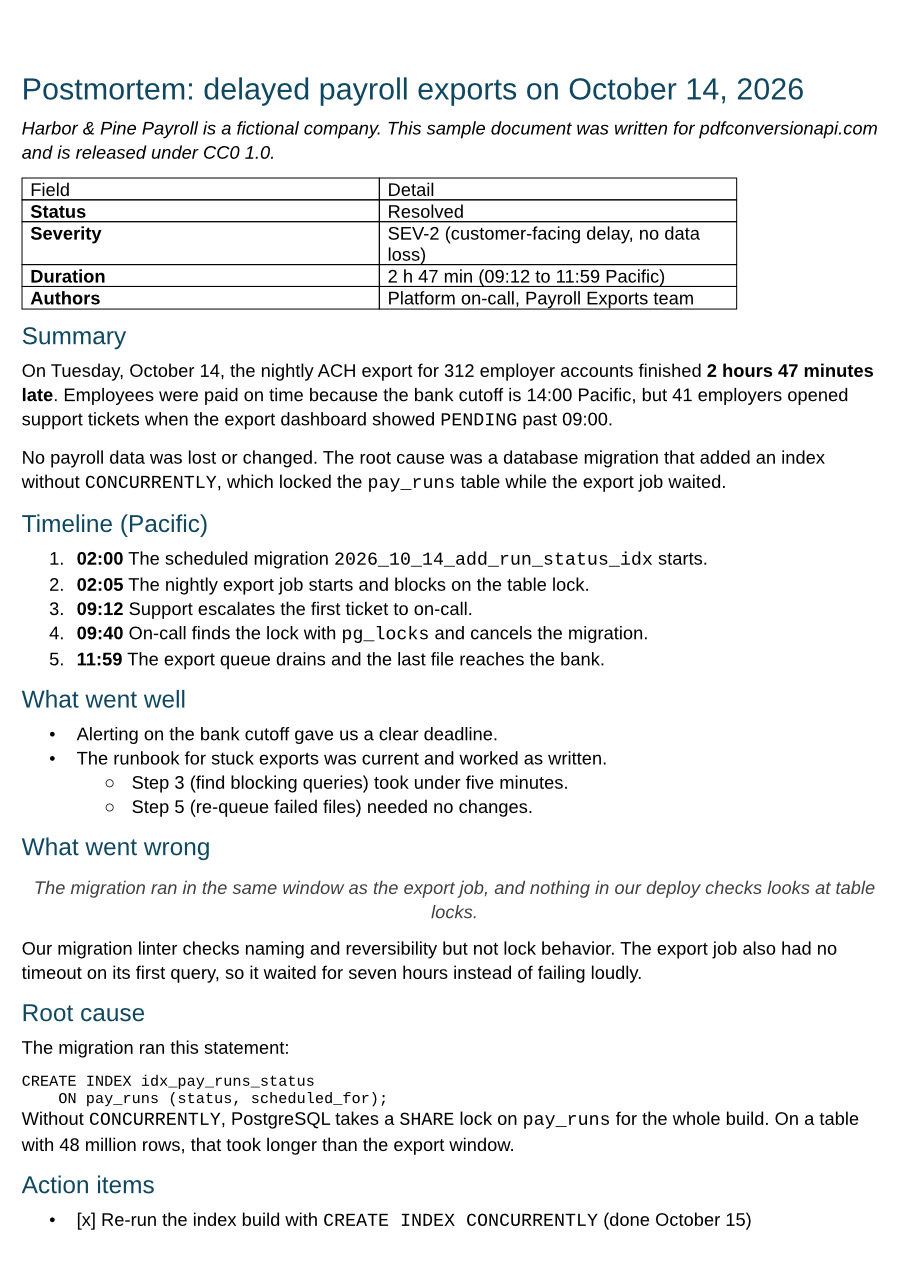
- Input
- postmortem.md (2.7 KB)
- Output
- postmortem.pdf (56 KB)
- Source
- Written for this site (fictional company), GitHub-flavored Markdown (CC0-1.0). How it was made
- Made by
- 2026-11-04, API build
9eeeb0640aba
Parameters
Send these as form fields next to the file. Names are case-insensitive. If you set one of the documented options below that we don't support yet, the request fails with a 400 that names it instead of returning a file made without it.
| Parameter | What it does |
|---|---|
PageSizeenum, default a4 | Paper size, matched in any case. a0 to a2 and b0 to b2 return 400, because the layout engine handles pages no longer than 22 in (559 mm) on a side.Values: a3 to a9, b3 to b5, letter, legal, ledger |
PageOrientationenum, default portrait | Which way the paper is turned. landscape swaps width and height, so A4 prints at 297 x 210 mm. Any other value returns 400.Values: portrait, landscape |
MarginTopinteger, default 10 | Top margin in whole millimeters. A decimal such as 12.5 returns 400.Values: 0 to 500 (mm) |
MarginRightinteger, default 5 | Right margin in millimeters.Values: 0 to 500 (mm) |
MarginBottominteger, default 10 | Bottom margin in millimeters.Values: 0 to 500 (mm) |
MarginLeftinteger, default 5 | Left margin in millimeters. Margins that leave less than 12.7 mm (0.5 in) of the page for text, across or down, return 400.Values: 0 to 500 (mm) |
FontNameenum, default arial | Font for body text, headings and tables, matched in any case. Each is drawn with an installed font that has the same character widths: Liberation Sans for Arial, Liberation Serif for Times New Roman, Liberation Mono for Courier New, Carlito for Calibri and Caladea for Cambria. Code stays in Liberation Mono. Other names return 400, including Times New Roman written with spaces.Values: arial, calibri, cambria, timesNewRoman, courierNew |
FileNamestring | Name for the PDF, without the extension. Without it the PDF is named after the .md file. |
StoreFileboolean, default false | Return a download link that expires after 3 hours, instead of the PDF itself. |
What carries over, and what doesn't
Kept
- Headings, in dark blue and sized by level; each one also becomes a PDF bookmark (7 in the sample)
- GitHub-style tables, with cell borders and the column alignment from the separator row (left, center, right)
- Numbered, bulleted and nested lists; a numbered list inside another is lettered a., b., c.
- Bold, italic, strikethrough and inline code, which is set in Liberation Mono
- Fenced code blocks with their line breaks and indentation
- Links written as [text](url) or <url>, which stay clickable in the PDF
- Images embedded in the Markdown as
data:URIs - Selectable text, with the fonts embedded as subsets (Liberation Sans and Liberation Mono in the sample)
Lost or not yet supported
- Task list items print as the typed text [x] and [ ] after a bullet, not as checkboxes.
- Raw HTML inside the Markdown, such as a span or a div, is printed as text, tags and all.
- Footnotes and YAML front matter are not read. [^1] and the note print as typed; front matter's opening --- prints as a horizontal rule and its fields print run together as a heading.
- Code blocks get no background or border, and the paragraph after one starts with no space above it.
- Links are clickable but not blue or underlined. A bare URL without angle brackets stays plain text rather than a link.
- Tables are always 6.5 in (165 mm) wide with equal columns, and the header row is not bold. On A4 with the default margins a table stops short of the right margin; on A5 and smaller pages it runs off the right edge.
- An image given as a file path or URL is replaced by its alt text; only
data:URIs are embedded. - Emoji such as a check mark print as an empty box.
Limits
- Paper sizes up to A3, B3 and Ledger. There is no custom width or height:
PageWidthandPageHeightare not options for Markdown and are ignored. PageRangeandPdfaare ignored for Markdown. Keep the pages you need with/v2/convert/pdf/to/extractand make PDF/A with/v2/convert/pdf/to/pdfaafterwards.- Requests up to 10 MB on the Free plan or 100 MB on paid plans (all files and fields together). A conversion can run for up to 120 seconds; after that the API returns 504.
Where teams use it
Postmortems and runbooks that live in Git
Incident reviews written next to the code are Markdown. Convert the approved file and attach the PDF to the ticket, or send it to the customer who asked for a written report. The sample on this page is a postmortem.
Text your app or a language model writes as Markdown
Chat models and many report tools answer in Markdown. Turn that answer into a PDF your users can download, without building an HTML template first.
Release notes for customers who want a document
Cut the section for one release out of CHANGELOG.md and convert it. Headings become bookmarks, so a long changelog stays easy to move through in a PDF viewer. Send PageSize=letter for readers in the US.
Questions
Which Markdown syntax does it understand?
Headings, emphasis, strikethrough, lists, block quotes, inline code, fenced code blocks, links, images and GitHub-style tables. It does not interpret task lists, footnotes, YAML front matter or raw HTML. /v2/convert/md/to/html reads a little more (its Markdown parser has GitHub's table, strikethrough, autolink and task-list extensions turned on, so bare URLs become links and task items become checkboxes), but it drops raw HTML and leaves footnotes as typed.
Which paper sizes, margins and fonts can I set?
PageSize takes A3 to A9, B3 to B5, Letter, Legal and Ledger, and PageOrientation=landscape turns the page sideways. Each margin is a whole number of millimeters from 0 to 500. FontName picks Arial, Calibri, Cambria, Times New Roman or Courier New. Without these options you get ConvertAPI's defaults for this conversion: A4 portrait, 10 mm margins at the top and bottom, 5 mm at the sides, and Arial.
Can I style the PDF with my own CSS?
Not on this route. Convert with /v2/convert/md/to/html, which returns plain HTML with no styles, then send that file to /v2/convert/html/to/pdf with a UserCss such as pre { background: #f4f4f4; padding: 8px }. That path lays the page out the way a browser does: headings do not become bookmarks, and task-list checkboxes and the horizontal rule are not drawn.
What will the PDF look like?
Like a document typed in a word processor, not like a GitHub page: dark blue headings, block quotes centered in gray italics, tables with a border on every cell. The preview on this page is the first of the sample's two pages, converted with no options, so it shows the defaults: A4, Liberation Sans in place of Arial, and 5 mm side margins.
How do I include images?
Embed them in the Markdown as data: URIs, for example . Nothing outside the uploaded file is read, so  or an https:// address prints the alt text instead.
Can I get an editable Word file instead?
Yes. /v2/convert/md/to/docx runs the same engine and returns a .docx with the same headings, lists and tables. The page and font options apply to PDF output only: the .docx is Letter with 1-inch margins and uses Aptos as its font. Edit it in Word or your own code, then convert it with /v2/convert/docx/to/pdf.
Convert your first MD file in a minute.