PDF to DOCX API
Send a PDF to POST /v2/convert/pdf/to/docx and get back a Word file you can edit. The converter rebuilds the text, headings and pictures. Tables and lists come back simplified: download the sample to see exactly how.
- Endpoint
- POST /v2/
convert/ pdf/ to/ docx - Accepts
- Sample timing
- 23 ms median of 5 runsHow we measure
- Request size
- Up to 10 MB on the Free plan or 100 MB on paid plans, all files together
Request and response
Every sample below ran against the API before this page was published. Set PDFCONVERSIONAPI_KEY to your key and run it as is.
curl -sS -X POST \
  https://api.pdfconversionapi.com/v2/convert/pdf/to/docx \
  -H "Authorization: Bearer $PDFCONVERSIONAPI_KEY" \
  -F File=@statement-of-work.pdf \
  -o response.json

# FileData is base64. Save the first file in converted/,
# or print the JSON error.
if jq -e '.Files' response.json > /dev/null; then
  mkdir -p converted
  name=$(jq -r '.Files[0].FileName' response.json)
  jq -r '.Files[0].FileData' response.json \
    | base64 --decode > "converted/$name"
else
  cat response.json
fi
import base64
import os
import requests
key = os.environ["PDFCONVERSIONAPI_KEY"]
response = requests.post(
"https://api.pdfconversionapi.com/v2/convert/pdf/to/docx",
headers={"Authorization": f"Bearer {key}"},
files=[("File", open("statement-of-work.pdf", "rb"))],
timeout=180,
)
result = response.json()
if not response.ok:
raise SystemExit(f"{result['Code']}: {result['Message']}")
os.makedirs("converted", exist_ok=True)
for file in result["Files"]:
path = os.path.join("converted", file["FileName"])
with open(path, "wb") as out:
out.write(base64.b64decode(file["FileData"]))
print(path, file["FileSize"], "bytes")
import { mkdir, readFile, writeFile } from "node:fs/promises";
import { join } from "node:path";

const form = new FormData();
const file = "statement-of-work.pdf";
form.append("File", new Blob([await readFile(file)]), file);

const url = "https://api.pdfconversionapi.com/v2/convert/pdf/to/docx";
const key = process.env.PDFCONVERSIONAPI_KEY;
const response = await fetch(url, {
  method: "POST",
  headers: { Authorization: `Bearer ${key}` },
  body: form,
});
const result = await response.json();
if (!response.ok) {
  throw new Error(`${result.Code}: ${result.Message}`);
}

await mkdir("converted", { recursive: true });
for (const file of result.Files) {
  const path = join("converted", file.FileName);
  await writeFile(path, Buffer.from(file.FileData, "base64"));
  console.log(path, file.FileSize, "bytes");
}
{
  "ConversionCost": 1,
  "ConversionTime": 0.023,
  "Files": [
    {
      "FileName": "statement-of-work.docx",
      "FileExt": "docx",
      "FileSize": 33609,
      "FileData": "UEsDBBQAAAgIAAAAIQBrxkS6…"
    }
  ]
}
Response from our test run on 2026-11-03. ConversionTime shows the median of 5 runs. FileData is shortened here; the real response carries the whole file as base64.
The sample, converted
The same file the code sends. Download the input and the output and compare them yourself.
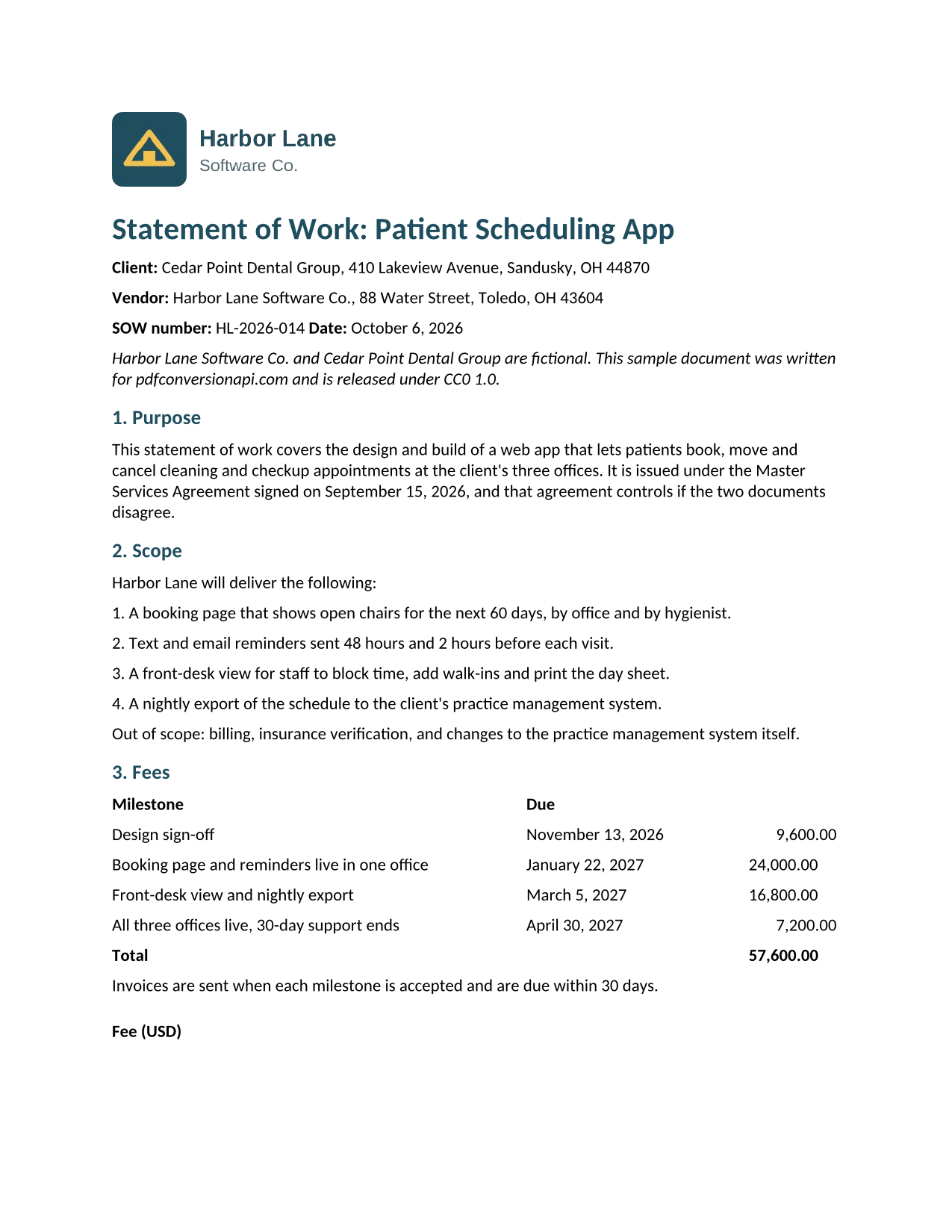
- Input
- statement-of-work.pdf (77 KB)
- Output
- statement-of-work.docx (33 KB)
- Source
- Written for this site (fictional companies); PDF saved by a word processor (CC0-1.0). How it was made
- Made by
- 2026-11-04, API build
9eeeb0640aba
Parameters
Send these as form fields next to the file. Names are case-insensitive. If you set one of the documented options below that we don't support yet, the request fails with a 400 that names it instead of returning a file made without it.
| Parameter | What it does |
|---|---|
PageRangestring | Convert only these pages. We cut them out of the PDF before it is converted, so the DOCX holds nothing else. last stands for the final page. A page past the end returns 400 and says how many pages the file has; a range that runs past the end, such as 2-9, stops at the last page. Left out, every page is converted.Values: Pages and ranges such as 1-3,5, 4- or 4-last (to the end) |
Passwordstring | Opens an encrypted PDF. If the PDF forbids copying text, only the owner password works, and PDFs that open freely but forbid copying need it too. A missing or wrong password returns 422. PageRange works with the owner password, and with the open password of a file that restricts nothing; with the open password of a file that keeps restrictions it returns 400 for now (see the FAQ). |
FileNamestring | Name for the DOCX, without the extension. Left out, the DOCX keeps the stem of the uploaded PDF's name. |
StoreFileboolean, default false | Return a download link instead of the file in the response. The link stops working after 3 hours. |
Not supported yet
Setting one of these to anything but its default returns 400.
| Option | What to do instead |
|---|---|
Layout | Only the default, flowing, is accepted. |
OcrMode | This step reads the PDF's text layer only. Send scans to /v2/convert/pdf/to/ocr first. |
Also refused when set: Annotations, OcrLanguage, OcrEngine.
What carries over, and what doesn't
Kept
- All of the sample's text, as editable paragraphs rather than a picture of the page, in reading order except the fee table's "Fee (USD)" header, which moved below the table
- Bold, italic, text color and point size (the sample's headings kept their dark teal)
- Headings, which get Word's Heading 1 and Heading 2 styles
- Embedded pictures (the sample's logo came through as a PNG)
- Page size (US Letter in the sample), with a section break where each PDF page ended
- Table cells, as a real Word table whose text you can edit
Lost or not yet supported
- The DOCX names no fonts, so each word processor falls back to its own default. One word processor we tested showed the sample in Carlito instead of the original Liberation Serif.
- Table borders, cell shading and right-aligned numbers are dropped. In the sample, the fee table's "Fee (USD)" header was read as a heading and placed after the table, and the sentence under the table moved into its last row.
- Lists are not Word lists. Numbered items become paragraphs with the number typed in, and bullets become a two-column table with no borders.
- Text set side by side comes out as single lines one under the other. The sample's two signature blocks became both "For ..." lines, then both signature lines.
- Page margins came out at 1 inch on every page; the sample's were 0.9 inch.
- Scanned pages come through as pictures with no editable text.
- Expect to tidy the formatting yourself: the conversion engine is still labeled alpha by its developers, who name DOCX layout as one of its weak spots.
Limits
- Uploads up to 10 MB on the Free plan or 100 MB on paid plans.
- A conversion can run for up to 120 seconds; after that the API returns 504.
- PDFs that need a password to open return 422 "the input file is password-protected" until you send the right
Password. PDFs that forbid copying text return 422 "this PDF's permissions don't allow copying text and images; send the owner password in Password, or remove the restrictions with /v2/convert/pdf/to/unprotect and the owner password" until the owner password is sent, with or withoutPageRange.
Where teams use it
Redlining a contract that arrived as a PDF
A client sends a statement of work as a PDF and you need to propose changes. Convert it, open the DOCX with track changes on, and send it back. Check the tables before you do: borders and column alignment are not rebuilt.
Recovering text when the Word original is gone
Old policies and manuals often survive only as PDFs. The DOCX gives you the paragraphs back with Heading 1 and Heading 2 styles applied, so the navigation pane and a generated table of contents work again.
Pulling a few pages into a new document
Set PageRange to the pages you need, for example the fee schedule from a longer agreement, and paste the result into your own template instead of retyping it.
Questions
Will the Word file look like the PDF?
The words will be the same; the layout will not match. A PDF stores positioned lines of text, and the converter has to guess which lines form paragraphs, tables and lists. On our sample it got the paragraphs, headings, bold text and the logo right, and simplified the tables, lists and the two-column signature block. Open the sample DOCX above to judge it on a real file.
Can I convert a scanned PDF to an editable DOCX?
Not in one step. A scanned page has no text layer, so the DOCX holds only the page picture. Send the scan to /v2/convert/pdf/to/ocr first (English only), then convert the result. When we did that with a scan of the sample, the DOCX had the page picture behind positioned text boxes holding the recognized text, with a few misreads such as "CCO" for "CC0". Good for copying text out, awkward for editing.
How do I convert a password-protected PDF?
Send the password in the Password field. Without it, or with a wrong one, the API returns 422 "the input file is password-protected". The converter respects a PDF's copy restriction, so a file that forbids copying text needs its owner password; in our test the open password alone returned 422 because copying was not allowed. PageRange works with the owner password: page 1 of our protected copy came back as the same DOCX as page 1 of the unprotected file. With the open password of a file that keeps restrictions, PageRange returns 400 "PageRange can't be combined with the open password yet for PDF → DOCX; send the owner password in Password, or remove the protection with /v2/convert/pdf/to/unprotect first". A file protected with only a UserPassword takes PageRange with that password.
Which fonts does the DOCX use?
None are named in the file, so the app that opens it applies its own default font. One word processor we tested used Carlito for our sample. Point sizes, bold, italic and text colors are kept on each run of text, so if the original font matters, select everything once and set it.
Can I convert only some pages?
Yes. PageRange takes pages and ranges such as 2, 1-3,7 or 5- for page 5 to the end, and last stands for the final page (5-last). The pages are cut from the PDF first, so the DOCX contains only those pages. Asking for page 5 of a 2-page file returns 400 with the message "PageRange asks for page 5, but the document has 2 pages"; a range that runs past the end, such as 2-9, stops at page 2.
Convert your first PDF file in a minute.