Password-protect PDF API
Send a PDF and a password to POST /v2/convert/pdf/to/protect and you get an encrypted copy back, AES-256 by default. UserPassword is asked for when the file opens. OwnerPassword switches printing, copying and editing off until you allow them; the sample below uses only that, so it opens without a prompt.
- Endpoint
- POST /v2/
convert/ pdf/ to/ protect - Accepts
- Sample timing
- 70 ms median of 5 runsHow we measure
- Request size
- Up to 10 MB on the Free plan or 100 MB on paid plans, all files together
Request and response
Every sample below ran against the API before this page was published. Set PDFCONVERSIONAPI_KEY to your key and run it as is.
curl -sS -X POST \
  https://api.pdfconversionapi.com/v2/convert/pdf/to/protect \
  -H "Authorization: Bearer $PDFCONVERSIONAPI_KEY" \
  -F File=@pay-statement.pdf \
  --form-string OwnerPassword=replace-with-your-owner-password \
  --form-string PrintFaithfulCopy=true \
  --form-string FileName=pay-statement.print-only.pdf \
  -o response.json

# FileData is base64. Save the first file in converted/,
# or print the JSON error.
if jq -e '.Files' response.json > /dev/null; then
  mkdir -p converted
  name=$(jq -r '.Files[0].FileName' response.json)
  jq -r '.Files[0].FileData' response.json \
    | base64 --decode > "converted/$name"
else
  cat response.json
fi
import base64
import os
import requests
key = os.environ["PDFCONVERSIONAPI_KEY"]
response = requests.post(
"https://api.pdfconversionapi.com/v2/convert/pdf/to/protect",
headers={"Authorization": f"Bearer {key}"},
files=[("File", open("pay-statement.pdf", "rb"))],
data={
"OwnerPassword": "replace-with-your-owner-password",
"PrintFaithfulCopy": "true",
"FileName": "pay-statement.print-only.pdf",
},
timeout=180,
)
result = response.json()
if not response.ok:
raise SystemExit(f"{result['Code']}: {result['Message']}")
os.makedirs("converted", exist_ok=True)
for file in result["Files"]:
path = os.path.join("converted", file["FileName"])
with open(path, "wb") as out:
out.write(base64.b64decode(file["FileData"]))
print(path, file["FileSize"], "bytes")
import { mkdir, readFile, writeFile } from "node:fs/promises";
import { join } from "node:path";

const form = new FormData();
const file = "pay-statement.pdf";
form.append("File", new Blob([await readFile(file)]), file);
form.append(
  "OwnerPassword",
  "replace-with-your-owner-password",
);
form.append("PrintFaithfulCopy", "true");
form.append("FileName", "pay-statement.print-only.pdf");

const url = "https://api.pdfconversionapi.com/v2/convert/pdf/to/protect";
const key = process.env.PDFCONVERSIONAPI_KEY;
const response = await fetch(url, {
  method: "POST",
  headers: { Authorization: `Bearer ${key}` },
  body: form,
});
const result = await response.json();
if (!response.ok) {
  throw new Error(`${result.Code}: ${result.Message}`);
}

await mkdir("converted", { recursive: true });
for (const file of result.Files) {
  const path = join("converted", file.FileName);
  await writeFile(path, Buffer.from(file.FileData, "base64"));
  console.log(path, file.FileSize, "bytes");
}
{
  "ConversionCost": 1,
  "ConversionTime": 0.07,
  "Files": [
    {
      "FileName": "pay-statement.print-only.pdf",
      "FileExt": "pdf",
      "FileSize": 37456,
      "FileData": "JVBERi0xLjcKJeLjz9MKMSAw…"
    }
  ]
}
Response from our test run on 2026-11-03. ConversionTime shows the median of 5 runs. FileData is shortened here; the real response carries the whole file as base64.
The sample and the result
The same file the code sends. Download the input and the output and compare them yourself.
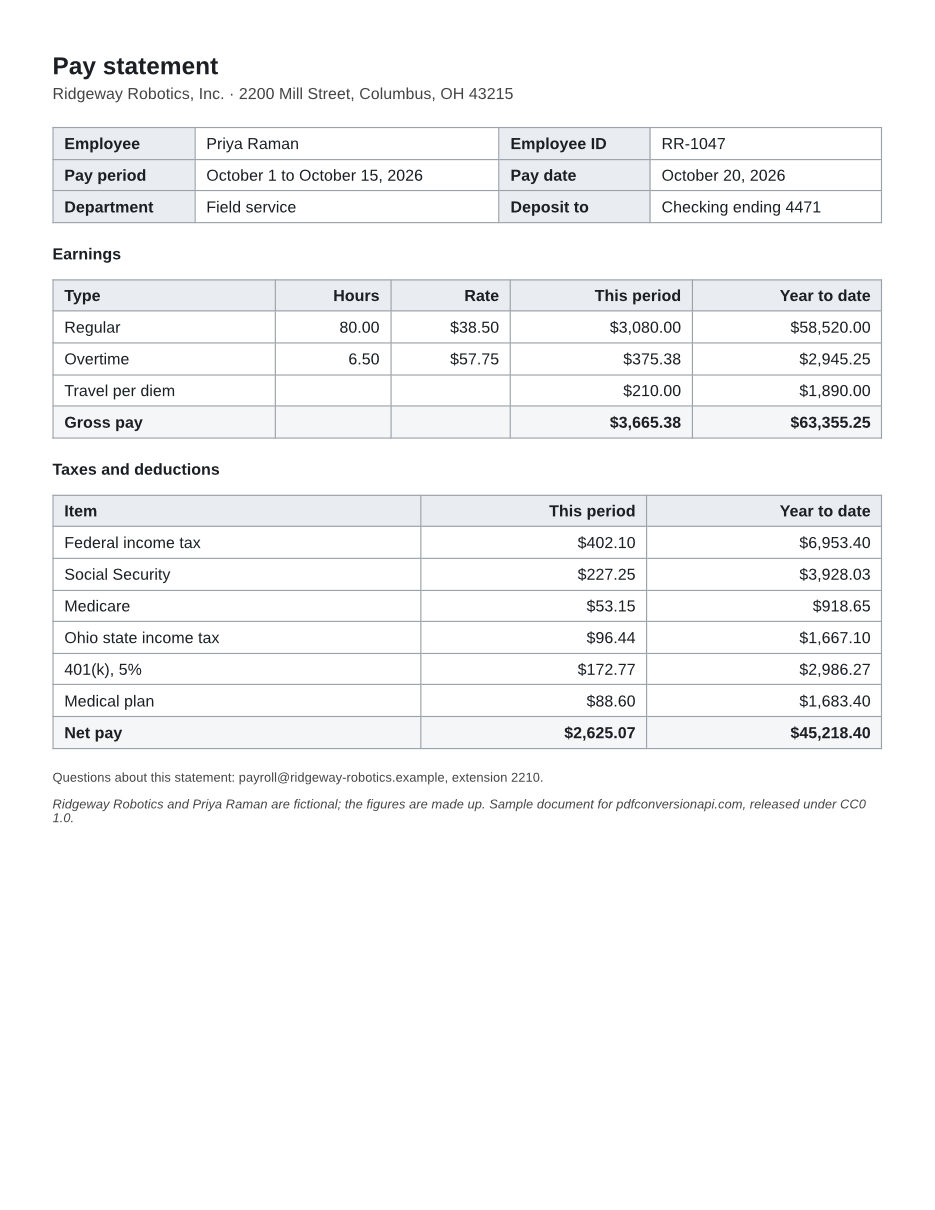
- Input
- pay-statement.pdf (39 KB)
- Output
- pay-statement.print-only.pdf (37 KB)
- Source
- Written for this site: a fictional pay statement with made-up figures (CC0-1.0). How it was made
- Made by
- 2026-11-04, API build
9eeeb0640aba
Parameters
Send these as form fields next to the file. Names are case-insensitive. If you set one of the documented options below that we don't support yet, the request fails with a 400 that names it instead of returning a file made without it.
| Parameter | What it does |
|---|---|
UserPasswordstring | Password needed to open the file. On its own it restricts nothing: whoever has it can print, copy and edit. Send UserPassword, OwnerPassword or both; with neither the API returns 400. |
OwnerPasswordstring | Password needed to change or remove the security. With it, the restrictions apply: each permission below is off unless you set it to true. Without a UserPassword the file opens with no prompt and only the restrictions apply. |
EncryptionAlgorithmenum, default Aes256Bit | Aes256Bit writes AES-256 (security handler revision 6). Aes128Bit is revision 4. Standard128Bit and Standard40Bit are the old RC4 schemes (revisions 3 and 2), only for readers that predate AES.Values: Aes256Bit, Aes128Bit, Standard128Bit, Standard40Bit |
EncryptMetaboolean, default false | Also encrypt the XMP metadata stream. Left off, the XMP metadata stays readable without the password, so file indexers can still see it. |
PrintDocumentboolean, default false | Needs OwnerPassword. Allow printing at low resolution. |
PrintFaithfulCopyboolean, default false | Needs OwnerPassword. Allow printing at full quality. Low-resolution printing is included, so PrintDocument adds nothing when sent with it. |
CopyContentsboolean, default false | Needs OwnerPassword. Allow copying text and images. ExtractContents does the same; sending both is fine. |
ExtractContentsboolean, default false | Same effect as CopyContents. |
FillFormFieldsboolean, default false | Needs OwnerPassword. Allow filling in form fields and signing. |
ModifyAnnotationsboolean, default false | Needs OwnerPassword. Allow comments, plus filling in forms and signing. |
AssembleDocumentboolean, default false | Needs OwnerPassword. Allow inserting, deleting and rotating pages, and nothing else in the changes group. Sent with ModifyContents, ModifyAnnotations, FillFormFields or AllowEverything, it is accepted but has no effect: the other flag decides, and page assembly stays off. |
ModifyContentsboolean, default false | Needs OwnerPassword. Allow editing the document, comments and forms. Page assembly stays off. |
AllowEverythingboolean, default false | Needs OwnerPassword. Turn on printing, copying, editing, comments and forms in one switch. Page assembly stays off today, even if you add AssembleDocument; other flags sent with it change nothing. |
Passwordstring | For an input that is already protected: its owner password. The old security is replaced by the new one. The user password is enough only on a file that restricts nothing, such as one this route locked with only a UserPassword, or with both passwords and AllowEverything=true; on a file with restrictions it returns 422. A file that opens without a password and restricts nothing needs no Password. |
FileNamestring | Name for the output file; the last extension is replaced with .pdf. Without it the result has the same name as the upload, and saving it next to the original overwrites the unprotected file. |
StoreFileboolean, default false | Return a download link instead of the file. The link expires after 3 hours and the file is then deleted. |
Not supported yet
Setting one of these to anything but its default returns 400.
| Option | What to do instead |
|---|---|
PreservePermissions | The input's permissions are not carried over. Set the flags you want again. |
RespectOwnerPassword | To change a file that is already protected, send its owner password in Password. |
What carries over, and what doesn't
Kept
- Text, fonts and layout: the sample's text extracts exactly as it did before encryption
- Page count and page size
- XMP metadata, readable without the password unless
EncryptMeta=true - Passwords with non-ASCII characters under the default
Aes256Bit(we tested ä, ö and an emoji). The older algorithms take printable ASCII only.
Lost or not yet supported
- Permission flags ask the reader software to behave; they don't lock anything. A file with only an owner password opens without a prompt, and tools that ignore the flags can copy its text: PyMuPDF extracted the sample's text with no password. Our own
pdf/to/txt, merge, split and rotate routes refuse such a file with 422 unlessPasswordcarries the owner password, and our PDF to image routes render it either way. - Page assembly (insert, delete, rotate pages) whenever another change flag or
AllowEverythingis set. OnlyAssembleDocumentwithout another change flag switches it on; flags from the printing and copying groups don't get in the way. Our own split, rotate and merge routes follow the PDF specification, where permission to edit includes assembly, so they accept anAllowEverythingfile without the owner password. - Permissions and passwords already on the input are replaced, not merged.
Limits
- Permission flags come in three groups: printing (
PrintDocument,PrintFaithfulCopy), copying (CopyContents,ExtractContents) and changes (ModifyContents,ModifyAnnotations,FillFormFields,AssembleDocument). Each group gets one setting. In the changes groupModifyContentswins overModifyAnnotations, thenFillFormFields, thenAssembleDocument, with no error for the flags that lose. - Permission flags set to
truewithout anOwnerPasswordreturn 400, for example "PrintDocument is not supported yet for pdf/to/protect". - Password rules return 400:
UserPasswordandOwnerPasswordmust be different, they can hold only printable ASCII characters unlessEncryptionAlgorithmisAes256Bit, and a password made only of characters that passwords ignore, such as soft hyphens, is refused. - Digitally signed PDFs return 422 "this PDF is digitally signed, and rewriting it would invalidate the signature".
- Uploads up to 10 MB on the Free plan or 100 MB on paid plans. A conversion can run for up to 120 seconds.
- An input that already has restrictions needs its owner password in
Password; without it, or with its user password or a wrong one, the API returns 422. An input that restricts nothing also takes its user password, and needs none if it opens without one.
Where teams use it
Pay statements and tax forms sent by email
Encrypt each document with its own UserPassword before it leaves your system, and give the recipient the password through a different channel than the attachment.
Print-only copies for customers
Send only an OwnerPassword with PrintFaithfulCopy=true. The file opens without a prompt and readers that honor the flags allow printing but not editing or copying. That is the sample on this page.
Rotating a password
Send the protected file with its owner password in Password and the new UserPassword. The old security is dropped and the new one applied in the same request.
Questions
What is the difference between UserPassword and OwnerPassword?
UserPassword is asked for when the file is opened; with only that set, anyone who opens it can do anything. OwnerPassword controls the security settings: it switches on the print, copy and edit restrictions and is needed to change or remove them. Use both when the file must be both private and restricted.
How strong is the encryption?
The default is AES-256 with security handler revision 6. The cipher is only part of it: anyone holding the file can try passwords offline for as long as they like, so a short or guessable password is the weak point. Use a long random password per file.
Do the permission flags stop people from copying text?
Only in software that honors them. Viewers that do will disable copying and editing, but any program that ignores the flags can still read the text: PyMuPDF extracted the sample's text without a password. Our own pdf/to/txt honors them and returns 422 for that file unless you send the owner password in Password. If the content must stay private, set a UserPassword.
Can I protect a PDF that already has a password?
Yes, if you have its owner password. Send it in Password together with the new passwords; the old security is replaced. Without any Password, or with a wrong one, a file that asks for a password when it opens returns 422 "the input file is password-protected". A file with restrictions returns 422 "this PDF's permissions don't allow changing security; send the owner password in Password, or remove the restrictions with /v2/convert/pdf/to/unprotect and the owner password" when it opens without a password and you send anything but the owner password, or when you send only its user password. A file that restricts nothing, such as one locked with AllowEverything=true, is protected again with its user password, or with no Password if it opens without one.
Is my password stored anywhere?
It travels in the form body, never in the URL. The converter reads it from a script file in a temporary folder that is deleted when the run ends, and logs one line per request with the route, the outcome and any error message. The PDF library's own tool notes say passwords are never echoed back, and none of the errors we triggered on this route repeated one. To take a password off later, see /v2/convert/pdf/to/unprotect.
Convert your first PDF file in a minute.