Compress PDF API
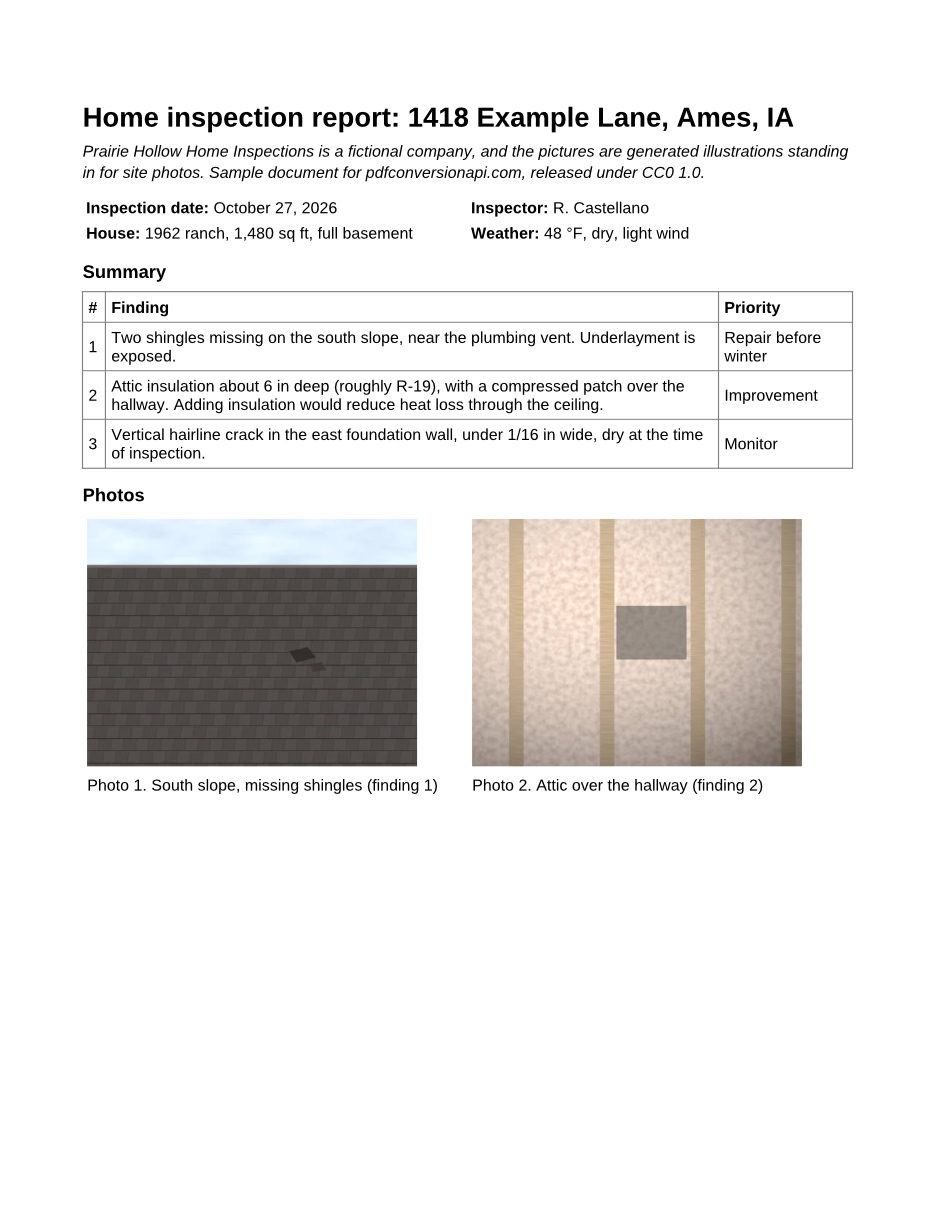
POST a PDF to /v2/convert/pdf/to/compress and a smaller copy comes back. The API resamples and re-encodes the color and grayscale images, then rewrites the file's structure; text, fonts and bookmarks stay as they are. The sample report below, with three large JPEG pictures, went from 648,531 to 85,049 bytes.
- Endpoint
- POST /v2/
convert/ pdf/ to/ compress - Accepts
- Sample timing
- 0.113 s median of 5 runsHow we measure
- Request size
- Up to 10 MB on the Free plan or 100 MB on paid plans, all files together
Request and response
Every sample below ran against the API before this page was published. Set PDFCONVERSIONAPI_KEY to your key and run it as is.
curl -sS -X POST \
  https://api.pdfconversionapi.com/v2/convert/pdf/to/compress \
  -H "Authorization: Bearer $PDFCONVERSIONAPI_KEY" \
  -F File=@inspection-report.pdf \
  --form-string Preset=ebook \
  --form-string FileName=inspection-report-small \
  -o response.json

# FileData is base64. Save the first file in converted/,
# or print the JSON error.
if jq -e '.Files' response.json > /dev/null; then
  mkdir -p converted
  name=$(jq -r '.Files[0].FileName' response.json)
  jq -r '.Files[0].FileData' response.json \
    | base64 --decode > "converted/$name"
else
  cat response.json
fi
import base64
import os
import requests
key = os.environ["PDFCONVERSIONAPI_KEY"]
response = requests.post(
"https://api.pdfconversionapi.com/v2/convert/pdf/to/compress",
headers={"Authorization": f"Bearer {key}"},
files=[("File", open("inspection-report.pdf", "rb"))],
data={
"Preset": "ebook",
"FileName": "inspection-report-small",
},
timeout=180,
)
result = response.json()
if not response.ok:
raise SystemExit(f"{result['Code']}: {result['Message']}")
os.makedirs("converted", exist_ok=True)
for file in result["Files"]:
path = os.path.join("converted", file["FileName"])
with open(path, "wb") as out:
out.write(base64.b64decode(file["FileData"]))
print(path, file["FileSize"], "bytes")
import { mkdir, readFile, writeFile } from "node:fs/promises";
import { join } from "node:path";

const form = new FormData();
const file = "inspection-report.pdf";
form.append("File", new Blob([await readFile(file)]), file);
form.append("Preset", "ebook");
form.append("FileName", "inspection-report-small");

const url = "https://api.pdfconversionapi.com/v2/convert/pdf/to/compress";
const key = process.env.PDFCONVERSIONAPI_KEY;
const response = await fetch(url, {
  method: "POST",
  headers: { Authorization: `Bearer ${key}` },
  body: form,
});
const result = await response.json();
if (!response.ok) {
  throw new Error(`${result.Code}: ${result.Message}`);
}

await mkdir("converted", { recursive: true });
for (const file of result.Files) {
  const path = join("converted", file.FileName);
  await writeFile(path, Buffer.from(file.FileData, "base64"));
  console.log(path, file.FileSize, "bytes");
}
{
  "ConversionCost": 1,
  "ConversionTime": 0.113,
  "Files": [
    {
      "FileName": "inspection-report-small.pdf",
      "FileExt": "pdf",
      "FileSize": 85049,
      "FileData": "JVBERi0xLjcKJeLjz9MKMyAw…"
    }
  ]
}
Response from our test run on 2026-11-03. ConversionTime shows the median of 5 runs. FileData is shortened here; the real response carries the whole file as base64.
The sample and the result
The same file the code sends. Download the input and the output and compare them yourself.
- Input
- inspection-report.pdf (633 KB)
- Output
- inspection-report-small.pdf (83 KB)
- Source
- Written for this site (fictional company); PDF saved by a word processor (CC0-1.0). How it was made
- Made by
- 2026-11-04, API build
9eeeb0640aba
Parameters
Send these as form fields next to the file. Names are case-insensitive. If you set one of the documented options below that we don't support yet, the request fails with a 400 that names it instead of returning a file made without it.
| Parameter | What it does |
|---|---|
Presetenum, default none | Target resolution and JPEG quality for color and grayscale images. web: 72 ppi, quality 60. ebook and text: 150 ppi, quality 70. printer: 300 ppi, quality 85. none: 150 ppi, quality 80. lossless and archive leave every image as it is and only rewrite the file's structure.Values: none, web, ebook, text, printer, lossless, archive |
ImageResolutioninteger, default 150 | Target pixels per inch, measured at the size each image is drawn on the page; replaces the preset's value. Only images above 1.5 times the target are resampled: at 300, the sample's two 467 ppi pictures came down to 300 ppi and its 350 ppi picture kept its pixels.Values: 36–1200 |
ImageQualityinteger, default 80 | JPEG quality for re-encoded images; replaces the preset's value. Images below the resampling threshold are re-encoded at this quality too, but an image is only replaced when the new version is smaller.Values: 1–100 |
Passwordstring | Opens a PDF that needs a password. With the open password of a file that restricts printing, copying or editing, the compressed copy comes back encrypted with the same password, method and restrictions (we checked AES-256). When the open password allows everything, as on a file locked with only UserPassword, the copy comes back with no password. With the owner password, it comes back with no password and no restrictions. A file locked only with an owner password needs no Password here and keeps its restrictions, also when a wrong password is sent with it. If such a file allows everything, the copy comes back with no protection at all, with or without Password. |
FileNamestring | Name for the result, without the extension. Without it the result has the same name as your upload, so set it if you save next to the original. |
StoreFileboolean, default false | Send back a download URL in Files[].Url instead of FileData. The URL works for 3 hours. |
Not supported yet
Setting one of these to anything but its default returns 400.
| Option | What to do instead |
|---|---|
Linearize | Linearize=true returns 400. The result is not linearized for page-at-a-time loading in browsers. |
PreservePdfa | PreservePdfa=true returns 400. To end up with PDF/A, compress first and then send the result to /v2/convert/pdf/to/pdfa. |
RemoveMetadata | false returns 400. true, ConvertAPI's documented default, is accepted, but document properties and XMP metadata are kept today. |
RemoveEmbeddedFiles | false returns 400. true, the documented default, is accepted, but attachments are kept today. |
RemoveStructureInformation | false returns 400. true, the documented default, is accepted, but accessibility tags are kept today. |
RemoveForms | true returns 400. Form fields are kept and stay fillable. |
UnembedBaseFonts | Fonts stay embedded as they were. |
SubsetEmbeddedFonts | Fonts are not re-subset. |
Also refused when set: RemoveDuplicates, RemovePieceInformation, RemoveUnusedResources, Optimize.
What carries over, and what doesn't
Kept
- Text, fonts and vector drawings; the sample's text extracts exactly the same before and after
- Bookmarks, links, form fields, comments, attachments and page labels (checked on a test file that has all of them)
- Title, Author and other document properties, XMP metadata, and accessibility tags
- Black-and-white images: in our 600 ppi tests every pixel came back unchanged
- Encryption of a restricted file, unless you send the owner password: opened with its open password, it comes back with the same password and restrictions, and a file with only an owner password keeps its print and copy restrictions
- Page count and page sizes
Lost or not yet supported
- Fine detail in color and grayscale images that are above the target resolution. At
Preset=ebookthe shingle edges in the sample's roof picture look softer at 300 dpi zoom. - Lossless images such as screenshots and charts become JPEG when that is smaller, so text inside them gets slightly blurred edges. Use
Preset=losslessto leave them alone. - Nothing is stripped to save space: if you need metadata, attachments or tags removed, this route does not do it yet (see
RemoveMetadataabove).
Limits
- Digitally signed PDFs return 422 "this PDF is digitally signed, and rewriting it would invalidate the signature".
- When the result would not be smaller, the API returns your original bytes unchanged.
- One PDF per request, up to 10 MB on the Free plan or 100 MB on paid plans.
- A conversion that runs longer than 120 seconds is stopped and returns 504.
Where teams use it
Reports with phone photos
A report that embeds photos at camera resolution can pass an email or upload limit with a handful of pictures, even when each prints only 3 inches wide. Compressing brings each one down to what its printed size needs. The sample stands in for this with three 1400 x 1050 pictures printed 3 and 4 inches wide.
Black-and-white scans
Images that hold only black and white pixels are stored losslessly as CCITT Group 4 when that is smaller. A 600 ppi page of black text we made for the test went from 247,166 to 104,097 bytes, and every pixel came back unchanged.
Archives of generated documents
Text-only PDFs shrink too, because the file's many small objects are packed into compressed object streams. The 6-page statement PDF from our split sample, which has no image in it, went from 95,949 bytes to about 50 KB.
Questions
How much smaller will my PDF get?
It depends on what the bytes are spent on. In the sample, three JPEG pictures at 350 to 467 ppi were 93% of the file, and Preset=ebook took it from 648,531 to 85,049 bytes. Text-only files gain less; a file that was already compressed comes back unchanged.
Which preset should I use?
Measured on the sample report (649 KB): web gave 52 KB (72 ppi, for screens), ebook 85 KB (150 ppi, for reading and office printing), none 94 KB, printer 421 KB (300 ppi), and lossless 645 KB, where only the file structure changed. Look at the result at the zoom your readers use before you pick web.
Can I compress a password-protected PDF?
Yes. Send the open password as Password. If the file also restricts printing, copying or editing, the result keeps the same password and restrictions; if it restricts nothing, as a file locked with only UserPassword does, the result comes back unencrypted. Without the open password, or with a wrong one, the API returns 422 "the input file is password-protected". A file that opens without a password but restricts printing or copying needs no Password, and the result keeps those restrictions, even when a wrong password is sent. Send the owner password instead and the restrictions go too: in our test, a file with only an owner password and a file with both passwords each came back unencrypted.
I send RemoveMetadata=true. Is the metadata removed?
No, not today. true is ConvertAPI's documented default, and our check only refuses values that differ from the default, so the request succeeds while Title, Author and XMP metadata stay in the file. The same goes for RemoveEmbeddedFiles and RemoveStructureInformation.
Why did I get exactly the same file back?
Because the compressed version was not smaller. Sending the sample's output through the route again saved only 30 more bytes (85,019), and a third pass returned that file byte for byte.
Convert your first PDF file in a minute.