PDF to PNG API
Send a PDF to POST /v2/convert/pdf/to/png and get one lossless PNG per page. Each page is drawn at the DPI or pixel size you ask for, so wiring diagrams, floor plans and small type come out without compression artifacts.
- Endpoint
- POST /v2/
convert/ pdf/ to/ png - Accepts
- Sample timing
- 44 ms median of 5 runsHow we measure
- Request size
- Up to 10 MB on the Free plan or 100 MB on paid plans, all files together
Request and response
Every sample below ran against the API before this page was published. Set PDFCONVERSIONAPI_KEY to your key and run it as is.
curl -sS -X POST \
  https://api.pdfconversionapi.com/v2/convert/pdf/to/png \
  -H "Authorization: Bearer $PDFCONVERSIONAPI_KEY" \
  -F File=@irrigation-wiring.pdf \
  -o response.json

# FileData is base64. Save the first file in converted/,
# or print the JSON error.
if jq -e '.Files' response.json > /dev/null; then
  mkdir -p converted
  name=$(jq -r '.Files[0].FileName' response.json)
  jq -r '.Files[0].FileData' response.json \
    | base64 --decode > "converted/$name"
else
  cat response.json
fi
import base64
import os
import requests
key = os.environ["PDFCONVERSIONAPI_KEY"]
response = requests.post(
"https://api.pdfconversionapi.com/v2/convert/pdf/to/png",
headers={"Authorization": f"Bearer {key}"},
files=[("File", open("irrigation-wiring.pdf", "rb"))],
timeout=180,
)
result = response.json()
if not response.ok:
raise SystemExit(f"{result['Code']}: {result['Message']}")
os.makedirs("converted", exist_ok=True)
for file in result["Files"]:
path = os.path.join("converted", file["FileName"])
with open(path, "wb") as out:
out.write(base64.b64decode(file["FileData"]))
print(path, file["FileSize"], "bytes")
import { mkdir, readFile, writeFile } from "node:fs/promises";
import { join } from "node:path";

const form = new FormData();
const file = "irrigation-wiring.pdf";
form.append("File", new Blob([await readFile(file)]), file);

const url = "https://api.pdfconversionapi.com/v2/convert/pdf/to/png";
const key = process.env.PDFCONVERSIONAPI_KEY;
const response = await fetch(url, {
  method: "POST",
  headers: { Authorization: `Bearer ${key}` },
  body: form,
});
const result = await response.json();
if (!response.ok) {
  throw new Error(`${result.Code}: ${result.Message}`);
}

await mkdir("converted", { recursive: true });
for (const file of result.Files) {
  const path = join("converted", file.FileName);
  await writeFile(path, Buffer.from(file.FileData, "base64"));
  console.log(path, file.FileSize, "bytes");
}
{
  "ConversionCost": 1,
  "ConversionTime": 0.044,
  "Files": [
    {
      "FileName": "irrigation-wiring-1.png",
      "FileExt": "png",
      "FileSize": 168876,
      "FileData": "iVBORw0KGgoAAAANSUhEUgAA…"
    },
    {
      "FileName": "irrigation-wiring-2.png",
      "FileExt": "png",
      "FileSize": 226404,
      "FileData": "iVBORw0KGgoAAAANSUhEUgAA…"
    }
  ]
}
Response from our test run on 2026-11-03. ConversionTime shows the median of 5 runs. FileData is shortened here; the real response carries the whole file as base64.
The sample, converted
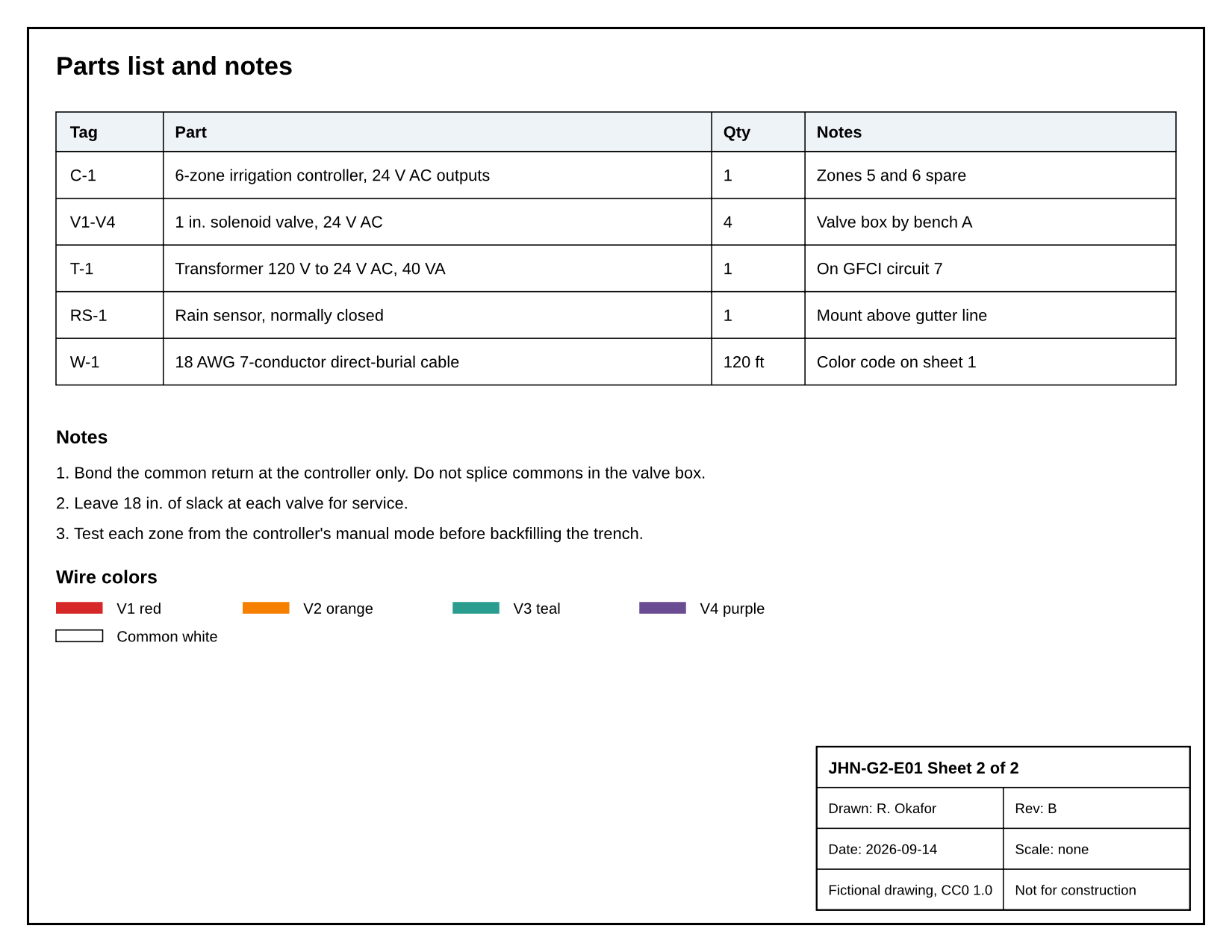
The same file the code sends. Download the input and the output and compare them yourself.
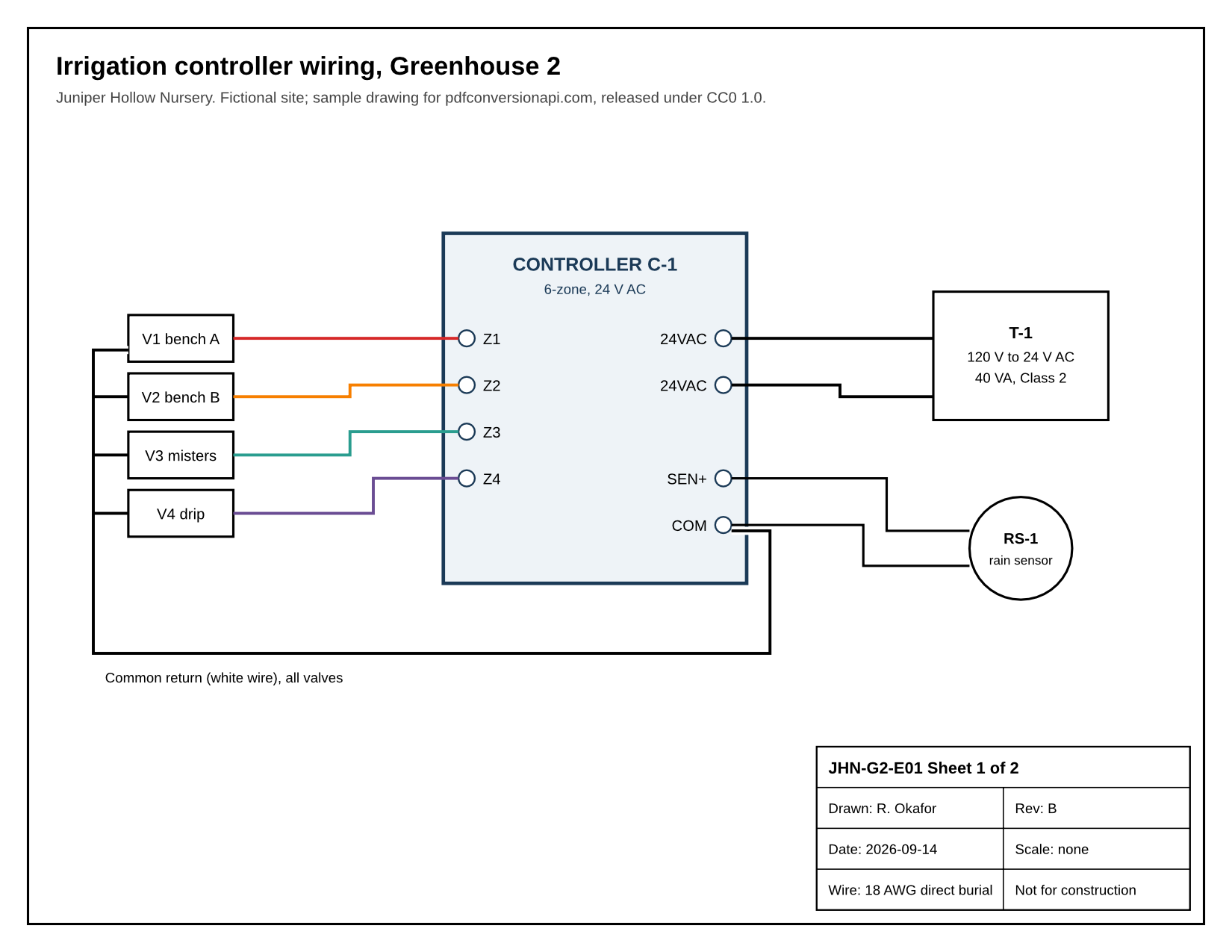
- Input
- irrigation-wiring.pdf (56 KB)
- Output
- irrigation-wiring-1.png (165 KB)irrigation-wiring-2.png (221 KB)
- Source
- Drawn for this site: a two-page vector wiring drawing (fictional) (CC0-1.0). How it was made
- Made by
- 2026-11-04, API build
9eeeb0640aba
Parameters
Send these as form fields next to the file. Names are case-insensitive. If you set one of the documented options below that we don't support yet, the request fails with a 400 that names it instead of returning a file made without it.
| Parameter | What it does |
|---|---|
ImageResolutioninteger, default 150 | How many pixels to draw per inch of page. Our 11 × 8.5 inch sample is 1,650 × 1,275 at the default and 3,300 × 2,550 at 300. When you send it, the PNG also records that DPI; left out, no DPI is written. ConvertAPI uses 200 when this is left out, so set it explicitly if you are moving code over.Values: 36–600 |
ImageWidthinteger | Width of each page image in pixels, with the height following the page's proportions: ImageWidth=800 gave 800 × 618 pages from the sample. The page is drawn at that scale, not shrunk from a larger render. A page that would be drawn past 16,000 pixels on a side returns 413.Values: 1–20000 |
ImageHeightinteger | Height in pixels, the width following: ImageHeight=600 gave 776 × 600. With both sizes set, the page fits inside the box, so 800 × 800 gave 800 × 618.Values: 1–20000 |
ScaleProportionsboolean, default true | With false and both sizes set, each page is stretched to exactly that box: 800 × 800 gave square images of the sample's wide sheets. |
ScaleIfLargerboolean, default false | With true, a size only ever makes a page smaller. ImageWidth=2000 then returned the sample at its 150 DPI size, 1,650 × 1,275, because the page is already narrower than that. |
ScaleImageboolean, default true | With false, the page is drawn at ImageResolution and cut to the size instead of scaled: ImageWidth=800 gave the left 800 × 1,275 pixels of each sheet. |
ColorSpaceenum, default rgb | rgb, the default, writes three-channel PNGs with no alpha channel: the sample's page 1 is a 168,876-byte RGB PNG. gray writes one-channel grayscale (63,392 bytes for page 1), and monochrome turns every pixel pure black or white (25,359 bytes). Sent with TransparentColor, rgb gives an RGBA PNG and gray a grayscale PNG with alpha. cmyk returns 400.Values: rgb, gray, monochrome |
PageRangestring | Draw only these pages; the rest are skipped. last stands for the final page. A page past the end returns 400 with the page count, and a reversed range such as 2-1 returns 400.Values: Pages and ranges such as 2, 1-4, 3- or 3-last (to the end) |
TransparentColorstring | Every pixel of exactly this color becomes fully transparent. TransparentColor=white removes the page background. Near-white pixels, such as the soft edges of letters, stay as they are.Values: white, black, red, green, blue, gray, #RRGGBB or R,G,B |
BackgroundColorstring, default white | Color painted behind each page; it only shows where the PDF paints nothing. A value that is not a color returns 400.Values: white, black, red, green, blue, gray, #RRGGBB or R,G,B |
Passwordstring | Opens a PDF that needs a password to open; the open password and the owner password both work. Our protected one-page statement gave the same PNG with either. Sent with a PDF that opens without one, it changes nothing. |
FileNamestring | Stem for the page files: FileName=g2-wiring gives g2-wiring-1.png, g2-wiring-2.png. Without it, the stem of the uploaded PDF is used. |
StoreFileboolean, default false | Store the PNGs and return one download link per page in place of the data. Links expire after 3 hours. |
Not supported yet
Setting one of these to anything but its default returns 400.
| Option | What to do instead |
|---|---|
Scale | Set the size with ImageResolution, ImageWidth or ImageHeight. |
Rotate | Rotate the pages with /v2/convert/pdf/to/rotate, then render. Rotate refuses signed PDFs, and refuses restricted PDFs unless Password carries the owner password; this route draws both kinds as they are. |
CompressionLevel | Send the PNGs to /v2/convert/png/to/compress for smaller files with the same pixels. |
Also refused when set: FitToSize, CropTo, BitDepth.
What carries over, and what doesn't
Kept
- Every pixel exactly as rendered. PNG is lossless, so the sample's colored wire runs and 8 to 10 point labels carry no compression noise
- Vector line work, fills and text in embedded fonts, drawn fresh at the DPI you choose rather than scaled up from a low-resolution copy
- RGB colors as written in the PDF: the sample's red wire, #D62828 in the source, is 214, 40, 40 in the PNG. Next to macOS's own renderer at the same size, with its output converted to sRGB, the page differed by 0.9 levels in 255 on average, almost all of it on the soft edges of lines and letters, and the wire measured 214, 39, 39 there
- One file per page, in page order, named after the PDF and the page number
- PDFs with only print or copy restrictions render without a password, and a PDF that needs one to open renders once you send
Password
Lost or not yet supported
- Physical size, unless you send
ImageResolution. Left at the default, the PNG stores no DPI value (no pHYs chunk), and it never carries a color profile, so print layouts have to be told the resolution you used. - An alpha channel, unless you ask for one. Each page comes back as an RGB PNG with its background filled in; only
TransparentColoradds alpha, as RGBA, or as grayscale with alpha when sent withColorSpace=gray. - Clean transparent edges. With
TransparentColor=white, the soft edges of letters stay light gray, so on a dark background text shows a pale outline. Areas that were pure white inside the drawing, like the sample's terminal circles, turn transparent too. - Small files. PNGs come back lightly compressed;
/v2/convert/png/to/compresstook the sample's first page from 169 KB to 91 KB with identical pixels. - A background color on pages that paint their own: our wiring sample fills its pages white, so
BackgroundColor=blackchanged no pixel, while a page saved from an office suite took the color edge to edge.
Limits
- Up to 2,000 pages per request; above that the API returns 413 and you can work through the file with
PageRange. - 16,000 pixels per side and 100 million pixels per page image, whether the size comes from
ImageResolutionorImageWidth/ImageHeight. Past either, the API returns 413; the per-side message reads "page 1 is too large to draw at 23,622×23,622 pixels; lower ImageResolution" when the DPI set the size, and ends "lower ImageWidth or ImageHeight" when those did. - A PDF that needs a password to open returns 422 "the input file is password-protected" until you send the right
Password. - Uploads up to 10 MB on the Free plan or 100 MB on paid plans; conversions stop at 120 seconds with a 504.
Where teams use it
Drawings and schematics in a web viewer
CAD exports, wiring diagrams and site plans are mostly thin lines and small labels, where JPEG adds visible noise. Render them to PNG at 200 or 300 DPI and show them with an ordinary img tag and zoom.
Page images for OCR and visual diffing
Rendering the same page twice gave byte-identical PNGs in our runs, and there is no compression noise to mistake for a change. Render two revisions of a PDF at the same DPI and compare the PNGs pixel by pixel to see what moved.
Figures and stamps for slides or other documents
Pull one page of a report as a PNG and drop it into a deck. For a logo or signature page, TransparentColor=white lets the slide color show through the page background.
Questions
What DPI should I use for PDF to PNG?
150 (the default) is enough for on-screen previews. Use 200 to 300 for OCR or for drawings people will zoom into, and keep 600 for small, detailed sheets: a 36 × 24 inch plan at 600 DPI would be 21,600 pixels wide, past the 16,000-pixel limit, and returns 413. If you need a fixed pixel width instead, such as 800 for a web viewer, send ImageWidth and leave the DPI alone.
How do I get a transparent background?
Send TransparentColor=white. Pixels that are exactly white become transparent and everything else stays opaque. That works well for diagrams placed on a light background. On dark backgrounds the anti-aliased edges of text show as a thin light fringe, because those pixels are near-white rather than white.
Why does ImageQuality not change my PNGs?
PNG is lossless, so there is no quality setting. ImageQuality is not one of the documented options for this conversion, so the API ignores it instead of refusing it, and the output is byte for byte the same. To make the files smaller, pass them through /v2/convert/png/to/compress, or use /v2/convert/pdf/to/jpg for photo-heavy pages.
Can I get a single image of a multi-page PDF?
Not from this route: each page becomes its own PNG. If you need one file holding every page, /v2/convert/pdf/to/tiff returns a single multi-page TIFF by default. Our 2-page sample came back as one TIFF with 2 frames.
Do I need Poppler, ImageMagick or another PDF tool on my server?
No. Pages are drawn on our side, and nothing runs on yours but an HTTP request.
Can I convert a password-protected PDF?
Yes. Send the password in Password. Our test statement, which has separate open and owner passwords, rendered the same page with either one; without a password, or with a wrong one, it returned 422 "the input file is password-protected". A PDF that only restricts printing or copying renders without a password.
Convert your first PDF file in a minute.