PDF to PDF/A API
POST a PDF to /v2/convert/pdf/to/pdfa and get PDF/A-2b or 3b back. The conversion fixes what it can, checks the result, and answers 422 with the remaining issues instead of returning a file that fails. /v2/convert/pdfa/to/validate checks any PDF against PDF/A-2b or 3b and returns a JSON report.
- Endpoint
- POST /v2/
convert/ pdf/ to/ pdfa - Accepts
- pdf, pdfa
- Sample timing
- 24 ms median of 5 runsHow we measure
- Request size
- Up to 10 MB on the Free plan or 100 MB on paid plans, all files together
Request and response
Every sample below ran against the API before this page was published. Set PDFCONVERSIONAPI_KEY to your key and run it as is.
curl -sS -X POST \
  https://api.pdfconversionapi.com/v2/convert/pdf/to/pdfa \
  -H "Authorization: Bearer $PDFCONVERSIONAPI_KEY" \
  -F File=@board-minutes.pdf \
  --form-string PdfaVersion=pdfA2b \
  --form-string FileName=minutes.pdfa.pdf \
  -o response.json

# FileData is base64. Save the first file in converted/,
# or print the JSON error.
if jq -e '.Files' response.json > /dev/null; then
  mkdir -p converted
  name=$(jq -r '.Files[0].FileName' response.json)
  jq -r '.Files[0].FileData' response.json \
    | base64 --decode > "converted/$name"
else
  cat response.json
fi
import base64
import os
import requests
key = os.environ["PDFCONVERSIONAPI_KEY"]
response = requests.post(
"https://api.pdfconversionapi.com/v2/convert/pdf/to/pdfa",
headers={"Authorization": f"Bearer {key}"},
files=[("File", open("board-minutes.pdf", "rb"))],
data={
"PdfaVersion": "pdfA2b",
"FileName": "minutes.pdfa.pdf",
},
timeout=180,
)
result = response.json()
if not response.ok:
raise SystemExit(f"{result['Code']}: {result['Message']}")
os.makedirs("converted", exist_ok=True)
for file in result["Files"]:
path = os.path.join("converted", file["FileName"])
with open(path, "wb") as out:
out.write(base64.b64decode(file["FileData"]))
print(path, file["FileSize"], "bytes")
import { mkdir, readFile, writeFile } from "node:fs/promises";
import { join } from "node:path";

const form = new FormData();
const file = "board-minutes.pdf";
form.append("File", new Blob([await readFile(file)]), file);
form.append("PdfaVersion", "pdfA2b");
form.append("FileName", "minutes.pdfa.pdf");

const url = "https://api.pdfconversionapi.com/v2/convert/pdf/to/pdfa";
const key = process.env.PDFCONVERSIONAPI_KEY;
const response = await fetch(url, {
  method: "POST",
  headers: { Authorization: `Bearer ${key}` },
  body: form,
});
const result = await response.json();
if (!response.ok) {
  throw new Error(`${result.Code}: ${result.Message}`);
}

await mkdir("converted", { recursive: true });
for (const file of result.Files) {
  const path = join("converted", file.FileName);
  await writeFile(path, Buffer.from(file.FileData, "base64"));
  console.log(path, file.FileSize, "bytes");
}
{
  "ConversionCost": 1,
  "ConversionTime": 0.024,
  "Files": [
    {
      "FileName": "minutes.pdfa.pdf",
      "FileExt": "pdf",
      "FileSize": 58980,
      "FileData": "JVBERi0xLjcKJeLjz9MKMSAw…"
    }
  ]
}
Response from our test run on 2026-11-03. ConversionTime shows the median of 5 runs. FileData is shortened here; the real response carries the whole file as base64.
The sample and the result
The same file the code sends. Download the input and the output and compare them yourself.
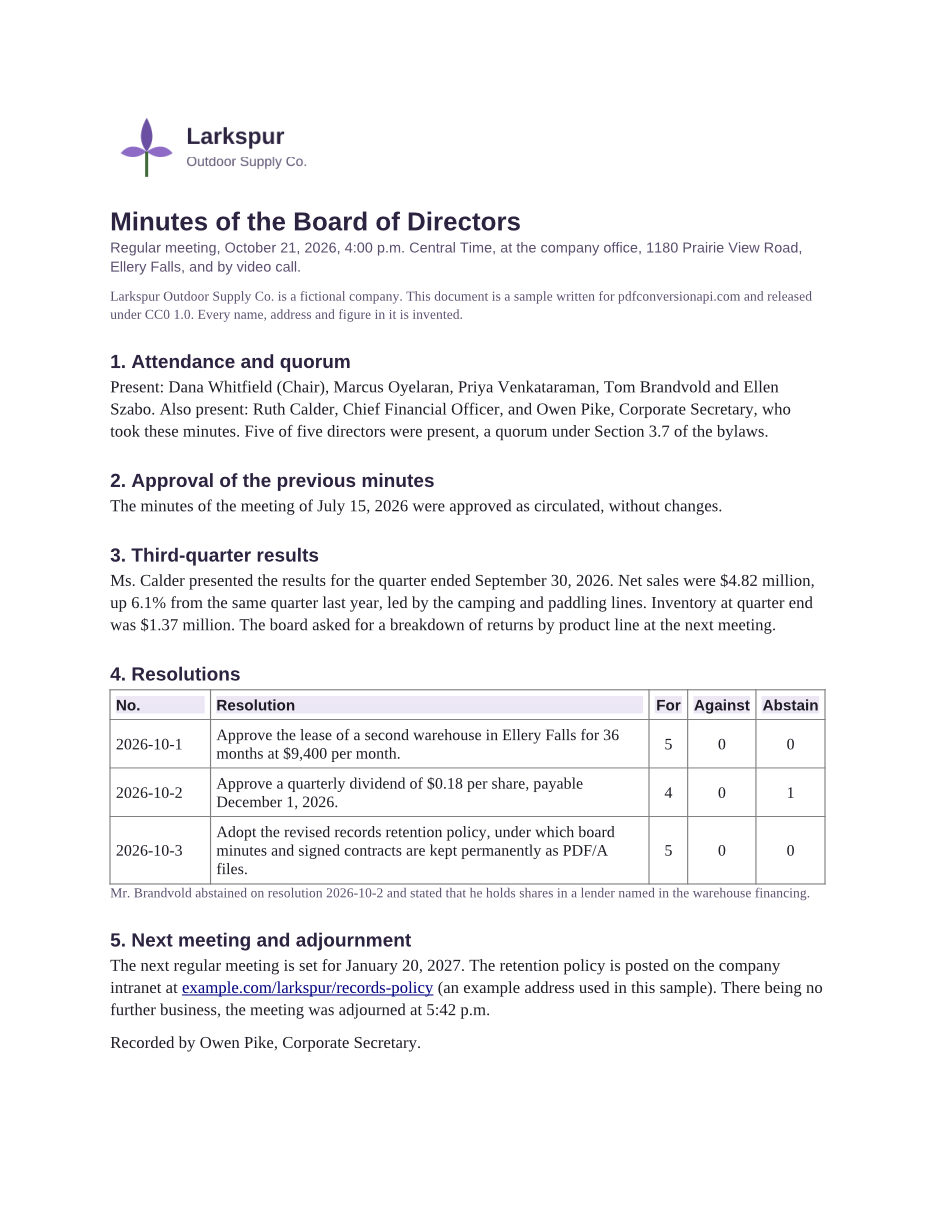
- Input
- board-minutes.pdf (58 KB)
- Output
- minutes.pdfa.pdf (58 KB)
- Source
- Written for this site (fictional company); a plain PDF from a word processor (CC0-1.0). How it was made
- Made by
- 2026-11-04, API build
9eeeb0640aba
Parameters
Send these as form fields next to the file. Names are case-insensitive. If you set one of the documented options below that we don't support yet, the request fails with a 400 that names it instead of returning a file made without it.
| Parameter | What it does |
|---|---|
PdfaVersionenum, default pdfA2b | On /v2/convert/pdf/to/pdfa, the PDF/A part to write: PDF/A-2b (ISO 19005-2) or PDF/A-3b (ISO 19005-3), which also allows attached files of any type. Matched in any case. Levels 1, A and U return 400.Values: pdfA2b, pdfA3b |
Passwordstring | Opens an encrypted PDF. PDF/A does not allow encryption, so the output never has a password or copy and print restrictions. A file that restricts copying or printing needs its owner password here, whether or not it also has an open password: the open password alone returns 422. A file that restricts nothing, such as one locked by pdf/to/protect with both passwords and AllowEverything=true, converts with its open password. Locked with only an owner password and AllowEverything=true, it converts with no Password at all, and any value you send is ignored. |
ExpectedConformanceenum, default auto | On /v2/convert/pdfa/to/validate only: the level to check against. auto uses the level the file claims in its XMP metadata, so a PDF/A-3b file is checked as 3b. A file that claims no level comes back with compliant: false, level: null and a single issue saying so; send pdfA2b to list every rule it breaks. A file that claims PDF/A-1, level A or U, or PDF/A-4 returns 422 with auto.Values: auto, pdfA2b, pdfA3b |
FileNamestring | Name for the output file. A final extension is dropped and .pdf (or .json on the validate route) is added, so minutes.pdfa.pdf stays minutes.pdfa.pdf. Without it the result takes the uploaded file's name. |
StoreFileboolean, default false | Return a download link instead of the file. The link expires after 3 hours and the file is then deleted. |
Not supported yet
Setting one of these to anything but its default returns 400.
| Option | What to do instead |
|---|---|
Linearize | Only false is accepted; the output is not linearized. |
InvoiceFormat | Only none. ZUGFeRD and Factur-X invoices can't be built yet. |
InvoiceFile | Files can't be attached in this step. Files already attached to the PDF are kept with PdfaVersion=pdfA3b. |
What carries over, and what doesn't
Kept
- What the pages look like: rendered at 100 dpi before and after, no color value on the sample's page differs by more than 1 in 255
- Text, embedded fonts and images; the sample's image and font streams come out byte for byte the same
- Bookmarks, structure tags and the document language
- Title, author, producer, creator tool and creation date, which are written into the new XMP metadata
- Links, which get the print flag PDF/A requires
- Files attached to the PDF, with
PdfaVersion=pdfA3b
Lost or not yet supported
JavaScriptand other actions PDF/A forbids are removed. In our test, an open action that ran app.alert was dropped.- Encryption is removed, and with it any copy and print restrictions.
- The file's XMP metadata is rewritten from its document information. In the sample, dc:date, dc:format, pdf:PDFVersion, xmp:ModifyDate and xmp:MetadataDate did not carry over.
- Fonts that aren't embedded are not embedded for you. Such a file returns 422 naming the font.
- No PDF/A-1, and no level A or U, from a PDF (see the questions below for PDF/A-1b from Office files).
PageRangeis not an option here: every page is converted. Cut the PDF first with/v2/convert/pdf/to/extract.
Limits
- Requests up to 10 MB on the Free plan or 100 MB on paid plans in total (all files and fields).
- A conversion can run for up to 120 seconds; after that the API returns 504.
- A file that still breaks a PDF/A rule after conversion is never returned. The API answers 422 "the PDF could not be made PDF/A compliant" followed by up to five of the remaining issues.
- PDFs that use DeviceCMYK color, common in files made for print, return 422: the conversion adds an sRGB output intent only, and CMYK color needs a CMYK one.
- Digitally signed PDFs return 422 "this PDF is digitally signed, and rewriting it would invalidate the signature". Convert to PDF/A before signing.
- Encrypted files without the right
Passwordreturn 422 "the input file is password-protected". A file that restricts copying or printing returns 422 "this PDF's permissions don't allow removing the encryption, which PDF/A forbids" until you send its owner password, even if it opens without one or you sent its open password. - The validate route checks PDF/A-2b and 3b only. With
auto, a file that claims another level (1a, 1b, 2a, 2u, 3a, 3u or 4) returns 422. WithpdfA2borpdfA3bit gets a report instead, but the report counts the file's own level claim as an issue (clause 6.6.4), socompliantisfalseeven when nothing else is wrong.
Where teams use it
Records kept permanently
Minutes, contracts and closing statements that a retention policy says to keep as PDF/A. Convert each file when it is filed and before anyone signs it digitally. If the API answers 422, the issues in the message say what to fix at the source.
Checking files before they are archived
Run uploads from customers or vendors through /v2/convert/pdfa/to/validate with ExpectedConformance=pdfA2b first. Branch on compliant in the JSON, and use fixable on each issue to decide whether a conversion will help or the file needs to go back to its sender. With the default auto, a file that isn't PDF/A yet gets one issue saying so instead of the full list.
The second step after another conversion
Convert a Word, HTML or EPUB file to PDF, then send that PDF here. The published outputs of our DOCX, PPTX, XLSX, HTML and EPUB sample pages all came back from this route without errors.
Questions
Who decides that the output is compliant?
The PDF/A checker that comes with the PDF library doing the conversion, the same one behind /v2/convert/pdfa/to/validate. It reports each problem with its ISO 19005 clause. Checked as PDF/A-2b, the sample input had three issues (no PDF/A identification in the metadata, device color without an output intent, a link not set to print) and the output none. We have not cross-checked these results with veraPDF for this page.
Should I choose PDF/A-2b or PDF/A-3b?
PDF/A-2b, the default, unless the PDF carries attached files that aren't PDF/A themselves, such as a CSV or an XML file. With 2b such a file returns 422 "Embedded files must be PDF/A files themselves (use PDF/A-3 for others)". With PdfaVersion=pdfA3b the same file converts and the attachment is kept.
What does the validate route return?
A JSON file with compliant (true or false), the level it checked, what the file declares (its PDF/A part, PDF/UA and output intents) and an issues list. Each issue has the clause, a message, the page when there is one, and fixable, which says whether /v2/convert/pdf/to/pdfa can repair it. With the default ExpectedConformance=auto the level is the one the file claims; a file that claims none gets compliant: false, level: null and one issue saying it doesn't identify itself as PDF/A.
Why do I get 422 "The font Helvetica isn't embedded"?
PDF/A requires every font to be embedded, and this step does not add missing fonts. Re-create the PDF from its source with fonts embedded. Fillable forms can hit this too: in our test, a text field set in Helvetica, with the font not embedded, gave the same 422. Our DOCX, HTML and EPUB conversions embed every font they use as a subset.
Can I get PDF/A-1b?
Not from a PDF. Some conversions from Office and spreadsheet formats, such as /v2/convert/xlsx/to/pdf and /v2/convert/csv/to/pdf, write PDF/A-1b, 2b or 3b during the conversion with PdfaVersion; we checked both routes with pdfA1b. The validate route can't check PDF/A-1: with auto, a PDF/A-1b file returns 422 "this PDF identifies itself as PDF/A-1b; only PDF/A-2b and PDF/A-3b can be validated yet".
Can I convert a digitally signed PDF?
No. Writing a PDF/A file means rewriting the whole PDF, which would break every signature in it, so the API returns 422 with "this PDF is digitally signed, and rewriting it would invalidate the signature". The validate route still reports on a signed file. Convert the unsigned document to PDF/A first and sign the result.
Convert your first PDF file in a minute.