HEIC to JPG API
Upload a HEIC or HEIF photo to POST /v2/convert/heic/to/jpg and get a JPEG back, optionally resized.
- Endpoint
- POST /v2/
convert/ heic/ to/ jpg - Accepts
- heic, heif
- Sample timing
- 0.951 s median of 5 runsHow we measure
- Request size
- Up to 10 MB on the Free plan or 100 MB on paid plans, all files together
Request and response
Every sample below ran against the API before this page was published. Set PDFCONVERSIONAPI_KEY to your key and run it as is.
curl -sS -X POST \
  https://api.pdfconversionapi.com/v2/convert/heic/to/jpg \
  -H "Authorization: Bearer $PDFCONVERSIONAPI_KEY" \
  -F File=@mug-listing.heic \
  --form-string ImageWidth=1600 \
  -o response.json

# FileData is base64. Save the first file in converted/,
# or print the JSON error.
if jq -e '.Files' response.json > /dev/null; then
  mkdir -p converted
  name=$(jq -r '.Files[0].FileName' response.json)
  jq -r '.Files[0].FileData' response.json \
    | base64 --decode > "converted/$name"
else
  cat response.json
fi
import base64
import os
import requests
key = os.environ["PDFCONVERSIONAPI_KEY"]
response = requests.post(
"https://api.pdfconversionapi.com/v2/convert/heic/to/jpg",
headers={"Authorization": f"Bearer {key}"},
files=[("File", open("mug-listing.heic", "rb"))],
data={
"ImageWidth": "1600",
},
timeout=180,
)
result = response.json()
if not response.ok:
raise SystemExit(f"{result['Code']}: {result['Message']}")
os.makedirs("converted", exist_ok=True)
for file in result["Files"]:
path = os.path.join("converted", file["FileName"])
with open(path, "wb") as out:
out.write(base64.b64decode(file["FileData"]))
print(path, file["FileSize"], "bytes")
import { mkdir, readFile, writeFile } from "node:fs/promises";
import { join } from "node:path";

const form = new FormData();
const file = "mug-listing.heic";
form.append("File", new Blob([await readFile(file)]), file);
form.append("ImageWidth", "1600");

const url = "https://api.pdfconversionapi.com/v2/convert/heic/to/jpg";
const key = process.env.PDFCONVERSIONAPI_KEY;
const response = await fetch(url, {
  method: "POST",
  headers: { Authorization: `Bearer ${key}` },
  body: form,
});
const result = await response.json();
if (!response.ok) {
  throw new Error(`${result.Code}: ${result.Message}`);
}

await mkdir("converted", { recursive: true });
for (const file of result.Files) {
  const path = join("converted", file.FileName);
  await writeFile(path, Buffer.from(file.FileData, "base64"));
  console.log(path, file.FileSize, "bytes");
}
{
  "ConversionCost": 1,
  "ConversionTime": 0.951,
  "Files": [
    {
      "FileName": "mug-listing.jpg",
      "FileExt": "jpg",
      "FileSize": 142189,
      "FileData": "/9j/4AAQSkZJRgABAgAAAQAB…"
    }
  ]
}
Response from our test run on 2026-11-03. ConversionTime shows the median of 5 runs. FileData is shortened here; the real response carries the whole file as base64.
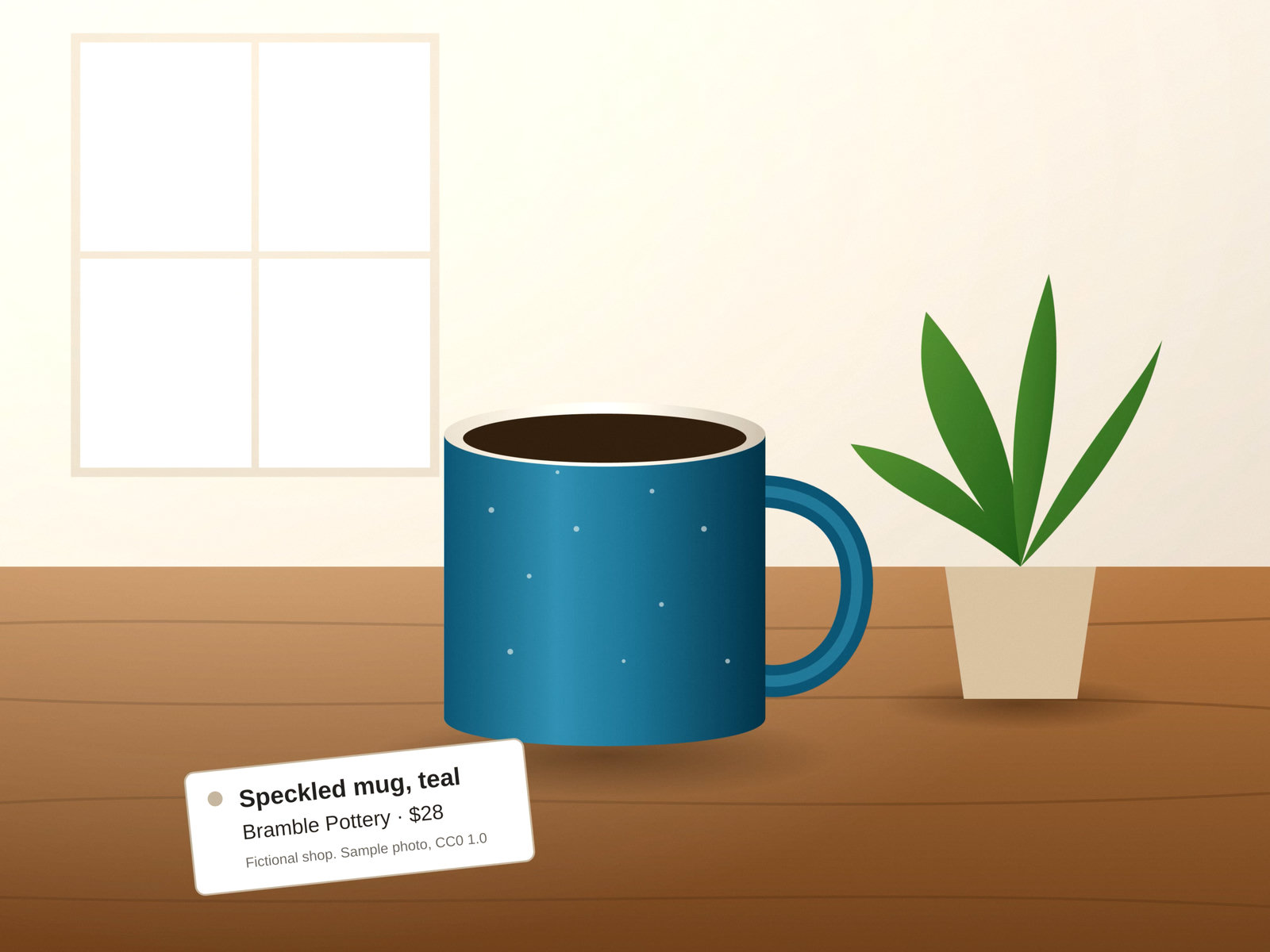
The sample, converted
The same file the code sends. Download the input and the output and compare them yourself.
- Input
- mug-listing.heic (326 KB)
- Output
- mug-listing.jpg (139 KB)
- Source
- Made for this site: a drawn shop photo saved as HEIC (CC0-1.0). How it was made
- Made by
- 2026-11-04, API build
9eeeb0640aba

Parameters
Send these as form fields next to the file. Names are case-insensitive. If you set one of the documented options below that we don't support yet, the request fails with a 400 that names it instead of returning a file made without it.
| Parameter | What it does |
|---|---|
ImageWidthinteger | Width of the JPEG in pixels. On its own, the height keeps the photo's proportions: the 4032 x 3024 sample sent with 1600 comes back 1600 x 1200. The resize uses a Lanczos3 filter.Values: 1 to 20000 |
ImageHeightinteger | Height in pixels. With ImageWidth as well, the photo is fitted inside the box: 1000 x 1000 gives 1000 x 750 for a 4:3 photo.Values: 1 to 20000 |
ScaleProportionsboolean, default true | Set to false to stretch the photo to exactly ImageWidth x ImageHeight. It only matters when a width or height is in the request; sent without one it is accepted and changes nothing. |
ScaleIfLargerboolean, default false | Set to true so the resize can only shrink. A photo smaller than the requested size keeps its own size; without this, ImageWidth=6000 enlarges a 4032-pixel photo. Without a width or height in the request it changes nothing. |
ScaleImageboolean, default true | Set to false to crop instead of resizing: the JPEG keeps the top-left ImageWidth x ImageHeight pixels of the photo. Without a width or height, nothing is cropped. |
ImageQualityinteger, default 85 | JPEG encoder quality. We default to 85 where ConvertAPI documents 75; send ImageQuality=75 to match ConvertAPI's documented default.Values: 1 to 100 |
ColorSpaceenum, default default | gray writes a one-channel JPEG: the sample came back at 90,311 bytes instead of 142,189. monochrome turns each pixel black or white before encoding; JPEG compression then leaves a few near-black and near-white values (97.5% of the sample's pixels decode to exactly 0 or 255). rgb changes nothing, and cmyk returns 400.Values: default, rgb, gray, monochrome |
ImageResolutioninteger | Writes this DPI into the JPEG's JFIF header without touching the pixels: the sample sent with 300 is still 1600 x 1200 and reports 300 DPI. Left out, the JPEG has no DPI. The photo's own resolution tag is not carried over either way.Values: 10 to 800 |
ImageInterpolationboolean, default false | Accepted for ConvertAPI compatibility. Resizing always uses Lanczos3, so true and false returned byte-identical files. |
AlphaColorstring, default white | Color placed behind transparent pixels before the JPEG is written. It matters only for HEIC files with an alpha channel: in a test file with a transparent left half, AlphaColor=red filled that half with red.Values: white, black, red, green, blue, gray, #RRGGBB or R,G,B |
FileNamestring | Output name without .jpg. IMG_4021.heic becomes IMG_4021.jpg unless you set this. |
StoreFileboolean, default false | Return a link to the JPEG (valid for 3 hours) in Files[].Url instead of base64 data. |
What carries over, and what doesn't
Kept
- Full resolution unless you ask for a resize (4032 x 3024 in, 4032 x 3024 out)
- A rotation flag stored in the file: a test HEIC that macOS saved sideways with a 90 degree flag came out upright
- Grid (tiled) HEIC images: the sample, saved by macOS, is stored as 512 x 512 tiles
- Colors of HEIC files tagged sRGB or carrying no color tag: in our patch tests every value was within 2 levels of Apple's own decoder
Lost or not yet supported
- HEIC files that store their color as an embedded Display P3 profile (how macOS saved our sample) come out with stretched contrast. Gray 235 became 255 and gray 16 became 0, so the sample's window panes turned pure white. We have not tested a photo straight from an iPhone, so we can't yet say whether iPhone files are affected.
- The JPEG carries no color profile. A Display P3 photo's values are written as they are, so viewers read them as sRGB and saturated colors look duller, like the sample's teal mug.
- All metadata is removed: camera model, capture date and GPS position. Keep the original if you need them.
- JPEG is lossy. Each conversion re-encodes at quality 85 unless you set
ImageQuality.
Limits
- One photo per request, up to 100,000,000 pixels.
- Requests up to 10 MB on the Free plan or 100 MB on paid plans (all files and fields together), 120 seconds per conversion, and
ImageWidthorImageHeightup to 20,000 pixels. - HEIC files that macOS saved at its top quality setting (sips formatOptions 100) return 422 "the input file could not be read: the HEIC image is damaged, or encoded in a way that can't be read yet", although macOS opens them. The same pictures saved at 95 converted.
- Not tested yet: photos straight from an iPhone (their color and the way they record rotation) and HEIC files that hold more than one image. Our test files were made with macOS from pictures we drew.
- A file that isn't an image returns 422 "the input file could not be read: it is not a HEIC image" (HEIF on the heif route). An AVIF photo gets "it is an AVIF image, and AVIF images can't be read yet".
Where teams use it
Photo uploads from iPhones
Chrome and Firefox don't display HEIC images, so a marketplace listing or a support form that accepts iPhone uploads needs a JPEG to show. Convert each upload once when it arrives and serve the JPEG.
Listing images at a fixed width
Send ImageWidth=1600 with ScaleIfLarger=true and every photo comes back at most 1600 pixels wide in the same request, with no second resize step on your side.
Publishing photos without their location
iPhone photos often carry GPS coordinates in EXIF. The JPEG written here has no EXIF block at all, so a converted photo can be posted publicly without revealing where it was taken.
Questions
Does the JPEG keep the GPS location from the iPhone?
No. The sample HEIC carries camera, date and GPS tags; the JPEG we return has no EXIF segment at all. If you need the capture date, read it from the HEIC before converting.
Why does my converted photo look brighter than in Photos?
It's a decoder problem we found while writing this page. When the HEIC describes its colors with an embedded Display P3 profile, the decoder stretches the tones: dark grays go darker and light grays go to white. In the sample, the window panes come out pure white. HEIC files tagged sRGB, or with no color tag, matched macOS within 2 levels in our tests.
How do I make web-sized copies?
Add ImageWidth (the sample uses 1600) and, if some uploads may be smaller than that, ScaleIfLarger=true so they aren't blown up. Resizing happens in the same request, with a Lanczos3 filter.
Do I need libheif or ImageMagick on my server?
No. Your code sends the photo over HTTPS and gets a JPEG back. The HEIC decoding runs on our side, so your server needs only an HTTP client.
Can I get PNG or WebP instead?
Yes: /v2/convert/heic/to/png keeps the decoded pixels without further loss, and /v2/convert/heic/to/webp and /v2/convert/heic/to/jxl exist too. The same resize parameters apply, and so does the Display P3 color problem described above. Files with a .heif extension go to /v2/convert/heif/to/jpg.
Convert your first HEIC file in a minute.