PDF conversion API for developers
POST a Word, Excel, PowerPoint, HTML or image file and get the converted file back in the response. 556 conversions use the same request shape.
- Files deletedAfter every conversion
- No internetInside the converters
- Hashed keysSHA-256, never in a URL
- 3-hour linksFor results you store
- US storageEncrypted with AES-256
Guides
Start with a tested conversion
Each guide has code we ran against the API, a real sample file you can download, and a list of what the conversion keeps and what it loses.
DOCX to PDF
Convert DOCX and DOC files to PDF with one POST request and no Microsoft Word on your server.
46 ms median time per conversionView guideHTML to PDF
Send an HTML file, get a PDF back.
17 ms median time per conversionView guideXLSX to PDF
Convert Excel XLSX, XLS, XLSB and ODS workbooks to PDF with one POST request.
668 ms median time per conversionView guidePPTX to PDF
Convert PowerPoint PPTX and PPT files to PDF with one POST request.
279 ms median time per conversionView guidePDF to DOCX
Convert PDF to DOCX with one POST request.
23 ms median time per conversionView guidePDF to JPG
Turn PDF pages into JPG images with one POST request.
81 ms median time per conversionView guideMerge PDF
Combine 2 to 50 PDF files into one with a single POST request.
2 ms median time per conversionView guideOCR for scanned PDFs
Add an invisible text layer to scanned PDFs with one POST request, or get the recognized text as a .txt file.
4.0 s median time per conversionView guide
How it works
One HTTP call per conversion
01
Get a key
Sign in with Google or GitHub and copy your key. It goes in the
Authorizationheader, never in the URL.02
POST the file
Send it as
multipart/form-datato the path for your two formats. Options are plain form fields.POST /v2/convert/docx/to/pdf
03
Get the file back
The JSON response carries the converted file as base64. With
StoreFile=trueyou get a download link that works for 3 hours instead.
mkdir -p converted
curl -sS https://api.pdfconversionapi.com/v2/convert/docx/to/pdf \
  -H "Authorization: Bearer $PDFCONVERSIONAPI_KEY" \
  -F File=@quarterly-report.docx \
  --form-string UpdateFields=true \
  | jq -r '.Files[0].FileData // error(.Message)' \
  | base64 --decode > converted/quarterly-report.pdf
import base64
import os
import requests
key = os.environ["PDFCONVERSIONAPI_KEY"]
response = requests.post(
"https://api.pdfconversionapi.com/v2/convert/docx/to/pdf",
headers={"Authorization": f"Bearer {key}"},
files=[("File", open("quarterly-report.docx", "rb"))],
data={
"UpdateFields": "true",
},
timeout=180,
)
result = response.json()
if not response.ok:
raise SystemExit(f"{result['Code']}: {result['Message']}")
os.makedirs("converted", exist_ok=True)
for file in result["Files"]:
path = os.path.join("converted", file["FileName"])
with open(path, "wb") as out:
out.write(base64.b64decode(file["FileData"]))
print(path, file["FileSize"], "bytes")
import { mkdir, readFile, writeFile } from "node:fs/promises";
import { join } from "node:path";

const form = new FormData();
const file = "quarterly-report.docx";
form.append("File", new Blob([await readFile(file)]), file);
form.append("UpdateFields", "true");

const url = "https://api.pdfconversionapi.com/v2/convert/docx/to/pdf";
const key = process.env.PDFCONVERSIONAPI_KEY;
const response = await fetch(url, {
  method: "POST",
  headers: { Authorization: `Bearer ${key}` },
  body: form,
});
const result = await response.json();
if (!response.ok) {
  throw new Error(`${result.Code}: ${result.Message}`);
}

await mkdir("converted", { recursive: true });
for (const file of result.Files) {
  const path = join("converted", file.FileName);
  await writeFile(path, Buffer.from(file.FileData, "base64"));
  console.log(path, file.FileSize, "bytes");
}
{
  "ConversionCost": 1,
  "ConversionTime": 0.046,
  "Files": [
    {
      "FileName": "quarterly-report.pdf",
      "FileExt": "pdf",
      "FileSize": 82830,
      "FileData": "JVBERi0xLjcKJYCAgIAKMSAw…"
    }
  ]
}
Response from our test run on 2026-11-03. ConversionTime shows the median of 5 runs. FileData is shortened here; the real response carries the whole file as base64.
- Conversions, one request shape
- 556
- Input formats, from DOCX to DWG and HEIC
- 71
- Median for our DOCX to PDF sample, 5 runs. How we measure
- 46 ms
- Per request, all files together (10 MB on the Free plan)
- 100 MB
Output quality
Check the output yourself
The same Word file, converted by our API and by a widely used free office suite that many teams run themselves. Download the input DOCX, our PDF and the reference PDF and compare them in any viewer.
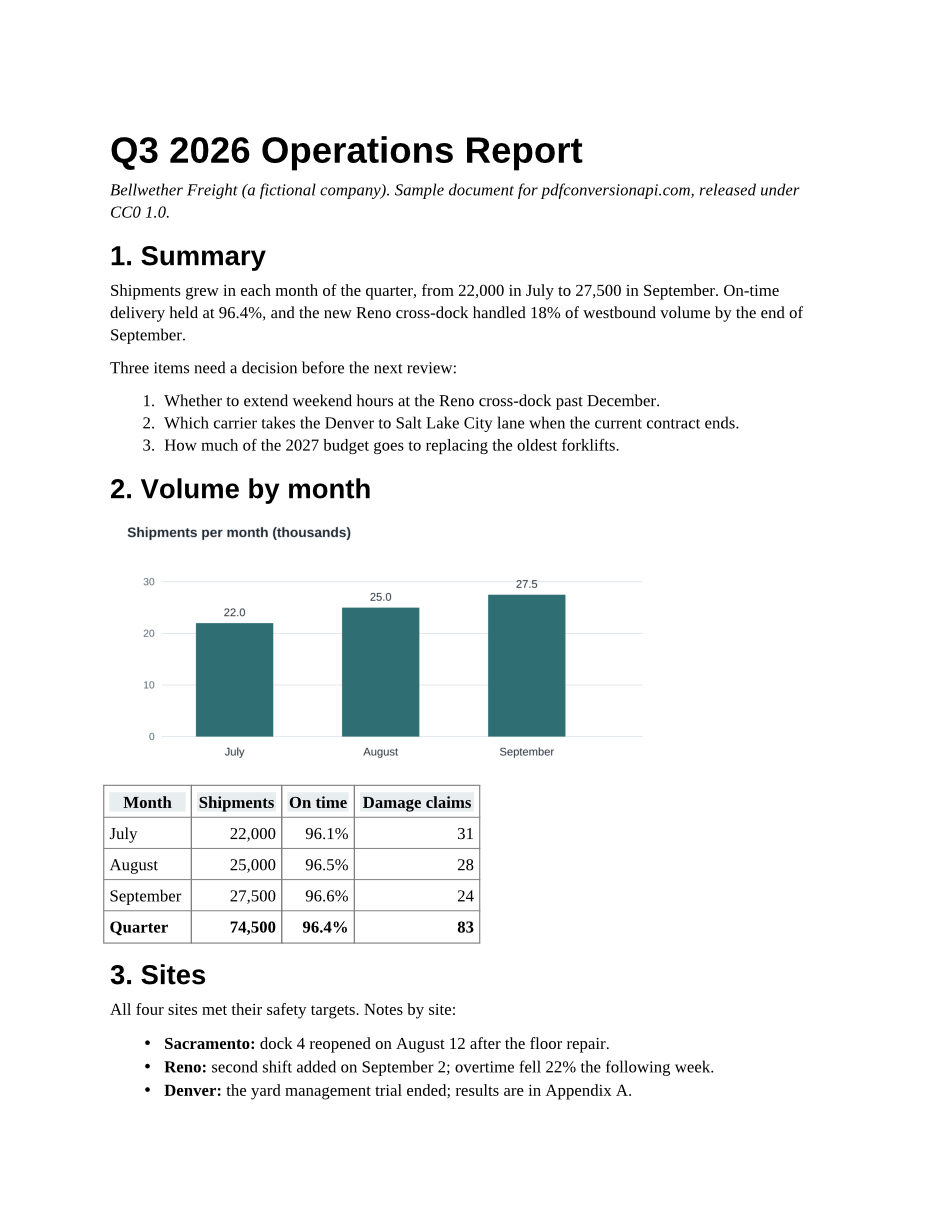
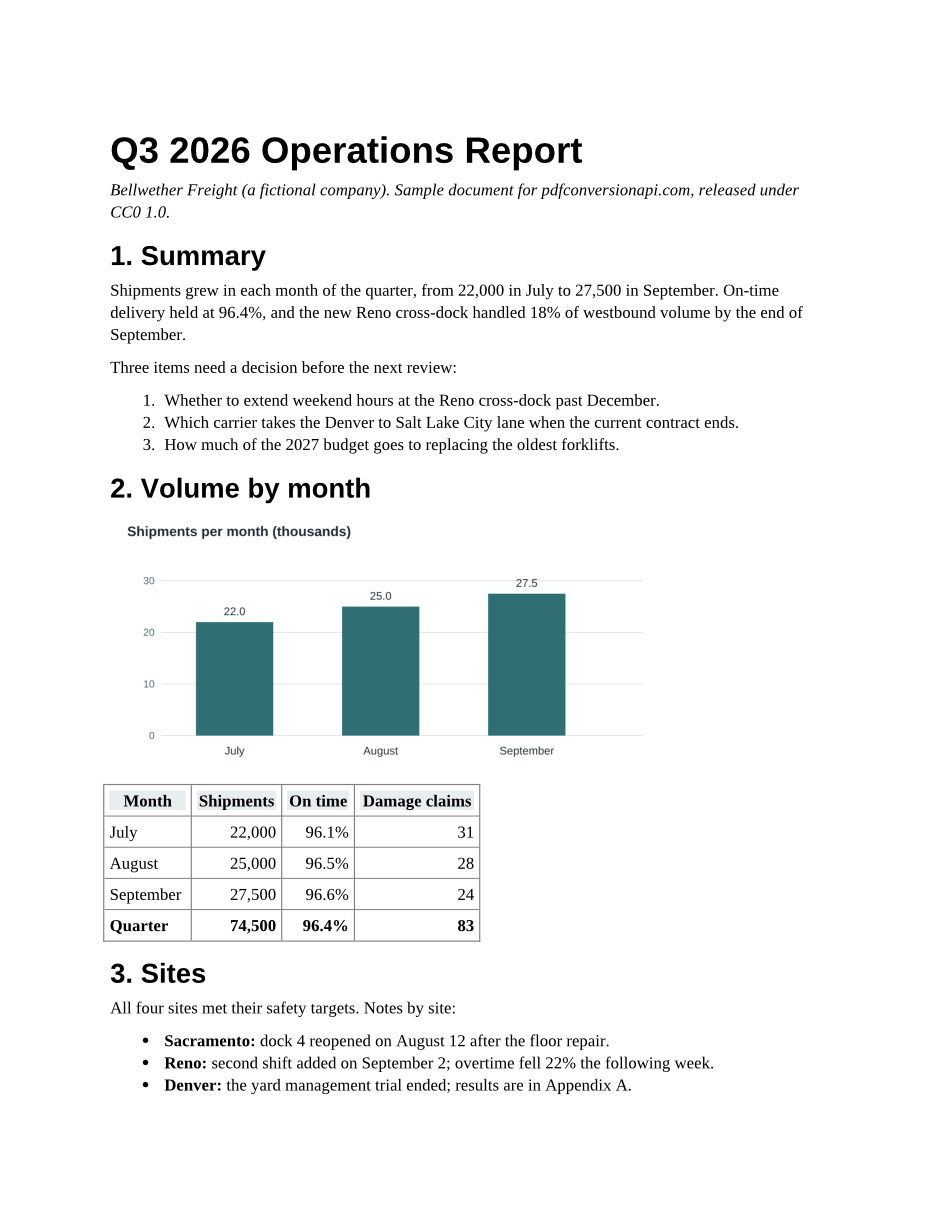
Differences we found: list bullets are drawn slightly smaller. Each conversion page lists what that conversion keeps and loses. How we test
The API
One request shape for every format
Change the two formats in the path. Everything else stays the same.
- Endpoint
- POST https://api.pdfconversionapi.com
/v2/ convert/ {from}/ to/ {to} - Auth
Authorization: Bearer <key>. Never in the URL.- Body
multipart/form-data: the file inFile(or several inFiles), options as plain fields.- Response
- JSON with
ConversionCost,ConversionTimeandFiles: name, size and base64 data, or a link withStoreFile=true. - Unsupported options
- A documented option we don't support yet fails the request with a 400 that names it, rather than returning a file made without it.
Errors
Every error is JSON:
{"Code": 422, "Message": "the input file is password-protected"}| Status | Meaning | What to do |
|---|---|---|
| 400 | No file, a bad parameter value, or an option this conversion doesn't support yet. The message names the parameter. | Fix the request; retrying won't help. |
| 401 | Missing or unknown API key, or one that was replaced, deleted or disabled. | Send Authorization: Bearer <key>. Keys in URLs are refused. |
| 403 | The key's plan isn't set up on our side. | Write to support. |
| 404 | We don't convert between those two formats, or a download link has expired. | Check /v2/info for the conversions we offer. |
| 413 | A request over your plan's upload limit (10 MB on the Free plan or 100 MB on paid plans; all files and fields together), or a result past a limit (512 MB output, 100 megapixel images, 2,000 pages). | Split the input or lower the resolution. |
| 422 | The file can't be read as the format in the URL, is password-protected, or is a restricted or signed PDF this conversion would rewrite. The message says which. | Check the file and the format; remove the password or restrictions first. |
| 429 | More than 600 requests in a minute from one account; all the conversions your plan runs at once are busy; or, on a plan without overage such as Free, this month's conversions are used up. The message says which. | Wait for the Retry-After seconds, then retry. For the monthly limit that is the start of next month (UTC); GET /v2/usage shows where you stand. |
| 500 | The converter failed on this file for a reason on our side. | Retry once; if it fails again, send us the x-request-id header. |
| 503 | Every conversion slot is busy, or we paused your plan's conversions for a while to stop abuse. | Retry after the Retry-After seconds, with backoff. |
| 504 | The conversion ran past 120 seconds. | Split large files, or ask us about longer limits. |
Pricing
Priced per conversion
One successful request is one conversion, whatever the page count. Failed requests are free. Billing is not open yet. The Free plan is self-serve: sign in and your key is ready. The paid plans show the prices we plan to charge when billing opens; for higher limits before then, write to sales.
Free
$0 a month
- Conversions included
- 250 a month
- Per 1,000 included
- $0
- Each extra conversion
- Stops at the limit
Starter
$15 a month
- Conversions included
- 2,000 a month
- Per 1,000 included
- $7.50
- Each extra conversion
- $0.008
Pro
$49 a month
- Conversions included
- 15,000 a month
- Per 1,000 included
- $3.27
- Each extra conversion
- $0.005
Business
$199 a month
- Conversions included
- 100,000 a month
- Per 1,000 included
- $1.99
- Each extra conversion
- $0.003
| Plan detail | Free | Starter | Pro | Business |
|---|---|---|---|---|
| Per month | $0 | $15 | $49 | $199 |
| Conversions included | 250 a month | 2,000 a month | 15,000 a month | 100,000 a month |
| Per 1,000 included | $0 | $7.50 | $3.27 | $1.99 |
| Each extra conversion | Stops at the limit | $0.008 | $0.005 | $0.003 |
Infrastructure and security
How we keep your files safe
Every request takes the same path. Here is what happens to a file on the way, and what is left afterwards.
1Your app
Sends the file over HTTPS with your key in the Authorization header.
2API gateway
Checks the key and your rate limit, then picks the container pool for the conversion.
3Conversion container
Converts the file in memory or in a temporary folder, with internet access turned off, and deletes what it wrote.
4Response
Carries the converted file back. Nothing is kept unless you set StoreFile=true.
Nothing is kept by default
Each conversion runs in a temporary folder that is deleted when it ends, and the result comes back in the response.
Stored results expire
With StoreFile=true, the download link works for 3 hours. A cleanup job runs every 15 minutes and deletes expired files, and only your account can delete a file early.
No internet inside the converters
The containers that run conversions start with internet access turned off, so a document can't call out or load remote content.
Isolated per conversion
Conversions run as a non-root user, in separate container pools by kind of conversion. An engine still running after 120 seconds is stopped.
Encrypted in transit and at rest
Requests travel over HTTPS. Stored results are encrypted with AES-256. Files aren't end-to-end encrypted: the converter has to read them.
Keys are hashed
We store only the SHA-256 hash of each API key, and accept keys only in the Authorization header, never in the URL.
Stored results stay in the US
Files you ask us to keep are stored in the US. Conversions themselves run wherever a container is free.
Not used for training
We don't use your files to train or improve any model.
Limits that protect the service
A request can carry up to 10 MB on the Free plan or 100 MB on paid plans, a result up to 512 MB or 2,000 pages, and each key is rate-limited.
FAQ
Questions
Is there a free plan?
Yes. The Free plan includes 250 conversions a month, files up to 10 MB and 1 conversion at a time, with no card. Sign in with Google or GitHub and your key is ready.
What counts as one conversion?
One successful request, whatever the page count or file size, within your plan's limits. Requests that fail are not counted.
Do you keep my files?
No. The converted file comes back in the response and the temporary copy is deleted when the conversion ends. If you set StoreFile=true we keep the result behind a random link for 3 hours, then delete it.
Do you have SDKs?
Not yet. Any HTTP client that can send multipart/form-data works. Every page shows curl, Python and Node.js code that we ran against the API before publishing.
Can I send a URL instead of uploading the file?
Not yet. The conversion servers have no internet access, so they can't fetch a URL, and HTML pages can't load remote images or fonts. Upload the file and inline anything it needs.
Are there async jobs or webhooks?
Not yet. Every request is answered in the same HTTP call, and a single conversion can run for up to 120 seconds.
Can I switch from another conversion API without rewriting my code?
If your code posts multipart/form-data straight to a /convert/{from}/to/{to} endpoint and reads ConversionCost and Files from the JSON response, point it at our URL and use your new key. Client libraries that upload the file in a separate step don't work with our API yet. A documented option we don't support yet returns a 400 that names it, so gaps show up on the first test run.
Tell us what you need to convert.