Merge PDF API
Send two or more PDFs to POST /v2/convert/pdf/to/merge and one PDF comes back, with the pages in upload order. The merge uses a PDF library that copies each page's content as it is instead of drawing the pages again.
- Endpoint
- POST /v2/
convert/ pdf/ to/ merge - Accepts
- Sample timing
- 2 ms median of 5 runsHow we measure
- Request size
- Up to 10 MB on the Free plan or 100 MB on paid plans, all files together
Request and response
Every sample below ran against the API before this page was published. Set PDFCONVERSIONAPI_KEY to your key and run it as is.
curl -sS -X POST \
  https://api.pdfconversionapi.com/v2/convert/pdf/to/merge \
  -H "Authorization: Bearer $PDFCONVERSIONAPI_KEY" \
  -F Files=@invoice.pdf \
  -F Files=@timesheet.pdf \
  -F Files=@terms.pdf \
  --form-string FileName=october-billing \
  -o response.json

# FileData is base64. Save the first file in converted/,
# or print the JSON error.
if jq -e '.Files' response.json > /dev/null; then
  mkdir -p converted
  name=$(jq -r '.Files[0].FileName' response.json)
  jq -r '.Files[0].FileData' response.json \
    | base64 --decode > "converted/$name"
else
  cat response.json
fi
import base64
import os
import requests
key = os.environ["PDFCONVERSIONAPI_KEY"]
response = requests.post(
"https://api.pdfconversionapi.com/v2/convert/pdf/to/merge",
headers={"Authorization": f"Bearer {key}"},
files=[
("Files", open("invoice.pdf", "rb")),
("Files", open("timesheet.pdf", "rb")),
("Files", open("terms.pdf", "rb")),
],
data={
"FileName": "october-billing",
},
timeout=180,
)
result = response.json()
if not response.ok:
raise SystemExit(f"{result['Code']}: {result['Message']}")
os.makedirs("converted", exist_ok=True)
for file in result["Files"]:
path = os.path.join("converted", file["FileName"])
with open(path, "wb") as out:
out.write(base64.b64decode(file["FileData"]))
print(path, file["FileSize"], "bytes")
import { mkdir, readFile, writeFile } from "node:fs/promises";
import { join } from "node:path";

const form = new FormData();
for (const file of [
  "invoice.pdf",
  "timesheet.pdf",
  "terms.pdf",
]) {
  form.append("Files", new Blob([await readFile(file)]), file);
}
form.append("FileName", "october-billing");

const url = "https://api.pdfconversionapi.com/v2/convert/pdf/to/merge";
const key = process.env.PDFCONVERSIONAPI_KEY;
const response = await fetch(url, {
  method: "POST",
  headers: { Authorization: `Bearer ${key}` },
  body: form,
});
const result = await response.json();
if (!response.ok) {
  throw new Error(`${result.Code}: ${result.Message}`);
}

await mkdir("converted", { recursive: true });
for (const file of result.Files) {
  const path = join("converted", file.FileName);
  await writeFile(path, Buffer.from(file.FileData, "base64"));
  console.log(path, file.FileSize, "bytes");
}
{
  "ConversionCost": 1,
  "ConversionTime": 0.002,
  "Files": [
    {
      "FileName": "october-billing.pdf",
      "FileExt": "pdf",
      "FileSize": 107308,
      "FileData": "JVBERi0xLjcKJbutwN4KMSAw…"
    }
  ]
}
Response from our test run on 2026-11-03. ConversionTime shows the median of 5 runs. FileData is shortened here; the real response carries the whole file as base64.
The sample and the result
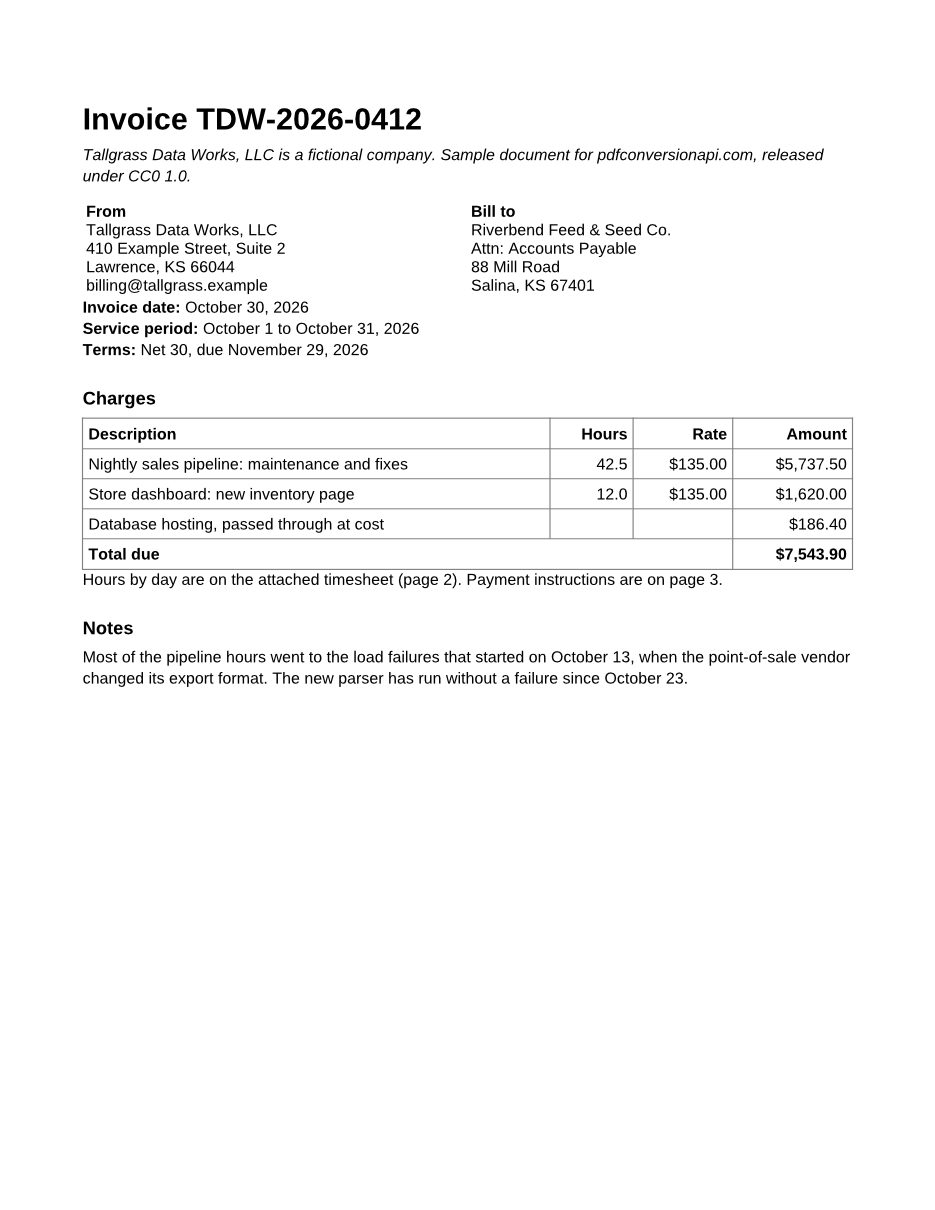
The same file the code sends. Download the input and the output and compare them yourself.
- Input
- invoice.pdf (48 KB)timesheet.pdf (60 KB)terms.pdf (41 KB)
- Output
- october-billing.pdf (105 KB)
- Source
- Written for this site (fictional company); PDFs saved by a word processor (CC0-1.0). How it was made
- Made by
- 2026-11-04, API build
9eeeb0640aba
Parameters
Send these as form fields next to the file. Names are case-insensitive. If you set one of the documented options below that we don't support yet, the request fails with a 400 that names it instead of returning a file made without it.
| Parameter | What it does |
|---|---|
Filesfile | The PDFs to combine, one Files part per document. Pages are joined in the order the parts appear in the request body; numbered field names such as Files[0] and Files[1] are accepted, but the numbers are not used for sorting.Values: 2 to 50 PDF files |
Passwordstring | One password, tried on every input. A file that needs it to open is opened with it, and a file that opens without one but restricts printing, copying or editing loses those restrictions when this is its owner password. The merged PDF has no password. A copy of the sample's terms.pdf locked with UserPassword merged with invoice.pdf into the same 71,741-byte file as the two unprotected originals. |
FileNamestring | Name of the merged PDF, without the extension. If you leave it out, the result is named after the first uploaded file, so a client that saves it next to the inputs would replace that file. |
StoreFileboolean, default false | Respond with a download URL (Files[].Url) in place of the base64 data. The link stops working 3 hours after the request. |
Not supported yet
Setting one of these to anything but its default returns 400.
| Option | What to do instead |
|---|---|
BookmarksTableOfContents | The merged file has no bookmarks yet, and the bookmarks inside each input are not carried over either. |
PageSize | Every page keeps the size it had in its own file. To bring pages to one paper size, send the merged PDF to /v2/convert/pdf/to/resize with PageSize=letter. |
PageOrientation | Pages keep the orientation they had in their own file. To make every page portrait, send the merged PDF to /v2/convert/pdf/to/resize with PageSize=letter and PageOrientation=portrait; a wide page is scaled down to fit. |
OpenPage | Set it in a second step with /v2/convert/pdf/to/pdf, which reads OpenPage. |
RemoveDuplicateFonts | Each input keeps its own embedded fonts; two files that embed the same font both keep their copy. |
What carries over, and what doesn't
Kept
- Upload order: file by file, and each file's pages in their original order
- Each page's own size and orientation (the sample's 11 x 8.5 in timesheet sits between two 8.5 x 11 in pages)
- Page content, fonts and images, copied without being drawn again; in our check, every page of the sample output rendered pixel for pixel like its source page
- Selectable, searchable text
- Web links, and links to another page of the same input, which are re-pointed to that page in the merged file
- Comments and other annotations on each page
Lost or not yet supported
- Bookmarks. The three sample inputs carry 7 between them; the merged file has none.
- Document properties such as Title, Author and Subject. Add a title back with
/v2/convert/pdf/to/pdfand PdfTitle. - Working form fields. Fields still show their values on the page, but the merged file has no form dictionary (AcroForm), so viewers stop treating them as fillable. If field values only need to print, flatten each form first with
/v2/convert/pdf/to/flatten. - Accessibility tags and the document language: a tagged input lost its structure tree and its en-US language setting in our test.
- File attachments, page labels (such as i, ii, iii) and other settings stored for the whole document rather than on a page. The merge builds a new document catalog that holds only the page list.
- Encryption and permission settings. A file opened with
Password, a restricted file sent with its owner password and a file protected with everything allowed are all merged, and the merged PDF has no password and no restrictions.
Limits
- 2 to 50 files per request. A single file returns 400 "merging needs at least two PDF files"; a 51st file returns 400 "at most 50 files per request".
- The merged PDF can have up to 2,000 pages. Past that the API returns 413 "the merged PDF would exceed 2000 pages".
- Requests up to 10 MB on the Free plan or 100 MB on paid plans, counting every file in it.
- A digitally signed PDF returns 422 with its position and name, for example "file 1 (signed.pdf): this PDF is digitally signed, and rewriting it would invalidate the signature". The merged file could not carry a valid signature.
- A PDF that restricts printing, copying or editing merges only when
Passwordis its owner password, because the merged file drops the restrictions. Without it, or with only the open password, the answer is 422 "file 2 (terms.pdf): this PDF has permission restrictions; send the owner password in Password, or remove them with /v2/convert/pdf/to/unprotect and the owner password". A file protected withAllowEverything=truecounts as unrestricted. - A file that is not a PDF returns 422 "file 2 (preview.jpg) could not be read: couldn't parse input". This message and the 422s for signed, restricted or password-protected files all start with the position, counting from 1, and the name of the file that caused them.
Where teams use it
One attachment instead of three
Generate the invoice, the timesheet and the payment terms as separate PDFs, merge them, and email a single file. That is the sample below: three documents in, one 3-page PDF out, with the wide timesheet page left as it was.
A standard last page on every document
Keep your disclosures or terms as one PDF and send it as the last file with each generated report or quote, so every customer gets the same closing page without editing your templates.
Applications and case files
Collect an application form, uploaded ID scans already turned into PDF, and supporting letters into one file per applicant before it goes to a reviewer or into storage.
Questions
In what order are the files merged?
In the order the file parts appear in the request body. Index numbers in field names are ignored: we sent Files[1] before Files[0] and the merged PDF started with the Files[1] document. Append the parts in the order you want the pages.
Can I merge only some pages of each file?
Not in one call. Cut each file down first with /v2/convert/pdf/to/extract and a PageRange such as 1-3, then merge the results. A PageRange sent to the merge route has no effect, because it is not a merge option.
Why does the merged PDF have no bookmarks?
The merge copies pages into a new document and does not rebuild the outline. Building one from the input bookmarks or file names (BookmarksTableOfContents) returns 400 today. If your readers depend on bookmarks, this route is not a fit yet.
Can I merge password-protected PDFs?
Yes, when they share one password. Send it as Password: every file that needs it to open is opened with it, and the merged PDF comes back without a password. A file locked with a different password returns 422 "file 1 (invoice.pdf) is password-protected, and Password does not open it", so free that one first with /v2/convert/pdf/to/unprotect. With no Password at all, the 422 reads "file 2 (terms.pdf) is password-protected; send its password in Password". A file that restricts printing, copying or editing merges when Password is its owner password; with only its open password, or none, it returns 422, because the merged file would drop those restrictions. Files protected with AllowEverything=true need only their open password, or nothing when they have none.
What is the merged file called?
It takes the name of the first uploaded file, so invoice.pdf plus two others comes back as invoice.pdf. Set FileName to choose another name; FileName=october-billing gives october-billing.pdf.
Convert your first PDF file in a minute.