XLSX to PDF API
Send a workbook to POST /v2/convert/xlsx/to/pdf and get back the PDF that a headless office suite prints from it: every visible sheet, in tab order, laid out by the page setup saved in the file. Options pick one sheet or change the paper, orientation and scale.
- Endpoint
- POST /v2/
convert/ xlsx/ to/ pdf - Accepts
- xlsx, xls, xlsb, ods
- Sample timing
- 0.668 s median of 5 runsHow we measure
- Request size
- Up to 10 MB on the Free plan or 100 MB on paid plans, all files together
Request and response
Every sample below ran against the API before this page was published. Set PDFCONVERSIONAPI_KEY to your key and run it as is.
curl -sS -X POST \
  https://api.pdfconversionapi.com/v2/convert/xlsx/to/pdf \
  -H "Authorization: Bearer $PDFCONVERSIONAPI_KEY" \
  -F File=@store-sales-q3.xlsx \
  -o response.json

# FileData is base64. Save the first file in converted/,
# or print the JSON error.
if jq -e '.Files' response.json > /dev/null; then
  mkdir -p converted
  name=$(jq -r '.Files[0].FileName' response.json)
  jq -r '.Files[0].FileData' response.json \
    | base64 --decode > "converted/$name"
else
  cat response.json
fi
import base64
import os
import requests
key = os.environ["PDFCONVERSIONAPI_KEY"]
response = requests.post(
"https://api.pdfconversionapi.com/v2/convert/xlsx/to/pdf",
headers={"Authorization": f"Bearer {key}"},
files=[("File", open("store-sales-q3.xlsx", "rb"))],
timeout=180,
)
result = response.json()
if not response.ok:
raise SystemExit(f"{result['Code']}: {result['Message']}")
os.makedirs("converted", exist_ok=True)
for file in result["Files"]:
path = os.path.join("converted", file["FileName"])
with open(path, "wb") as out:
out.write(base64.b64decode(file["FileData"]))
print(path, file["FileSize"], "bytes")
import { mkdir, readFile, writeFile } from "node:fs/promises";
import { join } from "node:path";

const form = new FormData();
const file = "store-sales-q3.xlsx";
form.append("File", new Blob([await readFile(file)]), file);

const url = "https://api.pdfconversionapi.com/v2/convert/xlsx/to/pdf";
const key = process.env.PDFCONVERSIONAPI_KEY;
const response = await fetch(url, {
  method: "POST",
  headers: { Authorization: `Bearer ${key}` },
  body: form,
});
const result = await response.json();
if (!response.ok) {
  throw new Error(`${result.Code}: ${result.Message}`);
}

await mkdir("converted", { recursive: true });
for (const file of result.Files) {
  const path = join("converted", file.FileName);
  await writeFile(path, Buffer.from(file.FileData, "base64"));
  console.log(path, file.FileSize, "bytes");
}
{
  "ConversionCost": 1,
  "ConversionTime": 0.668,
  "Files": [
    {
      "FileName": "store-sales-q3.pdf",
      "FileExt": "pdf",
      "FileSize": 264534,
      "FileData": "JVBERi0xLjcKJcOkw7zDtsOf…"
    }
  ]
}
Response from our test run on 2026-11-03. ConversionTime shows the median of 5 runs. FileData is shortened here; the real response carries the whole file as base64.
The sample, converted
The same file the code sends. Download the input and the output and compare them yourself.
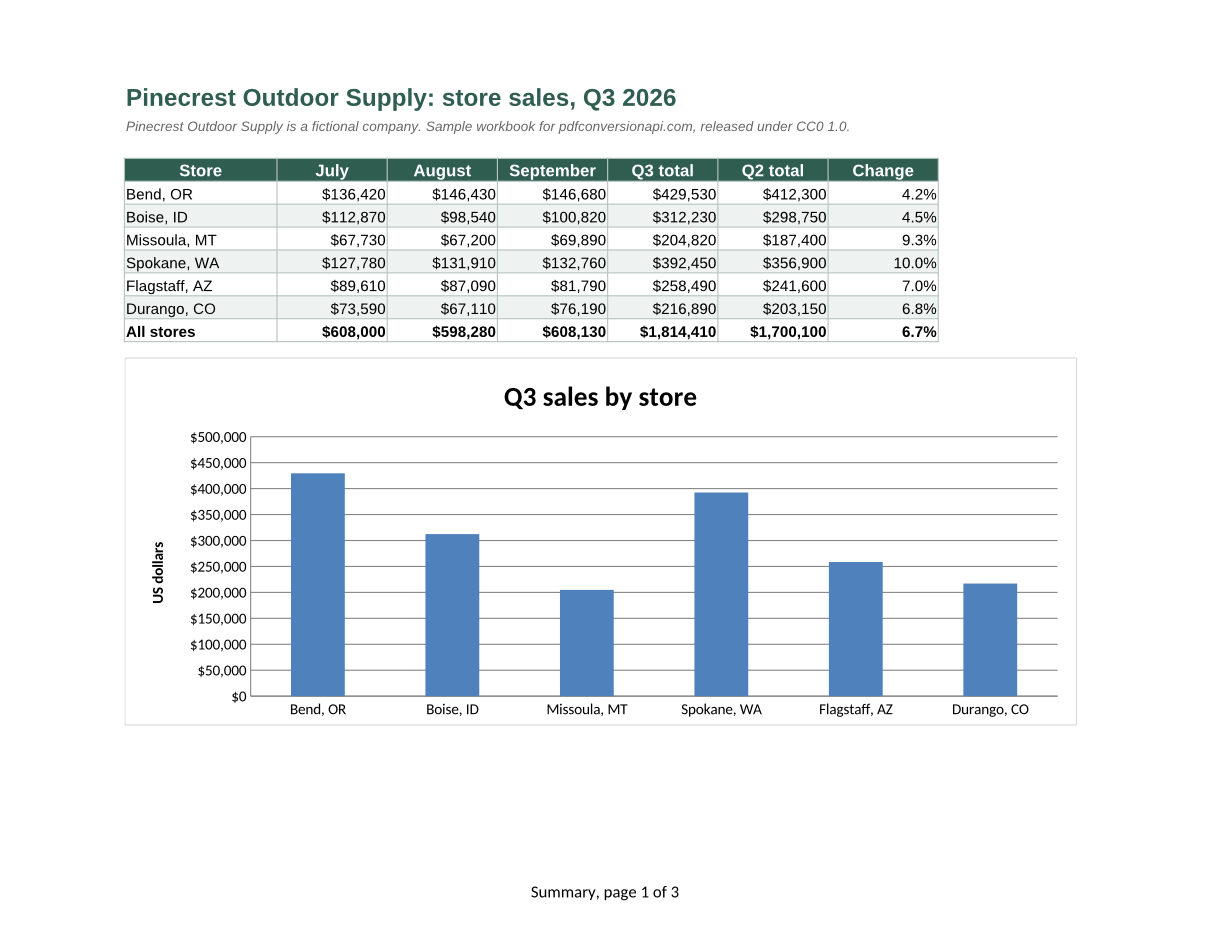
- Input
- store-sales-q3.xlsx (18 KB)
- Output
- store-sales-q3.pdf (258 KB)
- Source
- Written for this site (fictional retailer): an Excel workbook (CC0-1.0). How it was made
- Made by
- 2026-11-04, API build
9eeeb0640aba
Parameters
Send these as form fields next to the file. Names are case-insensitive. If you set one of the documented options below that we don't support yet, the request fails with a 400 that names it instead of returning a file made without it.
| Parameter | What it does |
|---|---|
WorksheetNamestring | Print only this sheet; the name is matched without regard to case. WorksheetName=Orders returned the sample's 2 Orders pages. A name the workbook doesn't have returns 400 "no worksheet named 'Nope'", and sending it together with WorksheetIndex returns 400. |
WorksheetIndexinteger | Print only the sheet at this position in the tab order, hidden sheets included: 2 is Orders, and 3 prints the hidden Rates sheet on its own A4 page. A number past the last sheet returns 400 "WorksheetIndex is 4, but the workbook has 3 worksheets".Values: 1–2000 |
ActiveWorksheetOnlyboolean, default false | Print only the sheet that was open when the file was saved. For the sample that is Summary, a single landscape page. |
PageSizeenum, default default | Paper for every printed sheet, replacing the size saved in the file; each sheet keeps its orientation. PageSize=a4 printed the Summary page at 11.69 × 8.27 in and the Orders pages at 8.27 × 11.69 in.Values: letter, legal, tabloid, ledger, executive, statement, a3, a4, a5, b4, b5 |
PageOrientationenum, default default | Turns every printed sheet. landscape laid Orders out on 3 wide pages instead of 2 tall ones; portrait stood the Summary page upright.Values: default, portrait, landscape |
Scaleinteger | Print every sheet at this percentage instead of the scaling saved in the file. It switches off a sheet's saved fit-to-page setting: at 50, the sample's Summary table took half the page width it fills by default.Values: 10–300 (percent) |
FitToPageboolean, default false | Shrink each sheet to one page wide, with as many pages down as it needs. A 150-row, 12-column test sheet whose last columns spilled onto pages of their own went from 8 pages to 3, all of them A4. The sample's sheets already fit their width, so nothing changes there. |
HeaderOnEachPageboolean, default false | Repeat the first row that holds data at the top of every page. On our 150-row test sheet, page 2 then began with the header row. The sample's Orders sheet already repeats its header through the file's print titles. |
ClearPrintAreaboolean, default false | Ignore print areas saved in the sheets and print every used cell. A test sheet with a print area of A1:C20 printed 1 page by default and 8 with this option. |
PageRangestring | Pages to keep, counted in the finished PDF across all sheets. In the sample, Summary is page 1 and Orders is pages 2 and 3. A range may end past the last page, so 1-10 returns all 3 pages, but a page that doesn't exist, such as 5, returns 400 with the real page count.Values: e.g. 1-3,5, 2- or 2-last |
Pdfaboolean, default false | Write the PDF as PDF/A-1b. For 2b or 3b, use PdfaVersion. |
PdfaVersionenum, default none | Choose the PDF/A version instead. Sent together with Pdfa=true, PdfaVersion decides: the pair with pdfA2b gave PDF/A-2b. A PageRange that leaves pages out can't be combined with either one, but WorksheetName can: WorksheetName=Orders with PdfaVersion=pdfA2b returned the 2 Orders pages as PDF/A-2b.Values: none, pdfA1b, pdfA2b, pdfA3b |
Passwordstring | Opens a workbook saved with a password to open, as Excel 2010 and later encrypt it. A protected copy of the sample gave the same 3 pages. Files using Office 2007's older encryption return 422. Sent with a workbook that has no password, it changes nothing. |
FileNamestring | Base name for the PDF. Without it, store-sales-q3.xlsx becomes store-sales-q3.pdf. |
StoreFileboolean, default false | Keep the PDF on our side and answer with a link to it instead of the file. Links expire 3 hours after the conversion. |
Not supported yet
Setting one of these to anything but its default returns 400.
| Option | What to do instead |
|---|---|
ThousandsSeparator | Numbers print with the cell formats saved in the file. |
DateFormat | Dates print with the cell formats saved in the file. |
Also refused when set: AutoFitColumns, DecimalSeparator, IncludeMetadata.
What carries over, and what doesn't
Kept
- Every visible sheet in tab order, each with its own paper size and orientation (the sample's Summary page is 11 by 8.5 inches, Orders is 8.5 by 11)
- Print titles: the Orders header row repeats at the top of pages 2 and 3
- Fit-to-page scaling, margins, centering, and headers and footers with page numbers
- Charts, drawn as vector graphics
- Currency, percentage and date formats as shown in the cells
- Cell fills, borders and fonts, with text that can be selected and searched
- A PDF bookmark for each sheet, named after the sheet
Lost or not yet supported
- The PDF shows the formula results saved in the file. The converter recalculates only cells saved without a result and volatile functions such as TODAY().
- A sheet saved with no page setup at all prints on A4 rather than Letter unless you send
PageSize=letter.ScaleandFitToPagekeep such a sheet on A4. - Calibri, Excel's default font, is drawn with Carlito, which has the same character widths. Other fonts the server doesn't have are replaced too.
- Footers must fit between the footer margin and the bottom margin. In a test sheet with a 0.6 in bottom margin and the footer 0.5 in from the edge, the footer text was cut in half.
- The layout comes from the office suite that converts the file, not from Excel. We have not compared it with a PDF saved from Excel.
Limits
- Requests up to 10 MB on the Free plan or 100 MB on paid plans, all files and fields together.
- 120 seconds per conversion, then 504.
- A
PageRangethat leaves pages out plus PDF/A in one request returns 400. - A password-protected workbook returns 422 "the input file is password-protected" until you send the right
Password. A damaged file returns 422 "the input file could not be read: it could not be opened as XLSX".
Where teams use it
Monthly reports from a workbook your code fills in
Write numbers into a template with openpyxl, ExcelJS or Apache POI and convert it. Formula cells saved without a result are calculated during the conversion, so the totals in the PDF are filled in.
Read-only copies for review and audit
Send reviewers a PDF of the workbook instead of the workbook, so nobody edits a formula by accident. Ask for PdfaVersion=pdfA2b when the copy goes into long-term storage.
Print previews for uploaded spreadsheets
Show users what their sheet looks like on paper before they print or send it. Page breaks, repeated header rows and footers come out the way the workbook defines them.
Questions
Can I convert just one worksheet?
Yes. WorksheetName=Orders or WorksheetIndex=2 returns only the sample's 2 Orders pages, and ActiveWorksheetOnly=true prints the sheet that was open when the file was saved. WorksheetIndex counts hidden sheets, and picking one prints it: WorksheetIndex=3 returned the hidden Rates sheet. Without these options hidden sheets are never printed, so the Rates sheet, which the tax formulas read, is not in the sample PDF.
How do I set Letter paper, page orientation or fit to one page wide?
Send PageSize=letter, PageOrientation=landscape or FitToPage=true with the request; each applies to every printed sheet and replaces what the file says. FitToPage fits a sheet one page wide and lets it run as many pages down as it needs. To give sheets different settings, save them in the workbook instead. In openpyxl that is ws.page_setup.paperSize = ws.PAPERSIZE_LETTER and ws.page_setup.orientation = ws.ORIENTATION_LANDSCAPE; for one page wide, ws.sheet_properties.pageSetUpPr.fitToPage = True, ws.page_setup.fitToWidth = 1 and ws.page_setup.fitToHeight = 0.
Are formulas recalculated before the PDF is made?
Mostly not. We changed the saved result of =SUM(B5:D5) in a copy of the sample to 111 and the PDF printed 111. Two exceptions: cells saved with no result at all (files written by openpyxl, for example) are calculated, and volatile functions such as TODAY() are refreshed.
Which spreadsheet formats can I send?
XLSX at /v2/convert/xlsx/to/pdf, Excel 97-2003 XLS at xls/to/pdf, binary XLSB at xlsb/to/pdf and OpenDocument ODS at ods/to/pdf. All four run on the same converter and accept the same options. For CSV files, use csv/to/pdf.
Do macros in the workbook run?
No. Every conversion starts the office suite with a new, empty profile in which macro execution is switched off, whatever the file asks for.
Convert your first XLSX file in a minute.