CSV to XLSX API
Send a CSV file to POST /v2/convert/csv/to/xlsx and an Excel workbook comes back in the response. The converter decides cell by cell whether a value is a number or text, and it never writes a formula.
- Endpoint
- POST /v2/
convert/ csv/ to/ xlsx - Accepts
- csv
- Sample timing
- 2 ms median of 5 runsHow we measure
- Request size
- Up to 10 MB on the Free plan or 100 MB on paid plans, all files together
Request and response
Every sample below ran against the API before this page was published. Set PDFCONVERSIONAPI_KEY to your key and run it as is.
curl -sS -X POST \
  https://api.pdfconversionapi.com/v2/convert/csv/to/xlsx \
  -H "Authorization: Bearer $PDFCONVERSIONAPI_KEY" \
  -F File=@orders-october.csv \
  -o response.json

# FileData is base64. Save the first file in converted/,
# or print the JSON error.
if jq -e '.Files' response.json > /dev/null; then
  mkdir -p converted
  name=$(jq -r '.Files[0].FileName' response.json)
  jq -r '.Files[0].FileData' response.json \
    | base64 --decode > "converted/$name"
else
  cat response.json
fi
import base64
import os
import requests
key = os.environ["PDFCONVERSIONAPI_KEY"]
response = requests.post(
"https://api.pdfconversionapi.com/v2/convert/csv/to/xlsx",
headers={"Authorization": f"Bearer {key}"},
files=[("File", open("orders-october.csv", "rb"))],
timeout=180,
)
result = response.json()
if not response.ok:
raise SystemExit(f"{result['Code']}: {result['Message']}")
os.makedirs("converted", exist_ok=True)
for file in result["Files"]:
path = os.path.join("converted", file["FileName"])
with open(path, "wb") as out:
out.write(base64.b64decode(file["FileData"]))
print(path, file["FileSize"], "bytes")
import { mkdir, readFile, writeFile } from "node:fs/promises";
import { join } from "node:path";

const form = new FormData();
const file = "orders-october.csv";
form.append("File", new Blob([await readFile(file)]), file);

const url = "https://api.pdfconversionapi.com/v2/convert/csv/to/xlsx";
const key = process.env.PDFCONVERSIONAPI_KEY;
const response = await fetch(url, {
  method: "POST",
  headers: { Authorization: `Bearer ${key}` },
  body: form,
});
const result = await response.json();
if (!response.ok) {
  throw new Error(`${result.Code}: ${result.Message}`);
}

await mkdir("converted", { recursive: true });
for (const file of result.Files) {
  const path = join("converted", file.FileName);
  await writeFile(path, Buffer.from(file.FileData, "base64"));
  console.log(path, file.FileSize, "bytes");
}
{
  "ConversionCost": 1,
  "ConversionTime": 0.002,
  "Files": [
    {
      "FileName": "orders-october.xlsx",
      "FileExt": "xlsx",
      "FileSize": 7034,
      "FileData": "UEsDBBQACAAIAAAAIQAAAAAA…"
    }
  ]
}
Response from our test run on 2026-11-03. ConversionTime shows the median of 5 runs. FileData is shortened here; the real response carries the whole file as base64.
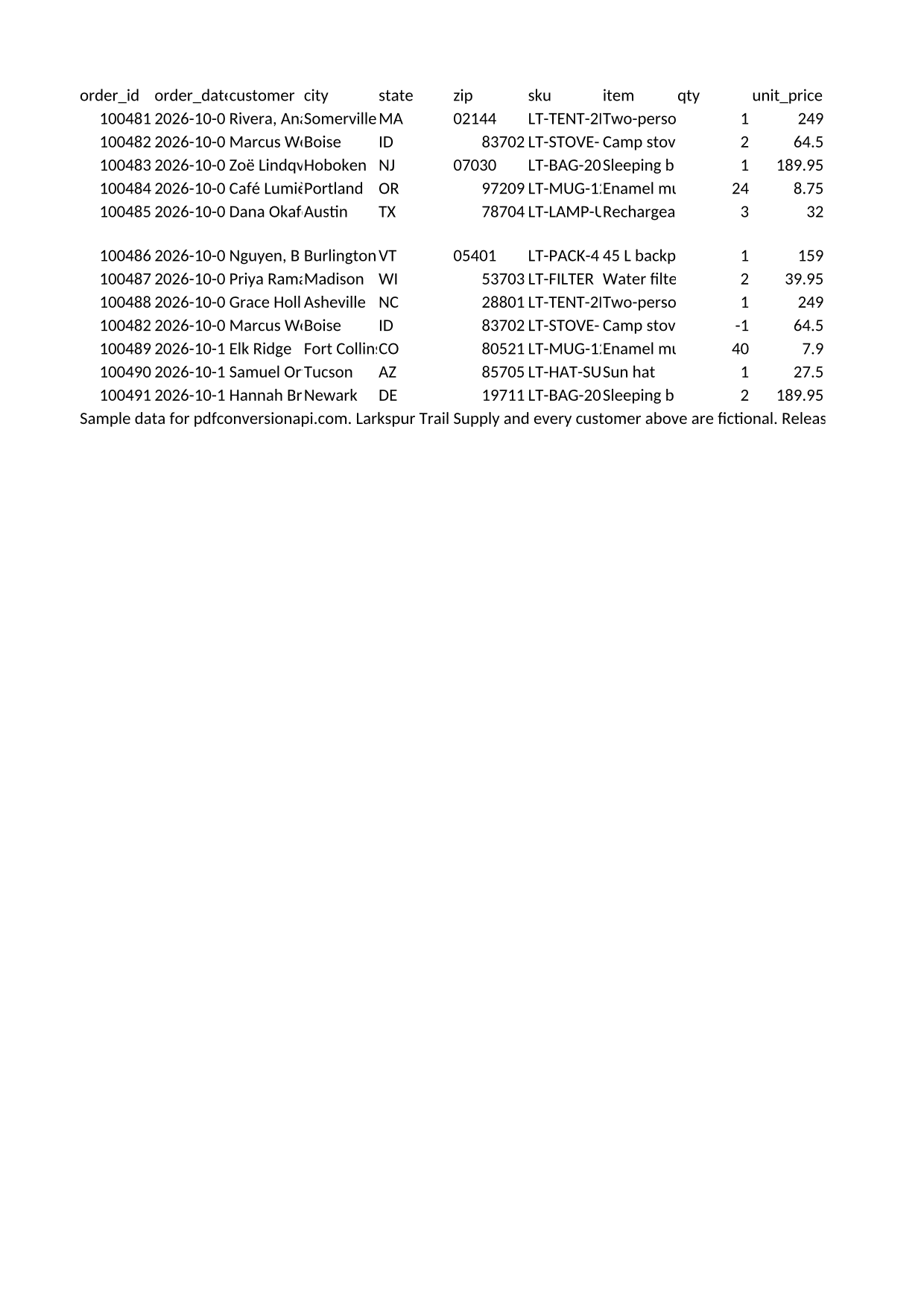
The sample, converted
The same file the code sends. Download the input and the output and compare them yourself.
- Input
- orders-october.csv (1.6 KB)
- Output
- orders-october.xlsx (6.9 KB)
- Source
- Written for this site (fictional company and customers) (CC0-1.0). How it was made
- Made by
- 2026-11-04, API build
9eeeb0640aba
Parameters
Send these as form fields next to the file. Names are case-insensitive. If you set one of the documented options below that we don't support yet, the request fails with a 400 that names it instead of returning a file made without it.
| Parameter | What it does |
|---|---|
Delimiterstring, default , | The character between fields. Use ; for files from spreadsheets set to a European locale and tab for TSV. Two or more characters, or a non-ASCII character such as §, return 400.Values: One ASCII character, or tab (send tab or \t) |
FileNamestring | Name for the workbook, without the extension. Without it the .xlsx takes the uploaded file's name. |
StoreFileboolean, default false | Return a download link instead of the file. The link expires after 3 hours and the file is then deleted. |
Not supported yet
Setting one of these to anything but its default returns 400.
| Option | What to do instead |
|---|---|
CellType | Number detection can't be switched off yet. CellType=text is accepted because it is the documented default; any other value returns 400. |
What carries over, and what doesn't
Kept
- Every row and column of the CSV, in one worksheet named Sheet1
- Plain decimal numbers such as 249.00, 64.50 and -1 as number cells you can sum, sort and filter
- Leading zeros in digit strings like the ZIP code 02144, which are written as text
- Anything that isn't a plain number, including cells that start with = or @, kept as text exactly as typed; nothing becomes a formula
- Quoted fields with commas or line breaks inside them, each in a single cell
- UTF-8 text such as Zoë, Café Lumière and 20°F; a UTF-8 byte order mark at the start of the file is dropped
- Rows of different lengths; missing fields become empty cells
Lost or not yet supported
- Dates stay text. 2026-10-01 arrives as the text 2026-10-01, so date filters and date math don't work on that column. For comparison, a desktop office suite's CSV import turned the same values into date cells.
- A ZIP code column ends up mixed: codes with a leading zero are text and the others are numbers (02144 is text, 83702 is a number in the sample).
- Numbers written with thousands separators, currency signs, percent signs, exponents or decimal commas (1,234 or $5.00 or 12% or 1e5 or 1,5) stay text.
- Long digit-only IDs become numbers. In a desktop spreadsheet app we tested, the sample's 12-digit tracking numbers show as 6.12E+11 at the default column width, and values above 2^53 are rounded: 12345678901234567 is stored as 12345678901234568.
- No number formats, so trailing zeros go: 249.00 is stored and shown as 249.
- No formatting. The header row isn't bold, nothing is frozen, and every column keeps the default width, so long text looks cut off until you widen the column.
- The CSV is read as UTF-8. In a Windows-1252 or Latin-1 file, letters such as the é in José become the replacement character U+FFFD.
Limits
- 1,048,576 rows and 16,384 columns, the size of one Excel sheet. A longer file returns 413 with "the CSV has more than 1,048,576 rows"; a wider row returns 413 with its row number, such as "row 1 has more than 16,384 columns".
- One CSV per request, and one worksheet per workbook.
- Requests up to 10 MB on the Free plan or 100 MB on paid plans, all files and fields together.
- A conversion can run for up to 120 seconds; after that the API returns 504.
Where teams use it
Excel downloads next to your CSV export
If your app already writes CSV for a reports screen, convert that same file and offer an .xlsx link too. People who open it get amount columns they can sum and ZIP codes that still start with 0.
Spreadsheets for finance and operations
Run the query, write the CSV, convert it, and attach the workbook to the email or ticket. Nobody has to go through an import wizard to read it.
Passing customer uploads on to staff
A CSV opened straight in a spreadsheet app can turn a cell that starts with = into a formula. In our test, a desktop office suite converting the sample from the command line did that with the note "=== FRAGILE ===". Converted here, the same cell stays plain text.
Questions
Will ZIP codes and account numbers keep their leading zeros?
Yes. A value that starts with 0 and has more digits after it, such as 02144 or 007, is written as text so the zero stays. 0.5 is still a number. The catch is that ZIP codes without a leading zero, like 83702, become numbers, so one column can hold both types.
Can a cell in the CSV become a formula in the workbook?
No. The converter writes only numbers and text. =HYPERLINK("http://example.com","y"), +15550100 and @SUM(A1) are all stored as text and shown as typed, so a CSV from an untrusted source can't add formulas to the file.
My file uses semicolons. How do I set the delimiter with curl?
Send Delimiter=; and use --form-string 'Delimiter=;' rather than -F. curl's -F reads a semicolon as the start of a content-type setting, so the API receives an empty value and splits on commas. For tab-separated files send Delimiter=tab.
Why do dates come through as text?
The converter recognizes plain decimal numbers and nothing else, so it never reads a value as a date, in any format. Dates arrive exactly as they were written in the CSV. If you need date cells, convert the column in your spreadsheet app after opening the file.
Can I name the worksheet or put several CSV files in one workbook?
Not yet. Each request takes one CSV and returns a workbook with one sheet called Sheet1. Parameters for other conversions, such as WorksheetName, are ignored here.
Convert your first CSV file in a minute.