HTML to PDF API
POST an HTML file to /v2/convert/html/to/pdf and the PDF comes back in the response. Pages without scripts are laid out inside the API process by an HTML layout engine. Pages that need a browser are printed by a full browser engine instead. The API decides which one per request.
- Endpoint
- POST /v2/
convert/ html/ to/ pdf - Accepts
- html
- Sample timing
- 17 ms median of 5 runsHow we measure
- Request size
- Up to 10 MB on the Free plan or 25 MB on paid plans, file and fields together
Request and response
Every sample below ran against the API before this page was published. Set PDFCONVERSIONAPI_KEY to your key and run it as is.
curl -sS -X POST \
  https://api.pdfconversionapi.com/v2/convert/html/to/pdf \
  -H "Authorization: Bearer $PDFCONVERSIONAPI_KEY" \
  -F File=@invoice.html \
  --form-string CssMediaType=print \
  --form-string PageSize=letter \
  -o response.json

# FileData is base64. Save the first file in converted/,
# or print the JSON error.
if jq -e '.Files' response.json > /dev/null; then
  mkdir -p converted
  name=$(jq -r '.Files[0].FileName' response.json)
  jq -r '.Files[0].FileData' response.json \
    | base64 --decode > "converted/$name"
else
  cat response.json
fi
import base64
import os
import requests
key = os.environ["PDFCONVERSIONAPI_KEY"]
response = requests.post(
"https://api.pdfconversionapi.com/v2/convert/html/to/pdf",
headers={"Authorization": f"Bearer {key}"},
files=[("File", open("invoice.html", "rb"))],
data={
"CssMediaType": "print",
"PageSize": "letter",
},
timeout=180,
)
result = response.json()
if not response.ok:
raise SystemExit(f"{result['Code']}: {result['Message']}")
os.makedirs("converted", exist_ok=True)
for file in result["Files"]:
path = os.path.join("converted", file["FileName"])
with open(path, "wb") as out:
out.write(base64.b64decode(file["FileData"]))
print(path, file["FileSize"], "bytes")
import { mkdir, readFile, writeFile } from "node:fs/promises";
import { join } from "node:path";

const form = new FormData();
const file = "invoice.html";
form.append("File", new Blob([await readFile(file)]), file);
form.append("CssMediaType", "print");
form.append("PageSize", "letter");

const url = "https://api.pdfconversionapi.com/v2/convert/html/to/pdf";
const key = process.env.PDFCONVERSIONAPI_KEY;
const response = await fetch(url, {
  method: "POST",
  headers: { Authorization: `Bearer ${key}` },
  body: form,
});
const result = await response.json();
if (!response.ok) {
  throw new Error(`${result.Code}: ${result.Message}`);
}

await mkdir("converted", { recursive: true });
for (const file of result.Files) {
  const path = join("converted", file.FileName);
  await writeFile(path, Buffer.from(file.FileData, "base64"));
  console.log(path, file.FileSize, "bytes");
}
{
  "ConversionCost": 1,
  "ConversionTime": 0.017,
  "Files": [
    {
      "FileName": "invoice.pdf",
      "FileExt": "pdf",
      "FileSize": 63321,
      "FileData": "JVBERi0xLjcKJYCAgIAKMSAw…"
    }
  ]
}
Response from our test run on 2026-11-03. ConversionTime shows the median of 5 runs. FileData is shortened here; the real response carries the whole file as base64.
The sample, converted
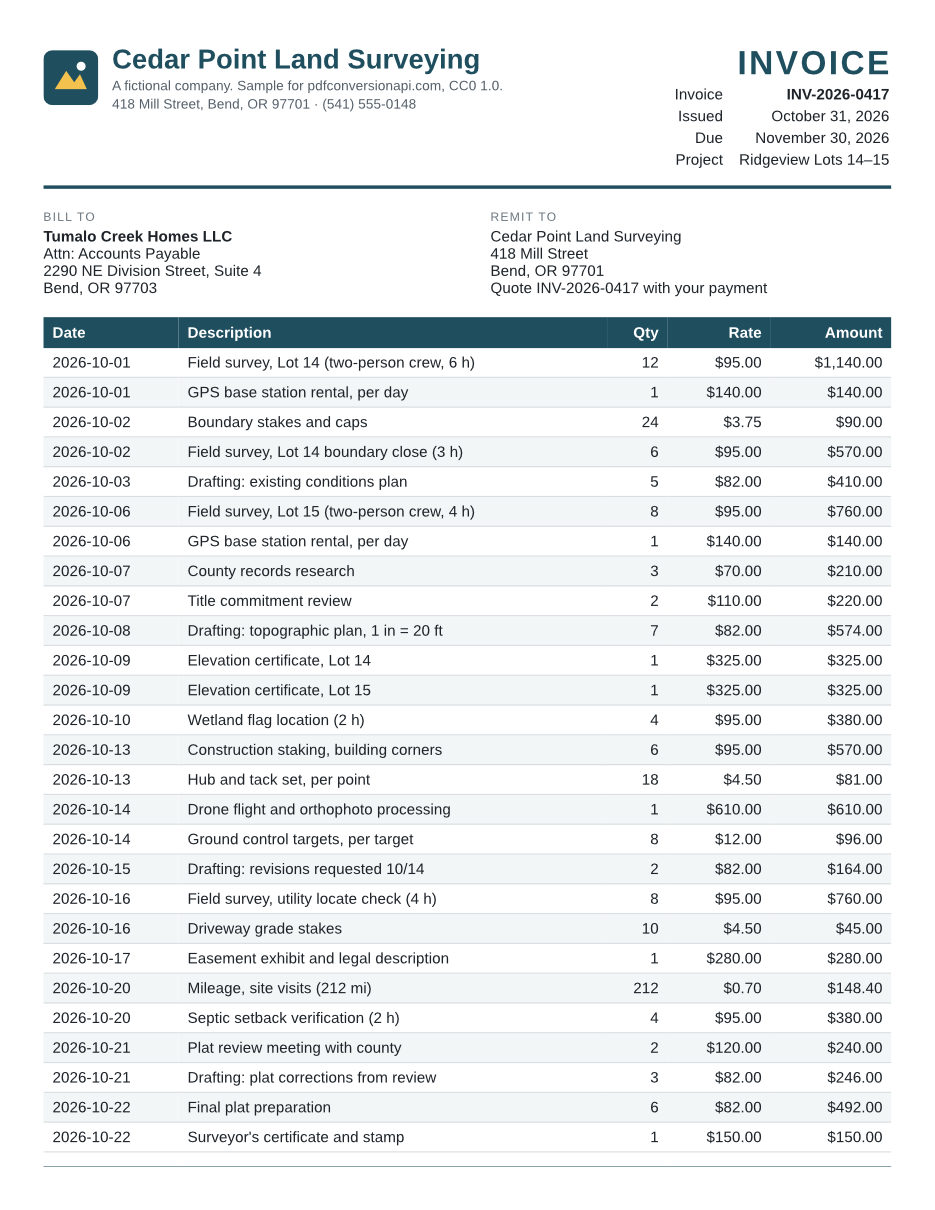
The same file the code sends. Download the input and the output and compare them yourself.
- Input
- invoice.html (9.7 KB)
- Output
- invoice.pdf (62 KB)
- Source
- Written for this site (fictional company): an HTML and CSS invoice (CC0-1.0). How it was made
- Made by
- 2026-11-04, API build
9eeeb0640aba
Parameters
Send these as form fields next to the file. Names are case-insensitive. If you set one of the documented options below that we don't support yet, the request fails with a 400 that names it instead of returning a file made without it.
| Parameter | What it does |
|---|---|
PageSizeenum, default letter | Paper size. Letter is 8.5 x 11 in; names are matched in any case.Values: a0 to a9, b0 to b5, letter, legal, ledger |
PageOrientationenum, default portrait | Which way the paper is turned. Turning it sideways swaps width and height, so Letter prints at 11 x 8.5 in.Values: portrait, landscape |
PageWidthinteger | Custom paper width in millimeters. Replaces the width that PageSize sets.Values: 10 to 30000 (mm) |
PageHeightinteger | Custom paper height in millimeters. Replaces the height that PageSize sets.Values: 10 to 30000 (mm) |
MarginTopinteger, default 10 | Top margin in millimeters. A Header template prints inside it.Values: 0 to 500 (mm) |
MarginRightinteger, default 10 | Right margin in millimeters.Values: 0 to 500 (mm) |
MarginBottominteger, default 10 | Bottom margin in millimeters. A Footer template prints inside it.Values: 0 to 500 (mm) |
MarginLeftinteger, default 10 | Left margin in millimeters. If the margins leave no room for content, the request gets a 400.Values: 0 to 500 (mm) |
PageRangestring | Keep only these pages of the printed result. last is the last page, so 2-last and 2- both run to the end. A range may end past the last page and stops there; a page or range start past the end returns 400, such as "PageRange asks for page 5, but the document has 3 pages".Values: e.g. 1-3,5, 2- or 2-last |
Headerstring | HTML template printed in the top margin of every page. Elements with the class pageNumber or totalPages are filled in. A template that uses title, date or url sends the page to the browser engine, which fills those too. Since the page is uploaded, url prints the placeholder address http://document.invalid/, not where the page came from. |
Footerstring | HTML template for the bottom margin, with the same placeholders as Header. The template does not inherit the page's CSS, so give it its own font and size. |
CssMediaTypeenum, default screen | Which @media rules apply. A page that has @media rules is printed by the browser engine with the default screen value; with print it stays in the in-process engine, which applies print rules.Values: screen, print |
HideElementsstring | CSS selector. Matching elements are left out of the PDF (display: none). |
AvoidBreakElementsstring | CSS selector. Page breaks avoid falling inside matching elements, such as a totals block or a signature box. |
BreakBeforeElementsstring | CSS selector. Each matching element starts on a new page. |
BreakAfterElementsstring | CSS selector. A new page starts after each matching element. |
UserCssstring | Extra CSS applied after the page's own style sheets. Handy for print tweaks you don't want in the page itself. |
JavaScriptboolean, default true | Set to false to print a page that contains scripts without running them. The page then stays in the in-process engine. |
UserJsstring | JavaScript to run in the page after it loads and before it is printed. The request goes to the browser engine. |
WaitElementstring | CSS selector to wait for before printing, for pages that build their content with scripts. The request goes to the browser engine. If the element never appears, the request fails with 400 when the time limit runs out. |
ConversionDelayinteger, default 0 | Seconds to wait after the page loads before printing. It applies to pages printed by the browser engine; a page without scripts has nothing to wait for and is printed at once.Values: 0 to 30 (seconds) |
Backgroundboolean, default true | Print background colors and images. false sends the page to the browser engine, which prints without them. |
Scaleinteger, default 100 | Zoom for the printed page, like the scale box in a browser's print dialog. Any value other than 100 is printed by the browser engine.Values: 10 to 200 (%) |
RespectViewportboolean, default false | true lays the page out at ViewportWidth, as on a desktop screen, and shrinks it to fit the paper (printed by the browser engine). The default lays the page out for the paper width, as a browser's Save as PDF does. ConvertAPI defaults to true, so send RespectViewport=true if you are moving from there and want the same layout. |
ViewportWidthinteger, default 1366 | Browser window width in CSS pixels. Scripts read it as innerWidth, and RespectViewport=true lays the page out at this width. The in-process engine lays pages out for the paper and does not use it.Values: 200 to 4000 (px) |
ViewportHeightinteger, default 1024 | Browser window height in CSS pixels, which scripts read as innerHeight. Not used by the in-process engine.Values: 200 to 4000 (px) |
FileNamestring | Name for the PDF, without the extension. Without it the PDF takes the uploaded file's name. |
StoreFileboolean, default false | Return a download link instead of the file. The link expires after 3 hours. |
Not supported yet
Setting one of these to anything but its default returns 400.
| Option | What to do instead |
|---|---|
Url | Fetch the page in your own code and send the HTML as File. The converter loads nothing over the network, so put images in as data: URIs and CSS in style elements. |
AuthUsername, AuthPassword, Cookies, Headers | Applies to Url. |
AdBlock | Hide ad slots with HideElements, or strip them from the HTML before you send it. |
CookieConsentBlock | Hide the banner with HideElements. |
ShowElements | Use HideElements on the parts you want left out. |
FixedElements | Only the value fixed is accepted. |
Also refused when set: LoadLazyContent.
What carries over, and what doesn't
Kept
- Selectable, searchable text, with each font embedded as a subset (Liberation Sans and Liberation Sans Bold in the sample)
- Flexbox, grid, floats, tables with rowspan and colspan, border-radius, gradients, box shadows, transforms, calc() and CSS custom properties, which came out as in the browser engine's print in our feature test, apart from the box sizing noted below
- Table heading rows (
thead) repeat at the top of each page a table continues onto - SVG images stay vector: the sample's logo, sent as a
data:URI, is drawn as paths, not a bitmap - Links stay clickable (the sample's mailto link is a link annotation in the PDF)
- CSS page breaks:
break-beforestarts the sample's terms on page 3, andbreak-inside: avoidkeeps the totals together - Tagged PDF: headings, tables, lists and links are in the document's structure tree
Lost or not yet supported
- Today the in-process engine draws text in Liberation Serif when no font in a font-family list is installed and the list ends in a generic name (sans-serif, monospace, system-ui), and code and pre text is not monospaced. Name an installed font, such as Arial, Helvetica, Liberation Sans or Courier New. The browser engine resolves generic names.
- Fonts declared with
@font-faceare not used by the in-process engine, even asdata:URIs; that text falls back to the server's fonts. The browser engine uses them. - CSS multi-column layout (
columns: 3) prints as a single column in the in-process engine. - Some browser defaults are missing in the in-process engine: links get no color or underline, a plain
hrdraws no rule, checkboxes are not drawn, andborder="1"on a table draws no borders. Style links, rules and borders in CSS; checkboxes need the browser engine. - Elements are sized as
box-sizing: border-boxby default, so a 200px-wide box with 20px padding is 200px wide in total, where a browser makes it 240px. Addbox-sizing: content-boxwhere that matters. - In the sample, a hairline in the heading row's color appears at the foot of page 1, where the table breaks. The browser engine's print of the same file does not have it.
- Paper size comes from
PageSize,PageWidthandPageHeight, not from a CSS@pagesize rule. SetPageOrientationtoo: the in-process engine ignores@pagesize, but the browser engine still takes the orientation keyword from it, so a sideways A4 rule printed as sideways Letter in our test. - Headings do not become PDF bookmarks, and the in-process engine does not copy the page's title element into the PDF's document title (the browser engine does).
Limits
- HTML is uploaded as a file.
Urlis refused, and nothing the page references by URL (images, style sheets, fonts, scripts) is loaded. - On the hosted API, an HTML request (the file and all fields together) can be up to 10 MB on the Free plan or 25 MB on paid plans. Pages over 10 MB are printed by the browser engine.
- A page that prints to more than 2,000 pages returns 413, whichever engine prints it. The limit counts the whole printed document, so a
PageRangethat keeps fewer pages does not get around it. - A conversion can run for up to 120 seconds, waits included; after that the API returns 504. A
WaitElementthat never appears returns 400.
Where teams use it
Invoices and statements from your own templates
Render the same HTML your customers see in the browser, send it with CssMediaType=print so your @media print rules hide buttons and banners, and file the PDF. The sample on this page is one: 36 line items over two pages, with the column headings repeated on page 2.
Reports with charts drawn by JavaScript
A page that builds its chart with JavaScript goes to the browser engine. Have your script add an element when it finishes, for example <div id="chart-done">, and send WaitElement=#chart-done so the PDF is printed after the chart is drawn.
Contracts and letters with page numbers
Put the document in HTML, set margins in millimeters, and add a Footer template with pageNumber and totalPages so each page reads Page 2 of 5. Page numbers alone keep the page in the in-process engine.
Questions
Which engine prints my page, and can I pick one?
The API picks per request. A page goes to the browser engine when it has script elements, event-handler attributes or javascript: links, is not UTF-8, is over 10 MB, or the request uses UserJs, WaitElement, Scale, RespectViewport=true, Background=false, a header or footer with title, date or url, or a CssMediaType that the page's @media rules depend on. Everything else is laid out in process by the HTML layout engine. There is no engine parameter, but JavaScript=false keeps a page with scripts in process.
Why not send every page to the browser engine?
Each browser engine conversion starts a new browser with an empty profile and shuts it down afterwards, which costs time and memory on every request. The in-process engine skips all of that. We printed the sample invoice with both engines and compared them page by page; the differences we found are the ones listed on this page.
How do I add page numbers?
Send a Footer such as <div style="font-family: Arial; font-size: 8pt; width: 100%; text-align: center">Page <span class="pageNumber"></span> of <span class="totalPages"></span></div>. Set the font and size inside the template, since it does not inherit the page's CSS. With curl, pass it with --form-string instead of -F, because -F reads a value that starts with < from a file.
Can I convert a live web page by URL?
No. Url returns 400. Download the page in your own code and send the HTML. The converter makes no network requests, so inline what the page needs: images as data: URIs, CSS in style elements. Anything still referenced by URL is left blank.
Which fonts can my page use?
The fonts installed on the server: Liberation Sans, Serif and Mono, DejaVu, Carlito, Caladea and the Noto families, including CJK. Arial and Helvetica map to Liberation Sans, Times New Roman to Liberation Serif, Courier New to Liberation Mono, Calibri to Carlito and Cambria to Caladea, all metric-compatible. A font embedded with @font-face as a data: URI is used only when the page is printed by the browser engine.
Is my HTML kept after the conversion?
No. The PDF is returned in the response and the upload is dropped when the request ends. The browser engine runs in a temporary folder that is deleted with its profile after each request. Only StoreFile=true keeps a copy, behind a link that expires after 3 hours.
Convert your first HTML file in a minute.