OCR API for scanned PDFs
Send a scanned PDF to POST /v2/convert/pdf/to/ocr and you get the same pages back with invisible, selectable text placed over each word of the scan. Set OutputType=txt if you only want the text.
- Endpoint
- POST /v2/
convert/ pdf/ to/ ocr - Accepts
- pdf, png, jpg, tiff
- Sample timing
- 4.038 s median of 5 runsHow we measure
- Request size
- Up to 10 MB on the Free plan or 100 MB on paid plans, all files together
Request and response
Every sample below ran against the API before this page was published. Set PDFCONVERSIONAPI_KEY to your key and run it as is.
curl -sS -X POST \
  https://api.pdfconversionapi.com/v2/convert/pdf/to/ocr \
  -H "Authorization: Bearer $PDFCONVERSIONAPI_KEY" \
  -F File=@inspection-report-scan.pdf \
  --form-string FileName=scan.ocr.pdf \
  -o response.json

# FileData is base64. Save the first file in converted/,
# or print the JSON error.
if jq -e '.Files' response.json > /dev/null; then
  mkdir -p converted
  name=$(jq -r '.Files[0].FileName' response.json)
  jq -r '.Files[0].FileData' response.json \
    | base64 --decode > "converted/$name"
else
  cat response.json
fi
import base64
import os
import requests
key = os.environ["PDFCONVERSIONAPI_KEY"]
response = requests.post(
"https://api.pdfconversionapi.com/v2/convert/pdf/to/ocr",
headers={"Authorization": f"Bearer {key}"},
files=[("File", open("inspection-report-scan.pdf", "rb"))],
data={
"FileName": "scan.ocr.pdf",
},
timeout=180,
)
result = response.json()
if not response.ok:
raise SystemExit(f"{result['Code']}: {result['Message']}")
os.makedirs("converted", exist_ok=True)
for file in result["Files"]:
path = os.path.join("converted", file["FileName"])
with open(path, "wb") as out:
out.write(base64.b64decode(file["FileData"]))
print(path, file["FileSize"], "bytes")
import { mkdir, readFile, writeFile } from "node:fs/promises";
import { join } from "node:path";

const form = new FormData();
const file = "inspection-report-scan.pdf";
form.append("File", new Blob([await readFile(file)]), file);
form.append("FileName", "scan.ocr.pdf");

const url = "https://api.pdfconversionapi.com/v2/convert/pdf/to/ocr";
const key = process.env.PDFCONVERSIONAPI_KEY;
const response = await fetch(url, {
  method: "POST",
  headers: { Authorization: `Bearer ${key}` },
  body: form,
});
const result = await response.json();
if (!response.ok) {
  throw new Error(`${result.Code}: ${result.Message}`);
}

await mkdir("converted", { recursive: true });
for (const file of result.Files) {
  const path = join("converted", file.FileName);
  await writeFile(path, Buffer.from(file.FileData, "base64"));
  console.log(path, file.FileSize, "bytes");
}
{
  "ConversionCost": 1,
  "ConversionTime": 4.038,
  "Files": [
    {
      "FileName": "scan.ocr.pdf",
      "FileExt": "pdf",
      "FileSize": 497437,
      "FileData": "JVBERi0xLjcKJeLjz9MKNCAw…"
    }
  ]
}
Response from our test run on 2026-11-03. ConversionTime shows the median of 5 runs. FileData is shortened here; the real response carries the whole file as base64.
The sample and the result
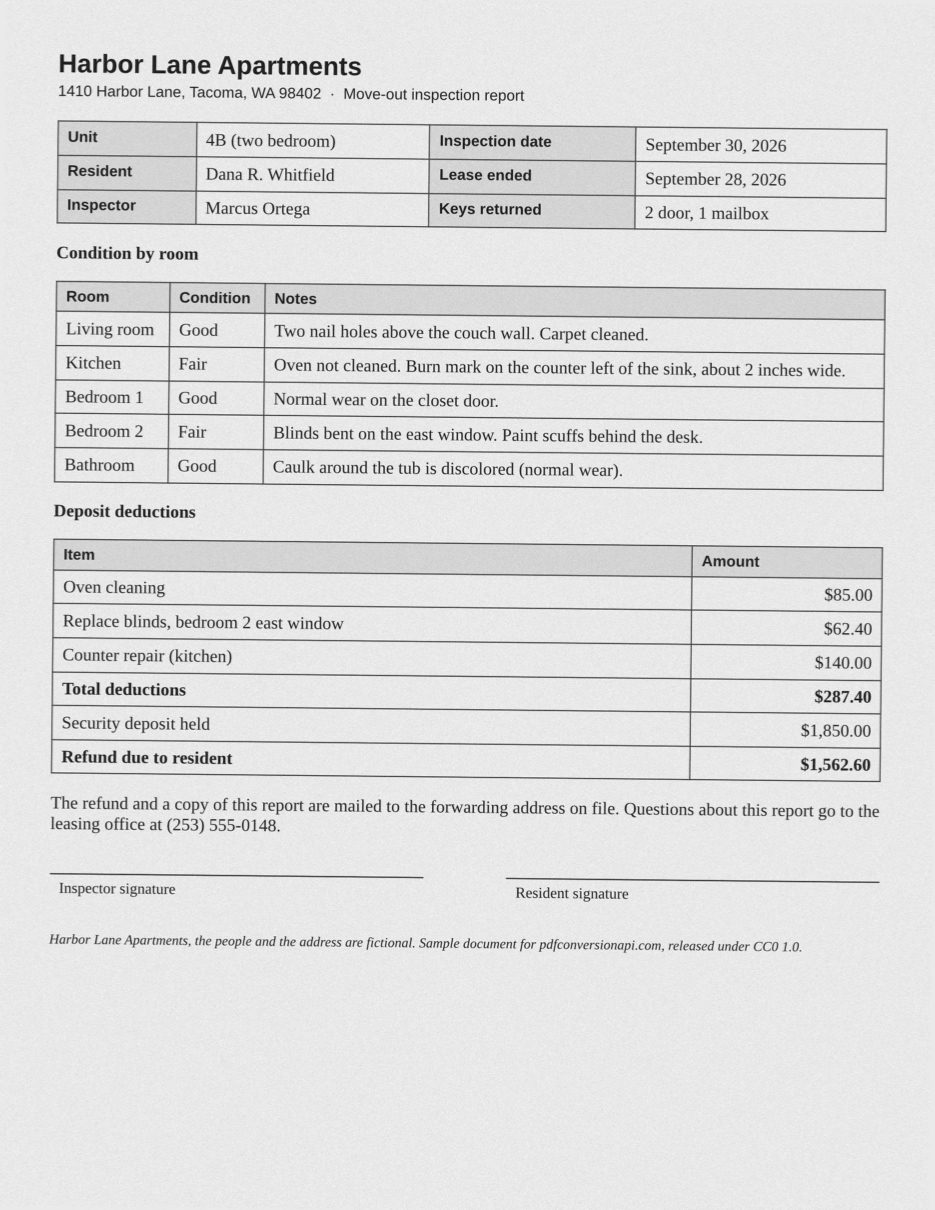
The same file the code sends. Download the input and the output and compare them yourself.
- Input
- inspection-report-scan.pdf (482 KB)
- Output
- scan.ocr.pdf (486 KB)
- Source
- Made for this site: a fictional move-out inspection report, given a scanned look (CC0-1.0). How it was made
- Made by
- 2026-11-04, API build
9eeeb0640aba
Parameters
Send these as form fields next to the file. Names are case-insensitive. If you set one of the documented options below that we don't support yet, the request fails with a 400 that names it instead of returning a file made without it.
| Parameter | What it does |
|---|---|
OcrModeenum, default auto | auto reads only pages that have no text yet, so the born-digital pages of a mixed file are left alone. always also reads pages that already have text, including pictures placed on them, and adds only words the page doesn't already contain. reprocess does the same as always today: an earlier OCR layer is kept, not replaced.Values: auto, always, reprocess |
OutputTypeenum, default pdf | pdf returns the searchable PDF. txt returns a plain text file of every page in reading order, with a form feed between pages.Values: pdf, txt |
PageRangestring | Pages to read. The other pages stay in the result unchanged, and with OutputType=txt the text they already had is still exported. A page past the end returns 400 ("PageRange asks for page 3, but the document has 2 pages"), but a range may end past it, so 1-2000 reads every page. With the open password of a file that keeps restrictions, PageRange returns 400 for now; send the owner password instead, or remove the password with /v2/convert/pdf/to/unprotect first. An open password that allows everything works with a range.Values: Pages and ranges, e.g. 1-3,8, 5- or 2-last |
Passwordstring | Password of an encrypted PDF. With the open password of a file that allows changes but restricts something else, such as printing, the searchable result is saved with the same encryption, so it opens with the same password. When the open password allows everything, as on a file locked with only UserPassword, the result comes back with no password. With the owner password, the result comes back with no password and no restrictions, and so does a file locked only with an owner password that allows everything, whatever Password holds. A file that restricts editing needs its owner password; the open password alone returns 422. |
FileNamestring | Name for the output file. The last extension is swapped for the real one: scan.ocr.pdf stays scan.ocr.pdf, and becomes scan.ocr.txt with OutputType=txt. Without it the result has the same name as the upload, so saving it next to the original overwrites the scan. |
StoreFileboolean, default false | Return a download link instead of the file. The link expires after 3 hours and the file is then deleted. |
Not supported yet
Setting one of these to anything but its default returns 400.
| Option | What to do instead |
|---|---|
OcrLanguage | Only en is accepted. Any other language returns 400 with "OcrLanguage=de is not supported yet (supported: en)". |
OcrQuality | There is one recognition setting. The documented default value is accepted; any other value returns 400. |
PageSegmentationMode | Page layout is detected by the model. sparseText, the default, is accepted; other values return 400. |
Preprocessing | Image routes (png, jpg, tiff to txt) accept only true, the default. |
What carries over, and what doesn't
Kept
- The scanned image itself. In our sample the JPEG inside the page is byte for byte the same after OCR
- Page size, page count and page order
- Word positions: each recognized word sits over its place in the scan, so search hits and selections land on the right spot
- Pages that already have a text layer (left as they are in
automode) - Encryption of a file that allows changes but restricts printing, when you send its open password: the result keeps the same password and restrictions (AES-256 in our test). Sent with the owner password, or with an open password that allows everything, it comes back unprotected
- On the image routes, a photo's EXIF orientation flag: a JPEG stored sideways with the flag read the same three lines as an upright copy, while the same sideways picture without the flag gave no text
Lost or not yet supported
- In our sample scan, 172 of the 189 words in the source were read exactly right. Most misses were one letter or a punctuation mark: "Gooo" for Good, "cleanng", "Ouestions", "CCO" for CC0.
- Several commas were read as periods, thousands separators included: $1,850.00 came out as "$1.850 00", $1,562.60 as "$1.562.60" and "September 30, 2026" as "September 30. 2026". Check amounts before you parse them as numbers.
- Accented letters become question marks or lose their accent. In our test "José Núñez" was read as "Jos? Nu?ez" and "crème brûlée" as "cr?me br?l?e".
- Tables are not kept as tables. In the text output, a column of labels can come out before the column of values that belongs to it, several lines apart.
- We haven't tested handwriting, photos taken at an angle or fax-quality scans. Try your own files before relying on them.
Limits
- English only.
- Requests up to 10 MB on the Free plan or 100 MB on paid plans in total, all files and fields together. A request can run for up to 120 seconds, and each page is rendered and read by two neural networks, so split long scans with
/v2/convert/pdf/to/splitand send the parts. tiff/to/txtreads only the first image of a multi-page TIFF and still returns 200. Send each page as its own image, or put the pages in one PDF with/v2/convert/images/to/pdfand send that topdf/to/ocr.PageRangewith the open password of a file that keeps restrictions returns 400 "PageRange can't be combined with the open password yet for pdf/to/ocr; send the owner password in Password, or remove the protection with /v2/convert/pdf/to/unprotect first". With the owner password, or an open password that allows everything, the range works.- Encrypted PDFs sent without the right
Passwordreturn 422 "the input file is password-protected". A PDF that restricts editing returns 422 "this PDF's permissions don't allow changes to the document; send the owner password in Password, or remove the restrictions with /v2/convert/pdf/to/unprotect and the owner password" unless you send its owner password, even if it opens without one. - A digitally signed PDF returns 422 "this PDF is digitally signed, and rewriting it would invalidate the signature", because saving the text layer rewrites the file.
OutputType=txtstill works on it, since nothing is saved.
Where teams use it
Find the scanned lease in a pile of uploads
Run every scanned upload through pdf/to/ocr once and keep the result instead of the original. Viewers can then search and copy text in it, and the page still looks exactly like the scan.
Text from scans for indexing or an LLM
pdf/to/txt returns an empty file for a scan because there is no text layer to read. Send scans to pdf/to/ocr with OutputType=txt instead. In auto mode, pages that already have text are exported as they are, without recognition.
Scan, OCR, then archive
Searchable scans can go straight on to /v2/convert/pdf/to/pdfa. We sent our OCR sample through it and the result passed the PDF/A-2b check that route runs before it answers.
A single scanned page saved as an image
A form saved as PNG, JPG or TIFF goes to png/to/txt, jpg/to/txt or tiff/to/txt. The image is placed on a one-page PDF, read the same way, and the text comes back as a .txt file.
Questions
Why does pdf/to/txt return an empty file for my scanned PDF?
pdf/to/txt only reads the text layer, and a scan has none: it is a picture of a page. Send it to pdf/to/ocr with OutputType=txt instead. For a mixed file, the default OcrMode=auto exports the pages that already have text as they are and reads only the scanned ones.
Will OCR change how my pages look?
No. The recognized words are written as invisible text (PDF text render mode 3) on top of the image, and the image is not re-encoded. PDF viewers show the same scan, and search and copy use the hidden text.
How accurate is it?
On the sample on this page, a 200 dpi grayscale scan with a slight skew, 172 of 189 words matched the source exactly. The errors were mostly single letters and commas read as periods, which matters for money amounts. Run a few of your own scans through it before you depend on the text.
Can it read Spanish, French or other languages?
Not yet. OcrLanguage accepts only en, and other values return 400. Accented letters in English text, such as the é in José, come back as a question mark.
Can I OCR a password-protected PDF?
Yes. Send the password in Password. With the owner password, the result has no password at all. With the open password, it depends on what the file allows: a file locked with only UserPassword, which allows everything, also comes back with no password, while a file that allows changes but restricts printing is saved with the same encryption, so your users open it with the same password. If the file restricts editing, send the owner password: in our test the open password returned 422 for such a file. For a file that needs a password to open, no password or a wrong one returns 422.
How is the text recognized?
Each page is rendered and read by two neural networks: one finds the lines of text on the page and the other reads them. They read English only.
Convert your first PDF file in a minute.