PDF watermark API
Three routes share one set of placement options: /v2/convert/pdf/to/text-watermark for text, image-watermark for a PNG or JPEG, and pdf-watermark for a page of another PDF. The mark is centered on each page, and you can turn it, fade it, move it or put it behind the content.
- Endpoint
- POST /v2/
convert/ pdf/ to/ text-watermark - Accepts
- Sample timing
- 23 ms median of 5 runsHow we measure
- Request size
- Up to 10 MB on the Free plan or 100 MB on paid plans, all files together
Request and response
Every sample below ran against the API before this page was published. Set PDFCONVERSIONAPI_KEY to your key and run it as is.
curl -sS -X POST \
  https://api.pdfconversionapi.com/v2/convert/pdf/to/text-watermark \
  -H "Authorization: Bearer $PDFCONVERSIONAPI_KEY" \
  -F File=@proposal.pdf \
  --form-string Text=DRAFT \
  --form-string 'FontColor=#B03A2E' \
  --form-string Opacity=30 \
  --form-string FileName=proposal.draft.pdf \
  -o response.json

# FileData is base64. Save the first file in converted/,
# or print the JSON error.
if jq -e '.Files' response.json > /dev/null; then
  mkdir -p converted
  name=$(jq -r '.Files[0].FileName' response.json)
  jq -r '.Files[0].FileData' response.json \
    | base64 --decode > "converted/$name"
else
  cat response.json
fi
import base64
import os
import requests
key = os.environ["PDFCONVERSIONAPI_KEY"]
response = requests.post(
"https://api.pdfconversionapi.com/v2/convert/pdf/to/text-watermark",
headers={"Authorization": f"Bearer {key}"},
files=[("File", open("proposal.pdf", "rb"))],
data={
"Text": "DRAFT",
"FontColor": "#B03A2E",
"Opacity": "30",
"FileName": "proposal.draft.pdf",
},
timeout=180,
)
result = response.json()
if not response.ok:
raise SystemExit(f"{result['Code']}: {result['Message']}")
os.makedirs("converted", exist_ok=True)
for file in result["Files"]:
path = os.path.join("converted", file["FileName"])
with open(path, "wb") as out:
out.write(base64.b64decode(file["FileData"]))
print(path, file["FileSize"], "bytes")
import { mkdir, readFile, writeFile } from "node:fs/promises";
import { join } from "node:path";

const form = new FormData();
const file = "proposal.pdf";
form.append("File", new Blob([await readFile(file)]), file);
form.append("Text", "DRAFT");
form.append("FontColor", "#B03A2E");
form.append("Opacity", "30");
form.append("FileName", "proposal.draft.pdf");

const url =
  "https://api.pdfconversionapi.com/v2/convert/pdf/to/text-watermark";
const key = process.env.PDFCONVERSIONAPI_KEY;
const response = await fetch(url, {
  method: "POST",
  headers: { Authorization: `Bearer ${key}` },
  body: form,
});
const result = await response.json();
if (!response.ok) {
  throw new Error(`${result.Code}: ${result.Message}`);
}

await mkdir("converted", { recursive: true });
for (const file of result.Files) {
  const path = join("converted", file.FileName);
  await writeFile(path, Buffer.from(file.FileData, "base64"));
  console.log(path, file.FileSize, "bytes");
}
{
  "ConversionCost": 1,
  "ConversionTime": 0.023,
  "Files": [
    {
      "FileName": "proposal.draft.pdf",
      "FileExt": "pdf",
      "FileSize": 55283,
      "FileData": "JVBERi0xLjcKJeLjz9MKMyAw…"
    }
  ]
}
Response from our test run on 2026-11-03. ConversionTime shows the median of 5 runs. FileData is shortened here; the real response carries the whole file as base64.
The sample and the result
The same file the code sends. Download the input and the output and compare them yourself.
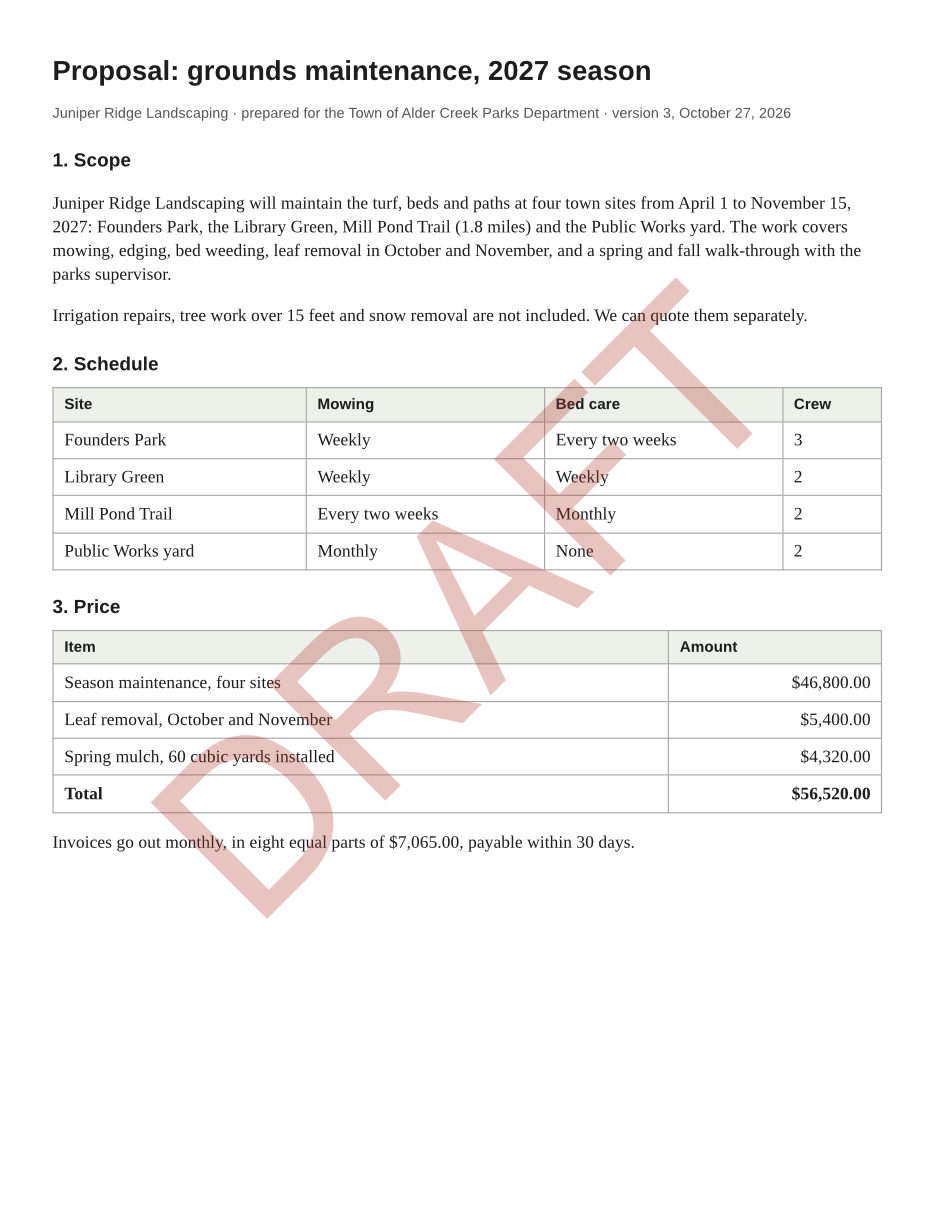
- Input
- proposal.pdf (58 KB)
- Output
- proposal.draft.pdf (54 KB)
- Source
- Written for this site: a fictional landscaping proposal (CC0-1.0). How it was made
- Made by
- 2026-11-04, API build
9eeeb0640aba
Parameters
Send these as form fields next to the file. Names are case-insensitive. If you set one of the documented options below that we don't support yet, the request fails with a 400 that names it instead of returning a file made without it.
| Parameter | What it does |
|---|---|
Textstring | text-watermark only, required. A line break in the value starts a second line. Western European characters only; other scripts return 422. |
FontSizeinteger, default fit to page | text-watermark only. Left out, the text is sized to run across the page.Values: 1–1000 (points) |
FontColorstring, default #999999 | text-watermark only. A name (white, black, red, green, blue, gray), #RRGGBB or R,G,B. |
Opacityinteger, default 50 | How opaque the mark is, in percent. All three routes.Values: 0–100 |
Rotateinteger, default 45 | Angle in degrees, counter-clockwise; negative turns clockwise. Left out, the mark runs diagonally from bottom left to top right. All three routes; send 0 for a level mark.Values: -360–360 |
Styleenum, default stamp | stamp draws the mark over the page content. watermark draws it underneath, so shaded table cells and filled shapes cover those parts of it. All three routes.Values: stamp, watermark |
OffsetXnumber, default 0 | Move the mark right from the page center, in MeasurementUnit. Negative moves it left. |
OffsetYnumber, default 0 | Move the mark down from the page center. Negative moves it up. |
MeasurementUnitenum, default pt | Unit for OffsetX and OffsetY.Values: pt, in, mm, cm |
PageRangestring | Pages to mark. Left out, every page gets the mark. A page past the end returns 400 ("PageRange asks for page 3, but the document has 2 pages"), but a range may end past it. On a protected file, PageRange works with the owner password, and with the open password of a file that restricts nothing; with the open password of a file that keeps restrictions it returns 400 for now.Values: Pages and ranges, e.g. 1, 2-5,9 or 2-last |
ImageFilefile | image-watermark only, required. Sent as a second file field. PNG transparency is kept, and the image is embedded at its own pixel size.Values: PNG, JPEG, TIFF, GIF, BMP |
OverlayFilefile | pdf-watermark only, required. A PDF whose page is placed on each page as the mark. Text and vector drawing in it stay vector. |
OverlayPageinteger, default 1 | pdf-watermark only. Which page of OverlayFile to use. A page past the end returns 422. |
Scaleinteger, default 50 | image-watermark and pdf-watermark. Size of the mark relative to the page, in percent. Values up to 1000 are accepted, but anything over 100 is drawn at 100.Values: 1–100 |
Passwordstring | Password of an encrypted input. Opened with its owner password, or with the open password of a file that restricts nothing, the result comes back unencrypted; opened with the open password of a file that keeps restrictions, it keeps the same encryption and password. A file that restricts editing needs its owner password, even if it opens without one; the open password alone returns 422. A file with only an owner password that restricts nothing needs no Password and comes back unencrypted, whatever you send. |
FileNamestring | Name for the output file; the last extension is replaced with .pdf. Without it the result has the same name as the upload, so saving it next to the original replaces the unmarked file. |
StoreFileboolean, default false | Return a download link instead of the file. The link expires after 3 hours and the file is then deleted. |
Not supported yet
Setting one of these to anything but its default returns 400.
| Option | What to do instead |
|---|---|
HorizontalAlignment | The mark is always centered. Move it with OffsetX and OffsetY. |
VerticalAlignment | Same as HorizontalAlignment: only center is accepted. |
FontName | Text is set in Helvetica, the PDF standard font with the same letter widths as Arial. arial, the default, is accepted. |
StrokeColor | Text is drawn filled, without an outline. |
TextRenderingMode | filltext and fillstroke are accepted and both draw filled text with no outline. Other modes return 400. |
LineSpacing | Lines started by a line break in Text use the default spacing. |
Width | Size text with FontSize, and images or PDF pages with Scale. |
FontEmbed | The font is never embedded. true, the default, is accepted but changes nothing (see what the routes lose, below). |
GoToLink | The mark can't carry a link. |
PageRotation | Documented for image-watermark and pdf-watermark; false, the default, is accepted. |
Also refused when set: StrokeWidth, Height, FontSubset, GoToPage.
What carries over, and what doesn't
Kept
- The page content itself. The sample's text extracts exactly as before, plus one DRAFT per page
- Embedded fonts, images and page size of the input. A scanned page's JPEG was byte for byte the same after a text mark
- PNG transparency in image marks: page content shows through the clear parts of our sample stamp
- Level marks on turned pages: on a page rotated 90 degrees with
pdf/to/rotate,Rotate=0text and image marks came out level as the page is displayed - Vector overlays: a PDF page placed with
pdf-watermarkadds no image, and its text stays selectable - Encryption, when an input that keeps restrictions is opened with its open password (with the owner password, or the open password of a file that restricts nothing, the result is unencrypted)
- Earlier marks: a second request adds its mark next to the first one instead of replacing it
Lost or not yet supported
- Text marks use Helvetica without embedding it. PDF/A does not allow that, so for archival files use an image or PDF mark instead.
pdf/to/pdfaaccepts a text-marked file today and its check passes anyway. - Only Western European characters work in
Text. Japanese, Greek and Polish text returned 422 in our tests; render other scripts to a PNG and useimage-watermark. - Text marks become part of the page's text, so copy, search and
pdf/to/txtinclude them (pdf/to/txtreturned DRAFT twice for the two-page sample). pdf-watermarkplaces the whole overlay page, background included. A PDF we made withsvg/to/pdfhas a white page, and at the defaultOpacityof 50 that white box faded the table text under it. Use an overlay with no background fill, or a transparent PNG withimage-watermark.- Left out,
Rotateis 45,Opacity50,StylestampandScale50 on all three routes, and text is gray and sized to fit the page. ConvertAPI documents different defaults, so send every value your code relies on.
Limits
- One mark per request. For text and a logo, call
text-watermarkand thenimage-watermarkon the result. - PageBox accepts mediabox and cropbox, but the mark is centered on the visible page (the crop box) either way.
PageRangewith the open password of a file that keeps restrictions returns 400 "PageRange can't be combined with the open password yet for pdf/to/text-watermark; send the owner password in Password, or remove the protection with /v2/convert/pdf/to/unprotect first"; the image and PDF routes return the same message with their own paths. With the owner password, or on a file that restricts nothing,PageRangeworks.- A digitally signed PDF returns 422 "this PDF is digitally signed, and rewriting it would invalidate the signature" on all three routes. Add the mark before the document is signed.
- Requests up to 10 MB on the Free plan or 100 MB on paid plans in total, all files and fields together, so the PDF and the
ImageFileorOverlayFileshare the limit. A conversion can run for up to 120 seconds.
Where teams use it
DRAFT on documents before sign-off
Stamp generated proposals and contracts with Text=DRAFT while they are in review, and send the final version without it. Because the mark is real text, a search for DRAFT finds every copy that still has it.
Copies marked for one recipient
Put the recipient's name and the date in Text, for example "Prepared for Alder Creek Parks, Nov 2026", so a forwarded copy shows where it came from.
Approval stamps and logos
Send a transparent PNG stamp to image-watermark, or a one-page vector logo to pdf-watermark when the mark must stay sharp at any zoom. Set Rotate=0 for a level stamp.
Questions
How do I put the watermark in a corner?
Alignment is fixed to the center, so move the mark with OffsetX and OffsetY. On a Letter page the side edges are 4.25 inches from the center and the top and bottom edges 5.5 inches. With MeasurementUnit=in, OffsetX=2.5, OffsetY=4.5, Rotate=0 and FontSize=24, our DRAFT mark sat about an inch in from the right and bottom edges. Positive OffsetY moves down.
Which way does Rotate turn the mark?
Positive angles turn counter-clockwise. That is why the default of 45 runs from bottom left to top right. Use a negative angle for the other diagonal, and 0 for a level mark.
Can someone remove the watermark?
Yes, with a PDF editor: the mark is separate page content tagged as a watermark. To bake it into the page, send the result to /v2/convert/pdf/to/rasterize. The pages become images, so text is no longer selectable and the file grows; our two-page sample went from 55,283 to 754,550 bytes. If the marked file kept its input's password, as it does when you mark a file that keeps restrictions with its open password, send rasterize the owner password in Password; with no password, or only the open password, rasterize returns 422.
Can I watermark only some pages?
Yes, with PageRange, for example PageRange=1 for a cover stamp, 2- for every page after the first or last for the final page. A page past the end of the document returns 400. On a protected file that keeps restrictions, send the owner password with PageRange; its open password with PageRange returns 400 for now.
Why does my image mark cover the whole width of the page?
Scale is relative to the page, not to the image, and anything above 100 is drawn at 100. Our 420 by 160 pixel stamp spans about half the page width at the default of 50; try 20 to 30 for a corner stamp.
Convert your first PDF file in a minute.