EML to PDF API
POST an .eml file to /v2/convert/eml/to/pdf and get back a PDF of the message: the subject and addresses on top, then the body, then a list of attachments. A mail parser reads the message and an HTML layout engine lays it out inside the API process, with no browser and no network access.
- Endpoint
- POST /v2/
convert/ eml/ to/ pdf - Accepts
- eml
- Sample timing
- 8 ms median of 5 runsHow we measure
- Request size
- Up to 10 MB on the Free plan or 100 MB on paid plans, all files together
Request and response
Every sample below ran against the API before this page was published. Set PDFCONVERSIONAPI_KEY to your key and run it as is.
curl -sS -X POST \
  https://api.pdfconversionapi.com/v2/convert/eml/to/pdf \
  -H "Authorization: Bearer $PDFCONVERSIONAPI_KEY" \
  -F File=@quote-mv-2611.eml \
  --form-string PageSize=letter \
  -o response.json

# FileData is base64. Save the first file in converted/,
# or print the JSON error.
if jq -e '.Files' response.json > /dev/null; then
  mkdir -p converted
  name=$(jq -r '.Files[0].FileName' response.json)
  jq -r '.Files[0].FileData' response.json \
    | base64 --decode > "converted/$name"
else
  cat response.json
fi
import base64
import os
import requests
key = os.environ["PDFCONVERSIONAPI_KEY"]
response = requests.post(
"https://api.pdfconversionapi.com/v2/convert/eml/to/pdf",
headers={"Authorization": f"Bearer {key}"},
files=[("File", open("quote-mv-2611.eml", "rb"))],
data={
"PageSize": "letter",
},
timeout=180,
)
result = response.json()
if not response.ok:
raise SystemExit(f"{result['Code']}: {result['Message']}")
os.makedirs("converted", exist_ok=True)
for file in result["Files"]:
path = os.path.join("converted", file["FileName"])
with open(path, "wb") as out:
out.write(base64.b64decode(file["FileData"]))
print(path, file["FileSize"], "bytes")
import { mkdir, readFile, writeFile } from "node:fs/promises";
import { join } from "node:path";

const form = new FormData();
const file = "quote-mv-2611.eml";
form.append("File", new Blob([await readFile(file)]), file);
form.append("PageSize", "letter");

const url = "https://api.pdfconversionapi.com/v2/convert/eml/to/pdf";
const key = process.env.PDFCONVERSIONAPI_KEY;
const response = await fetch(url, {
  method: "POST",
  headers: { Authorization: `Bearer ${key}` },
  body: form,
});
const result = await response.json();
if (!response.ok) {
  throw new Error(`${result.Code}: ${result.Message}`);
}

await mkdir("converted", { recursive: true });
for (const file of result.Files) {
  const path = join("converted", file.FileName);
  await writeFile(path, Buffer.from(file.FileData, "base64"));
  console.log(path, file.FileSize, "bytes");
}
{
  "ConversionCost": 1,
  "ConversionTime": 0.008,
  "Files": [
    {
      "FileName": "quote-mv-2611.pdf",
      "FileExt": "pdf",
      "FileSize": 43041,
      "FileData": "JVBERi0xLjcKJYCAgIAKMSAw…"
    }
  ]
}
Response from our test run on 2026-11-03. ConversionTime shows the median of 5 runs. FileData is shortened here; the real response carries the whole file as base64.
The sample, converted
The same file the code sends. Download the input and the output and compare them yourself.
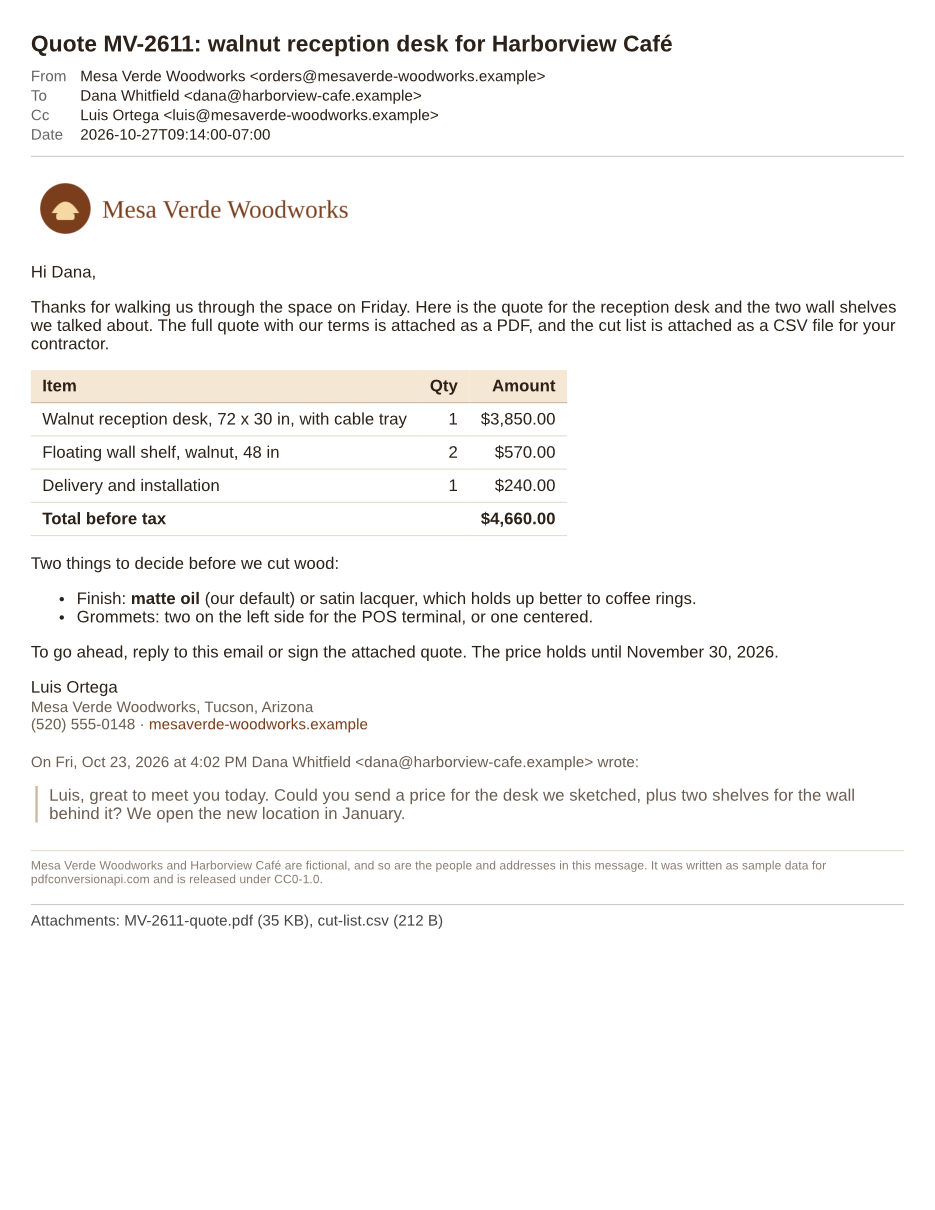
- Input
- quote-mv-2611.eml (76 KB)
- Output
- quote-mv-2611.pdf (42 KB)
- Source
- Written for this site: a fictional quote email with an inline logo and attachments (CC0-1.0). How it was made
- Made by
- 2026-11-04, API build
9eeeb0640aba
Parameters
Send these as form fields next to the file. Names are case-insensitive. If you set one of the documented options below that we don't support yet, the request fails with a 400 that names it instead of returning a file made without it.
| Parameter | What it does |
|---|---|
ConvertHeaderboolean, default true | Print the subject as a heading with the From, To, Cc and Date lines under it. With false the PDF starts with the message body; the attachment list at the end is still printed. |
PageSizeenum, default a4 | Paper for every page. Left out, it is A4 (210 x 297 mm); send letter for 8.5 x 11 in, as the sample does.Values: a0 to a9, b0 to b5, letter, legal, ledger |
PageOrientationenum, default portrait | Turns the paper sideways. Use it for newsletters built wider than the page: in our test a 900 px wide table was cut off on upright Letter and fit whole on Letter turned sideways.Values: portrait, landscape |
PageWidthinteger | Paper width in millimeters, overriding the width PageSize gives.Values: 10 to 30000 (mm) |
PageHeightinteger | Paper height in millimeters, overriding the height PageSize gives. A long message continues onto more pages of this height.Values: 10 to 30000 (mm) |
MarginTopinteger, default 5 | Space above the content on each page, in millimeters. The body adds its own 8 px of padding inside the margins, as a browser does.Values: 0 to 500 (mm) |
MarginRightinteger, default 5 | Space to the right of the content, in millimeters.Values: 0 to 500 (mm) |
MarginBottominteger, default 5 | Space below the content, in millimeters.Values: 0 to 500 (mm) |
MarginLeftinteger, default 5 | Space to the left of the content, in millimeters. Margins that leave no room for content return 400.Values: 0 to 500 (mm) |
IgnoreAttachmentErrorsboolean, default false | Accepted so existing requests keep working, and has no effect: attachments are only listed, so there is no attachment conversion to fail. |
Mergeboolean, default true | Accepted and has no effect, for the same reason. The result is always one PDF of the message. |
FileNamestring | Name of the returned PDF, without the extension. By default it is the .eml file's name with .pdf in place of .eml. |
StoreFileboolean, default false | Get a download URL in Files[].Url instead of base64 data. The link stops working after 3 hours. |
Not supported yet
Setting one of these to anything but its default returns 400.
| Option | What to do instead |
|---|---|
ConvertAttachments | Only false is accepted. To convert attachments, get them as separate files from /v2/convert/email/to/extract and send each one to its own route. |
TemplateFile | The header block has one fixed layout. ConvertHeader=false leaves it out. |
DateTimeFormat | The Date line is always the message's own timestamp in ISO 8601 form, with the sender's UTC offset. |
Pdfa | Convert first, then send the PDF to /v2/convert/pdf/to/pdfa. The sample's output passed through that route. |
What carries over, and what doesn't
Kept
- The subject, From, To, Cc and Date, printed in a block above the body (leave it out with
ConvertHeader=false) - HTML bodies with their style elements and inline style attributes: in the sample, the table shading, bold text, bulleted list and the border on the quoted reply match a browser's print of the same HTML
- Images sent inside the message and referenced with cid:, like the sample's logo
- Encoded headers and older character sets: an RFC 2047 encoded subject, and ISO-8859-1 and windows-1252 bodies, came out with the right accents, quotes and currency signs in our tests
- Links in the body stay clickable in the PDF
- Selectable text with each font embedded as a subset; Arial and Helvetica map to Liberation Sans, which has the same character widths
- Japanese, Chinese, Korean, Greek and Cyrillic text in our test, and Hebrew and Arabic paragraphs set right to left
- The name and size of every attachment, listed at the end of the message
Lost or not yet supported
- Attachments are listed, not converted or embedded. A forwarded message attached as .eml, an S/MIME signature and Outlook's winmail.dat each appear in the list by name only.
- Anything the body loads by URL is left out: remote images, external style sheets, CSS background images. An img with width and height leaves a blank area of that size.
- Presentational HTML attributes are ignored: bgcolor, border, cellpadding and width on tables, align on paragraphs and cells, and the color, size and face of font tags. A browser draws all of them, so markup that relies on them prints without those colors and borders. CSS in style attributes and style elements is applied.
- Links take their color from the message's CSS but are not underlined unless the CSS says so, and a plain
hrprints no rule. - Plain-text messages are set in a proportional font, so columns lined up with spaces drift slightly out of line. Their line breaks, runs of spaces, tabs and characters such as
<,&and © are kept as written. - Content wider than the page is cut off at the right edge, not scaled down. A long unbroken URL in our test ran past the margin.
- Emoji print as empty boxes or plain outlines; the server has no color emoji font.
- Bcc and Reply-To are not printed, and the subject is not copied into the PDF's document title. An image with a Content-ID but no Content-Disposition header is drawn in the body and also listed under Attachments.
Limits
- Requests up to 10 MB on the Free plan or 100 MB on paid plans in total, all files and fields together. Attachments count: base64 makes each one about a third larger inside the .eml.
- One message per request. Sending two files returns 400 "this conversion takes exactly one file".
- A file that is not a mail message returns 422 "the input file could not be read: this is not an e-mail message". The parser needs at least one of the From, To, Subject, Date or Message-ID headers.
- PowerPoint, Visio and Publisher 97-2003 files share the .msg container format; sent here, they get that same 422. A damaged .msg returns 422 "the input file could not be read: the Outlook message is damaged".
- Up to 2,000 pages per PDF; a longer result returns 413.
- A conversion can run for up to 120 seconds; after that the API returns 504.
Where teams use it
Case files and records requests
Export the messages from a mailbox as .eml and convert each one. The sender, recipients and timestamp are printed at the top of every PDF, so the record still makes sense once it is separated from the mail system.
Emails attached to tickets and claims
If your inbound mail service hands you the raw message, send those bytes as the File field and store the PDF next to the ticket, claim or order. Anyone can open it without a mail client.
Approvals kept next to the invoice
Save the reply that approved a purchase or a quote as a PDF in the same folder as the paperwork it approves. The attachment list shows which files were sent with it.
Questions
Are the attachments inside the PDF?
No. Each one is listed at the end with its name and size, for example "MV-2611-quote.pdf (35 KB)", and the files themselves are left out. To work with them, send the same .eml to /v2/convert/email/to/extract, which returns every attachment as its own file, then convert each with the route for its format.
Do remote images or tracking pixels load?
No. The layout engine makes no network requests and the conversion containers have no internet access, so nothing referenced by URL is fetched and a tracking pixel in the message is never requested. Images carried inside the message as cid: parts are drawn.
What exactly does the Date line show?
The message's Date header in ISO 8601 form with the sender's offset from UTC, such as 2026-10-27T09:14:00-07:00 in the sample. It is not converted to your time zone, and DateTimeFormat returns 400. A message without a Date header gets no Date line.
Can I send an Outlook .msg file to this endpoint?
Yes. eml/to/pdf and msg/to/pdf both check the first bytes of the upload and read either format, so a mixed folder can go to one endpoint. Outlook files have their own quirks, listed on the MSG to PDF page.
Can I get images of the message instead of a PDF?
Yes. /v2/convert/eml/to/png, jpg and webp render the same layout and return one image per page: a 150-row test message laid out to four Letter pages and came back as four PNG files. eml/to/tiff returns one multi-page TIFF unless you send MultiPage=false.
How do I turn a whole thread into one PDF?
Convert each message on its own, then send the PDFs in order to /v2/convert/pdf/to/merge as Files. Each request handles one message.
Convert your first EML file in a minute.