MSG to PDF API
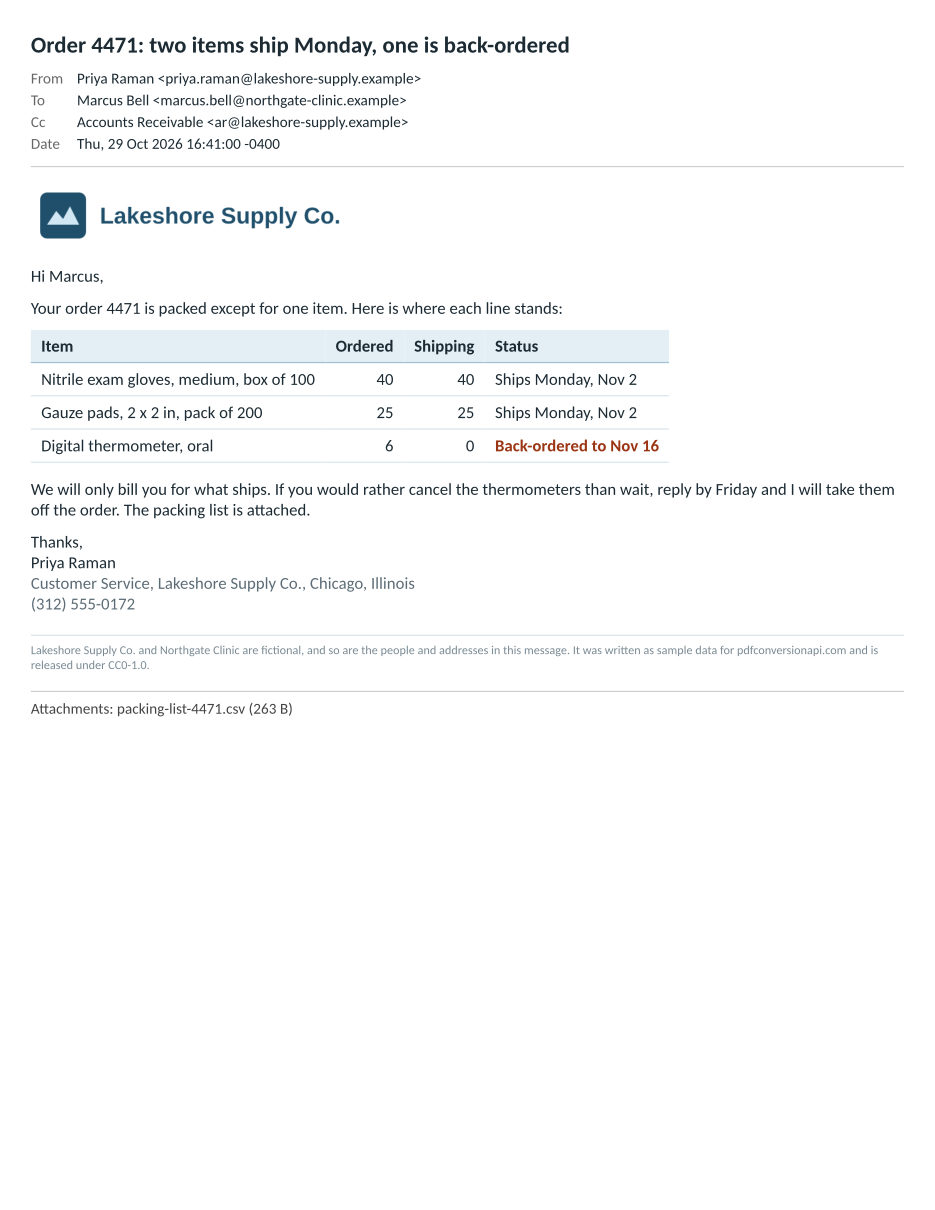
POST an Outlook .msg file to /v2/convert/msg/to/pdf and the PDF shows the subject, sender, recipients and date, then the body, then the attachment names. A message parser reads the file and an HTML layout engine lays out the page, using the message's HTML body when it has one, as the sample does.
- Endpoint
- POST /v2/
convert/ msg/ to/ pdf - Accepts
- msg
- Sample timing
- 8 ms median of 5 runsHow we measure
- Request size
- Up to 10 MB on the Free plan or 100 MB on paid plans, all files together
Request and response
Every sample below ran against the API before this page was published. Set PDFCONVERSIONAPI_KEY to your key and run it as is.
curl -sS -X POST \
  https://api.pdfconversionapi.com/v2/convert/msg/to/pdf \
  -H "Authorization: Bearer $PDFCONVERSIONAPI_KEY" \
  -F File=@order-update-4471.msg \
  --form-string PageSize=letter \
  -o response.json

# FileData is base64. Save the first file in converted/,
# or print the JSON error.
if jq -e '.Files' response.json > /dev/null; then
  mkdir -p converted
  name=$(jq -r '.Files[0].FileName' response.json)
  jq -r '.Files[0].FileData' response.json \
    | base64 --decode > "converted/$name"
else
  cat response.json
fi
import base64
import os
import requests
key = os.environ["PDFCONVERSIONAPI_KEY"]
response = requests.post(
"https://api.pdfconversionapi.com/v2/convert/msg/to/pdf",
headers={"Authorization": f"Bearer {key}"},
files=[("File", open("order-update-4471.msg", "rb"))],
data={
"PageSize": "letter",
},
timeout=180,
)
result = response.json()
if not response.ok:
raise SystemExit(f"{result['Code']}: {result['Message']}")
os.makedirs("converted", exist_ok=True)
for file in result["Files"]:
path = os.path.join("converted", file["FileName"])
with open(path, "wb") as out:
out.write(base64.b64decode(file["FileData"]))
print(path, file["FileSize"], "bytes")
import { mkdir, readFile, writeFile } from "node:fs/promises";
import { join } from "node:path";

const form = new FormData();
const file = "order-update-4471.msg";
form.append("File", new Blob([await readFile(file)]), file);
form.append("PageSize", "letter");

const url = "https://api.pdfconversionapi.com/v2/convert/msg/to/pdf";
const key = process.env.PDFCONVERSIONAPI_KEY;
const response = await fetch(url, {
  method: "POST",
  headers: { Authorization: `Bearer ${key}` },
  body: form,
});
const result = await response.json();
if (!response.ok) {
  throw new Error(`${result.Code}: ${result.Message}`);
}

await mkdir("converted", { recursive: true });
for (const file of result.Files) {
  const path = join("converted", file.FileName);
  await writeFile(path, Buffer.from(file.FileData, "base64"));
  console.log(path, file.FileSize, "bytes");
}
{
  "ConversionCost": 1,
  "ConversionTime": 0.008,
  "Files": [
    {
      "FileName": "order-update-4471.pdf",
      "FileExt": "pdf",
      "FileSize": 34932,
      "FileData": "JVBERi0xLjcKJYCAgIAKMSAw…"
    }
  ]
}
Response from our test run on 2026-11-03. ConversionTime shows the median of 5 runs. FileData is shortened here; the real response carries the whole file as base64.
The sample, converted
The same file the code sends. Download the input and the output and compare them yourself.
- Input
- order-update-4471.msg (30 KB)
- Output
- order-update-4471.pdf (34 KB)
- Source
- Written for this site: a fictional Outlook order update with an HTML body (CC0-1.0). How it was made
- Made by
- 2026-11-04, API build
9eeeb0640aba
Parameters
Send these as form fields next to the file. Names are case-insensitive. If you set one of the documented options below that we don't support yet, the request fails with a 400 that names it instead of returning a file made without it.
| Parameter | What it does |
|---|---|
ConvertHeaderboolean, default true | Controls the block at the top of page 1: the subject in bold, then sender, To, Cc and Date rows. false drops that block and keeps the body and the attachment line. |
PageSizeenum, default a4 | Named paper size. Requests that leave it out get A4 (210 x 297 mm); US offices usually want letter.Values: a0 to a9, b0 to b5, letter, legal, ledger |
PageOrientationenum, default portrait | Upright or sideways paper. Sideways gives a wide HTML message about 2.5 inches more room on Letter.Values: portrait, landscape |
PageWidthinteger | A custom paper width; when set it wins over the PageSize width.Values: 10 to 30000 (mm) |
PageHeightinteger | A custom paper height; when set it wins over the PageSize height.Values: 10 to 30000 (mm) |
MarginTopinteger, default 5 | Blank band at the top of every page. All four margins are whole millimeters.Values: 0 to 500 (mm) |
MarginRightinteger, default 5 | Blank band on the right edge.Values: 0 to 500 (mm) |
MarginBottominteger, default 5 | Blank band at the foot of every page.Values: 0 to 500 (mm) |
MarginLeftinteger, default 5 | Blank band on the left edge. A value over 500 is refused with 400 naming the parameter.Values: 0 to 500 (mm) |
IgnoreAttachmentErrorsboolean, default false | Read and then ignored. No attachment is converted here, so nothing can fail. |
Mergeboolean, default true | Read and then ignored; one .msg always becomes one PDF. |
FileNamestring | Output name without .pdf. Left out, order-update-4471.msg comes back as order-update-4471.pdf. |
StoreFileboolean, default false | Answer with a temporary link (Files[].Url) in place of the PDF bytes; the link lasts 3 hours. |
Not supported yet
Setting one of these to anything but its default returns 400.
| Option | What to do instead |
|---|---|
ConvertAttachments | false is the only value accepted. /v2/convert/email/to/extract reads .msg files too and hands back each attachment as a file you can convert on its own route. |
TemplateFile | Any value is refused; the header layout cannot be replaced. |
DateTimeFormat | Any value is refused. The Date line is copied from the message's saved internet headers as written there. |
Pdfa | Run the PDF through /v2/convert/pdf/to/pdfa afterwards. |
What carries over, and what doesn't
Kept
- The subject, the sender, To and Cc recipients, and the Date taken from the saved internet headers, above the body
- HTML bodies stored as binary data (PidTagHtml) or as text. The sample's body is stored as binary and prints with its table, colors, bold text and logo, with the same line breaks as a web browser's print of the same HTML
- The character set of a binary HTML body, taken from its meta tag, else UTF-8, else Windows-1252: accented letters, the euro sign and curly quotes in Windows-1252, and Japanese in Shift_JIS with a meta tag, printed correctly in our tests
- HTML that Outlook wrapped inside the compressed RTF body (marked
\fromhtml1) is taken back out and printed as HTML, with bold text and tables, when the file has no separate HTML body - Plain-text bodies with their line breaks, runs of spaces and tabs (the text keeps white-space: pre-wrap);
<,&and text such as © print as written - Unicode text fields: Japanese, Cyrillic and Hebrew text and accented letters in the subject, names and body printed correctly in our test
- Attachment names (the long file name when the file has one) and sizes, listed after the body
- Selectable text, with fonts embedded as subsets; Calibri is drawn with Carlito, which has the same character widths
Lost or not yet supported
- Formatting that exists only in an ordinary RTF body, one not converted from HTML, is lost. The PDF shows the plain-text copy of the body, or the RTF's text when there is no plain copy, without bold, tables or images.
- The message's code page property (PR_INTERNET_CPID) is not read. A binary HTML body with no charset in a meta tag is read as UTF-8 or Windows-1252, so in our test a Shift_JIS body without one printed as the wrong characters.
- Some files in Outlook's older ANSI format lose text: the message parser drops an 8-bit text field whose bytes are not valid UTF-8. In our test an accented subject and body in Windows-1252 were missing from the PDF, while ASCII-only fields printed. Unicode .msg files are not affected.
- The Date line comes only from saved internet headers. A message saved without them, such as a draft, gets no Date line, even when the file records a sent time.
- Any attachment with a content ID is treated as an inline image and left out of the list, even when the body never shows it. An attached Outlook item is listed with a size of 0 B and its contents are not printed.
- Addresses are printed as stored: an Exchange-internal address such as /
O=EXCHANGELABS/... appears when the file has no SMTP address, and a recipient whose display name is the address shows it twice. - Bcc is not printed, and neither are the fields of other Outlook items: a meeting's start time and location, or a contact's phone numbers, saved in a .msg do not appear.
- Plain-text bodies use a proportional font, so columns lined up with spaces drift slightly. Emoji print as empty boxes or plain outlines; the server has no color emoji font.
Limits
- Requests up to 10 MB on the Free plan or 100 MB on paid plans in total, all files and fields together.
- One .msg per request; a second file returns 400.
- A damaged .msg returns 422 "the input file could not be read: the Outlook message is damaged". The sample cut off after 4,000 bytes gets that answer.
- Other Office 97-2003 files share the .msg container format. A .ppt, .vsd or .pub sent here returns 422 "the input file could not be read: this is not an Outlook message".
- Files saved as version 4 compound files, with 4096-byte sectors, return 422 "the input file could not be read: Outlook messages saved with 4096-byte sectors are not supported yet". The reader handles the 512-byte sector layout.
- Up to 2,000 pages per PDF, and 120 seconds per conversion (504 after that).
Where teams use it
Messages saved out of Outlook
A message saved or dragged out of Outlook for Windows lands on disk as a .msg file. Convert those files before they go into a case file, an audit folder or a records system that should not depend on Outlook being installed.
Previews in a document system
When people upload .msg files to your app, browsers cannot display them. Convert each upload once and show the PDF, with the attachments named at the bottom so reviewers know what came with it.
Folders that mix .msg and .eml
msg/to/pdf identifies the format from the file's first bytes, so .eml files sent to it convert as well. One code path handles an export with both kinds.
Questions
Which body does the PDF show?
The HTML body when the file has one, whether it is stored as binary data or as text. Without it, the converter looks for HTML that Outlook wrapped in the RTF body, then the plain-text body, then the text of the RTF body. The sample stores its HTML as binary data, and the PDF shows its table, colors and logo.
Why are some letters wrong or missing?
There are two known causes. A binary HTML body with no charset in a meta tag is read as UTF-8, or as Windows-1252 when it is not valid UTF-8, so HTML in another encoding, such as Shift_JIS, prints as the wrong characters. And in files saved in Outlook's older ANSI format, the message parser drops a text field whose bytes are not valid UTF-8, such as a subject with an accented letter. Unicode .msg files avoid the second case.
Does it read the RTF body Outlook saves?
Yes, when there is no HTML body. RTF that Outlook made from HTML (it carries \fromhtml1) still holds that HTML, and the converter takes it back out, so bold text and tables print. Other RTF gives its text only, without bold, tables or images, and the plain-text body is printed instead when the file has one.
Where does the Date line come from?
From the internet headers Outlook keeps with a received message, copied as written, for example "Thu, 29 Oct 2026 16:41:00 -0400". It is not reformatted or moved to another time zone, and a file without those headers gets no Date line.
Can I get the attachments out of a .msg?
Yes, with a second request: /v2/convert/email/to/extract returns each attachment as its own file. For the sample it returned logo.png and packing-list-4471.csv. An attached Outlook item currently comes back as an empty file.
Was this tested with files saved by Outlook?
No. We have no copy of Outlook in our test setup. The sample and our test files were written by a script to the published .msg format (MS-OXMSG), plus one third-party test file. Formatting written by real Outlook versions may differ from what we tested.
Convert your first MSG file in a minute.