CSV to PDF API
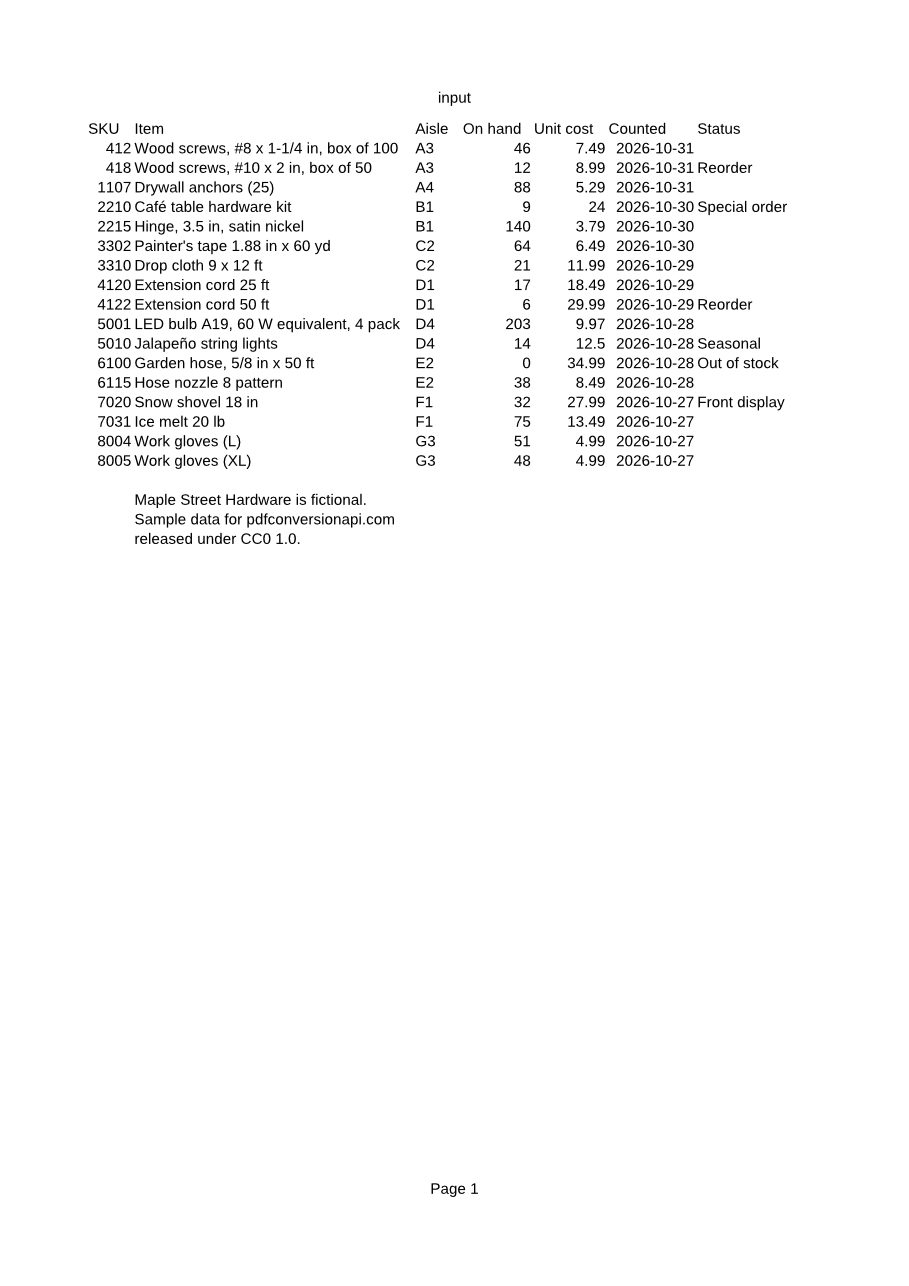
POST a CSV file to /v2/convert/csv/to/pdf and it comes back printed as a plain table: columns sized to their contents, on A4 pages unless you pick another PageSize. The sample below is unedited API output, quirks included.
- Endpoint
- POST /v2/
convert/ csv/ to/ pdf - Accepts
- csv
- Sample timing
- 0.5 s median of 5 runsHow we measure
- Request size
- Up to 10 MB on the Free plan or 100 MB on paid plans, all files together
Request and response
Every sample below ran against the API before this page was published. Set PDFCONVERSIONAPI_KEY to your key and run it as is.
curl -sS -X POST \
  https://api.pdfconversionapi.com/v2/convert/csv/to/pdf \
  -H "Authorization: Bearer $PDFCONVERSIONAPI_KEY" \
  -F File=@inventory-count.csv \
  --form-string PdfaVersion=pdfA2b \
  -o response.json

# FileData is base64. Save the first file in converted/,
# or print the JSON error.
if jq -e '.Files' response.json > /dev/null; then
  mkdir -p converted
  name=$(jq -r '.Files[0].FileName' response.json)
  jq -r '.Files[0].FileData' response.json \
    | base64 --decode > "converted/$name"
else
  cat response.json
fi
import base64
import os
import requests
key = os.environ["PDFCONVERSIONAPI_KEY"]
response = requests.post(
"https://api.pdfconversionapi.com/v2/convert/csv/to/pdf",
headers={"Authorization": f"Bearer {key}"},
files=[("File", open("inventory-count.csv", "rb"))],
data={
"PdfaVersion": "pdfA2b",
},
timeout=180,
)
result = response.json()
if not response.ok:
raise SystemExit(f"{result['Code']}: {result['Message']}")
os.makedirs("converted", exist_ok=True)
for file in result["Files"]:
path = os.path.join("converted", file["FileName"])
with open(path, "wb") as out:
out.write(base64.b64decode(file["FileData"]))
print(path, file["FileSize"], "bytes")
import { mkdir, readFile, writeFile } from "node:fs/promises";
import { join } from "node:path";

const form = new FormData();
const file = "inventory-count.csv";
form.append("File", new Blob([await readFile(file)]), file);
form.append("PdfaVersion", "pdfA2b");

const url = "https://api.pdfconversionapi.com/v2/convert/csv/to/pdf";
const key = process.env.PDFCONVERSIONAPI_KEY;
const response = await fetch(url, {
  method: "POST",
  headers: { Authorization: `Bearer ${key}` },
  body: form,
});
const result = await response.json();
if (!response.ok) {
  throw new Error(`${result.Code}: ${result.Message}`);
}

await mkdir("converted", { recursive: true });
for (const file of result.Files) {
  const path = join("converted", file.FileName);
  await writeFile(path, Buffer.from(file.FileData, "base64"));
  console.log(path, file.FileSize, "bytes");
}
{
  "ConversionCost": 1,
  "ConversionTime": 0.5,
  "Files": [
    {
      "FileName": "inventory-count.pdf",
      "FileExt": "pdf",
      "FileSize": 60489,
      "FileData": "JVBERi0xLjcKJcOkw7zDtsOf…"
    }
  ]
}
Response from our test run on 2026-11-03. ConversionTime shows the median of 5 runs. FileData is shortened here; the real response carries the whole file as base64.
The sample, converted
The same file the code sends. Download the input and the output and compare them yourself.
- Input
- inventory-count.csv (1.1 KB)
- Output
- inventory-count.pdf (59 KB)
- Source
- Written for this site (fictional store inventory export) (CC0-1.0). How it was made
- Made by
- 2026-11-04, API build
9eeeb0640aba
Parameters
Send these as form fields next to the file. Names are case-insensitive. If you set one of the documented options below that we don't support yet, the request fails with a 400 that names it instead of returning a file made without it.
| Parameter | What it does |
|---|---|
PdfaVersionenum, default none | Write the table as PDF/A in the version you name. Any other value returns 400 with the list above.Values: none, pdfA1b, pdfA2b, pdfA3b |
Pdfaboolean, default false | Shorthand for PDF/A-1b. PdfaVersion takes priority when both are sent. |
PageSizeenum, default default | Paper for every printed page. default prints on A4 (595 x 842 pt). letter gives 612 x 792 pt pages, which held 48 rows of our 89-row test file on the first page instead of 52.Values: default, letter, lettersmall, tabloid, ledger, legal, statement, executive, a3, a4, a4small, a5, b4, b5 |
PageOrientationenum, default default | default prints portrait. landscape turns the page, so more columns fit across: our 11-column test file printed 8 columns per page instead of 5.Values: default, portrait, landscape |
FitToPageboolean, default false | Shrink the table to one page wide, with as many pages down as the rows need. Our 11-column test file fit on one page at 89 rows and took 3 pages at 300 rows. When both are sent, FitToPage wins over Scale. |
Scaleinteger, default 100 | Print size in percent. At 50, the 11-column, 89-row test file printed on one page instead of 6.Values: 10–300 |
HeaderOnEachPageboolean, default false | Repeat the first row, your column names, at the top of every page. Without it the names print only on the first page of each set of columns. |
PageRangestring | Keep only some pages of the printed table. A range may end past the last page, but a page that doesn't exist returns 400 with the page count. You can't drop pages and ask for PDF/A in the same request.Values: e.g. 1-2,4 or 3-last |
FileNamestring | Name of the returned PDF, minus the extension. By default inventory-count.csv returns inventory-count.pdf. |
StoreFileboolean, default false | Answer with a download URL instead of the PDF bytes. The URL works for 3 hours. |
Not supported yet
Setting one of these to anything but its default returns 400.
| Option | What to do instead |
|---|---|
Delimiter | Only a comma is accepted; any other value returns 400. Convert semicolon or tab files to commas first. |
AutoFitColumns | Columns are already sized to their longest value. |
What carries over, and what doesn't
Kept
- Every row and column, each column sized to its longest value
- UTF-8 text with or without a byte order mark, including accented letters (the sample's Café and Jalapeño) and Chinese, Japanese and Korean characters
- Quoted fields that contain commas stay in one cell
- Dates written as 2026-10-31 or 10/31/2026 print the way they were written
- Formulas are calculated: a last row of Total,=SUM(B2:B3) prints 13
Lost or not yet supported
- Anything that looks like a number becomes a number: 00412 prints as 412, 24.00 as 24, "1,234.50" as 1234.5, and a 20-digit tracking number as 1.23456789012346E+19.
- Only comma-separated UTF-8 files are read correctly. Semicolon-separated lines are not split at the semicolons (a decimal comma still splits them), tab-separated lines land in a single cell, and Windows-1252 accents print as replacement characters.
- Margins are always the defaults. There is no margin option for this route, and margin fields sent anyway are ignored.
- Each page gets a default header and footer: the sheet name, which currently prints as "input" rather than your file's name, and "Page 1", "Page 2". The PDF's only bookmark is also called "input".
- The table is plain: no grid lines and no bold header row. The header row prints once for each set of columns unless you send
HeaderOnEachPage=true. - Columns that don't fit across the page continue on later pages, after all the rows. A 90-row, 11-column test file printed columns 1 to 5 on pages 1 and 2, columns 6 to 10 on pages 3 and 4, and column 11 on pages 5 and 6. With
FitToPage=truethe same file printed on one page. - Sending any of the page or sheet options above prints the page header ("input") and the "Page 1" footer in a serif face. The table itself stays sans-serif.
Limits
- Requests up to 10 MB on the Free plan or 100 MB on paid plans, all files and fields together.
- Up to 120 seconds of conversion time, then 504.
- Formulas that reach outside the file, such as WEBSERVICE or a reference to another file, print Err:540 and fetch nothing.
- A
PageRangethat drops pages can't be combined with PDF/A (400). - A CSV file is one sheet, named "input".
WorksheetIndex=1andWorksheetName=inputare accepted; any other sheet returns 400, for example "no worksheet named 'inventory-count'".
Where teams use it
Count sheets and pick lists for the floor
Print a CSV export from your inventory or order system for people who work from paper. The sample is a stock count list from a fictional hardware store.
A readable copy next to the raw export
Attach a PDF of the CSV to a ticket, an email or a customer portal, so people who don't open spreadsheets can still read it on a phone.
Dated snapshots of data you must keep
Turn the month-end export of a ledger or an access log into PDF/A-2b with PdfaVersion=pdfA2b, and file it next to the CSV.
Questions
Can I print on Letter paper or fit a wide table on one page?
Yes. PageSize=letter prints on 612 x 792 pt pages, and PageOrientation=landscape turns them. FitToPage=true shrinks the table to one page wide: our 11-column, 89-row test file went from 6 pages to 1. Scale sets a fixed percentage instead. These options change only the page setup. The cells print the same text as before, so 00412 is still 412.
How do I keep leading zeros in ZIP codes and IDs?
Quoting the value is not enough: "02134" still prints as 2134. Write the cell as a formula that returns text, which in the CSV file looks like "=""02134"""; that prints 02134. Long IDs need the same treatment: in our tests a 16-digit value printed as 9.00719925474099E+15.
My export uses semicolons. What should I send?
Rewrite it with commas first. In Python, read it with csv.reader(f, delimiter=";") and write it back with csv.writer, which quotes any field that contains a comma. Save it as UTF-8 too, since Windows-1252 accents don't survive. Delimiter values other than a comma return 400 for now.
Are formulas in the CSV calculated?
Yes. Any cell that starts with = is read as a formula and its result is printed, so =SUM(B2:B3) prints the total. Formulas that try to reach a server file or a URL print Err:540; our end-to-end tests send one that points at /etc/passwd and check that nothing from it appears.
Convert your first CSV file in a minute.