Rotate PDF API
POST a PDF to /v2/convert/pdf/to/rotate with an Angle and an optional PageRange. We change the rotation setting of each selected page and save the file; what is drawn on the page is left exactly as it was, so text stays sharp and selectable.
- Endpoint
- POST /v2/
convert/ pdf/ to/ rotate - Accepts
- Sample timing
- under 1 ms median of 5 runsHow we measure
- Request size
- Up to 10 MB on the Free plan or 100 MB on paid plans, all files together
Request and response
Every sample below ran against the API before this page was published. Set PDFCONVERSIONAPI_KEY to your key and run it as is.
curl -sS -X POST \
  https://api.pdfconversionapi.com/v2/convert/pdf/to/rotate \
  -H "Authorization: Bearer $PDFCONVERSIONAPI_KEY" \
  -F File=@work-order-scan.pdf \
  --form-string PageRange=1 \
  --form-string FileName=work-order-fixed \
  -o response.json

# FileData is base64. Save the first file in converted/,
# or print the JSON error.
if jq -e '.Files' response.json > /dev/null; then
  mkdir -p converted
  name=$(jq -r '.Files[0].FileName' response.json)
  jq -r '.Files[0].FileData' response.json \
    | base64 --decode > "converted/$name"
else
  cat response.json
fi
import base64
import os
import requests
key = os.environ["PDFCONVERSIONAPI_KEY"]
response = requests.post(
"https://api.pdfconversionapi.com/v2/convert/pdf/to/rotate",
headers={"Authorization": f"Bearer {key}"},
files=[("File", open("work-order-scan.pdf", "rb"))],
data={
"PageRange": "1",
"FileName": "work-order-fixed",
},
timeout=180,
)
result = response.json()
if not response.ok:
raise SystemExit(f"{result['Code']}: {result['Message']}")
os.makedirs("converted", exist_ok=True)
for file in result["Files"]:
path = os.path.join("converted", file["FileName"])
with open(path, "wb") as out:
out.write(base64.b64decode(file["FileData"]))
print(path, file["FileSize"], "bytes")
import { mkdir, readFile, writeFile } from "node:fs/promises";
import { join } from "node:path";

const form = new FormData();
const file = "work-order-scan.pdf";
form.append("File", new Blob([await readFile(file)]), file);
form.append("PageRange", "1");
form.append("FileName", "work-order-fixed");

const url = "https://api.pdfconversionapi.com/v2/convert/pdf/to/rotate";
const key = process.env.PDFCONVERSIONAPI_KEY;
const response = await fetch(url, {
  method: "POST",
  headers: { Authorization: `Bearer ${key}` },
  body: form,
});
const result = await response.json();
if (!response.ok) {
  throw new Error(`${result.Code}: ${result.Message}`);
}

await mkdir("converted", { recursive: true });
for (const file of result.Files) {
  const path = join("converted", file.FileName);
  await writeFile(path, Buffer.from(file.FileData, "base64"));
  console.log(path, file.FileSize, "bytes");
}
{
  "ConversionCost": 1,
  "ConversionTime": 0,
  "Files": [
    {
      "FileName": "work-order-fixed.pdf",
      "FileExt": "pdf",
      "FileSize": 84231,
      "FileData": "JVBERi0xLjcKJeLjz9MKMSAw…"
    }
  ]
}
Response from our test run on 2026-11-03. ConversionTime shows the median of 5 runs. FileData is shortened here; the real response carries the whole file as base64.
The sample and the result
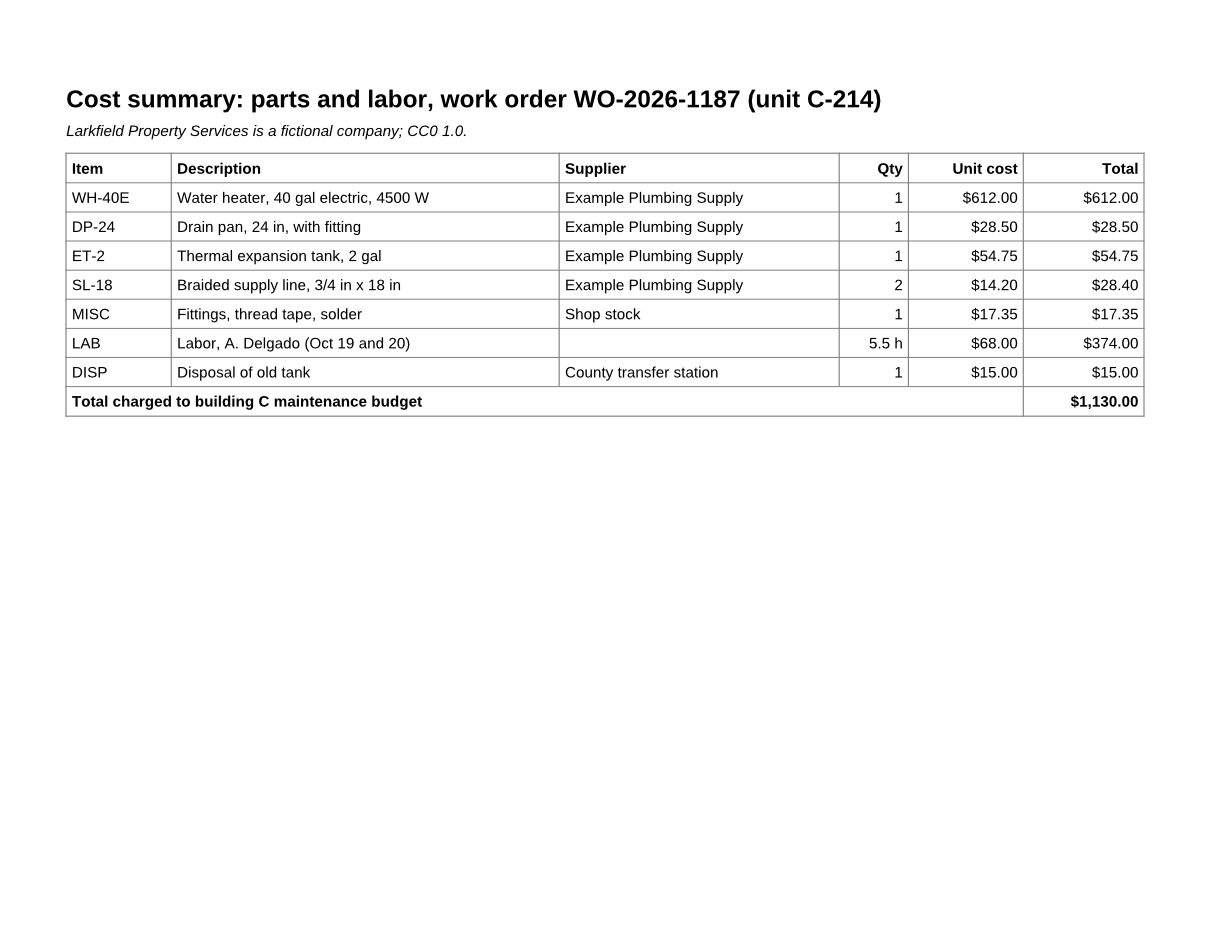
The same file the code sends. Download the input and the output and compare them yourself.
- Input
- work-order-scan.pdf (83 KB)
- Output
- work-order-fixed.pdf (82 KB)
- Source
- Written for this site (fictional company); one page stored sideways (CC0-1.0). How it was made
- Made by
- 2026-11-04, API build
9eeeb0640aba
Parameters
Send these as form fields next to the file. Names are case-insensitive. If you set one of the documented options below that we don't support yet, the request fails with a 400 that names it instead of returning a file made without it.
| Parameter | What it does |
|---|---|
Angleinteger, default 90 | Degrees to turn each selected page; positive values turn it clockwise as a viewer shows it. The angle is added to any rotation the page already has, so 90 on a page set to 270 brings it to 0.Values: -270, -180, -90, 0, 90, 180, 270 |
PageRangestring | Pages to turn. Every page is turned when it is left out. Ranges are 1-based; an open end such as 3- or 3-last runs to the last page. A range that ends past the last page stops there, but a page or range start past it returns 400 and nothing is turned.Values: for example 1, 2-4,7, 3- or 2-last |
Passwordstring | Opens a PDF that needs a password to open; the rotated file comes back with no password. The open password is enough when the file restricts nothing, which includes a file locked by pdf/to/protect with AllowEverything=true. When it restricts printing, copying or editing, send the owner password; the open password then returns 422 "this PDF has permission restrictions". On a PDF that opens without a password, the owner password lifts its restrictions and any other value changes nothing. |
FileNamestring | Output name without the extension. Leave it out and the rotated file keeps the uploaded file's name. |
StoreFileboolean, default false | Get Files[].Url, a link to download the rotated PDF, in place of the base64 data. The link lasts 3 hours. |
Not supported yet
Setting one of these to anything but its default returns 400.
| Option | What to do instead |
|---|---|
AutoRotate | AutoRotate=true returns 400. Pages turn only by the Angle you send; nothing detects sideways text. |
What carries over, and what doesn't
Kept
- What is drawn on each page: the content streams come out byte for byte the same, so text stays selectable and extracts the same as before
- Pages you did not select, which rendered pixel for pixel as before in our check (pages 2 and 3 of the sample)
- Bookmarks and document properties; the sample keeps its 3 bookmarks and its Title
- Links, comments, form fields, attachments and page labels (checked on a test file that has all of them)
- Embedded fonts and images
Lost or not yet supported
- Encryption. A file that opens without a password and restricts nothing, or one opened with
Password, is saved without encryption; send it to/v2/convert/pdf/to/protectif your pipeline expects a protected file.
Limits
- Angle must be a multiple of 90 from -270 to 270.
Angle=45returns 400 "Angle must be a multiple of 90"; 360 returns 400 "Angle must be between -270 and 270". - A page number past the end returns 400:
PageRange=4on a 3-page file gives "PageRange asks for page 4, but the document has 3 pages". - A digitally signed PDF returns 422 "this PDF is digitally signed, and rewriting it would invalidate the signature". Rotating saves the whole file again, so the signature would no longer verify.
- A PDF that restricts printing, copying or editing returns 422 "this PDF has permission restrictions; send the owner password in Password, or remove them with /v2/convert/pdf/to/unprotect and the owner password", because the saved copy would not keep the restrictions. Sending the owner password in
Passwordlifts them, whether or not the file also has an open password; a wrong password keeps the 422. - One PDF per request, up to 10 MB on the Free plan or 100 MB on paid plans. A file that needs a password to open returns 422 "the input file is password-protected" until you send the right
Password.
Where teams use it
A sideways page in a scanned packet
Sheet feeders often take wide forms in sideways. When your scanning step or a reviewer knows which pages they are, turn only those pages. The sample turns page 1 of a 3-page work order packet and leaves pages 2 and 3 alone.
Upside-down back sides
Some duplex scanners flip every back side. Send Angle=180 with those pages listed in PageRange, such as 2,4,6,8, and the whole file reads the right way up.
A rotate button in your document viewer
When a user turns a page in your app, call the route with that page number and store the result, so everyone who opens the file later sees it the right way up instead of each viewer keeping its own setting.
Questions
Which way does a positive Angle turn the page?
Clockwise, as the page appears in a viewer. The first page of our sample read from bottom to top; Angle=90, the default, made it read normally. Send -90 or 270 to turn a page counterclockwise.
Does it change the page content or only a setting?
Only the setting. Each selected page gets a new rotation value in its page dictionary and its content is untouched. PDF viewers and printers apply that value, and so do our PDF to image routes: the preview on this page was rendered by /v2/convert/pdf/to/jpg.
Can it find sideways pages by itself?
No. AutoRotate=true returns 400, and the route turns exactly the pages you list. You need the page numbers from your scanning software, a reviewer or your own check.
What happens if I rotate the same page twice?
The angles add up. Sending our fixed file back with Angle=90 and PageRange=1 left that page at 180 degrees, upside down.
What if PageRange names a page the file does not have?
If a page or the start of a range is past the end, you get 400 "PageRange asks for page 4, but the document has 3 pages" and nothing is turned. The end of a range may run past the end: PageRange=2-9 on our 3-page sample turns pages 2 and 3. 2-last and 2- mean the same.
Convert your first PDF file in a minute.