TIFF to JPG API
POST a TIFF to /v2/convert/tiff/to/jpg and get a baseline JPEG of its first page in the JSON response. ImageQuality sets the compression, ImageResolution writes the DPI and ColorSpace=gray gives a one-channel file.
- Endpoint
- POST /v2/
convert/ tiff/ to/ jpg - Accepts
- tiff
- Sample timing
- 3 ms median of 5 runsHow we measure
- Request size
- Up to 10 MB on the Free plan or 100 MB on paid plans, all files together
Request and response
Every sample below ran against the API before this page was published. Set PDFCONVERSIONAPI_KEY to your key and run it as is.
curl -sS -X POST \
  https://api.pdfconversionapi.com/v2/convert/tiff/to/jpg \
  -H "Authorization: Bearer $PDFCONVERSIONAPI_KEY" \
  -F File=@bin-label-c14.tiff \
  --form-string ImageQuality=90 \
  --form-string ImageResolution=200 \
  -o response.json

# FileData is base64. Save the first file in converted/,
# or print the JSON error.
if jq -e '.Files' response.json > /dev/null; then
  mkdir -p converted
  name=$(jq -r '.Files[0].FileName' response.json)
  jq -r '.Files[0].FileData' response.json \
    | base64 --decode > "converted/$name"
else
  cat response.json
fi
import base64
import os
import requests
key = os.environ["PDFCONVERSIONAPI_KEY"]
response = requests.post(
"https://api.pdfconversionapi.com/v2/convert/tiff/to/jpg",
headers={"Authorization": f"Bearer {key}"},
files=[("File", open("bin-label-c14.tiff", "rb"))],
data={
"ImageQuality": "90",
"ImageResolution": "200",
},
timeout=180,
)
result = response.json()
if not response.ok:
raise SystemExit(f"{result['Code']}: {result['Message']}")
os.makedirs("converted", exist_ok=True)
for file in result["Files"]:
path = os.path.join("converted", file["FileName"])
with open(path, "wb") as out:
out.write(base64.b64decode(file["FileData"]))
print(path, file["FileSize"], "bytes")
import { mkdir, readFile, writeFile } from "node:fs/promises";
import { join } from "node:path";

const form = new FormData();
const file = "bin-label-c14.tiff";
form.append("File", new Blob([await readFile(file)]), file);
form.append("ImageQuality", "90");
form.append("ImageResolution", "200");

const url = "https://api.pdfconversionapi.com/v2/convert/tiff/to/jpg";
const key = process.env.PDFCONVERSIONAPI_KEY;
const response = await fetch(url, {
  method: "POST",
  headers: { Authorization: `Bearer ${key}` },
  body: form,
});
const result = await response.json();
if (!response.ok) {
  throw new Error(`${result.Code}: ${result.Message}`);
}

await mkdir("converted", { recursive: true });
for (const file of result.Files) {
  const path = join("converted", file.FileName);
  await writeFile(path, Buffer.from(file.FileData, "base64"));
  console.log(path, file.FileSize, "bytes");
}
{
  "ConversionCost": 1,
  "ConversionTime": 0.003,
  "Files": [
    {
      "FileName": "bin-label-c14.jpg",
      "FileExt": "jpg",
      "FileSize": 41007,
      "FileData": "/9j/4AAQSkZJRgABAgEAyADI…"
    }
  ]
}
Response from our test run on 2026-11-03. ConversionTime shows the median of 5 runs. FileData is shortened here; the real response carries the whole file as base64.
The sample, converted
The same file the code sends. Download the input and the output and compare them yourself.
- Input
- bin-label-c14.tiff (42 KB)
- Output
- bin-label-c14.jpg (40 KB)
- Source
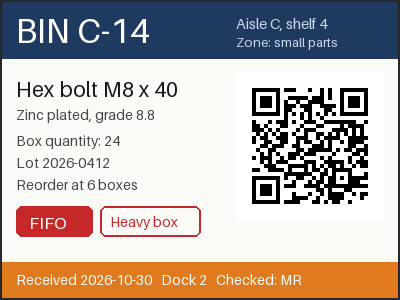
- A two-page warehouse bin label and cycle-count sheet we drew for this page, saved as an LZW-compressed TIFF at 200 dpi. (CC0-1.0). How it was made
- Made by
- 2026-11-04, API build
9eeeb0640aba
Parameters
Send these as form fields next to the file. Names are case-insensitive. If you set one of the documented options below that we don't support yet, the request fails with a 400 that names it instead of returning a file made without it.
| Parameter | What it does |
|---|---|
ImageQualityinteger, default 85 | JPEG quality. The label gave 28,287 bytes at 75 (ConvertAPI's documented default), 34,769 at our default of 85, 41,007 at 90 and 51,910 at 95.Values: 1–100 |
ImageResolutioninteger | DPI written into the JFIF header. The sample sends 200 to match the scan; without it the header says 1:1 with no unit.Values: 10–800 |
ColorSpaceenum, default default | gray writes a one-component JPEG (24,457 bytes for the label at quality 85); monochrome thresholds to black and white first. cmyk returns 400.Values: default, rgb, gray, monochrome |
AlphaColorstring, default white | Matte for TIFFs with an alpha channel, mixed in where pixels are transparent. The opaque label is unaffected.Values: Color name, #RRGGBB or R,G,B |
BackgroundColorstring, default white | Used as the matte when AlphaColor is not sent.Values: Same as AlphaColor |
ImageWidthinteger | Target width; 200 gave a 200 × 150 JPEG of 12,897 bytes.Values: 1–20000 |
ImageHeightinteger | Target height, alone or as the second side of a fitting box.Values: 1–20000 |
ScaleProportionsboolean, default true | false fills ImageWidth × ImageHeight exactly, distorting the page. |
ScaleIfLargerboolean, default false | true turns resizing into shrink-only, for batches of scans with mixed sizes. |
ScaleImageboolean, default true | false crops from the top-left corner to the requested size. |
ImageInterpolationboolean, default false | Accepted with either value; resizing always uses a Lanczos filter. |
FileNamestring | Output name; bin-label-c14.jpg by default. |
StoreFileboolean, default false | true stores the JPEG for 3 hours and returns Files[].Url. |
What carries over, and what doesn't
Kept
- Fine color detail: the JPEG is written with all three channels at full resolution (4:4:4), and the label's mean error per channel stayed under 1.4 at quality 90.
- The QR code: the sample JPEG still decodes to BIN C-14 / LOT 2026-0412 / 24 x hex bolt M8.
- The DPI, when you send it: the sample's JFIF header says 200 × 200 dots per inch.
- TIFFs compressed with LZW, Deflate, PackBits, JPEG or CCITT Group 4, and 16-bit gray TIFFs (reduced to 8 bits).
- The Orientation tag's effect: a 300 × 200 TIFF tagged 6 became an upright 200 × 300 JPEG. The tag itself is not copied.
Lost or not yet supported
- Exactness: JPEG is lossy, and the sharp edges of text picked up errors of up to 37 levels in one channel at quality 90.
- Page 2 of the sample, the count sheet, and every later page of any TIFF.
- Print colors of CMYK TIFFs: a CMYK value of (25, 195, 215, 0) became RGB (230, 60, 40) by plain inversion, with no profile.
- The embedded ICC profile: a Display P3 TIFF gave a JPEG with no profile, so its colors are read as sRGB.
Limits
- One TIFF per request.
- Requests up to 10 MB on the Free plan or 100 MB on paid plans, all files and fields together.
- Pages larger than 100,000,000 pixels return 413, checked before decoding.
- JPEG sides of at most 65,500 px: a 65,501 × 2 TIFF returned 413 'JPEG images can be at most 65,500 pixels on a side, and this one is 65,501×2', while 65,500 × 2 converted.
- Palette TIFFs return 422; save them as RGB first.
ImageQuality1 to 100;ImageResolution10 to 800; widths and heights 1 to 20,000.- Each conversion is stopped after 120 seconds with a 504.
Where teams use it
Scans that need to go on the web
Document scanners and fax servers save TIFF, while web previews, chat apps and ticket attachments are happier with JPEG. Convert each scan on arrival, keeping the DPI with ImageResolution so it still prints at the right size.
Print files from a CMYK TIFF
CMYK TIFFs from print workflows convert without errors and come out as RGB JPEGs. Look at the colors before you rely on them, because no color profile is applied in the process.
Smaller gray archives
For black text on paper, ColorSpace=gray writes one channel instead of three: the label dropped from 34,769 to 24,457 bytes at the same quality.
Questions
What quality should I use for scanned documents?
Our default is 85. On the label, 75 gave 28,287 bytes, 85 gave 34,769, 90 gave 41,007 and 95 gave 51,910. Text edges are where JPEG errors show first, so check small type at the quality you pick.
Does the JPEG keep the TIFF's DPI?
Only if you send ImageResolution. The sample sends 200 and the JFIF header records 200 dots per inch; a request without it writes a 1:1 aspect ratio and no unit.
Can I convert every page of a multi-page TIFF?
This endpoint converts page 1 only and returns one JPEG, as it did for the two-page sample. Split the pages before upload and send each one.
Can the JPEG be CMYK?
No. ColorSpace=cmyk returns 400 'ColorSpace cmyk is not supported yet; use rgb, gray or monochrome'. CMYK TIFFs are read and written out as RGB.
Is there a ConvertAPI-compatible default?
All of ConvertAPI's documented TIFF to JPG option names are accepted. Two defaults differ. ConvertAPI lists ImageQuality 75, and we use 85 when it is left out. It lists ImageResolution 200, while without it our JPEG records no DPI, only a 1:1 aspect ratio.
Convert your first TIFF file in a minute.