DXF to PDF API
POST a DXF file to /v2/convert/dxf/to/pdf and the response holds a one-page vector PDF of model space. A CAD renderer reads the DXF directly, and layer names carry over as PDF layers.
- Endpoint
- POST /v2/
convert/ dxf/ to/ pdf - Accepts
- dxf
- Sample timing
- 23 ms median of 5 runsHow we measure
- Request size
- Up to 10 MB on the Free plan or 100 MB on paid plans, all files together
Request and response
Every sample below ran against the API before this page was published. Set PDFCONVERSIONAPI_KEY to your key and run it as is.
curl -sS -X POST \
  https://api.pdfconversionapi.com/v2/convert/dxf/to/pdf \
  -H "Authorization: Bearer $PDFCONVERSIONAPI_KEY" \
  -F File=@kr-2041-mount-plate.dxf \
  -o response.json

# FileData is base64. Save the first file in converted/,
# or print the JSON error.
if jq -e '.Files' response.json > /dev/null; then
  mkdir -p converted
  name=$(jq -r '.Files[0].FileName' response.json)
  jq -r '.Files[0].FileData' response.json \
    | base64 --decode > "converted/$name"
else
  cat response.json
fi
import base64
import os
import requests
key = os.environ["PDFCONVERSIONAPI_KEY"]
response = requests.post(
"https://api.pdfconversionapi.com/v2/convert/dxf/to/pdf",
headers={"Authorization": f"Bearer {key}"},
files=[("File", open("kr-2041-mount-plate.dxf", "rb"))],
timeout=180,
)
result = response.json()
if not response.ok:
raise SystemExit(f"{result['Code']}: {result['Message']}")
os.makedirs("converted", exist_ok=True)
for file in result["Files"]:
path = os.path.join("converted", file["FileName"])
with open(path, "wb") as out:
out.write(base64.b64decode(file["FileData"]))
print(path, file["FileSize"], "bytes")
import { mkdir, readFile, writeFile } from "node:fs/promises";
import { join } from "node:path";

const form = new FormData();
const file = "kr-2041-mount-plate.dxf";
form.append("File", new Blob([await readFile(file)]), file);

const url = "https://api.pdfconversionapi.com/v2/convert/dxf/to/pdf";
const key = process.env.PDFCONVERSIONAPI_KEY;
const response = await fetch(url, {
  method: "POST",
  headers: { Authorization: `Bearer ${key}` },
  body: form,
});
const result = await response.json();
if (!response.ok) {
  throw new Error(`${result.Code}: ${result.Message}`);
}

await mkdir("converted", { recursive: true });
for (const file of result.Files) {
  const path = join("converted", file.FileName);
  await writeFile(path, Buffer.from(file.FileData, "base64"));
  console.log(path, file.FileSize, "bytes");
}
{
  "ConversionCost": 1,
  "ConversionTime": 0.023,
  "Files": [
    {
      "FileName": "kr-2041-mount-plate.pdf",
      "FileExt": "pdf",
      "FileSize": 20113,
      "FileData": "JVBERi0xLjcKJYCAgIAKMSAw…"
    }
  ]
}
Response from our test run on 2026-11-03. ConversionTime shows the median of 5 runs. FileData is shortened here; the real response carries the whole file as base64.
The sample, converted
The same file the code sends. Download the input and the output and compare them yourself.
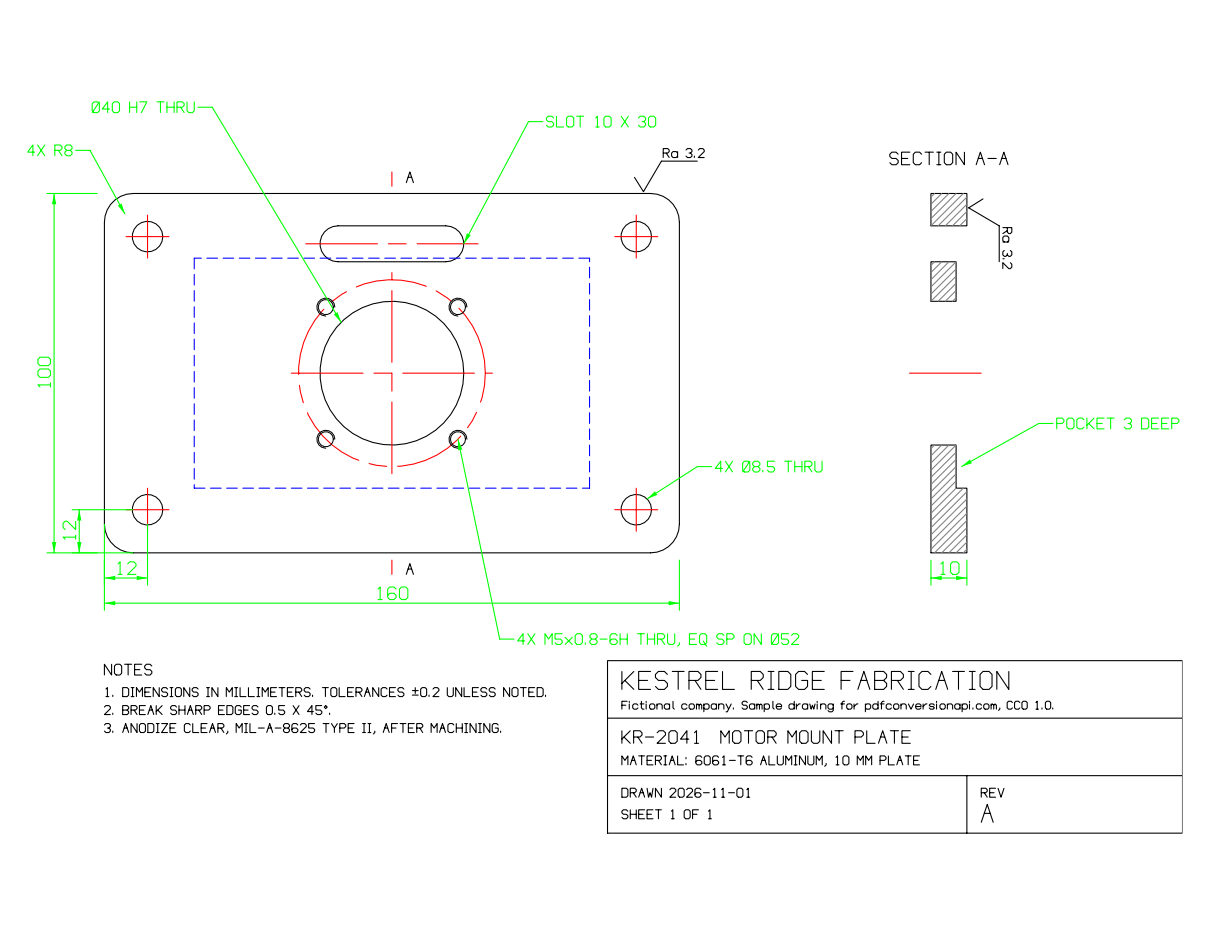
- Input
- kr-2041-mount-plate.dxf (18 KB)
- Output
- kr-2041-mount-plate.pdf (20 KB)
- Source
- Drawn for this site (fictional part), an R12 DXF in millimeters (CC0-1.0). How it was made
- Made by
- 2026-11-04, API build
9eeeb0640aba
Parameters
Send these as form fields next to the file. Names are case-insensitive. If you set one of the documented options below that we don't support yet, the request fails with a 400 that names it instead of returning a file made without it.
| Parameter | What it does |
|---|---|
FileNamestring | Output name without the extension, for example a part number and revision. When it's missing, the PDF is named after the DXF. |
StoreFileboolean, default false | Return a download link instead of the file. The link expires after 3 hours and the file is then deleted. |
Not supported yet
Setting one of these to anything but its default returns 400.
| Option | What to do instead |
|---|---|
SpaceToConvert | Only model space is converted, and only the default value is accepted: SpaceToConvert=model returns 400 too. Layouts in the DXF are skipped. |
CustomSpaceToConvert | No layout can be selected yet. |
PageSize | Output is a single sideways sheet: Letter (11 x 8.5 in), or A4 when the DXF's $MEASUREMENT header says metric. To change it, pass the PDF through /v2/convert/pdf/to/resize, which offers A2 to A6, Letter, Legal and custom sizes. |
PageOrientation | Fixed with the long side across. Sending portrait, the documented default, doesn't change it. |
PageWidth, PageHeight | /v2/convert/pdf/to/resize accepts it together with PageSize=custom. |
AutoFit | Always on: the drawing extents are scaled to the sheet. |
ExportLayers | Always on. |
ColorSpace | Entities print in the colors they have in the DXF. There's no black-and-white mode yet. |
What carries over, and what doesn't
Kept
- Linetypes defined in the file: the sample's HIDDEN pocket outline is dashed and its CENTER lines are dash-dot
- Blocks and their inserts, rotated ones included (the surface finish symbol appears twice in the sample)
- The text codes %%c, %%d and %%p, printed as Ø, ° and ±
- SOLID fills used as arrowheads, and section hatching drawn as lines
- HATCH, MTEXT, DIMENSION, TABLE and LEADER entities in R2000 files: an apartment plan we tested came out with its filled walls, room labels, dimensions, room schedule and leader
- One named PDF layer for each visible DXF layer (OUTLINE, CENTER, HIDDEN, DIMS and the others in the sample)
Lost or not yet supported
- Text is drawn as vector strokes rather than PDF text, so nothing in the PDF can be searched or copied. For comparison, a desktop office suite's drawing app kept selectable text from the same DXF, but drew the HIDDEN linetype solid and put the drawing small on a portrait A4 page.
- Circles and arcs become chains of short straight segments rather than curves. Zoomed in four times, the M5 tapped holes in the sample show their corners.
- The sheet is fitted to everything in model space. One stray 1 mm line, 20 m above and to the right of the sample part, shrank the whole drawing to a speck.
- Paper-space layouts, viewports and plot styles are ignored, and colors stay as drawn: the sample's green dimensions are green in the PDF.
- A DXF cut off partway can still convert. The sample truncated to 9,000 bytes returned 200 with part of the drawing and a layer named HA, cut from HATCH.
- 3D solids, regions, OLE objects and raster images aren't drawn yet.
Limits
- DXF versions R12 through 2018.
- One sheet per drawing.
- Input that isn't DXF returns 422 naming the line where reading stopped: a file holding only the word hello gets "the input file could not be read: line 1: bad group code
hello". An empty file gets "the input file could not be read: not a DXF file". - Requests up to 10 MB on the Free plan or 100 MB on paid plans, all files and fields together.
- A conversion can run for up to 120 seconds; after that the API returns 504.
Where teams use it
Proofs for laser, waterjet and CNC orders
Customers upload DXF part outlines. Convert each one and show the PDF on the order page, so they can check hole sizes and slot positions before the job is cut.
PDFs for DXF files your code writes
If a configurator or a library such as ezdxf generates DXF, convert the same file for the quote or the shop traveler. The PDF then shows exactly the geometry that goes to the machine.
Checking DXF exports in a build
Convert every DXF your pipeline writes and keep the PDF as a build artifact. A missing layer, a blank sheet or a drawing shrunk by a stray object is easy to spot by eye.
Questions
Why is my part tiny in the PDF?
The converter scales everything in model space onto the sheet, including stray points or lines far from the part. Zoom to extents in your CAD program to find them, delete them, and convert again. There's no option yet to plot only a window of the drawing.
Does the PDF keep the drawing's scale?
No. The drawing is fitted to one sideways sheet, Letter or A4, so read sizes from the dimensions, not with a ruler. A DXF whose $MEASUREMENT header is 1 (metric) gets A4; one with 0 or no header gets Letter, which is why the sample, written without a header, is on Letter. A true-scale plot needs paper-space layouts, which this conversion doesn't use yet.
Will a DXF written by my own code work?
In our tests, yes. The sample on this page was written by a short Python script, not by a CAD program, using only R12 entities: LINE, ARC, CIRCLE, POLYLINE, TEXT, SOLID and INSERT. Download the input from this page and open it in a text editor to see how little a valid file needs. Write $MEASUREMENT=1 in the header if you want an A4 sheet instead of Letter.
What happens with a damaged or truncated file?
Input that doesn't parse as DXF returns 422. A DXF cut off partway can return 200 with only the entities read before the cut, so check that uploads arrived whole, for example by comparing the byte count.
Can I get a DWG instead of a PDF?
Yes. /v2/convert/dxf/to/dwg saves the drawing as DWG with the same engine; the file it wrote for our tests had a 2004-format (AC1018) header. We made the sample for the DWG to PDF page that way.
Convert your first DXF file in a minute.