SVG to PDF API
POST an SVG to /v2/convert/svg/to/pdf and get a one-page PDF where paths stay paths and text stays text. The drawing is scaled to fit the page you choose and centered unless you say otherwise.
- Endpoint
- POST /v2/
convert/ svg/ to/ pdf - Accepts
- svg
- Sample timing
- 9 ms median of 5 runsHow we measure
- Request size
- Up to 10 MB on the Free plan or 100 MB on paid plans, all files together
Request and response
Every sample below ran against the API before this page was published. Set PDFCONVERSIONAPI_KEY to your key and run it as is.
curl -sS -X POST \
  https://api.pdfconversionapi.com/v2/convert/svg/to/pdf \
  -H "Authorization: Bearer $PDFCONVERSIONAPI_KEY" \
  -F File=@floor-plan.svg \
  --form-string PageSize=letter \
  --form-string PageOrientation=landscape \
  -o response.json

# FileData is base64. Save the first file in converted/,
# or print the JSON error.
if jq -e '.Files' response.json > /dev/null; then
  mkdir -p converted
  name=$(jq -r '.Files[0].FileName' response.json)
  jq -r '.Files[0].FileData' response.json \
    | base64 --decode > "converted/$name"
else
  cat response.json
fi
import base64
import os
import requests
key = os.environ["PDFCONVERSIONAPI_KEY"]
response = requests.post(
"https://api.pdfconversionapi.com/v2/convert/svg/to/pdf",
headers={"Authorization": f"Bearer {key}"},
files=[("File", open("floor-plan.svg", "rb"))],
data={
"PageSize": "letter",
"PageOrientation": "landscape",
},
timeout=180,
)
result = response.json()
if not response.ok:
raise SystemExit(f"{result['Code']}: {result['Message']}")
os.makedirs("converted", exist_ok=True)
for file in result["Files"]:
path = os.path.join("converted", file["FileName"])
with open(path, "wb") as out:
out.write(base64.b64decode(file["FileData"]))
print(path, file["FileSize"], "bytes")
import { mkdir, readFile, writeFile } from "node:fs/promises";
import { join } from "node:path";

const form = new FormData();
const file = "floor-plan.svg";
form.append("File", new Blob([await readFile(file)]), file);
form.append("PageSize", "letter");
form.append("PageOrientation", "landscape");

const url = "https://api.pdfconversionapi.com/v2/convert/svg/to/pdf";
const key = process.env.PDFCONVERSIONAPI_KEY;
const response = await fetch(url, {
  method: "POST",
  headers: { Authorization: `Bearer ${key}` },
  body: form,
});
const result = await response.json();
if (!response.ok) {
  throw new Error(`${result.Code}: ${result.Message}`);
}

await mkdir("converted", { recursive: true });
for (const file of result.Files) {
  const path = join("converted", file.FileName);
  await writeFile(path, Buffer.from(file.FileData, "base64"));
  console.log(path, file.FileSize, "bytes");
}
{
  "ConversionCost": 1,
  "ConversionTime": 0.009,
  "Files": [
    {
      "FileName": "floor-plan.pdf",
      "FileExt": "pdf",
      "FileSize": 27446,
      "FileData": "JVBERi0xLjcKJYCAgIAKMSAw…"
    }
  ]
}
Response from our test run on 2026-11-03. ConversionTime shows the median of 5 runs. FileData is shortened here; the real response carries the whole file as base64.
The sample, converted
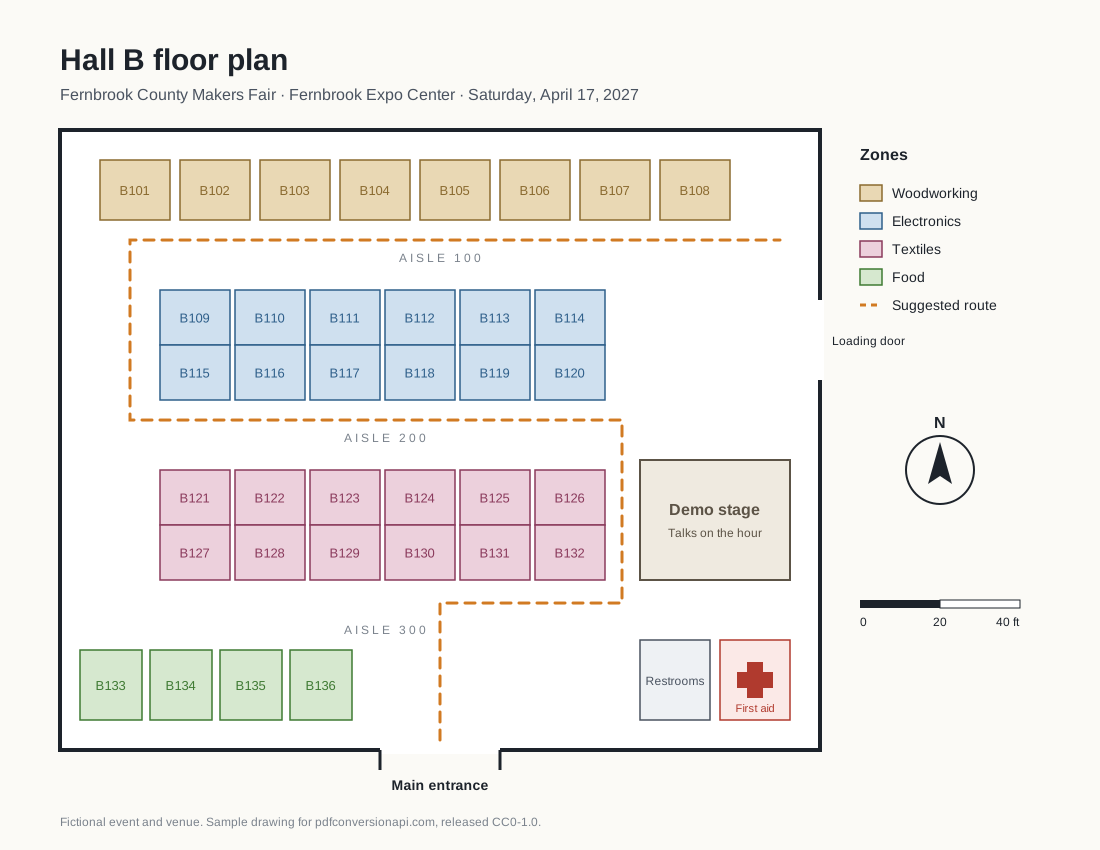
The same file the code sends. Download the input and the output and compare them yourself.
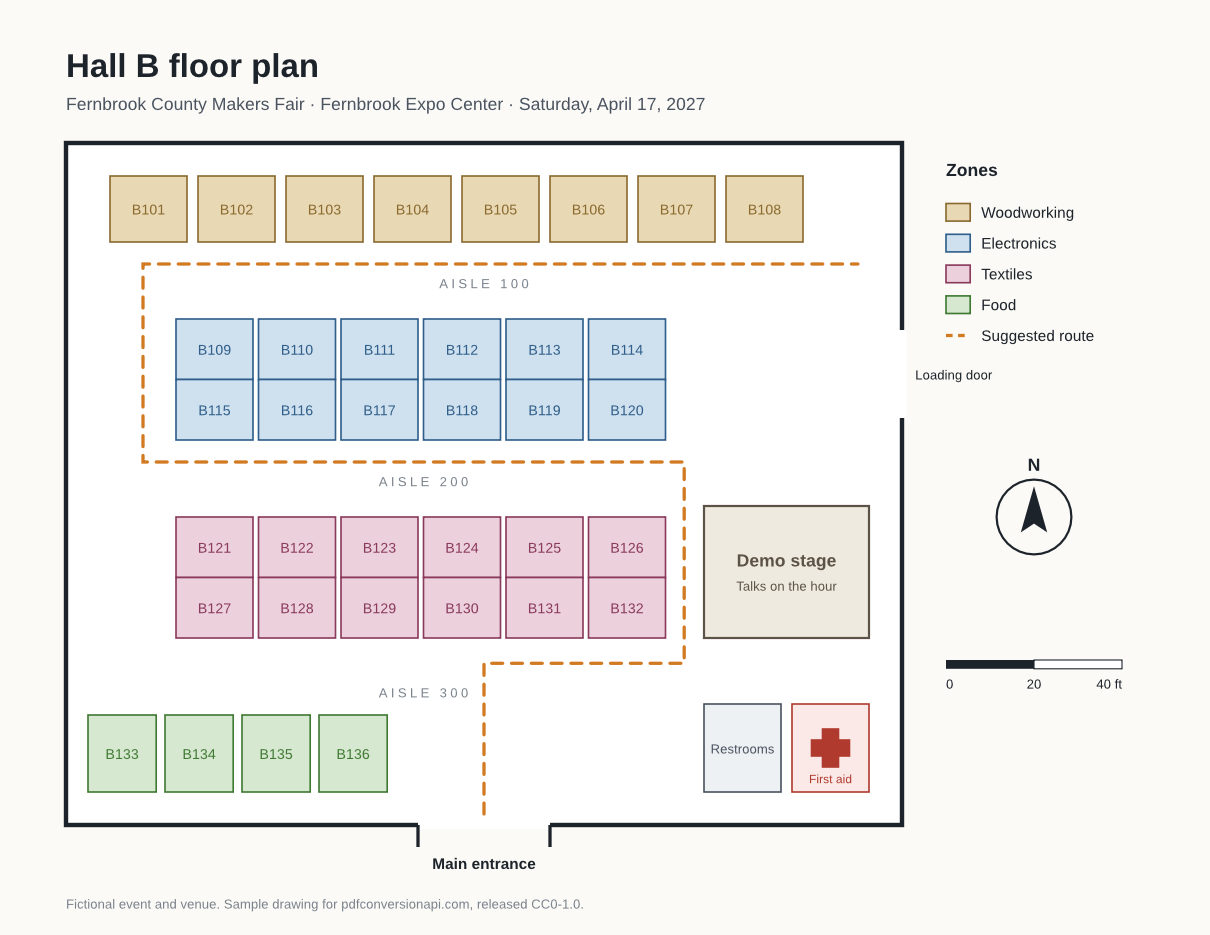
- Input
- floor-plan.svg (11 KB)
- Output
- floor-plan.pdf (27 KB)
- Source
- Drawn for this site: a floor plan for a fictional event (CC0-1.0). How it was made
- Made by
- 2026-11-04, API build
9eeeb0640aba
Parameters
Send these as form fields next to the file. Names are case-insensitive. If you set one of the documented options below that we don't support yet, the request fails with a 400 that names it instead of returning a file made without it.
| Parameter | What it does |
|---|---|
PageSizeenum, default a4 | Paper size. A4 is the default because it is ConvertAPI's, so US code should send letter. The drawing is scaled up or down to fit the page and never cropped.Values: a0–a9, b0–b5, letter, legal, ledger |
PageOrientationenum, default portrait | The second value turns the page sideways by swapping its width and height, custom sizes included. default is accepted and keeps the page upright, like portrait. The sample uses the sideways setting to put an 1100 × 850 drawing on an 11 × 8.5 inch page.Values: portrait, landscape, default |
PageWidthinteger | Custom page width in whole millimeters. It replaces the width of PageSize, so you can send it alone or with PageHeight.Values: 10–30000 (mm) |
PageHeightinteger | Custom page height in whole millimeters, replacing the height of PageSize.Values: 10–30000 (mm) |
HorizontalAlignmentenum, default center | Where the drawing sits when the page is relatively wider than the SVG, so there is spare room left and right.Values: left, center, right |
VerticalAlignmentenum, default center | Where the drawing sits when there is spare room above and below it, such as a wide SVG on a portrait page.Values: top, center, bottom |
BackgroundColorstring, default White | Fills the whole page before the SVG is drawn. transparent paints nothing, so the page has no background object at all.Values: transparent, white, black, red, green, blue, gray, #RRGGBB or R,G,B |
UseImagePageSizeboolean, default false | true makes the page exactly the SVG's size, at 0.75 pt per SVG pixel (1100 × 850 becomes 825 × 637.5 pt). PageSize, PageOrientation, PageWidth and PageHeight are then not read, and sending one of them with a non-default value returns 400. |
FileNamestring | Name of the PDF without .pdf. If omitted, floor-plan.svg becomes floor-plan.pdf. |
StoreFileboolean, default false | Keeps the PDF for 3 hours and returns its download URL instead of the file content. |
What carries over, and what doesn't
Kept
- Paths, strokes and dashed lines as vectors: the sample PDF contains no images at all
- Text as real text with the fonts embedded as subsets (Liberation Sans regular and bold in the sample), so labels can be selected and searched
- Gradients as PDF shadings and clip paths as clips, not bitmaps: the blog card from our SVG to PNG page came out with 2 shadings, its rounded chart panel and no images
- Opacity, written as PDF transparency (the blog card's faded last bar has 0.85), and letter-spacing (the spaced aisle labels in the sample)
- The drawing's proportions: it is scaled uniformly to fit the page
Lost or not yet supported
- Text set only in fonts the server doesn't have, including generic names like sans-serif and text with no font-family: it is currently omitted from the PDF without an error. Naming an installed family (Liberation Sans, Liberation Serif, DejaVu Sans, Noto Sans, Carlito) avoids it.
- Filter effects such as blur and drop shadow are embedded as bitmaps; everything around them stays vector.
- Remote images, linked files and <foreignObject> HTML. Only images embedded as data: URLs appear.
- Margins. There is no margin option on this route, so the drawing touches the page edges on one axis. Build the padding into the SVG's viewBox instead.
- PDF/A. A Pdfa parameter sent here is ignored; send the result to
/v2/convert/pdf/to/pdfaafterwards.
Limits
- One SVG per request and one page per PDF.
- Requests up to 10 MB on the Free plan or 100 MB on paid plans, all files and fields together.
PageWidthandPageHeight: whole millimeters from 10 to 30,000. 101.6 returns 400 "PageWidth must be a whole number".- The conversion is stopped at 120 seconds (HTTP 504).
Where teams use it
Print-ready plans and diagrams
Floor plans and wiring diagrams are often drawn or generated as SVG. Converting to PDF on Letter paper gives people a file they can print at any scale without blurry lines, like the hall plan on this page.
Labels and signs at exact sizes
Set PageWidth and PageHeight in millimeters to match label stock or a sign blank. Values are whole millimeters, so a 4 × 6 inch label is sent as 102 × 152.
Vector charts for PDF reports
Render each chart SVG to its own PDF page with UseImagePageSize=true, then combine them with your report pages through /v2/convert/pdf/to/merge. The charts stay sharp when readers zoom in.
Questions
Is the PDF vector, or a picture of the SVG?
Vector. The converter writes the SVG's paths, fills and gradients as PDF drawing operations and its text as text with embedded fonts. The sample floor plan has no raster image inside, and MuPDF and pypdf both extract its labels as text. The exception is SVG filters, which are drawn as embedded bitmaps.
How do I get US Letter instead of A4?
Send PageSize=letter. A4 is the default to match ConvertAPI. For a wide drawing, also turn the page sideways with PageOrientation, as the code sample on this page does; the sample PDF comes out at 792 × 612 pt.
Can the page be exactly the size of my SVG?
Yes, with UseImagePageSize=true. SVG pixels are converted at 0.75 pt each, so an SVG 1100 px wide makes a page 825 pt (11.46 in) wide. Leave out PageSize and the other page-size options when you do; combining them returns 400.
Some labels are missing from the PDF. What happened?
Their font-family doesn't name a font installed on our servers. The SVG renderer doesn't map Arial, Helvetica or sans-serif to a substitute, so that text is skipped. Put Liberation Sans (or another installed family) in the font-family list and the labels come back.
How do I add a margin around the drawing?
Make the canvas bigger in the SVG itself. For the sample, changing width="1100" height="850" viewBox="0 0 1100 850" to width="1200" height="950" viewBox="-50 -50 1200 950" leaves 50 SVG units of blank space on every side, which became about a half inch at the edges of the Letter page in our test.
Can I get PDF/A for archiving?
Not from this route directly. Convert to PDF, then send that file to /v2/convert/pdf/to/pdfa. We did this with the sample and /v2/convert/pdfa/to/validate reported it compliant with PDF/A-2b.
Convert your first SVG file in a minute.