EXR to JPG API
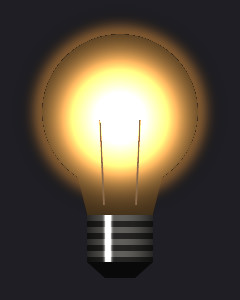
Send an OpenEXR file to /v2/convert/exr/to/jpg and get an 8-bit baseline JPEG back. JPEG has no alpha, so clear and soft areas are mixed with white or the AlphaColor you choose; the sample uses #1E1E24 to put the bulb on a dark backdrop.
- Endpoint
- POST /v2/
convert/ exr/ to/ jpg - Accepts
- exr
- Sample timing
- 24 ms median of 5 runsHow we measure
- Request size
- Up to 10 MB on the Free plan or 100 MB on paid plans, all files together
Request and response
Every sample below ran against the API before this page was published. Set PDFCONVERSIONAPI_KEY to your key and run it as is.
curl -sS -X POST \
  https://api.pdfconversionapi.com/v2/convert/exr/to/jpg \
  -H "Authorization: Bearer $PDFCONVERSIONAPI_KEY" \
  -F File=@glowing-bulb-render.exr \
  --form-string 'AlphaColor=#1E1E24' \
  --form-string ImageQuality=90 \
  -o response.json

# FileData is base64. Save the first file in converted/,
# or print the JSON error.
if jq -e '.Files' response.json > /dev/null; then
  mkdir -p converted
  name=$(jq -r '.Files[0].FileName' response.json)
  jq -r '.Files[0].FileData' response.json \
    | base64 --decode > "converted/$name"
else
  cat response.json
fi
import base64
import os
import requests
key = os.environ["PDFCONVERSIONAPI_KEY"]
response = requests.post(
"https://api.pdfconversionapi.com/v2/convert/exr/to/jpg",
headers={"Authorization": f"Bearer {key}"},
files=[("File", open("glowing-bulb-render.exr", "rb"))],
data={
"AlphaColor": "#1E1E24",
"ImageQuality": "90",
},
timeout=180,
)
result = response.json()
if not response.ok:
raise SystemExit(f"{result['Code']}: {result['Message']}")
os.makedirs("converted", exist_ok=True)
for file in result["Files"]:
path = os.path.join("converted", file["FileName"])
with open(path, "wb") as out:
out.write(base64.b64decode(file["FileData"]))
print(path, file["FileSize"], "bytes")
import { mkdir, readFile, writeFile } from "node:fs/promises";
import { join } from "node:path";

const form = new FormData();
const file = "glowing-bulb-render.exr";
form.append("File", new Blob([await readFile(file)]), file);
form.append("AlphaColor", "#1E1E24");
form.append("ImageQuality", "90");

const url = "https://api.pdfconversionapi.com/v2/convert/exr/to/jpg";
const key = process.env.PDFCONVERSIONAPI_KEY;
const response = await fetch(url, {
  method: "POST",
  headers: { Authorization: `Bearer ${key}` },
  body: form,
});
const result = await response.json();
if (!response.ok) {
  throw new Error(`${result.Code}: ${result.Message}`);
}

await mkdir("converted", { recursive: true });
for (const file of result.Files) {
  const path = join("converted", file.FileName);
  await writeFile(path, Buffer.from(file.FileData, "base64"));
  console.log(path, file.FileSize, "bytes");
}
{
  "ConversionCost": 1,
  "ConversionTime": 0.024,
  "Files": [
    {
      "FileName": "glowing-bulb-render.jpg",
      "FileExt": "jpg",
      "FileSize": 10518,
      "FileData": "/9j/4AAQSkZJRgABAgAAAQAB…"
    }
  ]
}
Response from our test run on 2026-11-03. ConversionTime shows the median of 5 runs. FileData is shortened here; the real response carries the whole file as base64.
The sample, converted
The same file the code sends. Download the input and the output and compare them yourself.
- Input
- glowing-bulb-render.exr (187 KB)
- Output
- glowing-bulb-render.jpg (10 KB)
- Source
- A glowing light bulb we drew in code and saved as a 240 × 300 OpenEXR render: half-float RGBA, premultiplied alpha, ZIP compression, values up to 12.0. (CC0-1.0). How it was made
- Made by
- 2026-11-04, API build
9eeeb0640aba
Parameters
Send these as form fields next to the file. Names are case-insensitive. If you set one of the documented options below that we don't support yet, the request fails with a 400 that names it instead of returning a file made without it.
| Parameter | What it does |
|---|---|
ImageQualityinteger, default 85 | JPEG encoder quality. The sample's 90 produced 10,518 bytes. On the default white backdrop, 85 gave 10,046 bytes and 60 gave 6,826.Values: 1–100 |
AlphaColorstring, default white | The color behind the render. With #1E1E24, the empty corners decoded as (31, 30, 36) after compression; without it they are pure white.Values: white, black, red, green, blue, gray, #RRGGBB or R,G,B |
BackgroundColorstring, default white | Read only when AlphaColor is missing. BackgroundColor=black turned the halo pixel at (34, 112) into (73, 49, 23).Values: Same as AlphaColor |
ImageWidthinteger | Target width; ImageWidth=120 returned a 120 × 150 JPEG of 4,175 bytes. Resizing happens before the backdrop is applied.Values: 1–20000 |
ImageHeightinteger | Target height; ImageHeight=100 gave 80 × 100. With a width as well, the render is fitted inside both.Values: 1–20000 |
ScaleProportionsboolean, default true | Set false to fill a box exactly: 200 × 200 squashed the bulb into a square JPEG of 6,721 bytes. |
ScaleIfLargerboolean, default false | With true, a width or height above 240 × 300 leaves the size alone; without it, ImageWidth=800 gave an 800 × 1000 JPEG of 54,925 bytes. |
ScaleImageboolean, default true | false cuts a region from the top-left corner instead of scaling: a 200 × 100 strip, 3,714 bytes. |
ColorSpaceenum, default default | gray writes a one-channel JPEG (6,423 bytes). monochrome is one channel too (9,397 bytes), and every pixel is set to black or white after the backdrop is applied, so gray shows up only as compression ringing along edges.Values: default, rgb, gray, monochrome; cmyk returns 400 |
ImageResolutioninteger | Sets the JFIF density: 300 writes 300 dots per inch. Without it the header holds a 1:1 aspect ratio and no unit.Values: 10–800 |
FileNamestring | Name for the JPEG without the extension; glowing-bulb-render is used otherwise. |
StoreFileboolean, default false | Returns a link valid for 3 hours in Files[].Url rather than the bytes. |
What carries over, and what doesn't
Kept
- The whole 240 × 300 frame, encoded baseline with full-resolution color (4:4:4)
- Colors inside 0 to 1, rounded to 8 bits: a glass pixel stored as (0.99, 0.71, 0.37) decoded as (251, 181, 96)
- Soft edges, mixed with the backdrop in proportion to their alpha
Lost or not yet supported
- Transparency. The 26,592 clear and 20,590 partly clear pixels (at 8 bits) all end up opaque over the backdrop color.
- Some of the glow. The EXR stores color premultiplied, yet it is blended as if it were straight: the halo pixel at 48% alpha became (89, 64, 42) on #1E1E24, where adding the stored light to the backdrop gives (169, 116, 63).
- Highlight detail: the 12.0 filament and the core of the glass go into the encoder as flat (255, 255, 255).
- The sRGB curve. Values go out as stored, so 0.5 gray becomes 128 rather than about 188, and the midtones look darker than in a viewer that applies a display transform.
- Precision. Half floats become 8-bit values, then lossy JPEG blocks.
Limits
- One OpenEXR file in, one JPEG out, per request.
- Uploads up to 10 MB on the Free plan or 100 MB on paid plans.
- Images above 100,000,000 pixels return 413.
- Width and height targets from 1 to 20,000 pixels.
- JPEG sides are capped at 65,500 px: a 65,500 × 16 EXR converted, and a 70,000 × 16 one returned 413
JPEG images can be at most 65,500 pixels on a side, and this one is 70,000×16. - A conversion is stopped after 120 seconds.
Where teams use it
Dailies and review mail
Review emails, chat threads and PDF reports all take JPEG. One request per rendered frame gives a small still of each shot; the sample bulb is about 10 KB.
Packshots on a page color
A product rendered on a transparent background can be flattened straight onto the site's background with AlphaColor, so the web image needs no extra compositing step.
Questions
How do I choose the background color?
Send AlphaColor as a name (white, black, red, green, blue, gray), as #RRGGBB or as R,G,B. Anything else is a 400, for example 'teal' is not a color. Opaque parts of the render are not affected.
Why is the glow around my object weaker than in the render?
Render engines store color multiplied by alpha. This route treats the stored values as straight color and multiplies by alpha again when it blends onto the backdrop, so soft glows and blurred edges lose brightness. Composite over your background in your own tools first if those edges must match.
Can I keep detail in highlights brighter than 1.0?
Not with a parameter: there is no exposure or tone-mapping option, and everything above 1.0 becomes 255. Scale the image down in your renderer or compositor before converting.
Is the JPEG progressive?
No. It is a baseline JPEG with a JFIF 1.02 header and no chroma subsampling. ImageQuality sets the compression; the encoder settings are otherwise fixed.
Convert your first EXR file in a minute.