HDR to JPG API
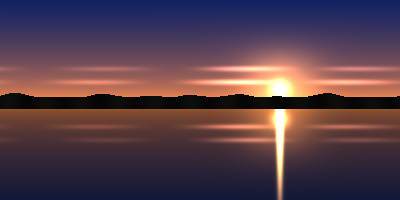
Send a Radiance .hdr to /v2/convert/hdr/to/jpg and get an 8-bit baseline JPEG of the same size. The sample sky panorama at ImageQuality=92 came back as 16,452 bytes, with the sun and the middle of its reflection clipped to white.
- Endpoint
- POST /v2/
convert/ hdr/ to/ jpg - Accepts
- hdr
- Sample timing
- 25 ms median of 5 runsHow we measure
- Request size
- Up to 10 MB on the Free plan or 100 MB on paid plans, all files together
Request and response
Every sample below ran against the API before this page was published. Set PDFCONVERSIONAPI_KEY to your key and run it as is.
curl -sS -X POST \
  https://api.pdfconversionapi.com/v2/convert/hdr/to/jpg \
  -H "Authorization: Bearer $PDFCONVERSIONAPI_KEY" \
  -F File=@lakeside-sunset-sky.hdr \
  --form-string ImageQuality=92 \
  -o response.json

# FileData is base64. Save the first file in converted/,
# or print the JSON error.
if jq -e '.Files' response.json > /dev/null; then
  mkdir -p converted
  name=$(jq -r '.Files[0].FileName' response.json)
  jq -r '.Files[0].FileData' response.json \
    | base64 --decode > "converted/$name"
else
  cat response.json
fi
import base64
import os
import requests
key = os.environ["PDFCONVERSIONAPI_KEY"]
response = requests.post(
"https://api.pdfconversionapi.com/v2/convert/hdr/to/jpg",
headers={"Authorization": f"Bearer {key}"},
files=[("File", open("lakeside-sunset-sky.hdr", "rb"))],
data={
"ImageQuality": "92",
},
timeout=180,
)
result = response.json()
if not response.ok:
raise SystemExit(f"{result['Code']}: {result['Message']}")
os.makedirs("converted", exist_ok=True)
for file in result["Files"]:
path = os.path.join("converted", file["FileName"])
with open(path, "wb") as out:
out.write(base64.b64decode(file["FileData"]))
print(path, file["FileSize"], "bytes")
import { mkdir, readFile, writeFile } from "node:fs/promises";
import { join } from "node:path";

const form = new FormData();
const file = "lakeside-sunset-sky.hdr";
form.append("File", new Blob([await readFile(file)]), file);
form.append("ImageQuality", "92");

const url = "https://api.pdfconversionapi.com/v2/convert/hdr/to/jpg";
const key = process.env.PDFCONVERSIONAPI_KEY;
const response = await fetch(url, {
  method: "POST",
  headers: { Authorization: `Bearer ${key}` },
  body: form,
});
const result = await response.json();
if (!response.ok) {
  throw new Error(`${result.Code}: ${result.Message}`);
}

await mkdir("converted", { recursive: true });
for (const file of result.Files) {
  const path = join("converted", file.FileName);
  await writeFile(path, Buffer.from(file.FileData, "base64"));
  console.log(path, file.FileSize, "bytes");
}
{
  "ConversionCost": 1,
  "ConversionTime": 0.025,
  "Files": [
    {
      "FileName": "lakeside-sunset-sky.jpg",
      "FileExt": "jpg",
      "FileSize": 16452,
      "FileData": "/9j/4AAQSkZJRgABAgAAAQAB…"
    }
  ]
}
Response from our test run on 2026-11-03. ConversionTime shows the median of 5 runs. FileData is shortened here; the real response carries the whole file as base64.
The sample, converted
The same file the code sends. Download the input and the output and compare them yourself.
- Input
- lakeside-sunset-sky.hdr (90 KB)
- Output
- lakeside-sunset-sky.jpg (16 KB)
- Source
- A sunset sky panorama we drew in code and saved as a 400 × 200 Radiance RGBE file with run-length scanlines; the sun disc is 60.0. (CC0-1.0). How it was made
- Made by
- 2026-11-04, API build
9eeeb0640aba
Parameters
Send these as form fields next to the file. Names are case-insensitive. If you set one of the documented options below that we don't support yet, the request fails with a 400 that names it instead of returning a file made without it.
| Parameter | What it does |
|---|---|
ImageQualityinteger, default 85 | Compression level. The sample's 92 gave 16,452 bytes; the default 85 gave 12,819 and 60 gave 8,267.Values: 1–100 |
ImageWidthinteger | Scales to this width, keeping 2:1: ImageWidth=120 made a 120 × 60 thumbnail of 2,625 bytes.Values: 1–20000 |
ImageHeightinteger | Scales to this height; ImageHeight=100 gave 200 × 100 in 4,678 bytes.Values: 1–20000 |
ScaleProportionsboolean, default true | Set to false to squeeze the panorama into an exact box, such as a 200 × 200 square (7,375 bytes). |
ScaleIfLargerboolean, default false | When true, sizes above 400 × 200 are ignored; otherwise ImageWidth=800 upsamples to 800 × 400 (31,353 bytes). |
ScaleImageboolean, default true | false crops the top-left corner instead of resizing. |
ColorSpaceenum, default default | gray encodes a single-channel JPEG of 6,576 bytes; monochrome is single-channel black and white.Values: default, rgb, gray, monochrome; cmyk returns 400 |
ImageResolutioninteger | Stored as the JFIF pixel density in dots per inch; by default the header has a 1:1 ratio and no unit.Values: 10–800 |
FileNamestring | Name of the JPEG without extension. |
StoreFileboolean, default false | Delivers a 3-hour URL instead of base64. |
What carries over, and what doesn't
Kept
- The full panorama at 400 × 200, encoded with full-resolution color (no subsampling)
- Colors below 1.0, rounded to 8 bits: the zenith enters the encoder as (16, 33, 97) and decodes as (15, 33, 97)
- The scene's proportions when you resize with one side
Lost or not yet supported
- Detail in bright areas. The 60.0 sun and the middle of the lake streak turn flat white, and the glow around them is cut to 255 in red, or red and green.
- Shadow detail. Linear values near zero stay near zero: the hills, stored between 0.017 and 0.056, come out between 4 and 14 of 255.
- Any exposure the file's header asks for; the
EXPOSUREline is ignored. - Precision, twice: 8 bits per channel, then lossy JPEG blocks.
Limits
- One Radiance file per call.
- Up to 10 MB on the Free plan or 100 MB on paid plans per request.
- A 413 above 100,000,000 pixels.
- JPEG sides are capped at 65,500 px, so a 65,500 × 8 .hdr converts while a 70,000 × 8 one returned 413
JPEG images can be at most 65,500 pixels on a side, and this one is 70,000×8. - Bottom-up or rotated .hdr files and XYZE files return 422.
- 120 seconds per job.
Where teams use it
Thumbnails for an HDRI catalog
A catalog of sky and studio panoramas can show a JPEG thumbnail per .hdr on listing pages; ImageWidth makes it small in the same request.
Simulation results in documents
Lighting and daylight studies can be delivered as .hdr images. A JPEG of each image drops into a slide, a wiki page or an email where an .hdr file would not open.
Questions
Can I set the exposure or tone mapping?
There is no parameter for either. Values from 0 to 1 are kept and each channel above 1.0 is cut to 255. To keep the sun's surroundings, scale the image down in your HDR tool first, or render with a lower exposure.
Why does the JPEG look darker than in my HDR viewer?
Viewers apply exposure and a display curve. This route writes the linear numbers straight into the JPEG, so the midtones sit lower: 0.5 becomes 128, where an sRGB encode gives about 188.
Does ConvertAPI offer HDR to JPG?
Not in the catalogue we fetched on 2026-11-01, which lists no Radiance input. This route works like the other image routes here: one multipart File upload and a Files[] array back.
Is the panorama's projection changed?
No. The JPEG has the same 2:1 pixel grid, so an equirectangular sky stays equirectangular. Neither the .hdr nor the JPEG carries panorama metadata.
Convert your first HDR file in a minute.