HDR to PNG API
POST a Radiance .hdr file to /v2/convert/hdr/to/png and get a 16-bit RGB PNG back. Each pixel is decoded from its shared-exponent RGBE bytes, clipped to the 0 to 1 range and written as is, with no exposure, tone mapping or sRGB curve.
- Endpoint
- POST /v2/
convert/ hdr/ to/ png - Accepts
- hdr
- Sample timing
- 26 ms median of 5 runsHow we measure
- Request size
- Up to 10 MB on the Free plan or 100 MB on paid plans, all files together
Request and response
Every sample below ran against the API before this page was published. Set PDFCONVERSIONAPI_KEY to your key and run it as is.
curl -sS -X POST \
  https://api.pdfconversionapi.com/v2/convert/hdr/to/png \
  -H "Authorization: Bearer $PDFCONVERSIONAPI_KEY" \
  -F File=@lakeside-sunset-sky.hdr \
  -o response.json

# FileData is base64. Save the first file in converted/,
# or print the JSON error.
if jq -e '.Files' response.json > /dev/null; then
  mkdir -p converted
  name=$(jq -r '.Files[0].FileName' response.json)
  jq -r '.Files[0].FileData' response.json \
    | base64 --decode > "converted/$name"
else
  cat response.json
fi
import base64
import os
import requests
key = os.environ["PDFCONVERSIONAPI_KEY"]
response = requests.post(
"https://api.pdfconversionapi.com/v2/convert/hdr/to/png",
headers={"Authorization": f"Bearer {key}"},
files=[("File", open("lakeside-sunset-sky.hdr", "rb"))],
timeout=180,
)
result = response.json()
if not response.ok:
raise SystemExit(f"{result['Code']}: {result['Message']}")
os.makedirs("converted", exist_ok=True)
for file in result["Files"]:
path = os.path.join("converted", file["FileName"])
with open(path, "wb") as out:
out.write(base64.b64decode(file["FileData"]))
print(path, file["FileSize"], "bytes")
import { mkdir, readFile, writeFile } from "node:fs/promises";
import { join } from "node:path";

const form = new FormData();
const file = "lakeside-sunset-sky.hdr";
form.append("File", new Blob([await readFile(file)]), file);

const url = "https://api.pdfconversionapi.com/v2/convert/hdr/to/png";
const key = process.env.PDFCONVERSIONAPI_KEY;
const response = await fetch(url, {
  method: "POST",
  headers: { Authorization: `Bearer ${key}` },
  body: form,
});
const result = await response.json();
if (!response.ok) {
  throw new Error(`${result.Code}: ${result.Message}`);
}

await mkdir("converted", { recursive: true });
for (const file of result.Files) {
  const path = join("converted", file.FileName);
  await writeFile(path, Buffer.from(file.FileData, "base64"));
  console.log(path, file.FileSize, "bytes");
}
{
  "ConversionCost": 1,
  "ConversionTime": 0.026,
  "Files": [
    {
      "FileName": "lakeside-sunset-sky.png",
      "FileExt": "png",
      "FileSize": 75292,
      "FileData": "iVBORw0KGgoAAAANSUhEUgAA…"
    }
  ]
}
Response from our test run on 2026-11-03. ConversionTime shows the median of 5 runs. FileData is shortened here; the real response carries the whole file as base64.
The sample, converted
The same file the code sends. Download the input and the output and compare them yourself.
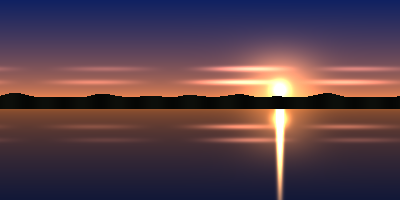
- Input
- lakeside-sunset-sky.hdr (90 KB)
- Output
- lakeside-sunset-sky.png (74 KB)
- Source
- A sunset sky panorama we drew in code and saved as a 400 × 200 Radiance RGBE file with run-length scanlines; the sun disc is 60.0. (CC0-1.0). How it was made
- Made by
- 2026-11-04, API build
9eeeb0640aba
Parameters
Send these as form fields next to the file. Names are case-insensitive. If you set one of the documented options below that we don't support yet, the request fails with a 400 that names it instead of returning a file made without it.
| Parameter | What it does |
|---|---|
ImageWidthinteger | Width in pixels, height following the 2:1 panorama: ImageWidth=120 returned 120 × 60 at 25,360 bytes, still 16-bit.Values: 1–20000 |
ImageHeightinteger | Height in pixels; ImageHeight=100 gave 200 × 100. A 200 × 200 box with both values also gives 200 × 100, the largest 2:1 fit.Values: 1–20000 |
ScaleProportionsboolean, default true | false fills the box exactly, squeezing the 400 × 200 sky into 200 × 200 (86,562 bytes). |
ScaleIfLargerboolean, default false | true refuses to enlarge. Plain ImageWidth=800 doubled the panorama to 800 × 400 and 678,734 bytes. |
ScaleImageboolean, default true | false cuts the requested size from the top left. 200 × 100 is the upper-left quarter: sky, with hilltops along its bottom edge, in 7,386 bytes. |
ColorSpaceenum, default default | gray writes an 8-bit grayscale PNG (10,643 bytes); monochrome splits the scene at level 128 (1,357 bytes).Values: default, rgb, gray, monochrome (also srgb, truecolors, grayscale); cmyk returns 400 |
ImageResolutioninteger | Records this DPI in a pHYs chunk; the PNG states no resolution unless you send it.Values: 10–800 |
TransparentColorstring | One exact color becomes clear and the PNG turns 8-bit RGBA. #FFFFFF cleared 333 pixels: 101 in the sun's clipped core and 232 along its streak on the lake.Values: #RRGGBB, R,G,B or a color name |
FileNamestring | Base name for the PNG; lakeside-sunset-sky otherwise. |
StoreFileboolean, default false | true holds the PNG for 3 hours and returns Files[].Url. |
What carries over, and what doesn't
Kept
- Every value up to 1.0 at 16 bits: the PNG equals our own RGBE decode, clipped to 0 to 1, on all 80,000 pixels
- 13,156 distinct colors in the sample, against 9,031 once the same pixels are cut to 8 bits
- The 400 × 200 panorama layout, row for row, as the standard
-Y 200 +X 400header gives it - Run-length and flat (uncompressed) scanlines alike
Lost or not yet supported
- Everything above 1.0. The sun disc is 60.0 in the file; 3,124 pixels of the sun, its glow and its reflection hit 65535 in at least one channel.
- The
EXPOSUREline. A file markedEXPOSURE=2.0gave a byte-identical PNG to the same file without it. - A display curve. The PNG holds linear values and no gAMA or ICC chunk, so the sky at the zenith, stored as (0.06, 0.13, 0.38), shows as a dark navy.
GAMMAandPRIMARIESheader lines, which change nothing.
Limits
- One .hdr per request, 10 MB on the Free plan or 100 MB on paid plans for the request.
- 100,000,000 pixels; an 8,193 × 8,192 file converted and 10,001 × 10,000 got 413.
- Only the standard
-Y height +X widthorientation. Bottom-up or rotated files return 422. - RGBE pixels only:
FORMAT=32-bit_rle_xyzereturns 422. - 120 seconds per conversion.
Where teams use it
Previews for HDRI environment maps
Sites and asset libraries that offer .hdr panoramas for 3D lighting need a picture people can see in a browser. A PNG per upload works as the preview, kept at 16 bits for any later processing.
Images from lighting simulations
Daylight and lighting simulation tools can write their renderings as Radiance .hdr files. A PNG of each result can go into a web dashboard or a design review without an HDR viewer.
Questions
Is the EXPOSURE value in the header applied?
No. The pixels are decoded exactly as stored, and the EXPOSURE line is ignored. If your file was saved with an exposure factor, divide it back out yourself, or adjust the image before converting.
Why is my sky so dark in the PNG?
Radiance pixels are linear light, and the PNG gets those numbers with no sRGB curve. A value of 0.18 shows at 18% brightness where an sRGB encode would give about 46%. Apply a display transform to the 16-bit values afterwards.
Which .hdr files are refused?
Files with any orientation other than -Y and +X (for example +Y 48 +X 64), files in the XYZE color format, and files whose first line is #?RGBE rather than #?RADIANCE. Each returns 422. A bottom-up file, for example, gets 'the input file could not be read: HDR images stored in the +Y +X orientation can't be read yet'.
How are the RGBE bytes turned into numbers?
Mantissa × 2^(exponent − 136), with no half-step added. A sun pixel stored as 240 with exponent 134 is 60.0. The result is clipped to 0 to 1 and scaled to 0 to 65535.
Convert your first HDR file in a minute.