PSD to PNG API
POST a .psd to /v2/convert/psd/to/png and get one flattened PNG back as base64 in the JSON. The API redraws the visible layers itself, so blend modes, masks and transparency come through, and a 16-bit document keeps 16 bits per channel.
- Endpoint
- POST /v2/
convert/ psd/ to/ png - Accepts
- psd
- Sample timing
- 88 ms median of 5 runsHow we measure
- Request size
- Up to 10 MB on the Free plan or 100 MB on paid plans, all files together
Request and response
Every sample below ran against the API before this page was published. Set PDFCONVERSIONAPI_KEY to your key and run it as is.
curl -sS -X POST \
  https://api.pdfconversionapi.com/v2/convert/psd/to/png \
  -H "Authorization: Bearer $PDFCONVERSIONAPI_KEY" \
  -F File=@night-market-sticker.psd \
  --form-string ImageResolution=300 \
  -o response.json

# FileData is base64. Save the first file in converted/,
# or print the JSON error.
if jq -e '.Files' response.json > /dev/null; then
  mkdir -p converted
  name=$(jq -r '.Files[0].FileName' response.json)
  jq -r '.Files[0].FileData' response.json \
    | base64 --decode > "converted/$name"
else
  cat response.json
fi
import base64
import os
import requests
key = os.environ["PDFCONVERSIONAPI_KEY"]
response = requests.post(
"https://api.pdfconversionapi.com/v2/convert/psd/to/png",
headers={"Authorization": f"Bearer {key}"},
files=[("File", open("night-market-sticker.psd", "rb"))],
data={
"ImageResolution": "300",
},
timeout=180,
)
result = response.json()
if not response.ok:
raise SystemExit(f"{result['Code']}: {result['Message']}")
os.makedirs("converted", exist_ok=True)
for file in result["Files"]:
path = os.path.join("converted", file["FileName"])
with open(path, "wb") as out:
out.write(base64.b64decode(file["FileData"]))
print(path, file["FileSize"], "bytes")
import { mkdir, readFile, writeFile } from "node:fs/promises";
import { join } from "node:path";

const form = new FormData();
const file = "night-market-sticker.psd";
form.append("File", new Blob([await readFile(file)]), file);
form.append("ImageResolution", "300");

const url = "https://api.pdfconversionapi.com/v2/convert/psd/to/png";
const key = process.env.PDFCONVERSIONAPI_KEY;
const response = await fetch(url, {
  method: "POST",
  headers: { Authorization: `Bearer ${key}` },
  body: form,
});
const result = await response.json();
if (!response.ok) {
  throw new Error(`${result.Code}: ${result.Message}`);
}

await mkdir("converted", { recursive: true });
for (const file of result.Files) {
  const path = join("converted", file.FileName);
  await writeFile(path, Buffer.from(file.FileData, "base64"));
  console.log(path, file.FileSize, "bytes");
}
{
  "ConversionCost": 1,
  "ConversionTime": 0.088,
  "Files": [
    {
      "FileName": "night-market-sticker.png",
      "FileExt": "png",
      "FileSize": 35449,
      "FileData": "iVBORw0KGgoAAAANSUhEUgAA…"
    }
  ]
}
Response from our test run on 2026-11-03. ConversionTime shows the median of 5 runs. FileData is shortened here; the real response carries the whole file as base64.
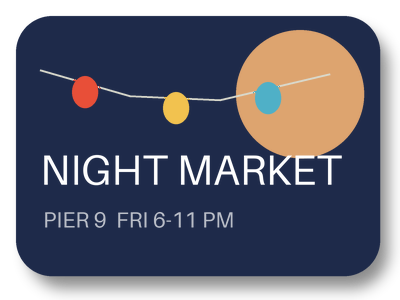
The sample, converted
The same file the code sends. Download the input and the output and compare them yourself.
- Input
- night-market-sticker.psd (173 KB)
- Output
- night-market-sticker.png (35 KB)
- Source
- A layered event sticker we drew for this site: 400 x 300 pixels, 8 bits per channel, transparent around the sticker, with seven layers including a soft shadow, a Screen-blended moon, a two-layer text group and a hidden draft stamp. Written as a PSD by our own script from the published file format specification. (CC0-1.0). How it was made
- Made by
- 2026-11-04, API build
9eeeb0640aba
Parameters
Send these as form fields next to the file. Names are case-insensitive. If you set one of the documented options below that we don't support yet, the request fails with a 400 that names it instead of returning a file made without it.
| Parameter | What it does |
|---|---|
ImageWidthinteger | Width of the PNG in pixels, with the height in proportion. ImageWidth=200 made the sticker 200 × 150 and 18,156 bytes. Layers are merged first, then the picture is scaled with a Lanczos3 filter.Values: 1–20000 |
ImageHeightinteger | Height in pixels. Sent together with ImageWidth, the two make a box the sticker is fitted into: 300 × 300 gave 300 × 225.Values: 1–20000 |
ScaleProportionsboolean, default true | false stretches the merged picture to the exact box, so 300 × 300 really came back 300 × 300 (32,563 bytes). Without a width or height it changes nothing. |
ScaleIfLargerboolean, default false | true only ever shrinks. With ImageWidth=800 the 400 px sticker stayed 400 × 300; without the flag it grew to 800 × 600 and 134,013 bytes. |
ScaleImageboolean, default true | false cuts instead of scaling: ImageWidth=200 with ImageHeight=100 kept the top-left 200 × 100 pixels of the canvas (4,398 bytes). |
ImageResolutioninteger | Writes a pHYs chunk with this many dots per inch. The sticker was saved at 300 ppi, yet the PNG records no resolution unless you ask; the sample sends 300.Values: 10–800 |
ColorSpaceenum, default default | gray writes an 8-bit gray PNG that keeps its alpha channel (17,316 bytes for the sticker). monochrome sets each pixel to black or white at level 128 (7,422 bytes).Values: default, rgb, gray, monochrome (also srgb, truecolors, grayscale); cmyk returns 400 |
TransparentColorstring | Every pixel of exactly this RGB value turns fully transparent. #1E2A4A, the sticker's navy, left 81,034 clear pixels instead of 10,195.Values: #RRGGBB, R,G,B or white, black, red, green, blue, gray |
FileNamestring | Base name of the result. night-market-sticker.psd returns night-market-sticker.png unless you set one; sticker-final gave sticker-final.png. |
StoreFileboolean, default false | true keeps the PNG on our side for 3 hours and puts a link in Files[].Url instead of FileData. |
What carries over, and what doesn't
Kept
- The visible layers, merged by the API: the sample's alpha matches the file's own merged image within 1 level, and its colors within 1.14 levels wherever the sticker is opaque
- Transparency as an 8-bit alpha channel: 10,195 fully clear pixels around the sticker and 18,056 partly clear ones, 13,953 in its soft shadow and 4,103 along the card's anti-aliased rim
- Blend modes, layer opacity, layer masks, clipping masks and group opacity, each checked on a small test file (gray 128 in Multiply over (200, 100, 50) gave (100, 50, 25))
- 16 bits per channel when the PSD has them: a 16-bit RGB test document came back as a 16-bit PNG
- Grayscale and 1-bit documents as 8-bit gray PNGs; indexed, CMYK and Lab documents as RGB
Lost or not yet supported
- Layers. One flat PNG comes back, so layer names, the Text group and the hidden Draft stamp are gone.
- The color profile. The sticker's sRGB profile is not copied, and a test PSD tagged Display P3 kept its stored numbers with no profile, so viewers that assume sRGB show it less saturated.
- The 300 ppi setting, unless you send
ImageResolution. The default PNG holds only the IHDR, IDAT and IEND chunks. - Saved selections in a flat PSD. With no layers in the file, the first extra channel is read as transparency: a test file with an all-black channel came back fully transparent.
Limits
- One PSD per request; a second file returns 400.
- Requests up to 10 MB on the Free plan or 100 MB on paid plans, all files and fields together.
- The flattened image may hold up to 100,000,000 pixels; a 10,001 × 10,000 document returned 413.
- Resize targets from 1 to 20,000 px per side.
- 120 seconds per conversion, then 504.
- Tested with files from our own PSD writer (pixel layers, masks, clipping, groups, blend modes). Type layers, smart objects, adjustment layers and layer effects are not tested yet.
Where teams use it
Previews in a design review
A designer uploads the layered master and the review thread shows a PNG of it, so reviewers need no image editor. Clear areas stay clear, which lets a sticker or logo sit on any page color.
Web assets generated from the source file
Keep the PSD as the one file people edit and produce the PNG your site serves each time it changes, at the width the layout needs with ImageWidth.
Thumbnails for an asset library
Asset managers that list PSD uploads need a picture for each card. One request per upload returns it, and layers someone switched off, such as a draft stamp, do not show up in it.
Questions
Does it use the merged image stored in the PSD, or the layers?
The layers. Our converter composites every visible layer itself. A test file whose stored merged image was green while its only layer was red came back red, and the sample still converted after we cut the file off before its merged image. A file saved without that merged image converts the same way.
Are hidden layers included in the PNG?
No. Layers switched off in the file stay out. The sample's hidden red DRAFT stamp does not appear, and in a test file a hidden red layer left the color under it untouched.
My PSD is 300 ppi. Why does the PNG show no DPI?
The document's resolution setting is not carried over. Send ImageResolution=300 and the PNG gets a pHYs chunk saying 300 dpi, as the sample does (35,449 bytes against 35,428 without it). The pixels are identical either way.
What happens to a CMYK PSD?
It comes back as RGB, because PNG cannot hold CMYK. A test file filled with 100% cyan ink and no profile became (0, 159, 228). Asking for ColorSpace=cmyk returns 400.
Can I get each layer as a separate PNG?
Not from this route. It always returns one merged PNG of the visible layers. Hide the layers you do not want before saving, or export the layers separately in your editor.
Convert your first PSD file in a minute.