PSD to PDF API
POST a .psd to /v2/convert/psd/to/pdf and get a one-page PDF back in the JSON. With no options the page is the size of the image at 96 pixels per inch: the 400 × 300 sticker gives a 300 × 225 pt page.
- Endpoint
- POST /v2/
convert/ psd/ to/ pdf - Accepts
- psd
- Sample timing
- 93 ms median of 5 runsHow we measure
- Request size
- Up to 10 MB on the Free plan or 100 MB on paid plans, all files together
Request and response
Every sample below ran against the API before this page was published. Set PDFCONVERSIONAPI_KEY to your key and run it as is.
curl -sS -X POST \
  https://api.pdfconversionapi.com/v2/convert/psd/to/pdf \
  -H "Authorization: Bearer $PDFCONVERSIONAPI_KEY" \
  -F File=@night-market-sticker.psd \
  -o response.json

# FileData is base64. Save the first file in converted/,
# or print the JSON error.
if jq -e '.Files' response.json > /dev/null; then
  mkdir -p converted
  name=$(jq -r '.Files[0].FileName' response.json)
  jq -r '.Files[0].FileData' response.json \
    | base64 --decode > "converted/$name"
else
  cat response.json
fi
import base64
import os
import requests
key = os.environ["PDFCONVERSIONAPI_KEY"]
response = requests.post(
"https://api.pdfconversionapi.com/v2/convert/psd/to/pdf",
headers={"Authorization": f"Bearer {key}"},
files=[("File", open("night-market-sticker.psd", "rb"))],
timeout=180,
)
result = response.json()
if not response.ok:
raise SystemExit(f"{result['Code']}: {result['Message']}")
os.makedirs("converted", exist_ok=True)
for file in result["Files"]:
path = os.path.join("converted", file["FileName"])
with open(path, "wb") as out:
out.write(base64.b64decode(file["FileData"]))
print(path, file["FileSize"], "bytes")
import { mkdir, readFile, writeFile } from "node:fs/promises";
import { join } from "node:path";

const form = new FormData();
const file = "night-market-sticker.psd";
form.append("File", new Blob([await readFile(file)]), file);

const url = "https://api.pdfconversionapi.com/v2/convert/psd/to/pdf";
const key = process.env.PDFCONVERSIONAPI_KEY;
const response = await fetch(url, {
  method: "POST",
  headers: { Authorization: `Bearer ${key}` },
  body: form,
});
const result = await response.json();
if (!response.ok) {
  throw new Error(`${result.Code}: ${result.Message}`);
}

await mkdir("converted", { recursive: true });
for (const file of result.Files) {
  const path = join("converted", file.FileName);
  await writeFile(path, Buffer.from(file.FileData, "base64"));
  console.log(path, file.FileSize, "bytes");
}
{
  "ConversionCost": 1,
  "ConversionTime": 0.093,
  "Files": [
    {
      "FileName": "night-market-sticker.pdf",
      "FileExt": "pdf",
      "FileSize": 24942,
      "FileData": "JVBERi0xLjcKJYCAgIAKMSAw…"
    }
  ]
}
Response from our test run on 2026-11-03. ConversionTime shows the median of 5 runs. FileData is shortened here; the real response carries the whole file as base64.
The sample, converted
The same file the code sends. Download the input and the output and compare them yourself.
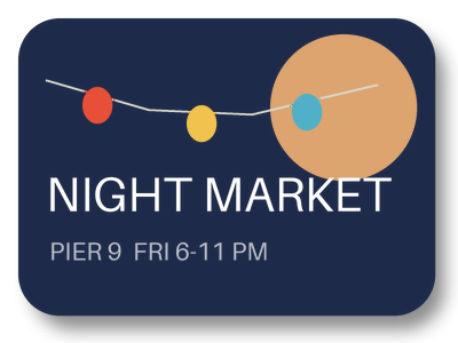
- Input
- night-market-sticker.psd (173 KB)
- Output
- night-market-sticker.pdf (24 KB)
- Source
- A layered event sticker we drew for this site: 400 x 300 pixels, 8 bits per channel, transparent around the sticker, with seven layers including a soft shadow, a Screen-blended moon, a two-layer text group and a hidden draft stamp. Written as a PSD by our own script from the published file format specification. (CC0-1.0). How it was made
- Made by
- 2026-11-04, API build
9eeeb0640aba
Parameters
Send these as form fields next to the file. Names are case-insensitive. If you set one of the documented options below that we don't support yet, the request fails with a 400 that names it instead of returning a file made without it.
| Parameter | What it does |
|---|---|
PageSizeenum, default default | A fixed sheet. The image is centered and never enlarged: on letter the sticker stays 300 × 225 pt in the middle of a 612 × 792 pt page. default and auto size the page to the image.Values: default, auto, a3, a4, a5, letter, legal |
PageOrientationenum, default default | Turns a fixed PageSize sideways: a4 with landscape gave an 841.89 × 595.28 pt page. Without PageSize it changes nothing.Values: default, portrait, landscape |
MarginHorizontalinteger, default 0 | Space left and right of the image. On an image-sized page the page grows: 10 mm made it 356.69 pt wide. On a fixed sheet, margins that leave no room return 400.Values: 0–500 (mm) |
MarginVerticalinteger, default 0 | Space above and below the image, with the same rules. a5 with 80 mm and 110 mm margins was refused: 'MarginHorizontal and MarginVertical leave no room for the image on the page'.Values: 0–500 (mm) |
Rotateinteger | Turns the image clockwise on its page. 90 gave a 225 × 300 pt page; 45 gave a 371.23 pt square that holds the tilted image.Values: -360–360 (degrees) |
FileNamestring | Base name of the PDF; otherwise night-market-sticker.pdf. |
StoreFileboolean, default false | true stores the PDF for 3 hours and answers with Files[].Url. |
Not supported yet
Setting one of these to anything but its default returns 400.
| Option | What to do instead |
|---|---|
ColorSpace | default and truecolors are accepted and give the same file as no value; gray, rgb or any other value returns 400 'ColorSpace is not supported yet for PSD → PDF'. |
Pdfa | Pdfa=true returns 400. The result is a plain PDF 1.7, not PDF/A. |
What carries over, and what doesn't
Kept
- Every pixel of the merged layers: the image is compressed without loss and decodes to exactly the PNG the API makes from the same PSD
- Transparency, as an 8-bit soft mask beside the RGB image, so the sticker's rounded corners and soft shadow stay see-through
- A non-sRGB color profile: a test PSD tagged Display P3 kept its 536-byte profile as an ICC-based color space
- Grayscale documents as a gray image (DeviceGray) rather than RGB
Lost or not yet supported
- The 300 ppi setting. Page size always assumes 96 pixels per inch, so the sticker's page is 4.17 inches wide instead of 1.33.
- Layers. The page holds one image, with no PDF layers and no selectable text.
- CMYK. A CMYK PSD is converted to RGB before it is embedded; 100% cyan became (0, 159, 228).
- Size on larger sheets. The image is never scaled up to fill
a4orletter.
Limits
- One PSD per request, one page out.
- Requests up to 10 MB on the Free plan or 100 MB on paid plans, all files and fields together.
- Up to 100,000,000 pixels after flattening; bigger documents return 413.
- Margins from 0 to 500 mm;
Rotatefrom -360 to 360. - 120 seconds per conversion, then 504.
- Our test PSDs hold pixel layers, masks, groups and blend modes; type layers, smart objects and layer effects are not tested yet.
Where teams use it
Proofs for client sign-off
Clients can open a PDF in any PDF viewer. Convert the current PSD on each revision and attach it to the approval request; layers switched off for the proof stay out.
Print vendor uploads
Print order forms that accept only PDF can take the artwork this way. Put it on a4 or letter with margins, or keep the page the size of the image when the printer places it.
Attaching designs to records
A one-page PDF fits ticketing, contract and invoicing systems that reject PSD attachments, and opens without an image editor.
Questions
Why is the page bigger than the print size in my PSD?
The page is sized at 96 pixels per inch and the PSD's own resolution is not used. The sample is 400 × 300 pixels at 300 ppi, which would print 1.33 inches wide, but its page is 300 × 225 pt (4.17 inches). Choose a PageSize if the printed size matters; the image is centered and not enlarged.
Is the image compressed with loss?
No. We decoded the image in the sample PDF and compared it with the PNG route's output for the same file: every color value and every alpha value matched.
Can I get PDF/A?
Not on this route yet. Pdfa=true returns 400 'Pdfa is not supported yet for PSD → PDF'. Convert the PDF with the PDF/A tool afterwards if you need it.
Do ImageWidth or ImageResolution change the PDF?
No. This route reads neither, and because ConvertAPI does not document them for PSD to PDF, they are ignored: both returned the same 300 × 225 pt page.
Convert your first PSD file in a minute.