PSB to PNG API
Send a .psb to /v2/convert/psb/to/png and the JSON carries back a single flattened PNG. Our 16-bit sample banner came out as a 16-bit RGB PNG whose values match the document's own merged image to within 1 step in 65,535.
- Endpoint
- POST /v2/
convert/ psb/ to/ png - Accepts
- psb
- Sample timing
- 89 ms median of 5 runsHow we measure
- Request size
- Up to 10 MB on the Free plan or 100 MB on paid plans, all files together
Request and response
Every sample below ran against the API before this page was published. Set PDFCONVERSIONAPI_KEY to your key and run it as is.
curl -sS -X POST \
  https://api.pdfconversionapi.com/v2/convert/psb/to/png \
  -H "Authorization: Bearer $PDFCONVERSIONAPI_KEY" \
  -F File=@ridge-loop-trail-banner.psb \
  -o response.json

# FileData is base64. Save the first file in converted/,
# or print the JSON error.
if jq -e '.Files' response.json > /dev/null; then
  mkdir -p converted
  name=$(jq -r '.Files[0].FileName' response.json)
  jq -r '.Files[0].FileData' response.json \
    | base64 --decode > "converted/$name"
else
  cat response.json
fi
import base64
import os
import requests
key = os.environ["PDFCONVERSIONAPI_KEY"]
response = requests.post(
"https://api.pdfconversionapi.com/v2/convert/psb/to/png",
headers={"Authorization": f"Bearer {key}"},
files=[("File", open("ridge-loop-trail-banner.psb", "rb"))],
timeout=180,
)
result = response.json()
if not response.ok:
raise SystemExit(f"{result['Code']}: {result['Message']}")
os.makedirs("converted", exist_ok=True)
for file in result["Files"]:
path = os.path.join("converted", file["FileName"])
with open(path, "wb") as out:
out.write(base64.b64decode(file["FileData"]))
print(path, file["FileSize"], "bytes")
import { mkdir, readFile, writeFile } from "node:fs/promises";
import { join } from "node:path";

const form = new FormData();
const file = "ridge-loop-trail-banner.psb";
form.append("File", new Blob([await readFile(file)]), file);

const url = "https://api.pdfconversionapi.com/v2/convert/psb/to/png";
const key = process.env.PDFCONVERSIONAPI_KEY;
const response = await fetch(url, {
  method: "POST",
  headers: { Authorization: `Bearer ${key}` },
  body: form,
});
const result = await response.json();
if (!response.ok) {
  throw new Error(`${result.Code}: ${result.Message}`);
}

await mkdir("converted", { recursive: true });
for (const file of result.Files) {
  const path = join("converted", file.FileName);
  await writeFile(path, Buffer.from(file.FileData, "base64"));
  console.log(path, file.FileSize, "bytes");
}
{
  "ConversionCost": 1,
  "ConversionTime": 0.089,
  "Files": [
    {
      "FileName": "ridge-loop-trail-banner.png",
      "FileExt": "png",
      "FileSize": 47095,
      "FileData": "iVBORw0KGgoAAAANSUhEUgAA…"
    }
  ]
}
Response from our test run on 2026-11-03. ConversionTime shows the median of 5 runs. FileData is shortened here; the real response carries the whole file as base64.
The sample, converted
The same file the code sends. Download the input and the output and compare them yourself.
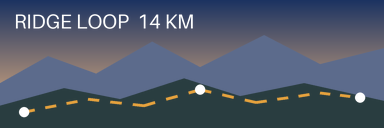
- Input
- ridge-loop-trail-banner.psb (171 KB)
- Output
- ridge-loop-trail-banner.png (46 KB)
- Source
- A layered trail-map banner we drew for this site: 384 x 128 pixels at 16 bits per channel on an opaque Background layer, with seven layers including a smooth sky gradient and a hidden old route. Written in the large document (PSB) format by our own script from the published file format specification. (CC0-1.0). How it was made
- Made by
- 2026-11-04, API build
9eeeb0640aba
Parameters
Send these as form fields next to the file. Names are case-insensitive. If you set one of the documented options below that we don't support yet, the request fails with a 400 that names it instead of returning a file made without it.
| Parameter | What it does |
|---|---|
ImageWidthinteger | Target width; the height keeps the banner's 3:1 shape. 192 gave a 192 × 64 PNG of 28,371 bytes that is still 16 bits per channel.Values: 1–20000 |
ImageHeightinteger | Target height. With a width too, the banner fits inside the box: 192 × 192 returned 192 × 64.Values: 1–20000 |
ScaleProportionsboolean, default true | Set false to force the exact box. 192 × 192 then squeezed the ridges into a 192 × 192 square (65,242 bytes). |
ScaleIfLargerboolean, default false | Makes the resize shrink-only: ImageWidth=1000 with it returned the 384 px original unchanged. |
ScaleImageboolean, default true | false crops from the top-left corner instead: 200 × 60 kept the label, the sky and the peaks of the far ridge. |
ImageResolutioninteger | Adds a pHYs chunk. The banner is set to 150 ppi, which the PNG only states when you send ImageResolution=150 (47,116 bytes).Values: 10–800 |
ColorSpaceenum, default default | gray gives an 8-bit gray PNG of 6,464 bytes and monochrome a black and white one of 1,383 bytes. Both drop the 16-bit depth.Values: default, rgb, gray, monochrome (also srgb, truecolors, grayscale); cmyk returns 400 |
TransparentColorstring | Pixels of exactly this color become transparent. #FFFFFF cleared 295 pixels in the label and markers, and the PNG became 8-bit RGBA (19,664 bytes).Values: #RRGGBB, R,G,B or a color name |
FileNamestring | Base name of the PNG. Left out, ridge-loop-trail-banner.psb comes back as ridge-loop-trail-banner.png. |
StoreFileboolean, default false | true returns a link valid for 3 hours in Files[].Url rather than base64 data. |
What carries over, and what doesn't
Kept
- 16 bits per channel: the sample PNG is 16-bit RGB and differs from the PSB's own merged image by at most 1 in 65,535
- The visible layer stack, redrawn by the API rather than copied from the merged image (a PSB cut off after its layer data still converted to the same PNG)
- Canvas sizes past the 30,000 px PSD limit: a 40,000 × 120 test PSB came back 40,000 px wide
- Opaque documents stay RGB with no alpha channel, as the sample does (color type 2)
- Masks, clipping, blend modes and group opacity, checked on separate test files in the PSD version of the format, which the same code reads
Lost or not yet supported
- Layers and their names. The hidden Old route layer is left out of the picture.
- The 150 ppi resolution, unless
ImageResolutionasks for it. - Depth, when you send
ColorSpace=grayormonochrome, or aTransparentColor: each turns the 16-bit result into an 8-bit PNG.rgbandtruecolorsreturn the same file as noColorSpace. - Embedded color profiles. Values are written as stored, with no ICC chunk.
Limits
- One PSB per request.
- Requests up to 10 MB on the Free plan or 100 MB on paid plans, all files and fields together.
- At most 100,000,000 pixels once flattened. A 10,001 × 10,000 PSB got 413 'the image is 10,001×10,000 pixels, above the limit of 100,000,000 pixels'.
- Resize targets from 1 to 20,000 px per side.
- 120 seconds per conversion, then 504.
- Our test documents come from our own writer: pixel layers in 8 and 16 bits, masks, groups and blend modes. Type layers, smart objects and layer effects are untested.
Where teams use it
Previews of oversized artwork
PSB is the format for documents that outgrow PSD, such as billboards, panoramas and trade show walls. Request a PNG with ImageWidth=2000 to show the whole layout in a browser or a ticket.
16-bit masters for grading
When a later step does color work, a 16-bit PNG keeps the smooth gradients of the master. The whole sample banner has 2,056 distinct 16-bit colors; the API's 8-bit outputs of it, such as the BMP or WebP, have 1,421.
Checking which layers ship
Render the PSB as people will see it: switched-off layers, like the sample's old route, stay out, so a PNG is a quick check before handing the file on.
Questions
Is the 16-bit depth of my PSB kept?
Yes, unless you ask for ColorSpace=gray or monochrome or set TransparentColor. The sample is a 16-bit PSB and the PNG's header says 16 bits per sample. Resizing with ImageWidth keeps 16 bits too. A 32-bit float test document came back as a 16-bit PNG.
Can I send a PSD to this endpoint, or a PSB to the PSD one?
Yes. The file's own header decides how it is read, not the URL. A version 1 PSD posted here and a version 2 PSB posted to /psd/to/png both converted to the same pixels.
My PSB is 60,000 px wide. Will it convert?
Only if the flattened image stays under 100,000,000 pixels; otherwise you get 413. A 40,000 × 120 test file (4.8 million pixels) converted. Note that ImageWidth is applied after flattening, so it does not get a larger file under the limit.
Does the PNG need the merged image stored in the file?
No. Our converter composites the layers itself. We cut the sample PSB off at 20,000 bytes, which removes the merged image but keeps all the layers, and the PNG came out byte for byte the same.
Convert your first PSB file in a minute.