XCF to PNG API
POST a GIMP .xcf file to /v2/convert/xcf/to/png and get a single flattened PNG back as base64 in the JSON. Visible layers are merged with their masks, groups, opacity and blend modes; a 16-bit or 32-bit float XCF comes back as a 16-bit PNG.
- Endpoint
- POST /v2/
convert/ xcf/ to/ png - Accepts
- xcf
- Sample timing
- 46 ms median of 5 runsHow we measure
- Request size
- Up to 10 MB on the Free plan or 100 MB on paid plans, all files together
Request and response
Every sample below ran against the API before this page was published. Set PDFCONVERSIONAPI_KEY to your key and run it as is.
curl -sS -X POST \
  https://api.pdfconversionapi.com/v2/convert/xcf/to/png \
  -H "Authorization: Bearer $PDFCONVERSIONAPI_KEY" \
  -F File=@gull-rock-lighthouse.xcf \
  -o response.json

# FileData is base64. Save the first file in converted/,
# or print the JSON error.
if jq -e '.Files' response.json > /dev/null; then
  mkdir -p converted
  name=$(jq -r '.Files[0].FileName' response.json)
  jq -r '.Files[0].FileData' response.json \
    | base64 --decode > "converted/$name"
else
  cat response.json
fi
import base64
import os
import requests
key = os.environ["PDFCONVERSIONAPI_KEY"]
response = requests.post(
"https://api.pdfconversionapi.com/v2/convert/xcf/to/png",
headers={"Authorization": f"Bearer {key}"},
files=[("File", open("gull-rock-lighthouse.xcf", "rb"))],
timeout=180,
)
result = response.json()
if not response.ok:
raise SystemExit(f"{result['Code']}: {result['Message']}")
os.makedirs("converted", exist_ok=True)
for file in result["Files"]:
path = os.path.join("converted", file["FileName"])
with open(path, "wb") as out:
out.write(base64.b64decode(file["FileData"]))
print(path, file["FileSize"], "bytes")
import { mkdir, readFile, writeFile } from "node:fs/promises";
import { join } from "node:path";

const form = new FormData();
const file = "gull-rock-lighthouse.xcf";
form.append("File", new Blob([await readFile(file)]), file);

const url = "https://api.pdfconversionapi.com/v2/convert/xcf/to/png";
const key = process.env.PDFCONVERSIONAPI_KEY;
const response = await fetch(url, {
  method: "POST",
  headers: { Authorization: `Bearer ${key}` },
  body: form,
});
const result = await response.json();
if (!response.ok) {
  throw new Error(`${result.Code}: ${result.Message}`);
}

await mkdir("converted", { recursive: true });
for (const file of result.Files) {
  const path = join("converted", file.FileName);
  await writeFile(path, Buffer.from(file.FileData, "base64"));
  console.log(path, file.FileSize, "bytes");
}
{
  "ConversionCost": 1,
  "ConversionTime": 0.046,
  "Files": [
    {
      "FileName": "gull-rock-lighthouse.png",
      "FileExt": "png",
      "FileSize": 31750,
      "FileData": "iVBORw0KGgoAAAANSUhEUgAA…"
    }
  ]
}
Response from our test run on 2026-11-03. ConversionTime shows the median of 5 runs. FileData is shortened here; the real response carries the whole file as base64.
The sample, converted
The same file the code sends. Download the input and the output and compare them yourself.
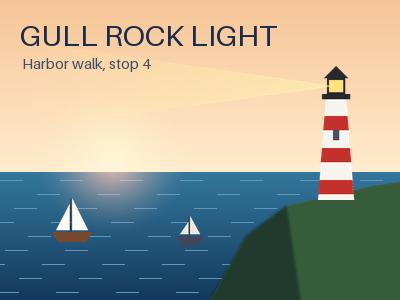
- Input
- gull-rock-lighthouse.xcf (203 KB)
- Output
- gull-rock-lighthouse.png (31 KB)
- Source
- A 400 x 300 harbor poster we drew and wrote as a layered XCF file ourselves: 11 layers, including a two-layer group, a layer mask, Multiply and Screen modes and a hidden guide layer. (CC0-1.0). How it was made
- Made by
- 2026-11-04, API build
9eeeb0640aba
Parameters
Send these as form fields next to the file. Names are case-insensitive. If you set one of the documented options below that we don't support yet, the request fails with a 400 that names it instead of returning a file made without it.
| Parameter | What it does |
|---|---|
ImageWidthinteger | Width of the PNG in pixels; the height follows the canvas. ImageWidth=200 turned the 400 × 300 poster into a 200 × 150 PNG of 18,948 bytes. Scaling runs after the layers are merged, with a Lanczos3 filter.Values: 1–20000 |
ImageHeightinteger | Height in pixels. Sent with ImageWidth, the pair is a box the flattened canvas is fitted into: 300 × 300 gave 300 × 225.Values: 1–20000 |
ScaleProportionsboolean, default true | false stretches the merged image to exactly ImageWidth × ImageHeight (300 × 300 in our test). Without a width or height it is accepted and does nothing. |
ScaleIfLargerboolean, default false | true makes the resize shrink-only. ImageWidth=800 with it returned the 400 px poster as the same 31,750-byte PNG; without it the PNG was 800 × 600. |
ScaleImageboolean, default true | false crops instead of scaling. ImageWidth=200 and ImageHeight=100 kept the top-left 200 × 100 pixels of the canvas, where the title sits. |
ColorSpaceenum, default default | gray writes an 8-bit grayscale PNG (12,119 bytes for the poster); monochrome sets every pixel to black or white at level 128 (2,648 bytes).Values: default, rgb, gray, monochrome (also srgb, truecolors, grayscale); cmyk returns 400 |
ImageResolutioninteger | Adds a pHYs chunk with this DPI. The sample XCF is set to 150 ppi, yet the PNG records no resolution unless you send ImageResolution=150.Values: 10–800 |
TransparentColorstring | Pixels of exactly this color become fully transparent and the PNG becomes RGBA. #FFFFFF cleared the poster's 87 pure white pixels.Values: #RRGGBB, R,G,B or white, black, red, green, blue, gray |
FileNamestring | Base name of the result. Without it, gull-rock-lighthouse.xcf comes back as gull-rock-lighthouse.png. |
StoreFileboolean, default false | true keeps the PNG for 3 hours and returns a link in Files[].Url instead of base64 FileData. |
What carries over, and what doesn't
Kept
- The merged look of the layer stack: our own composite of the poster's 11 layers matched the PNG within 1 level on all 120,000 pixels
- Layer offsets, masks and groups: the 60 × 136 lighthouse layer lands at its stored position, the light beam fades through its mask and both boats come from one layer group
- Normal, Multiply, Screen, Difference and legacy Multiply modes, plus pass-through groups, blended on the stored values
- Bit depth: a 16-bit XCF gave a 16-bit PNG with exact values, and a 32-bit float XCF also gave 16 bits
- Grayscale XCF files stay grayscale; an RGB canvas gives RGB, and RGBA only when some pixel is transparent
Lost or not yet supported
- Layers. The PNG is one flat image: layer names, the group and the hidden guide grid are gone.
- The 150 ppi stored in the XCF. Send
ImageResolutionif the PNG needs a DPI value. - Embedded color profiles. A test XCF with a Display P3 profile gave a PNG with no ICC chunk and unchanged values.
- Linear-light XCF files are not converted to sRGB: a 32-bit linear value of 0.5 was written as 32768 of 65535, so mid-tones come out darker.
- Per-layer blend and composite space settings: setting a layer to linear light changed no pixel.
- The palette of an indexed XCF. It is written as an RGB PNG.
Limits
- One XCF per request. The canvas may hold up to 67,108,864 pixels (8,192 × 8,192), so 16,384 × 4,096 converts. An 8,193 × 8,192 canvas got 413 'XCF images can be at most 67,108,864 pixels, and this one's canvas is larger'.
- Requests up to 10 MB on the Free plan or 100 MB on paid plans, all files and fields together.
- 120 seconds per conversion, then 504.
- Resize targets from 1 to 20,000 px per side.
- Our test files come from our own XCF writer (format versions 0, 3 and 11 to 15; RLE, zlib or no compression). Files saved by GIMP itself, including GIMP 3, are not tested yet.
Where teams use it
Previews for layered masters
Teams that keep GIMP masters in a shared folder or a Git repository can render a PNG beside each .xcf when it changes, so reviewers see the artwork in a browser or a pull request without opening GIMP.
Export in a build step
Game, app and documentation projects often store .xcf sources for icons and screenshots. One request per file at build time replaces the manual File, Export As step, and hidden guide layers stay out of the shipped image.
High bit depth edits
Photos edited in GIMP at 16-bit or 32-bit float come back as a 16-bit PNG, so smooth gradients are not cut to 8 bits before your next processing step.
Questions
Are hidden layers included in the PNG?
No. Only visible layers are merged. The sample's top layer is a magenta guide grid switched off in the file, and the PNG has no magenta pixel. A hidden layer group is left out together with its children.
Does the PNG keep 16-bit color?
Yes. A 16-bit XCF came back as a 16-bit RGB PNG with every value exact: a ramp step of 1040 out of 65535 stayed 1040. A 32-bit float XCF is written as 16-bit too, the deepest a PNG can hold.
Can I get each layer as its own PNG?
Not today. The route returns one flattened PNG per request and has no option to pick a layer. Hide the layers you don't want in GIMP and save, or split them into separate files first.
Will the result match GIMP's own export?
Normal layers, masks, groups and the common modes matched our own reference composite within 1 level. Two differences we found: layers are blended on the stored values even when the file asks for linear-light blending, and linear-precision images are not converted to sRGB. We have not compared against GIMP itself yet.
Does ConvertAPI convert XCF to PNG?
Its public service catalogue, as we fetched it on 2026-11-01, has no XCF input. Our route takes the same multipart File field and returns the same Files[] JSON as ConvertAPI-style image conversions.
Convert your first XCF file in a minute.