PDN to PNG API
POST a Paint.NET file to /v2/convert/pdn/to/png and get one PNG of the visible layers, as base64 in the JSON. Blend modes and layer opacity are applied the way Paint.NET defines them, and clear parts of the canvas stay clear in an RGBA PNG.
- Endpoint
- POST /v2/
convert/ pdn/ to/ png - Accepts
- pdn
- Sample timing
- 24 ms median of 5 runsHow we measure
- Request size
- Up to 10 MB on the Free plan or 100 MB on paid plans, all files together
Request and response
Every sample below ran against the API before this page was published. Set PDFCONVERSIONAPI_KEY to your key and run it as is.
curl -sS -X POST \
  https://api.pdfconversionapi.com/v2/convert/pdn/to/png \
  -H "Authorization: Bearer $PDFCONVERSIONAPI_KEY" \
  -F File=@lemonade-stand-sign.pdn \
  -o response.json

# FileData is base64. Save the first file in converted/,
# or print the JSON error.
if jq -e '.Files' response.json > /dev/null; then
  mkdir -p converted
  name=$(jq -r '.Files[0].FileName' response.json)
  jq -r '.Files[0].FileData' response.json \
    | base64 --decode > "converted/$name"
else
  cat response.json
fi
import base64
import os
import requests
key = os.environ["PDFCONVERSIONAPI_KEY"]
response = requests.post(
"https://api.pdfconversionapi.com/v2/convert/pdn/to/png",
headers={"Authorization": f"Bearer {key}"},
files=[("File", open("lemonade-stand-sign.pdn", "rb"))],
timeout=180,
)
result = response.json()
if not response.ok:
raise SystemExit(f"{result['Code']}: {result['Message']}")
os.makedirs("converted", exist_ok=True)
for file in result["Files"]:
path = os.path.join("converted", file["FileName"])
with open(path, "wb") as out:
out.write(base64.b64decode(file["FileData"]))
print(path, file["FileSize"], "bytes")
import { mkdir, readFile, writeFile } from "node:fs/promises";
import { join } from "node:path";

const form = new FormData();
const file = "lemonade-stand-sign.pdn";
form.append("File", new Blob([await readFile(file)]), file);

const url = "https://api.pdfconversionapi.com/v2/convert/pdn/to/png";
const key = process.env.PDFCONVERSIONAPI_KEY;
const response = await fetch(url, {
  method: "POST",
  headers: { Authorization: `Bearer ${key}` },
  body: form,
});
const result = await response.json();
if (!response.ok) {
  throw new Error(`${result.Code}: ${result.Message}`);
}

await mkdir("converted", { recursive: true });
for (const file of result.Files) {
  const path = join("converted", file.FileName);
  await writeFile(path, Buffer.from(file.FileData, "base64"));
  console.log(path, file.FileSize, "bytes");
}
{
  "ConversionCost": 1,
  "ConversionTime": 0.024,
  "Files": [
    {
      "FileName": "lemonade-stand-sign.png",
      "FileExt": "png",
      "FileSize": 72204,
      "FileData": "iVBORw0KGgoAAAANSUhEUgAA…"
    }
  ]
}
Response from our test run on 2026-11-03. ConversionTime shows the median of 5 runs. FileData is shortened here; the real response carries the whole file as base64.
The sample, converted
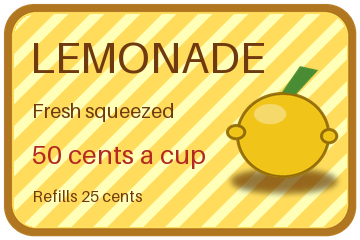
The same file the code sends. Download the input and the output and compare them yourself.
- Input
- lemonade-stand-sign.pdn (87 KB)
- Output
- lemonade-stand-sign.png (71 KB)
- Source
- A 360 x 240 price sign with rounded transparent corners that we drew and wrote as a layered PDN file ourselves: seven layers, including Overlay and Multiply blend modes, a semi-transparent shine and a hidden draft layer. (CC0-1.0). How it was made
- Made by
- 2026-11-04, API build
9eeeb0640aba
Parameters
Send these as form fields next to the file. Names are case-insensitive. If you set one of the documented options below that we don't support yet, the request fails with a 400 that names it instead of returning a file made without it.
| Parameter | What it does |
|---|---|
ImageWidthinteger | Width in pixels, applied after the layers are merged; the height keeps the 3:2 shape. ImageWidth=180 gave a 180 × 120 PNG of 35,546 bytes.Values: 1–20000 |
ImageHeightinteger | Height in pixels. ImageHeight=120 alone gave the same 180 × 120 file; sent with a width, the pair is a box, so 240 × 240 returned 240 × 160.Values: 1–20000 |
ScaleProportionsboolean, default true | false fills the ImageWidth × ImageHeight box exactly: the sign was stretched to 240 × 240 (64,823 bytes). |
ScaleIfLargerboolean, default false | true stops upscaling. With it, ImageWidth=720 returned the default 360 × 240 PNG byte for byte; without it, a 720 × 480 one. |
ScaleImageboolean, default true | false cuts instead of scaling: a 180 × 90 request kept the top-left corner with the rounded edge and the letters LEMON. |
ColorSpaceenum, default default | gray writes gray plus alpha (33,220 bytes) and monochrome black or white plus alpha (5,498 bytes); the clear corners survive both.Values: default, rgb, gray, monochrome (also srgb, truecolors, grayscale); cmyk returns 400 |
ImageResolutioninteger | Adds a pHYs chunk with this DPI (300 gave 72,225 bytes). Without it the PNG holds only IHDR, IDAT and IEND.Values: 10–800 |
TransparentColorstring | Clears every pixel of one exact color. #FFDC5C, the board's flat yellow, cleared 26,874 pixels and left the stripes, lettering and lemon.Values: #RRGGBB, R,G,B or white, black, red, green, blue, gray |
FileNamestring | Base name of the PNG: FileName=lemonade-sign returns lemonade-sign.png instead of lemonade-stand-sign.png. |
StoreFileboolean, default false | true keeps the PNG for 3 hours and answers with Files[].Url in place of base64 FileData. |
What carries over, and what doesn't
Kept
- The picture of the visible layers, exactly: our own composite of the sign's six visible layers matched the PNG on all 86,400 pixels, alpha included
- Blend modes: the stripes' Overlay and the shadow's Multiply in the sample, and in our tests all 14 Paint.NET modes from Additive to Xor
- Layer opacity, which Paint.NET stores from 0 to 255: the shine layer at 90 shows as a soft highlight on the lemon
- Transparency with soft edges: 3,311 fully clear and 3,866 partly clear pixels around the board, the same as in the merged layers
- 8 bits per channel, as Paint.NET stores it; a PDN with no clear pixel comes back as RGB without an alpha channel
Lost or not yet supported
- Layers and layer names. The PNG is one flat image.
- Hidden layers. The sign's switched-off draft price, a red 75? crossed out, does not appear.
- Any DPI. The PNG carries none unless you send
ImageResolution.
Limits
- One PDN per request. The merged canvas may have up to 100,000,000 pixels: 10,000 × 10,000 converted, 10,001 × 10,000 got 413.
- Requests up to 10 MB on the Free plan or 100 MB on paid plans, all files and fields together.
- 120 seconds per conversion, then 504.
- Resize targets from 1 to 20,000 px per side.
- We test with PDN3 files from our own writer, with gzip or raw pixel blocks. Files saved by Paint.NET itself are not tested yet.
Where teams use it
Showing Paint.NET work outside Paint.NET
Paint.NET is a Windows program, and browsers, chat apps and issue trackers do not display .pdn files. A PNG of the merged layers can go into a ticket or a web page while the .pdn stays the editable source.
Transparent web graphics
Badges, stickers and signs drawn on a clear canvas keep their alpha, soft edges included, so the PNG sits on any page color without a box around it.
Exporting a folder in a script
A build or publishing script can send each .pdn in a folder and save the PNG it gets back, instead of someone opening every file in Paint.NET to save a copy.
Questions
Do blend modes come out as in Paint.NET?
They follow Paint.NET's formulas. We put one color over another in each of the 14 modes and every result was within half a level of the formula; Overlay, for example, gave (171, 125, 86). We have not compared against an export from Paint.NET itself.
Which Paint.NET versions can I send?
The route reads the PDN3 layout. Our test files, with Paint.NET 3.36, 4.3 and 5.0 written as the saving version, all converted with the same pixels. Files saved by Paint.NET itself have not been tested yet.
Is the preview stored in the .pdn used?
No. Paint.NET keeps a small thumbnail in the file header, but the API merges the layers instead. A test file with a solid green thumbnail over an orange layer came back orange.
What if the file is not a real PDN?
A file without the PDN3 signature, such as a PNG renamed to .pdn or a text file, gets 422 'the input file could not be read: it is not a PDN file, or one from a version that can't be read yet'. A file cut short, or an empty one, gets 422 'the input file could not be read: truncated document'.
Does ConvertAPI convert PDN to PNG?
Not as of 2026-11-01: no service in ConvertAPI's catalogue takes .pdn files. Requests here use the field names ConvertAPI clients already send, File in and Files[] out.
Convert your first PDN file in a minute.