PDN to TIFF API
POST a .pdn to /v2/convert/pdn/to/tiff and get one uncompressed TIFF of the merged layers. A canvas with clear parts, like the sample sign, gives four 8-bit samples per pixel: red, green, blue and alpha.
- Endpoint
- POST /v2/
convert/ pdn/ to/ tiff - Accepts
- pdn
- Sample timing
- 22 ms median of 5 runsHow we measure
- Request size
- Up to 10 MB on the Free plan or 100 MB on paid plans, all files together
Request and response
Every sample below ran against the API before this page was published. Set PDFCONVERSIONAPI_KEY to your key and run it as is.
curl -sS -X POST \
  https://api.pdfconversionapi.com/v2/convert/pdn/to/tiff \
  -H "Authorization: Bearer $PDFCONVERSIONAPI_KEY" \
  -F File=@lemonade-stand-sign.pdn \
  -o response.json

# FileData is base64. Save the first file in converted/,
# or print the JSON error.
if jq -e '.Files' response.json > /dev/null; then
  mkdir -p converted
  name=$(jq -r '.Files[0].FileName' response.json)
  jq -r '.Files[0].FileData' response.json \
    | base64 --decode > "converted/$name"
else
  cat response.json
fi
import base64
import os
import requests
key = os.environ["PDFCONVERSIONAPI_KEY"]
response = requests.post(
"https://api.pdfconversionapi.com/v2/convert/pdn/to/tiff",
headers={"Authorization": f"Bearer {key}"},
files=[("File", open("lemonade-stand-sign.pdn", "rb"))],
timeout=180,
)
result = response.json()
if not response.ok:
raise SystemExit(f"{result['Code']}: {result['Message']}")
os.makedirs("converted", exist_ok=True)
for file in result["Files"]:
path = os.path.join("converted", file["FileName"])
with open(path, "wb") as out:
out.write(base64.b64decode(file["FileData"]))
print(path, file["FileSize"], "bytes")
import { mkdir, readFile, writeFile } from "node:fs/promises";
import { join } from "node:path";

const form = new FormData();
const file = "lemonade-stand-sign.pdn";
form.append("File", new Blob([await readFile(file)]), file);

const url = "https://api.pdfconversionapi.com/v2/convert/pdn/to/tiff";
const key = process.env.PDFCONVERSIONAPI_KEY;
const response = await fetch(url, {
  method: "POST",
  headers: { Authorization: `Bearer ${key}` },
  body: form,
});
const result = await response.json();
if (!response.ok) {
  throw new Error(`${result.Code}: ${result.Message}`);
}

await mkdir("converted", { recursive: true });
for (const file of result.Files) {
  const path = join("converted", file.FileName);
  await writeFile(path, Buffer.from(file.FileData, "base64"));
  console.log(path, file.FileSize, "bytes");
}
{
  "ConversionCost": 1,
  "ConversionTime": 0.022,
  "Files": [
    {
      "FileName": "lemonade-stand-sign.tiff",
      "FileExt": "tiff",
      "FileSize": 345814,
      "FileData": "SUkqAChGBQABAAAAAQAAAAEA…"
    }
  ]
}
Response from our test run on 2026-11-03. ConversionTime shows the median of 5 runs. FileData is shortened here; the real response carries the whole file as base64.
The sample, converted
The same file the code sends. Download the input and the output and compare them yourself.
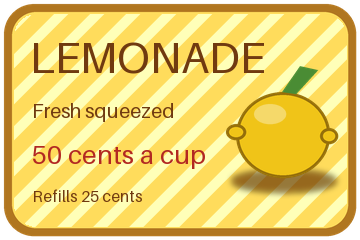
- Input
- lemonade-stand-sign.pdn (87 KB)
- Output
- lemonade-stand-sign.tiff (338 KB)
- Source
- A 360 x 240 price sign with rounded transparent corners that we drew and wrote as a layered PDN file ourselves: seven layers, including Overlay and Multiply blend modes, a semi-transparent shine and a hidden draft layer. (CC0-1.0). How it was made
- Made by
- 2026-11-04, API build
9eeeb0640aba
Parameters
Send these as form fields next to the file. Names are case-insensitive. If you set one of the documented options below that we don't support yet, the request fails with a 400 that names it instead of returning a file made without it.
| Parameter | What it does |
|---|---|
ImageResolutioninteger | Writes XResolution and YResolution with the unit set to inches; 300 gave 300 dpi. Left out, the TIFF says 1 with no unit.Values: 10–800 |
ImageWidthinteger | Width in pixels: 180 gave a 180 × 120 TIFF of 86,614 bytes.Values: 1–20000 |
ImageHeightinteger | Height in pixels; with a width, the box the 3:2 sign must fit.Values: 1–20000 |
ScaleProportionsboolean, default true | false makes the TIFF exactly ImageWidth × ImageHeight: 230,614 bytes at 240 × 240. |
ScaleIfLargerboolean, default false | true refuses to enlarge; a 720 px request kept the 360 px sign. |
ScaleImageboolean, default true | false crops from the top-left corner: 65,014 bytes for 180 × 90. |
ColorSpaceenum, default default | On an opaque canvas, gray and monochrome write a one-channel 8-bit TIFF. On the sample, which has clear corners, the TIFF stays RGBA at 345,814 bytes, with equal red, green and blue values and the 3,311 clear pixels kept.Values: default, rgb, gray, monochrome (also srgb, truecolors, grayscale); cmyk returns 400 |
TransparentColorstring | Clears one exact color: #FFDC5C removed the board's flat yellow and left 30,185 clear pixels, with the stripes, lettering and lemon kept.Values: #RRGGBB, R,G,B or white, black, red, green, blue, gray |
FileNamestring | Base name of the result; without it the file comes back as lemonade-stand-sign.tiff. |
StoreFileboolean, default false | true returns a 3-hour link instead of base64 data. |
What carries over, and what doesn't
Kept
- Every merged pixel and the alpha: decoded, the TIFF equals the PNG route's output on all 86,400 pixels
- Transparency as a fourth sample; the three readers we tried showed the corners clear
- Opaque canvases as plain RGB, and the print DPI you send
Lost or not yet supported
- Compression. The pixels sit raw in one strip: 345,814 bytes for 360 × 240 × 4 samples.
- Layers and hidden layers.
- A smaller gray file for canvases with transparency:
ColorSpace=graykeeps four samples per pixel there, so the sign stays 345,814 bytes.
Limits
- One PDN per request; merged canvas up to 100,000,000 pixels.
- Requests up to 10 MB on the Free plan or 100 MB on paid plans, all files and fields together.
- 120 seconds per conversion, then 504.
ImageResolutionfrom 10 to 800.
Where teams use it
Print and layout handoff
Print services and layout programs commonly take TIFF. A sign or flyer from Paint.NET sent with ImageResolution=300 comes back flat and tagged for print.
Flat archive copies with alpha
A TIFF beside each .pdn keeps the exact merged pixels, transparency included, in a file that does not need Paint.NET to open.
Questions
Does the TIFF keep the transparent background?
Yes. It stores four samples per pixel and the corners have alpha 0. The tag that labels the fourth sample as alpha (ExtraSamples) is not written, but the three readers we tried treated it as alpha anyway.
Is the TIFF compressed?
No. The pixels are one raw strip: 360 × 240 × 4 = 345,600 bytes, plus 214 bytes of header and tags. There is no LZW or ZIP option on this route yet.
Why is my gray TIFF still RGBA?
Because the canvas has transparent pixels. Gray keeps the alpha, and the route writes gray with alpha as RGBA with equal red, green and blue values: the sign came back at 345,814 bytes with its rounded corners still clear. A fully opaque canvas gives a one-channel gray TIFF.
Convert your first PDN file in a minute.