PSD to TIFF API
POST a .psd to /v2/convert/psd/to/tiff and get a flat, uncompressed TIFF back as base64. The sample adds ImageResolution=300 so the TIFF says 300 dpi like the PSD; without it the resolution fields read 1/1 with no unit.
- Endpoint
- POST /v2/
convert/ psd/ to/ tiff - Accepts
- psd
- Sample timing
- 86 ms median of 5 runsHow we measure
- Request size
- Up to 10 MB on the Free plan or 100 MB on paid plans, all files together
Request and response
Every sample below ran against the API before this page was published. Set PDFCONVERSIONAPI_KEY to your key and run it as is.
curl -sS -X POST \
  https://api.pdfconversionapi.com/v2/convert/psd/to/tiff \
  -H "Authorization: Bearer $PDFCONVERSIONAPI_KEY" \
  -F File=@night-market-sticker.psd \
  --form-string ImageResolution=300 \
  -o response.json

# FileData is base64. Save the first file in converted/,
# or print the JSON error.
if jq -e '.Files' response.json > /dev/null; then
  mkdir -p converted
  name=$(jq -r '.Files[0].FileName' response.json)
  jq -r '.Files[0].FileData' response.json \
    | base64 --decode > "converted/$name"
else
  cat response.json
fi
import base64
import os
import requests
key = os.environ["PDFCONVERSIONAPI_KEY"]
response = requests.post(
"https://api.pdfconversionapi.com/v2/convert/psd/to/tiff",
headers={"Authorization": f"Bearer {key}"},
files=[("File", open("night-market-sticker.psd", "rb"))],
data={
"ImageResolution": "300",
},
timeout=180,
)
result = response.json()
if not response.ok:
raise SystemExit(f"{result['Code']}: {result['Message']}")
os.makedirs("converted", exist_ok=True)
for file in result["Files"]:
path = os.path.join("converted", file["FileName"])
with open(path, "wb") as out:
out.write(base64.b64decode(file["FileData"]))
print(path, file["FileSize"], "bytes")
import { mkdir, readFile, writeFile } from "node:fs/promises";
import { join } from "node:path";

const form = new FormData();
const file = "night-market-sticker.psd";
form.append("File", new Blob([await readFile(file)]), file);
form.append("ImageResolution", "300");

const url = "https://api.pdfconversionapi.com/v2/convert/psd/to/tiff";
const key = process.env.PDFCONVERSIONAPI_KEY;
const response = await fetch(url, {
  method: "POST",
  headers: { Authorization: `Bearer ${key}` },
  body: form,
});
const result = await response.json();
if (!response.ok) {
  throw new Error(`${result.Code}: ${result.Message}`);
}

await mkdir("converted", { recursive: true });
for (const file of result.Files) {
  const path = join("converted", file.FileName);
  await writeFile(path, Buffer.from(file.FileData, "base64"));
  console.log(path, file.FileSize, "bytes");
}
{
  "ConversionCost": 1,
  "ConversionTime": 0.086,
  "Files": [
    {
      "FileName": "night-market-sticker.tiff",
      "FileExt": "tiff",
      "FileSize": 480214,
      "FileData": "SUkqAChTBwAsAQAAAQAAACwB…"
    }
  ]
}
Response from our test run on 2026-11-03. ConversionTime shows the median of 5 runs. FileData is shortened here; the real response carries the whole file as base64.
The sample, converted
The same file the code sends. Download the input and the output and compare them yourself.
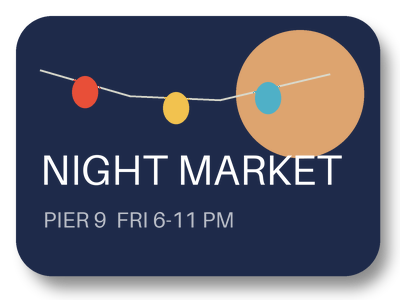
- Input
- night-market-sticker.psd (173 KB)
- Output
- night-market-sticker.tiff (469 KB)
- Source
- A layered event sticker we drew for this site: 400 x 300 pixels, 8 bits per channel, transparent around the sticker, with seven layers including a soft shadow, a Screen-blended moon, a two-layer text group and a hidden draft stamp. Written as a PSD by our own script from the published file format specification. (CC0-1.0). How it was made
- Made by
- 2026-11-04, API build
9eeeb0640aba
Parameters
Send these as form fields next to the file. Names are case-insensitive. If you set one of the documented options below that we don't support yet, the request fails with a 400 that names it instead of returning a file made without it.
| Parameter | What it does |
|---|---|
ImageResolutioninteger | Sets XResolution and YResolution in dots per inch. The PSD's own 300 ppi is not copied, so the sample sends it; the file size stays 480,214 bytes.Values: 10–800 |
ImageWidthinteger | Target width in pixels after the layers are merged; the height follows the 4:3 canvas.Values: 1–20000 |
ImageHeightinteger | Target height. Combined with ImageWidth it is a bounding box.Values: 1–20000 |
ScaleProportionsboolean, default true | false fills the exact width and height, distorting if needed. |
ScaleIfLargerboolean, default false | true refuses to scale the canvas up, so small requests are the only ones applied. |
ScaleImageboolean, default true | false crops from the top-left corner to the requested size. |
TransparentColorstring | Makes one exact color transparent in the alpha channel; #1E2A4A cleared 81,034 pixels of the sticker.Values: #RRGGBB, R,G,B or a color name |
ColorSpaceenum, default default | gray writes an 8-bit one-channel TIFF for an opaque PSD. On a PSD with transparency, such as the sample, gray and monochrome keep the alpha: the TIFF stays four 8-bit channels (480,214 bytes) with R, G and B equal, and monochrome leaves only black and white.Values: default, rgb, gray, monochrome; cmyk returns 400 |
MultiPageboolean, default true | Accepted for ConvertAPI compatibility. A PSD always gives one page, so false returns the same file. |
FileNamestring | Base name of the TIFF (default night-market-sticker.tiff). |
StoreFileboolean, default false | true returns a 3-hour link in Files[].Url instead of the data. |
Not supported yet
Setting one of these to anything but its default returns 400.
| Option | What to do instead |
|---|---|
ImageQuality | The TIFF is uncompressed, so there is nothing to tune. ConvertAPI's default 75 passes; any other value returns 400 'ImageQuality is not supported yet for PSD → TIFF'. |
What carries over, and what doesn't
Kept
- The merged image without any loss: color and alpha decode to exactly what the PNG route gives for the same PSD
- Transparency, as a fourth 8-bit channel; three readers we tried all showed the sticker's corners as clear
- 16 bits per channel when the PSD has them: a 16-bit test document gave a TIFF with 16, 16, 16 bits per sample
- Grayscale PSDs as one-channel TIFFs
Lost or not yet supported
- Compression. The TIFF is stored raw: 480,214 bytes for 400 × 300 pixels, where the PSD itself was 177,604.
- Layers. This route writes one flat page; the layer data an editor can keep inside a TIFF is not written.
- The color profile, and CMYK: a CMYK PSD comes back as an RGB TIFF.
- A label on the alpha channel. The file has four samples per pixel but no ExtraSamples tag saying the fourth is alpha; the readers we tried guessed it correctly.
Limits
- One PSD per request, one page out.
- Requests up to 10 MB on the Free plan or 100 MB on paid plans, all files and fields together.
- Up to 100,000,000 pixels after flattening; above that, 413.
- Resize targets from 1 to 20,000 px per side.
- 120 seconds per conversion, then 504.
- Pixel layers, masks, groups and blend modes are tested; type layers, smart objects and layer effects are not yet.
Where teams use it
Handing artwork to print and layout tools
Page layout and prepress tools that place TIFF can take the flattened design directly. Send ImageResolution with the print resolution, because the PSD's own setting does not carry over.
Flat archive copies next to the layered master
Keep the PSD for editing and store a flattened TIFF that needs no layer support to open. The pixels are exact: no compression is applied.
Questions
Can I get an LZW or ZIP compressed TIFF?
Not yet. The route always writes uncompressed strips, which is why the sample is 480,214 bytes. ImageQuality is refused rather than ignored, so you know no compression setting was applied.
What does ColorSpace=gray do to a transparent PSD?
It keeps the transparency. The TIFF is still RGBA with 8 bits per sample, but every pixel has equal R, G and B: the sticker came back with 252 gray levels and its 10,195 clear pixels still clear. An opaque PSD gets a one-channel 8-bit gray TIFF instead.
Will the TIFF open with transparency?
In our tests, yes: three different readers showed the 10,195 clear pixels as transparent. The fourth channel carries no ExtraSamples tag, though, so test the reader your pipeline uses.
Does the TIFF keep the PSD's layers?
No. You get one flattened image. Layers switched off in the PSD are not in it.
Convert your first PSD file in a minute.