PNG to WebP API
POST a PNG to /v2/convert/png/to/webp and get a lossless WebP (VP8L) with the alpha channel intact. Every RGBA value of the sample survived. Size is the trade-off: our encoder made 46,272 bytes from the 40,051-byte PNG.
- Endpoint
- POST /v2/
convert/ png/ to/ webp - Accepts
- png
- Sample timing
- 1 ms median of 5 runsHow we measure
- Request size
- Up to 10 MB on the Free plan or 100 MB on paid plans, all files together
Request and response
Every sample below ran against the API before this page was published. Set PDFCONVERSIONAPI_KEY to your key and run it as is.
curl -sS -X POST \
  https://api.pdfconversionapi.com/v2/convert/png/to/webp \
  -H "Authorization: Bearer $PDFCONVERSIONAPI_KEY" \
  -F File=@garden-plot-badge.png \
  -o response.json

# FileData is base64. Save the first file in converted/,
# or print the JSON error.
if jq -e '.Files' response.json > /dev/null; then
  mkdir -p converted
  name=$(jq -r '.Files[0].FileName' response.json)
  jq -r '.Files[0].FileData' response.json \
    | base64 --decode > "converted/$name"
else
  cat response.json
fi
import base64
import os
import requests
key = os.environ["PDFCONVERSIONAPI_KEY"]
response = requests.post(
"https://api.pdfconversionapi.com/v2/convert/png/to/webp",
headers={"Authorization": f"Bearer {key}"},
files=[("File", open("garden-plot-badge.png", "rb"))],
timeout=180,
)
result = response.json()
if not response.ok:
raise SystemExit(f"{result['Code']}: {result['Message']}")
os.makedirs("converted", exist_ok=True)
for file in result["Files"]:
path = os.path.join("converted", file["FileName"])
with open(path, "wb") as out:
out.write(base64.b64decode(file["FileData"]))
print(path, file["FileSize"], "bytes")
import { mkdir, readFile, writeFile } from "node:fs/promises";
import { join } from "node:path";

const form = new FormData();
const file = "garden-plot-badge.png";
form.append("File", new Blob([await readFile(file)]), file);

const url = "https://api.pdfconversionapi.com/v2/convert/png/to/webp";
const key = process.env.PDFCONVERSIONAPI_KEY;
const response = await fetch(url, {
  method: "POST",
  headers: { Authorization: `Bearer ${key}` },
  body: form,
});
const result = await response.json();
if (!response.ok) {
  throw new Error(`${result.Code}: ${result.Message}`);
}

await mkdir("converted", { recursive: true });
for (const file of result.Files) {
  const path = join("converted", file.FileName);
  await writeFile(path, Buffer.from(file.FileData, "base64"));
  console.log(path, file.FileSize, "bytes");
}
{
  "ConversionCost": 1,
  "ConversionTime": 0.001,
  "Files": [
    {
      "FileName": "garden-plot-badge.webp",
      "FileExt": "webp",
      "FileSize": 46272,
      "FileData": "UklGRri0AABXRUJQVlA4TKu0…"
    }
  ]
}
Response from our test run on 2026-11-03. ConversionTime shows the median of 5 runs. FileData is shortened here; the real response carries the whole file as base64.
The sample, converted
The same file the code sends. Download the input and the output and compare them yourself.
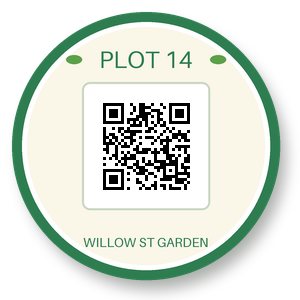
- Input
- garden-plot-badge.png (39 KB)
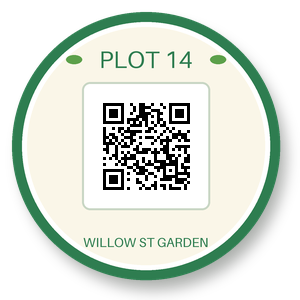
- Output
- garden-plot-badge.webp (45 KB)
- Source
- A round garden-plot sticker with a QR code, a transparent background and a soft drop shadow, drawn by us for these pages. (CC0-1.0). How it was made
- Made by
- 2026-11-04, API build
9eeeb0640aba
Parameters
Send these as form fields next to the file. Names are case-insensitive. If you set one of the documented options below that we don't support yet, the request fails with a 400 that names it instead of returning a file made without it.
| Parameter | What it does |
|---|---|
ImageWidthinteger | Output width; ImageWidth=150 gives a 150 × 150 WebP of 22,134 bytes, alpha resampled with the color.Values: 1–16384 |
ImageHeightinteger | Output height, or a box limit together with the width.Values: 1–16384 |
ScaleProportionsboolean, default true | false fills the exact box, distorting the round sticker. |
ScaleIfLargerboolean, default false | true refuses to enlarge; 600 px would otherwise give 182,458 bytes. |
ScaleImageboolean, default true | false crops instead of scaling. |
ImageInterpolationboolean, default false | Accepted, no effect; Lanczos3 is always used. |
ImageResolutioninteger | Accepted and ignored; the 144 dpi in the PNG is dropped as well.Values: 10–800 |
ColorSpaceenum, default default | gray halves the sample to 23,890 bytes and keeps transparency.Values: default, rgb, gray, monochrome; cmyk returns 400 |
TransparentColorstring | Clears one extra exact color; #FFFFFF on the sticker gives 46,930 bytes with the white panel removed.Values: Color name, #RRGGBB or R,G,B |
FileNamestring | Output name, default garden-plot-badge.webp. |
StoreFileboolean, default false | true returns a 3-hour link. |
Not supported yet
Setting one of these to anything but its default returns 400.
| Option | What to do instead |
|---|---|
ImageQuality | The encoder is lossless only. 75, ConvertAPI's default, is accepted; ImageQuality=90 returns 400 "ImageQuality is not supported yet for PNG → WebP". |
What carries over, and what doesn't
Kept
- All RGBA values, including the 13,498 partly transparent shadow and edge pixels
- Fully transparent areas (21,347 pixels in the sample)
- Pixel size, unless you resize
- Palette and 16-bit PNGs, stored as 8 bits per channel: RGBA when the image has transparent pixels, RGB when it has none, as with a palette PNG without a transparent index or a 16-bit gray PNG
Lost or not yet supported
- Compactness: 46,272 bytes against 40,051 for the PNG. A maximum-effort lossless encode of the same pixels with another encoder came to 26,530 bytes.
- 16-bit depth, color profiles, text chunks and DPI.
- Animation: an animated PNG becomes a still WebP of frame one.
- An alpha channel with nothing transparent in it. A 300 × 300 RGBA PNG whose pixels were all opaque came back as an RGB WebP with the same colors.
Limits
- One PNG per request.
- Uploads up to 10 MB on the Free plan or 100 MB on paid plans.
- Images up to 100,000,000 pixels.
- Sides up to 16,384 px. A 16,385 × 2 PNG returned 413 "WebP images can be at most 16,384 pixels on a side, and this one is 16,385×2" and converted with
ImageWidth=16384. Stretching the sticker to 100 × 16,385 gave the same 413 with "; lower ImageWidth or ImageHeight" added, because those options set the size. - 120 seconds per conversion.
Where teams use it
One modern format for a web asset folder
Sites that serve WebP everywhere can bring PNG icons and illustrations in without touching their pixels or transparency, then let the browser show them as before.
Resized transparent images in one call
Send ImageWidth with the PNG to get a smaller lossless WebP with clean alpha, for thumbnails of logos and stickers.
Questions
Will the WebP be smaller than my PNG?
Not necessarily. Our WebP encoder is lossless only, and the sample came out about 16% larger than its PNG. If size is the goal, run compress-png on the PNG instead (33,394 bytes for the sample at CompressionLevel=Extreme).
Is transparency kept exactly?
Yes. The decoded WebP matched the PNG on every channel of every pixel, soft shadow included.
Can I make a lossy WebP?
Not yet. ImageQuality is accepted only at 75 and has no effect; other values return 400.
What happens with an animated PNG?
Only the first frame is converted, giving a still WebP.
Convert your first PNG file in a minute.