WebP to PNG API
POST a .webp file to /v2/convert/webp/to/png and get a PNG back in the JSON. Lossy, lossless and transparent WebPs are decoded to the same pixels the reference decoder gives, and the alpha channel is written into an RGBA PNG.
- Endpoint
- POST /v2/
convert/ webp/ to/ png - Accepts
- webp
- Sample timing
- 4 ms median of 5 runsHow we measure
- Request size
- Up to 10 MB on the Free plan or 100 MB on paid plans, all files together
Request and response
Every sample below ran against the API before this page was published. Set PDFCONVERSIONAPI_KEY to your key and run it as is.
curl -sS -X POST \
  https://api.pdfconversionapi.com/v2/convert/webp/to/png \
  -H "Authorization: Bearer $PDFCONVERSIONAPI_KEY" \
  -F File=@guest-badge.webp \
  -o response.json

# FileData is base64. Save the first file in converted/,
# or print the JSON error.
if jq -e '.Files' response.json > /dev/null; then
  mkdir -p converted
  name=$(jq -r '.Files[0].FileName' response.json)
  jq -r '.Files[0].FileData' response.json \
    | base64 --decode > "converted/$name"
else
  cat response.json
fi
import base64
import os
import requests
key = os.environ["PDFCONVERSIONAPI_KEY"]
response = requests.post(
"https://api.pdfconversionapi.com/v2/convert/webp/to/png",
headers={"Authorization": f"Bearer {key}"},
files=[("File", open("guest-badge.webp", "rb"))],
timeout=180,
)
result = response.json()
if not response.ok:
raise SystemExit(f"{result['Code']}: {result['Message']}")
os.makedirs("converted", exist_ok=True)
for file in result["Files"]:
path = os.path.join("converted", file["FileName"])
with open(path, "wb") as out:
out.write(base64.b64decode(file["FileData"]))
print(path, file["FileSize"], "bytes")
import { mkdir, readFile, writeFile } from "node:fs/promises";
import { join } from "node:path";

const form = new FormData();
const file = "guest-badge.webp";
form.append("File", new Blob([await readFile(file)]), file);

const url = "https://api.pdfconversionapi.com/v2/convert/webp/to/png";
const key = process.env.PDFCONVERSIONAPI_KEY;
const response = await fetch(url, {
  method: "POST",
  headers: { Authorization: `Bearer ${key}` },
  body: form,
});
const result = await response.json();
if (!response.ok) {
  throw new Error(`${result.Code}: ${result.Message}`);
}

await mkdir("converted", { recursive: true });
for (const file of result.Files) {
  const path = join("converted", file.FileName);
  await writeFile(path, Buffer.from(file.FileData, "base64"));
  console.log(path, file.FileSize, "bytes");
}
{
  "ConversionCost": 1,
  "ConversionTime": 0.004,
  "Files": [
    {
      "FileName": "guest-badge.png",
      "FileExt": "png",
      "FileSize": 58609,
      "FileData": "iVBORw0KGgoAAAANSUhEUgAA…"
    }
  ]
}
Response from our test run on 2026-11-03. ConversionTime shows the median of 5 runs. FileData is shortened here; the real response carries the whole file as base64.
The sample, converted
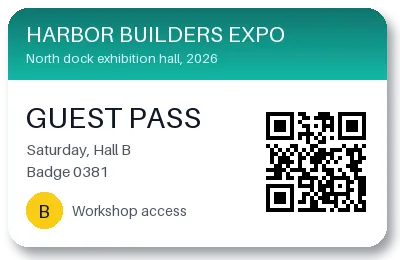
The same file the code sends. Download the input and the output and compare them yourself.
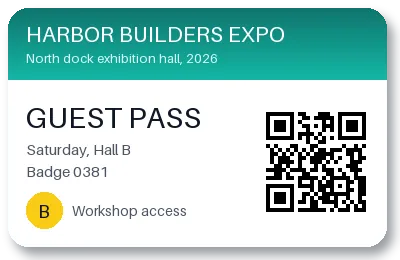
- Input
- guest-badge.webp (9.4 KB)
- Output
- guest-badge.png (57 KB)
- Source
- A guest pass for a made-up trade show that we drew for this page, saved as a lossy WebP with a transparent background and a soft shadow. (CC0-1.0). How it was made
- Made by
- 2026-11-04, API build
9eeeb0640aba
Parameters
Send these as form fields next to the file. Names are case-insensitive. If you set one of the documented options below that we don't support yet, the request fails with a 400 that names it instead of returning a file made without it.
| Parameter | What it does |
|---|---|
ImageWidthinteger | Output width. 200 gave a 200 × 130 PNG of 28,392 bytes; 800 enlarged the badge to 800 × 520 and 243,636 bytes.Values: 1–20000 |
ImageHeightinteger | Output height; sent with ImageWidth, it bounds a box the image is fitted into.Values: 1–20000 |
ScaleProportionsboolean, default true | false stretches the image to the exact width and height. |
ScaleIfLargerboolean, default false | true keeps WebPs that are already small enough at their size. |
ScaleImageboolean, default true | false crops the requested box from the top-left corner. |
TransparentColorstring | Turns one exact color transparent on top of the WebP's own alpha. #FFFFFF cleared the card's 42,768 pure white pixels (45,367 transparent in all). The badge is lossy, so 10,576 near-white pixels stay opaque as specks around the text, the QR code and the card's edges.Values: Color name, #RRGGBB or R,G,B |
ColorSpaceenum, default default | gray writes gray plus alpha (24,121 bytes for the badge); monochrome black, white and alpha (6,759 bytes). cmyk returns 400.Values: default, rgb, gray, monochrome |
ImageResolutioninteger | Adds a pHYs chunk with this DPI; 144 added 21 bytes. WebP has no DPI of its own to copy.Values: 10–800 |
ImageInterpolationboolean, default false | Both values are accepted; resizing is always Lanczos. |
FileNamestring | Name for the PNG; guest-badge.png by default. |
StoreFileboolean, default false | true returns a 3-hour download URL in Files[].Url. |
What carries over, and what doesn't
Kept
- Every decoded pixel and alpha value: the sample PNG equals the reference decoder's output with no difference in any channel.
- Soft transparency, from the 2,599 clear corner pixels to the 11,188 partly clear ones in the shadow.
- Lossy (VP8), lossless (VP8L) and extended (VP8X) WebP inputs.
- 8-bit RGBA output with the badge's 400 × 260 size.
- EXIF orientation, applied to the pixels: a 300 × 200 WebP tagged 6 came back as an upright 200 × 300 PNG.
Lost or not yet supported
- Compactness: the 9,596-byte lossy WebP became a 58,609-byte PNG, because PNG stores the decoded pixels, artifacts included, without loss.
- Frames after the first in animated WebPs.
- ICC profiles, EXIF and XMP. A Display P3 WebP came back with no profile, so its colors will be read as sRGB.
Limits
- One WebP per request.
- Requests up to 10 MB on the Free plan or 100 MB on paid plans, all files and fields together.
- 100,000,000 pixels per image, read from the header first; a 12,000 × 9,000 WebP returned 413.
- A damaged WebP returns 422 'the input file could not be read: the WebP image is damaged, or encoded in a way that can't be read yet'.
- 120 seconds per conversion, then 504.
Where teams use it
Editing images saved from the web
Design tools, slide software and older image editors may not open WebP. PNG keeps the decoded image and its transparency exactly, so nothing changes when it is edited and saved again.
A lossless master from a lossy file
Before cropping, annotating or compositing a lossy WebP, decode it once to PNG. Further saves then add no new compression loss.
Stills from animated WebP
An animated WebP gives its first frame as a PNG, which works as a thumbnail or a cover image.
Questions
Is WebP to PNG lossless?
The PNG step is. A lossy WebP's own compression artifacts are already in its pixels, and the PNG keeps exactly those: our decode of the sample matched the reference decoder on every pixel and alpha value.
Why is the PNG six times bigger than the WebP?
Lossy WebP throws away detail to save space; PNG stores every decoded pixel without loss. The badge went from 9,596 to 58,609 bytes. Use ImageWidth to shrink it, or keep WebP where it is accepted.
Does the transparent background stay transparent?
Yes. The PNG is RGBA, and partly transparent pixels keep their alpha, so the badge's drop shadow still fades into whatever is behind it.
Does the PNG follow the WebP's EXIF orientation?
Yes. The pixels are turned upright by the Orientation value before the PNG is written: WebPs tagged 2, 3, 6 and 8 all matched their upright views. The tag itself is not copied, so viewers don't turn the image a second time.
Convert your first WebP file in a minute.