GIF to PNG API
Send a GIF to POST /v2/convert/gif/to/png and the first frame comes back as an 8-bit RGBA PNG. Every pixel of that frame is kept, and pixels that used the GIF's transparent color get alpha 0.
- Endpoint
- POST /v2/
convert/ gif/ to/ png - Accepts
- gif
- Sample timing
- 1 ms median of 5 runsHow we measure
- Request size
- Up to 10 MB on the Free plan or 100 MB on paid plans, all files together
Request and response
Every sample below ran against the API before this page was published. Set PDFCONVERSIONAPI_KEY to your key and run it as is.
curl -sS -X POST \
  https://api.pdfconversionapi.com/v2/convert/gif/to/png \
  -H "Authorization: Bearer $PDFCONVERSIONAPI_KEY" \
  -F File=@parcel-tracker.gif \
  -o response.json

# FileData is base64. Save the first file in converted/,
# or print the JSON error.
if jq -e '.Files' response.json > /dev/null; then
  mkdir -p converted
  name=$(jq -r '.Files[0].FileName' response.json)
  jq -r '.Files[0].FileData' response.json \
    | base64 --decode > "converted/$name"
else
  cat response.json
fi
import base64
import os
import requests
key = os.environ["PDFCONVERSIONAPI_KEY"]
response = requests.post(
"https://api.pdfconversionapi.com/v2/convert/gif/to/png",
headers={"Authorization": f"Bearer {key}"},
files=[("File", open("parcel-tracker.gif", "rb"))],
timeout=180,
)
result = response.json()
if not response.ok:
raise SystemExit(f"{result['Code']}: {result['Message']}")
os.makedirs("converted", exist_ok=True)
for file in result["Files"]:
path = os.path.join("converted", file["FileName"])
with open(path, "wb") as out:
out.write(base64.b64decode(file["FileData"]))
print(path, file["FileSize"], "bytes")
import { mkdir, readFile, writeFile } from "node:fs/promises";
import { join } from "node:path";

const form = new FormData();
const file = "parcel-tracker.gif";
form.append("File", new Blob([await readFile(file)]), file);

const url = "https://api.pdfconversionapi.com/v2/convert/gif/to/png";
const key = process.env.PDFCONVERSIONAPI_KEY;
const response = await fetch(url, {
  method: "POST",
  headers: { Authorization: `Bearer ${key}` },
  body: form,
});
const result = await response.json();
if (!response.ok) {
  throw new Error(`${result.Code}: ${result.Message}`);
}

await mkdir("converted", { recursive: true });
for (const file of result.Files) {
  const path = join("converted", file.FileName);
  await writeFile(path, Buffer.from(file.FileData, "base64"));
  console.log(path, file.FileSize, "bytes");
}
{
  "ConversionCost": 1,
  "ConversionTime": 0.001,
  "Files": [
    {
      "FileName": "parcel-tracker.png",
      "FileExt": "png",
      "FileSize": 7622,
      "FileData": "iVBORw0KGgoAAAANSUhEUgAA…"
    }
  ]
}
Response from our test run on 2026-11-03. ConversionTime shows the median of 5 runs. FileData is shortened here; the real response carries the whole file as base64.
The sample, converted
The same file the code sends. Download the input and the output and compare them yourself.
- Input
- parcel-tracker.gif (8.7 KB)
- Output
- parcel-tracker.png (7.4 KB)
- Source
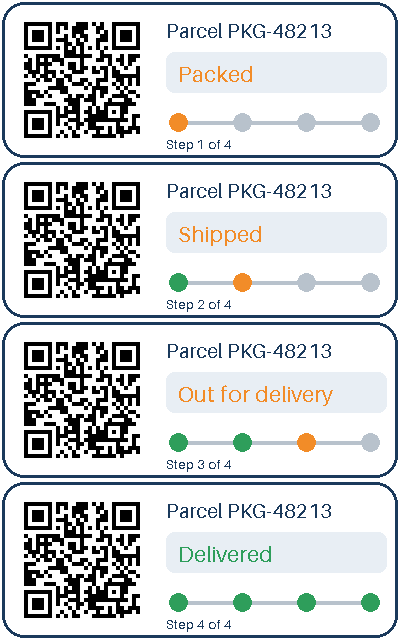
- A four-frame animated parcel-tracking card with a transparent outside and a QR code, drawn by us for this page. (CC0-1.0). How it was made
- Made by
- 2026-11-04, API build
9eeeb0640aba
Parameters
Send these as form fields next to the file. Names are case-insensitive. If you set one of the documented options below that we don't support yet, the request fails with a 400 that names it instead of returning a file made without it.
| Parameter | What it does |
|---|---|
ImageWidthinteger | Width of the PNG in pixels; the height follows the GIF's shape. The 400 × 160 tracker card sent with ImageWidth=200 came back 200 × 80 and weighed 15,677 bytes, twice the full-size PNG, because scaling blends neighboring colors into new ones.Values: 1–20000 |
ImageHeightinteger | Height in pixels. ImageHeight=100 gave 250 × 100. Sent together with ImageWidth, the pair is a box the frame is fitted into: 300 × 300 returned 300 × 120.Values: 1–20000 |
ScaleProportionsboolean, default true | false fills the width and height exactly, so the 300 × 300 box above becomes a square, stretched PNG. Without a width or height it is accepted and does nothing. |
ScaleIfLargerboolean, default false | true stops enlargement. ImageWidth=800 alone gave an 800 × 320 PNG; with this set, the card stayed 400 × 160. |
ScaleImageboolean, default true | false crops instead of scaling. With a 150 × 100 target you get the top-left 150 × 100 pixels of frame 1, here the upper two thirds of the QR code and the card's top-left corner. |
TransparentColorstring | Clears every pixel of exactly this color, on top of the GIF's own transparent index. #FFFFFF made the white body of the card see-through.Values: white, black, red, green, blue, gray, #RRGGBB or R,G,B |
ColorSpaceenum, default default | gray writes a gray-and-alpha PNG (4,438 bytes for the sample), monochrome cuts every pixel to black or white (2,752 bytes). Transparency survives both. rgb drops the alpha channel when no pixel is clear: an opaque 400 × 250 GIF gave a 19,998-byte RGB PNG instead of 21,563 bytes of RGBA, while the sample keeps its alpha. cmyk is refused with a 400.Values: default, rgb, gray, monochrome |
ImageResolutioninteger | DPI to store in a pHYs chunk. GIF has no resolution field, so without this the PNG carries none.Values: 10–800 |
FileNamestring | Name for the PNG without extension. Left out, parcel-tracker.gif comes back as parcel-tracker.png. |
StoreFileboolean, default false | true puts the PNG in temporary storage for 3 hours and returns Files[].Url in place of base64 FileData. |
What carries over, and what doesn't
Kept
- Every pixel of frame 1: decoded again, the PNG matched the GIF frame on R, G, B and alpha with zero difference
- Transparency: the rounded corners of the sample card stay clear (alpha 0)
- The exact colors; nothing is reduced or dithered
- Pixel size, 400 × 160 for the sample, unless you resize
Lost or not yet supported
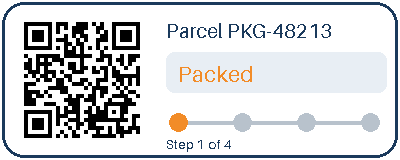
- Frames after the first. The sample animates through four delivery steps; the PNG shows only Packed.
- The 700 ms delay and the loop-forever setting, which PNG has no place for here.
- The palette. The PNG is truecolor with alpha (color type 6), not an indexed PNG, even though frame 1 uses six colors plus transparency. It still came out smaller than the GIF: 7,622 bytes against 8,956.
- Hidden color under clear pixels stays as stored. The sample's corners are magenta (255, 0, 255) with alpha 0, so software that drops alpha shows magenta corners.
- Metadata: the PNG holds only IHDR, IDAT and IEND chunks.
Limits
- One GIF per request; frame 1 is converted.
- Requests up to 10 MB on the Free plan or 100 MB on paid plans, all files and fields together.
- Above 100,000,000 pixels the API answers 413 before decoding. A 12,000 × 9,000 GIF was refused this way.
- Resize targets from 1 to 20,000 px per side.
- A conversion that runs past 120 seconds returns 504.
Where teams use it
A still frame for previews
Chat stickers, loading spinners and short screen recordings arrive as animated GIFs. Converting gives you frame 1 as a PNG for list views, link previews or a print layout where nothing should move.
Real alpha for compositing
GIF transparency is one palette slot. Image tools and canvas code that expect an alpha channel handle the PNG directly, so a GIF logo can be placed over photos or colored backgrounds.
Editing without palette limits
Once the frame is a truecolor PNG, later edits such as shadows, gradients or resizing are no longer squeezed into 256 colors.
Questions
Can I get every frame of an animated GIF as PNG files?
Not from this route. It returns one PNG of the first frame with a 200 status, and there is no frame-number option. Our four-step tracker card comes back as the Packed step only.
Is GIF to PNG lossless?
For the frame that is converted, yes. We decoded the output again and compared it with frame 1 of the GIF: no channel of any pixel differed. Only a resize changes pixel values.
Does the transparent background survive?
Yes. Pixels drawn with the GIF's transparent index become alpha 0 and all others alpha 255, since a GIF pixel is either clear or solid. The sample's rounded corners come back transparent.
What if the upload is not really a GIF?
The format is detected from the bytes, so a BMP posted to this route still converted. A copy of the sample cut off at 3,000 of its 8,956 bytes, inside frame 1, returned 422 with "the input file could not be read: the GIF image is damaged, or encoded in a way that can't be read yet". Cut at half its size it still converted, because frame 1 ends at byte 4,295 and only frame 1 is read.
Convert your first GIF file in a minute.