GIF to JPG API
POST a GIF to /v2/convert/gif/to/jpg and receive a baseline JPEG of its first frame. JPEG has no transparency, so the GIF's clear pixels are filled with white, or with the color you pass as AlphaColor.
- Endpoint
- POST /v2/
convert/ gif/ to/ jpg - Accepts
- gif
- Sample timing
- 1 ms median of 5 runsHow we measure
- Request size
- Up to 10 MB on the Free plan or 100 MB on paid plans, all files together
Request and response
Every sample below ran against the API before this page was published. Set PDFCONVERSIONAPI_KEY to your key and run it as is.
curl -sS -X POST \
  https://api.pdfconversionapi.com/v2/convert/gif/to/jpg \
  -H "Authorization: Bearer $PDFCONVERSIONAPI_KEY" \
  -F File=@parcel-tracker.gif \
  --form-string 'AlphaColor=#1B3A5C' \
  --form-string ImageQuality=90 \
  -o response.json

# FileData is base64. Save the first file in converted/,
# or print the JSON error.
if jq -e '.Files' response.json > /dev/null; then
  mkdir -p converted
  name=$(jq -r '.Files[0].FileName' response.json)
  jq -r '.Files[0].FileData' response.json \
    | base64 --decode > "converted/$name"
else
  cat response.json
fi
import base64
import os
import requests
key = os.environ["PDFCONVERSIONAPI_KEY"]
response = requests.post(
"https://api.pdfconversionapi.com/v2/convert/gif/to/jpg",
headers={"Authorization": f"Bearer {key}"},
files=[("File", open("parcel-tracker.gif", "rb"))],
data={
"AlphaColor": "#1B3A5C",
"ImageQuality": "90",
},
timeout=180,
)
result = response.json()
if not response.ok:
raise SystemExit(f"{result['Code']}: {result['Message']}")
os.makedirs("converted", exist_ok=True)
for file in result["Files"]:
path = os.path.join("converted", file["FileName"])
with open(path, "wb") as out:
out.write(base64.b64decode(file["FileData"]))
print(path, file["FileSize"], "bytes")
import { mkdir, readFile, writeFile } from "node:fs/promises";
import { join } from "node:path";

const form = new FormData();
const file = "parcel-tracker.gif";
form.append("File", new Blob([await readFile(file)]), file);
form.append("AlphaColor", "#1B3A5C");
form.append("ImageQuality", "90");

const url = "https://api.pdfconversionapi.com/v2/convert/gif/to/jpg";
const key = process.env.PDFCONVERSIONAPI_KEY;
const response = await fetch(url, {
  method: "POST",
  headers: { Authorization: `Bearer ${key}` },
  body: form,
});
const result = await response.json();
if (!response.ok) {
  throw new Error(`${result.Code}: ${result.Message}`);
}

await mkdir("converted", { recursive: true });
for (const file of result.Files) {
  const path = join("converted", file.FileName);
  await writeFile(path, Buffer.from(file.FileData, "base64"));
  console.log(path, file.FileSize, "bytes");
}
{
  "ConversionCost": 1,
  "ConversionTime": 0.001,
  "Files": [
    {
      "FileName": "parcel-tracker.jpg",
      "FileExt": "jpg",
      "FileSize": 24851,
      "FileData": "/9j/4AAQSkZJRgABAgAAAQAB…"
    }
  ]
}
Response from our test run on 2026-11-03. ConversionTime shows the median of 5 runs. FileData is shortened here; the real response carries the whole file as base64.
The sample, converted
The same file the code sends. Download the input and the output and compare them yourself.
- Input
- parcel-tracker.gif (8.7 KB)
- Output
- parcel-tracker.jpg (24 KB)
- Source
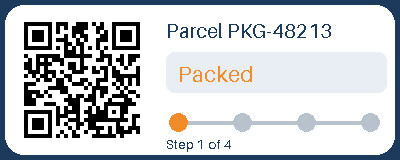
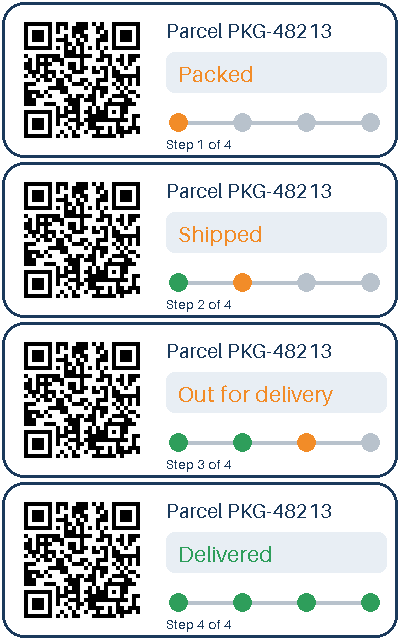
- A four-frame animated parcel-tracking card with a transparent outside and a QR code, drawn by us for this page. (CC0-1.0). How it was made
- Made by
- 2026-11-04, API build
9eeeb0640aba
Parameters
Send these as form fields next to the file. Names are case-insensitive. If you set one of the documented options below that we don't support yet, the request fails with a 400 that names it instead of returning a file made without it.
| Parameter | What it does |
|---|---|
ImageQualityinteger, default 85 | JPEG quality. The tracker card weighed 12,941 bytes at 50, 17,209 at 75, 21,850 at our default of 85 and 50,736 at 100. ConvertAPI documents 75 as its default.Values: 1–100 |
AlphaColorstring, default white | What shows through where the GIF was transparent. The sample sends the card's own navy, #1B3A5C, so the rounded corners blend into the border instead of turning white.Values: white, black, red, green, blue, gray, #RRGGBB or R,G,B |
BackgroundColorstring, default white | Used as the fill only when AlphaColor is missing. With AlphaColor=red and BackgroundColor=blue the corners came out red.Values: Same as AlphaColor |
ColorSpaceenum, default default | gray and monochrome produce a one-channel JPEG: 16,296 and 14,125 bytes for the tracker card with no other options, 18,397 and 16,023 with the sample's navy fill and quality 90. monochrome is applied after the fill, so the navy corners turn black. cmyk returns 400: "ColorSpace cmyk is not supported yet; use rgb, gray or monochrome".Values: default, rgb, gray, monochrome |
ImageWidthinteger | Output width; height keeps the 5:2 shape of the card, so 200 gives 200 × 80.Values: 1–20000 |
ImageHeightinteger | Output height. Combined with ImageWidth it forms a bounding box: 300 × 300 gave a 300 × 120 JPEG.Values: 1–20000 |
ScaleProportionsboolean, default true | Set false to stretch into the full box (300 × 300 then means 300 × 300). Has no effect without a width or height. |
ScaleIfLargerboolean, default false | With true, a target bigger than the GIF leaves it at 400 × 160 instead of upscaling. |
ScaleImageboolean, default true | false crops the top-left corner to the requested size rather than scaling. |
ImageResolutioninteger | Writes this DPI into the JFIF header. Left out, the header says density 1:1 with no unit.Values: 10–800 |
FileNamestring | Base name of the JPEG. Default: the GIF's name with .jpg. |
StoreFileboolean, default false | Return a download link valid for 3 hours instead of base64 data. |
What carries over, and what doesn't
Kept
- Close color: at the default quality of 85, pixels differed from the white-filled frame by 1.0 to 1.6 levels per channel on average, most of it next to text
- The QR code in the sample: it still decoded from the JPEG
- Full color resolution: the encoder writes 4:4:4 JPEGs, so the thin orange and green status text keeps its color
- Pixel size, unless you resize
Lost or not yet supported
- Transparency. Every clear pixel takes the fill color; in the sample the corners became (28, 58, 92), the navy we asked for, within JPEG rounding.
- Frames 2 to 4 and all timing. Only the Packed step of the tracker survives.
- Size. Flat GIF colors compress worse as JPEG: 8,956 bytes of four-frame GIF became 24,851 bytes of one-frame JPEG at quality 90.
- Crisp edges. JPEG adds faint ringing around text and lines; the largest single-channel error in the default conversion was 62 levels, next to lettering.
- Any comments or loop settings stored in the GIF.
Limits
- One GIF per request.
- Requests up to 10 MB on the Free plan or 100 MB on paid plans, all files and fields together.
- Images over 100,000,000 pixels are refused with 413 before decoding.
ImageWidthandImageHeightfrom 1 to 20,000.- Conversions stop after 120 seconds with a 504.
Where teams use it
Uploads that only accept JPEG
Some forms, print services and older content systems take JPEG and nothing else. Converting a GIF banner or badge first avoids a rejected upload, with the transparent edges filled in a color you pick.
Email and document thumbnails
A JPEG of the first frame is a stable poster image for an animated GIF in places where animation is unwanted, such as PDF reports or archived newsletters.
Matching a page background
Set AlphaColor to the color of the page the image will sit on, and the GIF's cut-out corners disappear into it.
Questions
Why is my JPEG bigger than the GIF?
GIF stores flat areas of a few colors very compactly, while JPEG spends bytes on every 8 × 8 block. The sample went from 8,956 bytes (four frames) to 21,850 bytes for one frame at the default quality. Drop ImageQuality to 50 and it was 12,941 bytes.
What color do transparent areas become?
White by default. Pass AlphaColor as a name, #RRGGBB or R,G,B to choose; BackgroundColor works as a fallback name for the same thing. Something like teal is not on the list and returns 400.
Does it keep the animation?
No, JPEG holds a single image. You get frame 1 and a 200 status; frames after it are dropped without a warning.
Which quality matches ConvertAPI?
ConvertAPI documents 75 as the default for this conversion; ours is 85. Send ImageQuality=75 to match it. Values outside 1 to 100 return 400 "ImageQuality must be between 1 and 100".
Convert your first GIF file in a minute.