BMP to JPG API
POST a bitmap to /v2/convert/bmp/to/jpg and receive a baseline JPEG encoded at quality 85, or at the ImageQuality you send. 1-, 8-, 24- and 32-bit bitmaps are all read and turned into 8-bit color.
- Endpoint
- POST /v2/
convert/ bmp/ to/ jpg - Accepts
- bmp
- Sample timing
- 3 ms median of 5 runsHow we measure
- Request size
- Up to 10 MB on the Free plan or 100 MB on paid plans, all files together
Request and response
Every sample below ran against the API before this page was published. Set PDFCONVERSIONAPI_KEY to your key and run it as is.
curl -sS -X POST \
  https://api.pdfconversionapi.com/v2/convert/bmp/to/jpg \
  -H "Authorization: Bearer $PDFCONVERSIONAPI_KEY" \
  -F File=@shelf-label.bmp \
  --form-string ImageQuality=90 \
  -o response.json

# FileData is base64. Save the first file in converted/,
# or print the JSON error.
if jq -e '.Files' response.json > /dev/null; then
  mkdir -p converted
  name=$(jq -r '.Files[0].FileName' response.json)
  jq -r '.Files[0].FileData' response.json \
    | base64 --decode > "converted/$name"
else
  cat response.json
fi
import base64
import os
import requests
key = os.environ["PDFCONVERSIONAPI_KEY"]
response = requests.post(
"https://api.pdfconversionapi.com/v2/convert/bmp/to/jpg",
headers={"Authorization": f"Bearer {key}"},
files=[("File", open("shelf-label.bmp", "rb"))],
data={
"ImageQuality": "90",
},
timeout=180,
)
result = response.json()
if not response.ok:
raise SystemExit(f"{result['Code']}: {result['Message']}")
os.makedirs("converted", exist_ok=True)
for file in result["Files"]:
path = os.path.join("converted", file["FileName"])
with open(path, "wb") as out:
out.write(base64.b64decode(file["FileData"]))
print(path, file["FileSize"], "bytes")
import { mkdir, readFile, writeFile } from "node:fs/promises";
import { join } from "node:path";

const form = new FormData();
const file = "shelf-label.bmp";
form.append("File", new Blob([await readFile(file)]), file);
form.append("ImageQuality", "90");

const url = "https://api.pdfconversionapi.com/v2/convert/bmp/to/jpg";
const key = process.env.PDFCONVERSIONAPI_KEY;
const response = await fetch(url, {
  method: "POST",
  headers: { Authorization: `Bearer ${key}` },
  body: form,
});
const result = await response.json();
if (!response.ok) {
  throw new Error(`${result.Code}: ${result.Message}`);
}

await mkdir("converted", { recursive: true });
for (const file of result.Files) {
  const path = join("converted", file.FileName);
  await writeFile(path, Buffer.from(file.FileData, "base64"));
  console.log(path, file.FileSize, "bytes");
}
{
  "ConversionCost": 1,
  "ConversionTime": 0.003,
  "Files": [
    {
      "FileName": "shelf-label.jpg",
      "FileExt": "jpg",
      "FileSize": 34178,
      "FileData": "/9j/4AAQSkZJRgABAgAAAQAB…"
    }
  ]
}
Response from our test run on 2026-11-03. ConversionTime shows the median of 5 runs. FileData is shortened here; the real response carries the whole file as base64.
The sample, converted
The same file the code sends. Download the input and the output and compare them yourself.
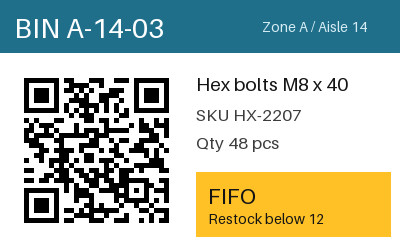
- Input
- shelf-label.bmp (293 KB)
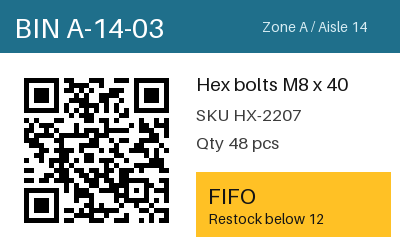
- Output
- shelf-label.jpg (33 KB)
- Source
- A 24-bit warehouse bin label with a QR code and a colored header, drawn by us for this page. (CC0-1.0). How it was made
- Made by
- 2026-11-04, API build
9eeeb0640aba
Parameters
Send these as form fields next to the file. Names are case-insensitive. If you set one of the documented options below that we don't support yet, the request fails with a 400 that names it instead of returning a file made without it.
| Parameter | What it does |
|---|---|
ImageQualityinteger, default 85 | JPEG quality. The label came to 18,174 bytes at 50, 24,292 at 75, 29,548 at 85 and 34,178 at 90, the sample's setting. ConvertAPI's documented default is 75.Values: 1–100 |
ColorSpaceenum, default default | gray writes a one-channel JPEG: 23,103 bytes at the default quality, 26,533 at the sample's 90. monochrome thresholds to black and white first, which JPEG compresses worse: 24,320 bytes at the default, 27,913 at 90. cmyk is refused.Values: default, rgb, gray, monochrome |
ImageWidthinteger | Scales to this width; 200 gave a 200 × 125 JPEG of 10,341 bytes at the default quality, 12,138 at the sample's 90.Values: 1–20000 |
ImageHeightinteger | Scales to this height. With both sizes the bitmap is fitted inside the box (300 × 300 gave 300 × 188).Values: 1–20000 |
ScaleProportionsboolean, default true | false stretches to the full box. |
ScaleIfLargerboolean, default false | true leaves bitmaps that already fit at their own size. |
ScaleImageboolean, default true | false crops the top-left area to the requested size. |
ImageResolutioninteger | DPI written to the JFIF header. The BMP's own resolution is not copied: a 300 DPI bitmap gave a JPEG with no unit unless this was sent.Values: 10–800 |
AlphaColorstring, default white | Fill for transparent pixels in 32-bit BMPs that have an alpha mask. Opaque bitmaps like the label are not affected.Values: Color name, #RRGGBB or R,G,B |
FileNamestring | JPEG name without extension. |
StoreFileboolean, default false | Return a temporary link (3 hours) instead of base64. |
What carries over, and what doesn't
Kept
- The picture: at quality 90 the average change was under 1.2 levels per channel, and the largest was 42, next to text
- The QR code on the label, which still decoded from the JPEG
- Full color detail: chroma is not subsampled (4:4:4)
- Pixel size, unless you resize
Lost or not yet supported
- Exact pixels. JPEG is lossy at every quality, including 100.
- Sharp edges on text and line art, which pick up faint ringing. A 1-bit version of the label even grew as JPEG, to 46,350 bytes, because hard black-and-white edges compress badly.
- The BMP's resolution (96 DPI for the label); the JFIF header says density 1:1 with no unit.
- Transparency in 32-bit BMPs: clear pixels take
AlphaColor.
Limits
- One BMP per request.
- Requests up to 10 MB on the Free plan or 100 MB on paid plans, all files and fields together.
- 413 for bitmaps over 100,000,000 pixels, checked from the header.
- Resize sides from 1 to 20,000.
- 504 when a conversion goes past 120 seconds.
Where teams use it
Photos from capture software that writes BMP
Some cameras, microscopes and older capture programs save photographs as BMP. JPEG is the practical format for sharing and archiving those, at a small fraction of the size.
Email and upload limits
A 24-bit BMP costs 3 bytes per pixel. When a form or mailbox has a size cap, converting to JPEG at a set quality makes the file fit.
Questions
How much smaller will my BMP get?
For the 400 × 250 label, 300,054 bytes became 29,548 at the default quality of 85, roughly a tenth. How far your own files shrink depends on what is in them.
Which quality should I use?
85 is our default. At 90, the sample's 14 px "Restock below 12" line and its QR code stay clear. Text and QR codes show artifacts first as quality drops, so check a few of your own files at 75 before converting in bulk.
Is the DPI carried over?
No. Send ImageResolution with the value you need and the JPEG's JFIF header records it in dots per inch.
Does it read 1-bit and 8-bit BMPs?
Yes. Palette and 1-bit bitmaps, run-length encoded ones and top-down ones are all decoded; the JPEG is always 8-bit color, or one channel with ColorSpace=gray.
Convert your first BMP file in a minute.