BMP to PNG API
Send a Windows bitmap to POST /v2/convert/bmp/to/png and get the same pixels back as a compressed PNG. Bitmaps at 1, 8, 24 and 32 bits per pixel are read, including run-length encoded and top-down ones.
- Endpoint
- POST /v2/
convert/ bmp/ to/ png - Accepts
- bmp
- Sample timing
- 1 ms median of 5 runsHow we measure
- Request size
- Up to 10 MB on the Free plan or 100 MB on paid plans, all files together
Request and response
Every sample below ran against the API before this page was published. Set PDFCONVERSIONAPI_KEY to your key and run it as is.
curl -sS -X POST \
  https://api.pdfconversionapi.com/v2/convert/bmp/to/png \
  -H "Authorization: Bearer $PDFCONVERSIONAPI_KEY" \
  -F File=@shelf-label.bmp \
  -o response.json

# FileData is base64. Save the first file in converted/,
# or print the JSON error.
if jq -e '.Files' response.json > /dev/null; then
  mkdir -p converted
  name=$(jq -r '.Files[0].FileName' response.json)
  jq -r '.Files[0].FileData' response.json \
    | base64 --decode > "converted/$name"
else
  cat response.json
fi
import base64
import os
import requests
key = os.environ["PDFCONVERSIONAPI_KEY"]
response = requests.post(
"https://api.pdfconversionapi.com/v2/convert/bmp/to/png",
headers={"Authorization": f"Bearer {key}"},
files=[("File", open("shelf-label.bmp", "rb"))],
timeout=180,
)
result = response.json()
if not response.ok:
raise SystemExit(f"{result['Code']}: {result['Message']}")
os.makedirs("converted", exist_ok=True)
for file in result["Files"]:
path = os.path.join("converted", file["FileName"])
with open(path, "wb") as out:
out.write(base64.b64decode(file["FileData"]))
print(path, file["FileSize"], "bytes")
import { mkdir, readFile, writeFile } from "node:fs/promises";
import { join } from "node:path";

const form = new FormData();
const file = "shelf-label.bmp";
form.append("File", new Blob([await readFile(file)]), file);

const url = "https://api.pdfconversionapi.com/v2/convert/bmp/to/png";
const key = process.env.PDFCONVERSIONAPI_KEY;
const response = await fetch(url, {
  method: "POST",
  headers: { Authorization: `Bearer ${key}` },
  body: form,
});
const result = await response.json();
if (!response.ok) {
  throw new Error(`${result.Code}: ${result.Message}`);
}

await mkdir("converted", { recursive: true });
for (const file of result.Files) {
  const path = join("converted", file.FileName);
  await writeFile(path, Buffer.from(file.FileData, "base64"));
  console.log(path, file.FileSize, "bytes");
}
{
  "ConversionCost": 1,
  "ConversionTime": 0.001,
  "Files": [
    {
      "FileName": "shelf-label.png",
      "FileExt": "png",
      "FileSize": 19990,
      "FileData": "iVBORw0KGgoAAAANSUhEUgAA…"
    }
  ]
}
Response from our test run on 2026-11-03. ConversionTime shows the median of 5 runs. FileData is shortened here; the real response carries the whole file as base64.
The sample, converted
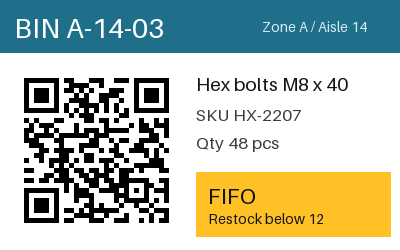
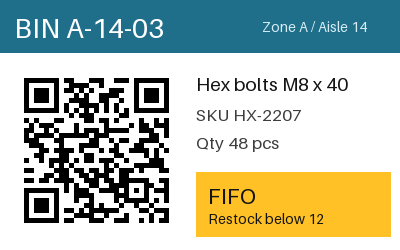
The same file the code sends. Download the input and the output and compare them yourself.
- Input
- shelf-label.bmp (293 KB)
- Output
- shelf-label.png (20 KB)
- Source
- A 24-bit warehouse bin label with a QR code and a colored header, drawn by us for this page. (CC0-1.0). How it was made
- Made by
- 2026-11-04, API build
9eeeb0640aba
Parameters
Send these as form fields next to the file. Names are case-insensitive. If you set one of the documented options below that we don't support yet, the request fails with a 400 that names it instead of returning a file made without it.
| Parameter | What it does |
|---|---|
ImageResolutioninteger | DPI for the PNG's pHYs chunk. The label BMP declares 96 DPI, but that value is not copied; send it here to keep a resolution (300 added 21 bytes).Values: 10–800 |
ImageWidthinteger | Width in pixels, height in proportion. Scaling the 400 × 250 label to 200 × 125 made a 22,798-byte PNG, larger than the full-size one, because smoothing creates many new in-between colors.Values: 1–20000 |
ImageHeightinteger | Height in pixels; 100 gave 160 × 100. With a width as well, the label fits inside both.Values: 1–20000 |
ScaleProportionsboolean, default true | false and a width and height stretch the bitmap to exactly that size. |
ScaleIfLargerboolean, default false | true refuses to upscale; the label stays 400 × 250 when asked for 800. |
ScaleImageboolean, default true | false keeps a top-left crop of the requested size, untouched by resampling. |
TransparentColorstring | BMPs rarely carry transparency, so this is how to make a background clear: #FFFFFF gave an RGBA PNG (21,966 bytes) with all 54,156 pure-white pixels clear: the label body and the QR code's light modules, and also 465 pixels inside the white "BIN A-14-03" lettering on the teal header.Values: Color name, #RRGGBB or R,G,B |
ColorSpaceenum, default default | gray writes a one-channel PNG, 8,226 bytes for the label; monochrome a black-and-white one of 3,549 bytes. cmyk returns 400.Values: default, rgb, gray, monochrome |
FileNamestring | Output name; shelf-label.bmp otherwise becomes shelf-label.png. |
StoreFileboolean, default false | Get Files[].Url, valid 3 hours, instead of base64. |
What carries over, and what doesn't
Kept
- Every pixel: the sample PNG decoded to the BMP's exact values
- Every BMP layout we tried: 1-bit, 8-bit palette, 24-bit, 32-bit, RLE8 and top-down files all came back pixel-identical
- Alpha from 32-bit BMPs that declare an alpha mask
- Pixel size, 400 × 250 here
Lost or not yet supported
- The BMP's resolution field. The label says 3,780 pixels per meter (96 DPI); the PNG has no pHYs chunk unless you send
ImageResolution. - Low bit depths. PNGs come back as 8-bit RGB, so a 1-bit version of the label (13,062 bytes as BMP) became a 34,874-byte PNG.
- The fourth byte of plain 32-bit BMPs. Without an alpha mask in the header it is not treated as transparency, and the PNG is RGB.
Limits
- One BMP per request.
- Requests up to 10 MB on the Free plan or 100 MB on paid plans, all files and fields together.
- Bitmaps whose header declares more than 100,000,000 pixels get a 413 before any pixel data is read.
- Resize targets from 1 to 20,000 px.
- 120 seconds per conversion, then 504.
Where teams use it
Screenshots and scans saved as BMP
Paint, older capture tools and some scanner drivers save uncompressed bitmaps. Converting to PNG keeps every pixel and cuts storage and upload size, which matters most for screenshots of text and interfaces.
Label and display art going online
Images prepared for label printers and small displays are often BMPs. A PNG copy can go on a web page or into a ticket without the bulk.
One modern format for odd bitmaps
Run-length encoded, top-down or 1-bit BMPs trip up some libraries. Converting them to PNG at upload time gives the rest of your code one predictable format.
Questions
How much smaller does a BMP get as PNG?
It depends on the content. Our 24-bit label, with large flat areas and a QR code, went from 300,054 to 19,990 bytes, about 7% of the original. Photos compress far less losslessly.
Is BMP to PNG lossless?
Yes, unless you resize. We decoded the PNG and compared it with the BMP: all 100,000 pixels matched on every channel.
Does the PNG keep the BMP's DPI?
No. Bitmaps store pixels per meter, but we do not copy it. Send ImageResolution=96 (or the value you need) and the PNG gets a matching pHYs chunk.
What if a file has a .bmp name but is something else?
We look at the bytes, not the name. A GIF sent to this route converted correctly. A BMP cut off halfway returned 422 "the input file could not be read: the image is cut short: its data ends before its last pixel".
Convert your first BMP file in a minute.