PNG to GIF API
Upload a PNG to POST /v2/convert/png/to/gif and receive a single-frame GIF89a with up to 256 colors. Flat artwork shrinks: the 40,051-byte sticker became 20,094 bytes. Transparency is all or nothing in GIF, which matters if your PNG has soft edges.
- Endpoint
- POST /v2/
convert/ png/ to/ gif - Accepts
- png
- Sample timing
- 50 ms median of 5 runsHow we measure
- Request size
- Up to 10 MB on the Free plan or 100 MB on paid plans, all files together
Request and response
Every sample below ran against the API before this page was published. Set PDFCONVERSIONAPI_KEY to your key and run it as is.
curl -sS -X POST \
  https://api.pdfconversionapi.com/v2/convert/png/to/gif \
  -H "Authorization: Bearer $PDFCONVERSIONAPI_KEY" \
  -F File=@garden-plot-badge.png \
  -o response.json

# FileData is base64. Save the first file in converted/,
# or print the JSON error.
if jq -e '.Files' response.json > /dev/null; then
  mkdir -p converted
  name=$(jq -r '.Files[0].FileName' response.json)
  jq -r '.Files[0].FileData' response.json \
    | base64 --decode > "converted/$name"
else
  cat response.json
fi
import base64
import os
import requests
key = os.environ["PDFCONVERSIONAPI_KEY"]
response = requests.post(
"https://api.pdfconversionapi.com/v2/convert/png/to/gif",
headers={"Authorization": f"Bearer {key}"},
files=[("File", open("garden-plot-badge.png", "rb"))],
timeout=180,
)
result = response.json()
if not response.ok:
raise SystemExit(f"{result['Code']}: {result['Message']}")
os.makedirs("converted", exist_ok=True)
for file in result["Files"]:
path = os.path.join("converted", file["FileName"])
with open(path, "wb") as out:
out.write(base64.b64decode(file["FileData"]))
print(path, file["FileSize"], "bytes")
import { mkdir, readFile, writeFile } from "node:fs/promises";
import { join } from "node:path";

const form = new FormData();
const file = "garden-plot-badge.png";
form.append("File", new Blob([await readFile(file)]), file);

const url = "https://api.pdfconversionapi.com/v2/convert/png/to/gif";
const key = process.env.PDFCONVERSIONAPI_KEY;
const response = await fetch(url, {
  method: "POST",
  headers: { Authorization: `Bearer ${key}` },
  body: form,
});
const result = await response.json();
if (!response.ok) {
  throw new Error(`${result.Code}: ${result.Message}`);
}

await mkdir("converted", { recursive: true });
for (const file of result.Files) {
  const path = join("converted", file.FileName);
  await writeFile(path, Buffer.from(file.FileData, "base64"));
  console.log(path, file.FileSize, "bytes");
}
{
  "ConversionCost": 1,
  "ConversionTime": 0.05,
  "Files": [
    {
      "FileName": "garden-plot-badge.gif",
      "FileExt": "gif",
      "FileSize": 20094,
      "FileData": "R0lGODlhLAEsAYAAAAAAAAAA…"
    }
  ]
}
Response from our test run on 2026-11-03. ConversionTime shows the median of 5 runs. FileData is shortened here; the real response carries the whole file as base64.
The sample, converted
The same file the code sends. Download the input and the output and compare them yourself.
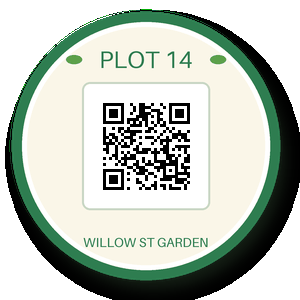
- Input
- garden-plot-badge.png (39 KB)
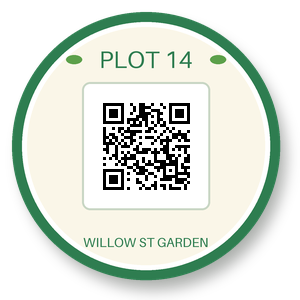
- Output
- garden-plot-badge.gif (20 KB)
- Source
- A round garden-plot sticker with a QR code, a transparent background and a soft drop shadow, drawn by us for these pages. (CC0-1.0). How it was made
- Made by
- 2026-11-04, API build
9eeeb0640aba
Parameters
Send these as form fields next to the file. Names are case-insensitive. If you set one of the documented options below that we don't support yet, the request fails with a 400 that names it instead of returning a file made without it.
| Parameter | What it does |
|---|---|
ImageWidthinteger | Target width; the sticker is square, so ImageWidth=150 returns 150 × 150 at 10,302 bytes.Values: 1–20000 |
ImageHeightinteger | Target height. Given with a width, it forms a box: 200 × 100 fits the circle at 100 × 100.Values: 1–20000 |
ScaleProportionsboolean, default true | Set false to fill the width and height exactly, distorting round art into an oval. |
ScaleIfLargerboolean, default false | true skips upscaling; asking for 600 px keeps the 300 px sticker. |
ScaleImageboolean, default true | false crops from the top-left corner at the requested size instead of resizing. |
ImageInterpolationboolean, default false | Both values are accepted. Scaled images always go through Lanczos3, so it changes nothing. |
ImageResolutioninteger | Accepted and ignored: GIF stores no DPI, and the PNG's 144 dpi is not kept either.Values: 10–800 |
ColorSpaceenum, default default | gray and monochrome convert the colors before the palette is chosen; alpha is kept.Values: default, rgb, gray, monochrome; cmyk returns 400 |
TransparentColorstring | Makes one more exact color transparent. #FFFFFF on the sticker also clears its white panel and the light QR modules (20,595 bytes).Values: Color name, #RRGGBB or R,G,B |
FileNamestring | Rename the GIF; default garden-plot-badge.gif. |
StoreFileboolean, default false | Get Files[].Url (3-hour link) in place of FileData. |
Not supported yet
Setting one of these to anything but its default returns 400.
| Option | What to do instead |
|---|---|
PersistAnimation | Accepted at true; false returns 400 "PersistAnimation is not supported yet for PNG → GIF". |
AnimationDelay | Accepted only at 100; animated PNGs give their first frame. |
AnimationIterations | Accepted only at 0. |
What carries over, and what doesn't
Kept
- Fully transparent pixels: all 21,347 in the sample are transparent in the GIF
- Flat colors and text: the sticker needed 193 palette entries
- Palette PNGs that mark one index transparent keep that transparency
- Exact pixel dimensions unless you resize
Lost or not yet supported
- Partial transparency. The 13,498 semi-transparent pixels of the shadow and the anti-aliased rim turn fully opaque with their stored colors, so the soft shadow becomes a dark ring.
- Animation. An animated PNG becomes a GIF of its first frame.
- 16-bit precision and any embedded color profile.
- Text chunks and the 144 dpi resolution.
Limits
- One PNG per request.
- Total request size 10 MB on the Free plan or 100 MB on paid plans.
- 100,000,000-pixel cap per image.
- Resize targets 1 to 20,000 px.
- GIF output stops at 65,535 px per side. A 70,000 × 2 PNG returned 413 "GIF images can be at most 65,535 pixels on a side, and this one is 70,000×2". The same strip with
ImageWidth=20000converted. - 120 seconds per conversion.
Where teams use it
Logos and badges for e-mail templates
Where an e-mail template or an older content system wants GIF, a flat logo PNG converts to a smaller GIF with its transparent background kept, as long as its edges are hard.
Small UI graphics in a 256-color budget
Icons and status badges with a handful of flat colors fit the format. The sample sticker used 193 palette entries and its file halved.
Questions
Why did my soft shadow turn into a black edge?
GIF can mark a pixel transparent or opaque, nothing in between. Our encoder keeps only alpha 0 as transparent; every other pixel is drawn solid in its stored color. A shadow pixel stored as (5, 8, 5) at 24 of 255 opacity becomes nearly black. Remove soft shadows before converting, or flatten them onto the page color: png-to-pnm with AlphaColor, then pnm to GIF.
Is AlphaColor supported?
No, it isn't read on this route. Transparency is passed through rather than blended onto a color.
Can I make an animated GIF from an animated PNG?
No. Only the first frame is read, and the animation options are refused unless they are at their defaults.
How much smaller is the GIF?
For flat artwork like the sample, about half: 40,051 bytes became 20,094. Photos behave the other way, so for those keep PNG, JPEG or WebP.
Convert your first PNG file in a minute.