PDN to JPG API
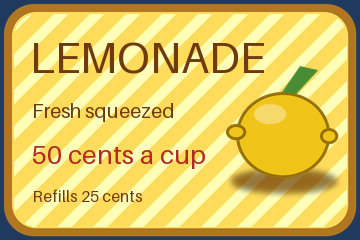
POST a .pdn to /v2/convert/pdn/to/jpg and get a baseline JPEG of the merged layers. JPEG has no transparency, so clear parts of the canvas are filled with AlphaColor: white by default, navy #1F3A5F in the sample, where the sign's rounded corners show it.
- Endpoint
- POST /v2/
convert/ pdn/ to/ jpg - Accepts
- pdn
- Sample timing
- 25 ms median of 5 runsHow we measure
- Request size
- Up to 10 MB on the Free plan or 100 MB on paid plans, all files together
Request and response
Every sample below ran against the API before this page was published. Set PDFCONVERSIONAPI_KEY to your key and run it as is.
curl -sS -X POST \
  https://api.pdfconversionapi.com/v2/convert/pdn/to/jpg \
  -H "Authorization: Bearer $PDFCONVERSIONAPI_KEY" \
  -F File=@lemonade-stand-sign.pdn \
  --form-string 'AlphaColor=#1F3A5F' \
  -o response.json

# FileData is base64. Save the first file in converted/,
# or print the JSON error.
if jq -e '.Files' response.json > /dev/null; then
  mkdir -p converted
  name=$(jq -r '.Files[0].FileName' response.json)
  jq -r '.Files[0].FileData' response.json \
    | base64 --decode > "converted/$name"
else
  cat response.json
fi
import base64
import os
import requests
key = os.environ["PDFCONVERSIONAPI_KEY"]
response = requests.post(
"https://api.pdfconversionapi.com/v2/convert/pdn/to/jpg",
headers={"Authorization": f"Bearer {key}"},
files=[("File", open("lemonade-stand-sign.pdn", "rb"))],
data={
"AlphaColor": "#1F3A5F",
},
timeout=180,
)
result = response.json()
if not response.ok:
raise SystemExit(f"{result['Code']}: {result['Message']}")
os.makedirs("converted", exist_ok=True)
for file in result["Files"]:
path = os.path.join("converted", file["FileName"])
with open(path, "wb") as out:
out.write(base64.b64decode(file["FileData"]))
print(path, file["FileSize"], "bytes")
import { mkdir, readFile, writeFile } from "node:fs/promises";
import { join } from "node:path";

const form = new FormData();
const file = "lemonade-stand-sign.pdn";
form.append("File", new Blob([await readFile(file)]), file);
form.append("AlphaColor", "#1F3A5F");

const url = "https://api.pdfconversionapi.com/v2/convert/pdn/to/jpg";
const key = process.env.PDFCONVERSIONAPI_KEY;
const response = await fetch(url, {
  method: "POST",
  headers: { Authorization: `Bearer ${key}` },
  body: form,
});
const result = await response.json();
if (!response.ok) {
  throw new Error(`${result.Code}: ${result.Message}`);
}

await mkdir("converted", { recursive: true });
for (const file of result.Files) {
  const path = join("converted", file.FileName);
  await writeFile(path, Buffer.from(file.FileData, "base64"));
  console.log(path, file.FileSize, "bytes");
}
{
  "ConversionCost": 1,
  "ConversionTime": 0.025,
  "Files": [
    {
      "FileName": "lemonade-stand-sign.jpg",
      "FileExt": "jpg",
      "FileSize": 37629,
      "FileData": "/9j/4AAQSkZJRgABAgAAAQAB…"
    }
  ]
}
Response from our test run on 2026-11-03. ConversionTime shows the median of 5 runs. FileData is shortened here; the real response carries the whole file as base64.
The sample, converted
The same file the code sends. Download the input and the output and compare them yourself.
- Input
- lemonade-stand-sign.pdn (87 KB)
- Output
- lemonade-stand-sign.jpg (37 KB)
- Source
- A 360 x 240 price sign with rounded transparent corners that we drew and wrote as a layered PDN file ourselves: seven layers, including Overlay and Multiply blend modes, a semi-transparent shine and a hidden draft layer. (CC0-1.0). How it was made
- Made by
- 2026-11-04, API build
9eeeb0640aba
Parameters
Send these as form fields next to the file. Names are case-insensitive. If you set one of the documented options below that we don't support yet, the request fails with a 400 that names it instead of returning a file made without it.
| Parameter | What it does |
|---|---|
AlphaColorstring, default white | Color put under clear and partly clear pixels. The sample's corners came out (30, 58, 95) for #1F3A5F. The file was 37,629 bytes; black gave 37,395 and the white default 37,252.Values: white, black, red, green, blue, gray, #RRGGBB or R,G,B |
BackgroundColorstring, default white | Read only when AlphaColor is missing: BackgroundColor=#1F3A5F alone returned the sample's exact bytes, while BackgroundColor=red next to AlphaColor=#1F3A5F changed nothing.Values: Same as AlphaColor |
ImageQualityinteger, default 85 | JPEG quality. On the white default, 50 gave 19,724 bytes, 85 gave 37,252 and 90 gave 46,197.Values: 1–100 |
ImageWidthinteger | Width in pixels after merging: ImageWidth=180 made a 180 × 120 JPEG of 13,553 bytes.Values: 1–20000 |
ImageHeightinteger | Height in pixels; with ImageWidth, a box that the 3:2 sign is fitted into.Values: 1–20000 |
ScaleProportionsboolean, default true | false with both sizes squeezes the sign into the box: 240 × 240 gave 28,209 bytes. |
ScaleIfLargerboolean, default false | true returns a canvas that is already smaller than the target at its own 360 × 240. |
ScaleImageboolean, default true | false crops a top-left region of the given size instead of scaling: 8,162 bytes for 180 × 90. |
ColorSpaceenum, default default | gray gives a one-channel JPEG of 20,589 bytes. monochrome sets each pixel to black or white after the clear areas are filled with AlphaColor, then JPEG compression adds gray fringes: the 20,348-byte one-channel file decodes to 44 gray levels, 82% of its pixels pure black or white.Values: default, rgb, gray, monochrome (also srgb, truecolors, grayscale); cmyk returns 400 |
ImageResolutioninteger | Sets the JFIF density in dots per inch; 300 wrote 300 × 300. Without it the header records only a 1:1 pixel aspect.Values: 10–800 |
FileNamestring | Base name of the result; without it the file comes back as lemonade-stand-sign.jpg. |
StoreFileboolean, default false | true answers with a link valid for 3 hours instead of base64 data. |
What carries over, and what doesn't
Kept
- All visible layers, merged with their blend modes and opacity before encoding: the Overlay stripes, the Multiply shadow and the shine at opacity 90 all show
- Full color resolution: the JPEG is baseline with 4:4:4 sampling, so the red price keeps clean color edges
- The canvas size: 360 × 240 in, 360 × 240 out unless you resize
- Close values overall: a mean error of 2.98 levels per channel against the merged layers laid on the same navy, at quality 85
Lost or not yet supported
- Transparency. Clear pixels take
AlphaColor, and the soft edge pixels are blended with it. - Precision on the diagonal stripe edges, which carry the largest errors: up to 61 levels at quality 85, with 2,574 pixels off by more than 20.
- Layers, the hidden draft layer and any DPI unless you send
ImageResolution.
Limits
- One PDN per request, up to 100,000,000 pixels after merging.
- Requests up to 10 MB on the Free plan or 100 MB on paid plans, all files and fields together.
- 120 seconds per conversion, then 504.
ImageQualityfrom 1 to 100; a color name the API does not know, such asteal, returns 400.- Tested with PDN files from our own writer, not yet with files saved by Paint.NET.
Where teams use it
Upload forms that take only JPEG
Some print, marketplace and email tools accept JPEG but not PNG. Sending the .pdn with an AlphaColor that matches the page or paper avoids a white box around rounded shapes.
Small files from layered sources
The sample .pdn stores each of its seven layers at full canvas size; the JPEG holds one merged picture. The 89,156-byte sign became 37,252 bytes at the default quality.
Questions
Why are the corners of my JPEG white?
JPEG cannot store transparency, so every clear pixel is painted with AlphaColor, which is white unless you send another. The sample sends #1F3A5F, so its corners are navy. Pick the color of the page or paper the image will sit on.
Which wins, AlphaColor or BackgroundColor?
AlphaColor. With AlphaColor=#1F3A5F and BackgroundColor=red together, the corners came out navy. BackgroundColor alone works the same way as AlphaColor alone.
Is the JPEG progressive?
No. It is a baseline JPEG (SOF0) with three components at full resolution, and there is no option for progressive output on this route yet.
Can I get a grayscale JPEG?
Yes, with ColorSpace=gray: the sign came back as a single-channel JPEG of 20,589 bytes. cmyk is refused with 400 'ColorSpace cmyk is not supported yet; use rgb, gray or monochrome'.
Convert your first PDN file in a minute.