XCF to JPG API
POST an .xcf to /v2/convert/xcf/to/jpg and get a baseline JPEG back. The visible layers of the GIMP file are merged into one picture, then encoded at ImageQuality 85 unless you send another value, with no chroma subsampling.
- Endpoint
- POST /v2/
convert/ xcf/ to/ jpg - Accepts
- xcf
- Sample timing
- 46 ms median of 5 runsHow we measure
- Request size
- Up to 10 MB on the Free plan or 100 MB on paid plans, all files together
Request and response
Every sample below ran against the API before this page was published. Set PDFCONVERSIONAPI_KEY to your key and run it as is.
curl -sS -X POST \
  https://api.pdfconversionapi.com/v2/convert/xcf/to/jpg \
  -H "Authorization: Bearer $PDFCONVERSIONAPI_KEY" \
  -F File=@gull-rock-lighthouse.xcf \
  --form-string ImageQuality=90 \
  -o response.json

# FileData is base64. Save the first file in converted/,
# or print the JSON error.
if jq -e '.Files' response.json > /dev/null; then
  mkdir -p converted
  name=$(jq -r '.Files[0].FileName' response.json)
  jq -r '.Files[0].FileData' response.json \
    | base64 --decode > "converted/$name"
else
  cat response.json
fi
import base64
import os
import requests
key = os.environ["PDFCONVERSIONAPI_KEY"]
response = requests.post(
"https://api.pdfconversionapi.com/v2/convert/xcf/to/jpg",
headers={"Authorization": f"Bearer {key}"},
files=[("File", open("gull-rock-lighthouse.xcf", "rb"))],
data={
"ImageQuality": "90",
},
timeout=180,
)
result = response.json()
if not response.ok:
raise SystemExit(f"{result['Code']}: {result['Message']}")
os.makedirs("converted", exist_ok=True)
for file in result["Files"]:
path = os.path.join("converted", file["FileName"])
with open(path, "wb") as out:
out.write(base64.b64decode(file["FileData"]))
print(path, file["FileSize"], "bytes")
import { mkdir, readFile, writeFile } from "node:fs/promises";
import { join } from "node:path";

const form = new FormData();
const file = "gull-rock-lighthouse.xcf";
form.append("File", new Blob([await readFile(file)]), file);
form.append("ImageQuality", "90");

const url = "https://api.pdfconversionapi.com/v2/convert/xcf/to/jpg";
const key = process.env.PDFCONVERSIONAPI_KEY;
const response = await fetch(url, {
  method: "POST",
  headers: { Authorization: `Bearer ${key}` },
  body: form,
});
const result = await response.json();
if (!response.ok) {
  throw new Error(`${result.Code}: ${result.Message}`);
}

await mkdir("converted", { recursive: true });
for (const file of result.Files) {
  const path = join("converted", file.FileName);
  await writeFile(path, Buffer.from(file.FileData, "base64"));
  console.log(path, file.FileSize, "bytes");
}
{
  "ConversionCost": 1,
  "ConversionTime": 0.046,
  "Files": [
    {
      "FileName": "gull-rock-lighthouse.jpg",
      "FileExt": "jpg",
      "FileSize": 23381,
      "FileData": "/9j/4AAQSkZJRgABAgAAAQAB…"
    }
  ]
}
Response from our test run on 2026-11-03. ConversionTime shows the median of 5 runs. FileData is shortened here; the real response carries the whole file as base64.
The sample, converted
The same file the code sends. Download the input and the output and compare them yourself.
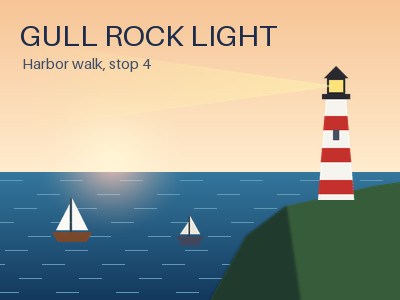
- Input
- gull-rock-lighthouse.xcf (203 KB)
- Output
- gull-rock-lighthouse.jpg (23 KB)
- Source
- A 400 x 300 harbor poster we drew and wrote as a layered XCF file ourselves: 11 layers, including a two-layer group, a layer mask, Multiply and Screen modes and a hidden guide layer. (CC0-1.0). How it was made
- Made by
- 2026-11-04, API build
9eeeb0640aba
Parameters
Send these as form fields next to the file. Names are case-insensitive. If you set one of the documented options below that we don't support yet, the request fails with a 400 that names it instead of returning a file made without it.
| Parameter | What it does |
|---|---|
ImageQualityinteger, default 85 | JPEG quality. For the 400 × 300 poster: 50 gave 11,212 bytes, 85 (the default) 19,085 bytes and 90 (the sample) 23,381 bytes.Values: 1–100 |
ImageWidthinteger | Target width in pixels, applied to the merged image. ImageWidth=200 gave a 200 × 150 JPEG of 7,902 bytes at the default quality.Values: 1–20000 |
ImageHeightinteger | Target height in pixels. With ImageWidth the two form a box the poster is fitted into, keeping its 4:3 shape.Values: 1–20000 |
ScaleProportionsboolean, default true | false with both sizes set distorts the picture to fill them; a 300 × 300 request gave a squeezed 300 × 300 JPEG. |
ScaleIfLargerboolean, default false | true stops enlargement: asking for 800 px wide returned the original 400 × 300. |
ScaleImageboolean, default true | false cuts the top-left ImageWidth × ImageHeight region out of the merged canvas instead of scaling it. |
ColorSpaceenum, default default | gray writes a one-channel grayscale JPEG (11,471 bytes for the poster); monochrome sets each pixel to black or white at level 128 before encoding, but JPEG compression adds gray fringes: the 13,827-byte one-channel file decodes to 45 gray levels, with 91% of pixels pure black or white.Values: default, rgb, gray, monochrome (also srgb, truecolors, grayscale); cmyk returns 400 |
ImageResolutioninteger | Writes this DPI into the JFIF header. Without it the density field is a plain 1:1 aspect ratio, whatever ppi the XCF had.Values: 10–800 |
AlphaColorstring, default white | Background for transparent parts of the canvas. The sample's sky layer is opaque, so it changed nothing there.Values: A color name (white, black, red, green, blue, gray), #RRGGBB or R,G,B |
BackgroundColorstring, default white | Used as the background when AlphaColor is not sent.Values: Same as AlphaColor |
FileNamestring | Name of the JPEG without the extension; by default the XCF's own name. |
StoreFileboolean, default false | true answers with a 3-hour download link instead of base64 data. |
What carries over, and what doesn't
Kept
- Everything visible in GIMP's layer stack, merged before encoding: masks, the boat group, the Multiply shadow and the Screen sun glow all show in the JPEG
- Full color resolution: the JPEG is baseline with 4:4:4 sampling, so the red stripes on the lighthouse are not blurred by color subsampling
- Pixel size: 400 × 300 in, 400 × 300 out unless you resize
- Close values at quality 90: mean difference of 1.0 level from the lossless PNG of the same file
Lost or not yet supported
- Transparency. JPEG has none; transparent canvas areas are filled with
AlphaColor, white by default. - Some detail around small lettering: at quality 90 the largest error, 47 levels, sat in the poster's subtitle.
- High bit depth. A 16-bit XCF is reduced to 8 bits per channel.
- The XCF's resolution, color profile, layers and hidden layers. The JPEG has only a JFIF header.
Limits
- One XCF per request. The canvas may hold up to 67,108,864 pixels (8,192 × 8,192): 16,384 × 4,096 converts, 8,193 × 8,192 gets a 413.
- Requests up to 10 MB on the Free plan or 100 MB on paid plans, all files and fields together.
- 120 seconds per conversion, then 504.
ImageQualityfrom 1 to 100; resize targets from 1 to 20,000 px.- Tested with XCF files from our own writer, not yet with files saved by GIMP.
Where teams use it
Artwork for a CMS or a shop
Content systems, marketplaces and email tools take JPEG uploads but not GIMP files. Convert the .xcf master when it is published and upload the JPEG, keeping the layered file as the source.
Smaller files for photo edits
A photo retouched in GIMP keeps its layers in the .xcf. A JPEG at quality 85 is a fraction of the size: the sample poster went from 207,799 bytes as XCF to 19,085 bytes.
Questions
Which quality should I send?
The default of 85 is a fair start for illustrations like the sample. Our poster measured 11,212 bytes at 50, 19,085 at 85 and 23,381 at 90. ConvertAPI documents 75 as its JPEG default for other inputs; send ImageQuality=75 if you want to match that.
What happens to a transparent GIMP canvas?
Transparent pixels are blended onto a solid background before encoding, because a JPEG has no alpha channel. The default is white. Send AlphaColor as a name, #RRGGBB or R,G,B for another color; an unknown name such as teal returns 400.
Are hidden layers merged into the JPEG?
No. Only layers that are visible in the file are merged. The sample's switched-off guide grid does not appear, and neither does a hidden layer group.
Can I make a grayscale JPEG?
Yes, with ColorSpace=gray. The poster then came back as a single-channel JPEG of 11,471 bytes. cmyk is refused with 400 'ColorSpace cmyk is not supported yet; use rgb, gray or monochrome'.
Convert your first XCF file in a minute.