XCF to WebP API
POST a GIMP file to /v2/convert/xcf/to/webp and get a WebP of the flattened layers. The WebP is lossless (VP8L), so its pixels are the same as the PNG route gives; resizing happens first if you ask for it.
- Endpoint
- POST /v2/
convert/ xcf/ to/ webp - Accepts
- xcf
- Sample timing
- 48 ms median of 5 runsHow we measure
- Request size
- Up to 10 MB on the Free plan or 100 MB on paid plans, all files together
Request and response
Every sample below ran against the API before this page was published. Set PDFCONVERSIONAPI_KEY to your key and run it as is.
curl -sS -X POST \
  https://api.pdfconversionapi.com/v2/convert/xcf/to/webp \
  -H "Authorization: Bearer $PDFCONVERSIONAPI_KEY" \
  -F File=@gull-rock-lighthouse.xcf \
  --form-string ImageWidth=300 \
  -o response.json

# FileData is base64. Save the first file in converted/,
# or print the JSON error.
if jq -e '.Files' response.json > /dev/null; then
  mkdir -p converted
  name=$(jq -r '.Files[0].FileName' response.json)
  jq -r '.Files[0].FileData' response.json \
    | base64 --decode > "converted/$name"
else
  cat response.json
fi
import base64
import os
import requests
key = os.environ["PDFCONVERSIONAPI_KEY"]
response = requests.post(
"https://api.pdfconversionapi.com/v2/convert/xcf/to/webp",
headers={"Authorization": f"Bearer {key}"},
files=[("File", open("gull-rock-lighthouse.xcf", "rb"))],
data={
"ImageWidth": "300",
},
timeout=180,
)
result = response.json()
if not response.ok:
raise SystemExit(f"{result['Code']}: {result['Message']}")
os.makedirs("converted", exist_ok=True)
for file in result["Files"]:
path = os.path.join("converted", file["FileName"])
with open(path, "wb") as out:
out.write(base64.b64decode(file["FileData"]))
print(path, file["FileSize"], "bytes")
import { mkdir, readFile, writeFile } from "node:fs/promises";
import { join } from "node:path";

const form = new FormData();
const file = "gull-rock-lighthouse.xcf";
form.append("File", new Blob([await readFile(file)]), file);
form.append("ImageWidth", "300");

const url = "https://api.pdfconversionapi.com/v2/convert/xcf/to/webp";
const key = process.env.PDFCONVERSIONAPI_KEY;
const response = await fetch(url, {
  method: "POST",
  headers: { Authorization: `Bearer ${key}` },
  body: form,
});
const result = await response.json();
if (!response.ok) {
  throw new Error(`${result.Code}: ${result.Message}`);
}

await mkdir("converted", { recursive: true });
for (const file of result.Files) {
  const path = join("converted", file.FileName);
  await writeFile(path, Buffer.from(file.FileData, "base64"));
  console.log(path, file.FileSize, "bytes");
}
{
  "ConversionCost": 1,
  "ConversionTime": 0.048,
  "Files": [
    {
      "FileName": "gull-rock-lighthouse.webp",
      "FileExt": "webp",
      "FileSize": 33924,
      "FileData": "UklGRnyEAABXRUJQVlA4TG+E…"
    }
  ]
}
Response from our test run on 2026-11-03. ConversionTime shows the median of 5 runs. FileData is shortened here; the real response carries the whole file as base64.
The sample, converted
The same file the code sends. Download the input and the output and compare them yourself.
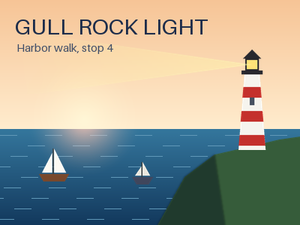
- Input
- gull-rock-lighthouse.xcf (203 KB)
- Output
- gull-rock-lighthouse.webp (33 KB)
- Source
- A 400 x 300 harbor poster we drew and wrote as a layered XCF file ourselves: 11 layers, including a two-layer group, a layer mask, Multiply and Screen modes and a hidden guide layer. (CC0-1.0). How it was made
- Made by
- 2026-11-04, API build
9eeeb0640aba
Parameters
Send these as form fields next to the file. Names are case-insensitive. If you set one of the documented options below that we don't support yet, the request fails with a 400 that names it instead of returning a file made without it.
| Parameter | What it does |
|---|---|
ImageWidthinteger | Width of the WebP. The sample sends 300, so the 400 × 300 poster comes back 300 × 225 and 33,924 bytes, still lossless after the resize. At that size the PNG route gives 33,442 bytes, so lossless WebP is not always the smaller file.Values: 1–20000 |
ImageHeightinteger | Height in pixels. Alone it sets the width from the canvas proportions; with ImageWidth the pair is a maximum box.Values: 1–20000 |
ScaleProportionsboolean, default true | Set to false to stretch to the exact width and height you send. |
ScaleIfLargerboolean, default false | true keeps a canvas that is already smaller than the target at its own size, so small GIMP files are never blown up. |
ScaleImageboolean, default true | false crops the top-left region at the requested size: 200 × 100 gave a 7,094-byte strip with the title. |
ColorSpaceenum, default default | gray stores gray values (11,464 bytes for the poster); monochrome reduces it to black and white (1,292 bytes). WebP has no gray mode, so both come back as RGB files with equal red, green and blue values.Values: default, rgb, gray, monochrome; cmyk returns 400 |
TransparentColorstring | Turns pixels of exactly this color transparent; #FFFFFF cleared 87 pixels of the poster.Values: #RRGGBB, R,G,B or a basic color name |
FileNamestring | Output name without .webp; defaults to the XCF's name. |
StoreFileboolean, default false | true returns a link valid for 3 hours instead of the file in the JSON. |
What carries over, and what doesn't
Kept
- Every pixel of the merged image: decoded, the WebP matched the PNG of the same XCF exactly
- The look of masks, the layer group and the Multiply and Screen layers, which are applied before encoding
- Transparency where the canvas has it: a test XCF with a clear background kept all 6,289 clear pixels, while the opaque poster comes back as RGB with no alpha channel
- Size at full resolution: 29,348 bytes for the 400 × 300 poster, below the 31,750-byte PNG
Lost or not yet supported
- Lossy compression is not offered:
ImageQualityis not read for WebP, and a value of 50 gave the same bytes. - High bit depth. 16-bit and float XCF files are written as 8 bits per channel.
- Resolution, color profile and layer structure. The file is a single VP8L chunk with no metadata.
Limits
- One XCF per request. The canvas may hold up to 67,108,864 pixels (8,192 × 8,192): 16,384 × 4,096 converts, 8,193 × 8,192 gets a 413.
- Requests up to 10 MB on the Free plan or 100 MB on paid plans, all files and fields together.
- 120 seconds per conversion, then 504.
- Resize targets are accepted from 1 to 20,000 px, but a WebP side can be at most 16,384 px:
ImageWidth=16385withImageHeight=100andScaleProportions=falsereturned 413WebP images can be at most 16,384 pixels on a side, and this one is 16,385×100; lower ImageWidth or ImageHeight, while 16,384 × 100 converted. A 20,000 × 100 canvas sent without a size got the same text ending at20,000×100, with no advice about the size options; withImageWidth=16384it converted.
Where teams use it
Web images straight from the source
Sites that keep GIMP masters can publish WebP without a manual export: send the .xcf when it changes and store the WebP the request returns.
Lossless archive copies
When a flat copy of each design is needed for search or preview, lossless WebP keeps every pixel. At the poster's full 400 × 300 it took less space than PNG, 29,348 bytes against 31,750; at the sample's 300 px width it was slightly larger, 33,924 against 33,442.
Questions
Is the WebP lossy or lossless?
Lossless. The route writes VP8L, and decoding it gives the same pixels as the PNG route. There is no option for lossy WebP yet; ImageQuality is accepted and ignored.
Why is the WebP smaller than the XCF?
The XCF stores each of its 10 pixel layers and a mask separately, the hidden guide grid included. The WebP holds only the merged result. Our 207,799-byte poster became 29,348 bytes at full size.
Does a transparent GIMP canvas stay transparent?
Yes. The WebP keeps the alpha of the merged image. Areas where no visible layer paints anything stay transparent. A canvas with no clear pixel, like the poster, is written without an alpha channel.
Can I set the DPI?
WebP has no resolution field, so ImageResolution is accepted and changes nothing. Use PNG, TIFF, BMP or JPEG if the DPI value matters.
Convert your first XCF file in a minute.