PSB to JPG API
Upload a .psb to /v2/convert/psb/to/jpg and receive a baseline JPEG, base64-encoded in the JSON. The sample sends ImageQuality=92: the 16-bit banner of 175,516 bytes came back as a 12,272-byte JPEG.
- Endpoint
- POST /v2/
convert/ psb/ to/ jpg - Accepts
- psb
- Sample timing
- 89 ms median of 5 runsHow we measure
- Request size
- Up to 10 MB on the Free plan or 100 MB on paid plans, all files together
Request and response
Every sample below ran against the API before this page was published. Set PDFCONVERSIONAPI_KEY to your key and run it as is.
curl -sS -X POST \
  https://api.pdfconversionapi.com/v2/convert/psb/to/jpg \
  -H "Authorization: Bearer $PDFCONVERSIONAPI_KEY" \
  -F File=@ridge-loop-trail-banner.psb \
  --form-string ImageQuality=92 \
  -o response.json

# FileData is base64. Save the first file in converted/,
# or print the JSON error.
if jq -e '.Files' response.json > /dev/null; then
  mkdir -p converted
  name=$(jq -r '.Files[0].FileName' response.json)
  jq -r '.Files[0].FileData' response.json \
    | base64 --decode > "converted/$name"
else
  cat response.json
fi
import base64
import os
import requests
key = os.environ["PDFCONVERSIONAPI_KEY"]
response = requests.post(
"https://api.pdfconversionapi.com/v2/convert/psb/to/jpg",
headers={"Authorization": f"Bearer {key}"},
files=[("File", open("ridge-loop-trail-banner.psb", "rb"))],
data={
"ImageQuality": "92",
},
timeout=180,
)
result = response.json()
if not response.ok:
raise SystemExit(f"{result['Code']}: {result['Message']}")
os.makedirs("converted", exist_ok=True)
for file in result["Files"]:
path = os.path.join("converted", file["FileName"])
with open(path, "wb") as out:
out.write(base64.b64decode(file["FileData"]))
print(path, file["FileSize"], "bytes")
import { mkdir, readFile, writeFile } from "node:fs/promises";
import { join } from "node:path";

const form = new FormData();
const file = "ridge-loop-trail-banner.psb";
form.append("File", new Blob([await readFile(file)]), file);
form.append("ImageQuality", "92");

const url = "https://api.pdfconversionapi.com/v2/convert/psb/to/jpg";
const key = process.env.PDFCONVERSIONAPI_KEY;
const response = await fetch(url, {
  method: "POST",
  headers: { Authorization: `Bearer ${key}` },
  body: form,
});
const result = await response.json();
if (!response.ok) {
  throw new Error(`${result.Code}: ${result.Message}`);
}

await mkdir("converted", { recursive: true });
for (const file of result.Files) {
  const path = join("converted", file.FileName);
  await writeFile(path, Buffer.from(file.FileData, "base64"));
  console.log(path, file.FileSize, "bytes");
}
{
  "ConversionCost": 1,
  "ConversionTime": 0.089,
  "Files": [
    {
      "FileName": "ridge-loop-trail-banner.jpg",
      "FileExt": "jpg",
      "FileSize": 12272,
      "FileData": "/9j/4AAQSkZJRgABAgAAAQAB…"
    }
  ]
}
Response from our test run on 2026-11-03. ConversionTime shows the median of 5 runs. FileData is shortened here; the real response carries the whole file as base64.
The sample, converted
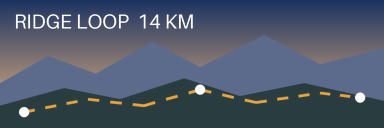
The same file the code sends. Download the input and the output and compare them yourself.
- Input
- ridge-loop-trail-banner.psb (171 KB)
- Output
- ridge-loop-trail-banner.jpg (12 KB)
- Source
- A layered trail-map banner we drew for this site: 384 x 128 pixels at 16 bits per channel on an opaque Background layer, with seven layers including a smooth sky gradient and a hidden old route. Written in the large document (PSB) format by our own script from the published file format specification. (CC0-1.0). How it was made
- Made by
- 2026-11-04, API build
9eeeb0640aba
Parameters
Send these as form fields next to the file. Names are case-insensitive. If you set one of the documented options below that we don't support yet, the request fails with a 400 that names it instead of returning a file made without it.
| Parameter | What it does |
|---|---|
ImageQualityinteger, default 85 | Compression level. On the banner: 60 gave 5,970 bytes, 85 gave 9,324 and 92 gave 12,272. At 92 the average error against the 8-bit reduction of the document was 0.97 levels.Values: 1–100 |
ImageWidthinteger | Width in pixels. Useful for previews of very wide documents: the height follows, so 768 made the 3:1 banner 768 × 256 (20,205 bytes).Values: 1–20000 |
ImageHeightinteger | Height in pixels; paired with a width it sets a box the banner is fitted into, keeping its shape.Values: 1–20000 |
ScaleProportionsboolean, default true | false distorts the banner to the exact width and height you send. |
ScaleIfLargerboolean, default false | true keeps documents that are already small enough at their own size. |
ScaleImageboolean, default true | false crops a piece of the canvas, starting top left, instead of resizing it. |
AlphaColorstring, default white | Fill for transparent pixels. The banner has none, so AlphaColor=black returned the same 9,324 bytes; it matters for PSBs with clear areas.Values: A color name, #RRGGBB or R,G,B |
ImageResolutioninteger | DPI in the JFIF header. The banner's 150 ppi is only written when you send ImageResolution=150.Values: 10–800 |
ColorSpaceenum, default default | gray produces a one-channel JPEG, 5,594 bytes for the banner.Values: default, rgb, gray, monochrome; cmyk returns 400 |
FileNamestring | Name for the result; by default the upload's name with .jpg. |
StoreFileboolean, default false | true hands back a link that works for 3 hours instead of the file data. |
What carries over, and what doesn't
Kept
- All visible layers composited by the API; the hidden Old route stays out
- The sky gradient row by row: along one column of the sample's sky, all 30 rows that differ in the document still differ in the JPEG
- Full chroma detail: baseline JPEG with 4:4:4 sampling
- The 384 × 128 size unless you resize
Lost or not yet supported
- Half the bit depth. JPEG holds 8 bits per channel, so the 16-bit sky is rounded before it is compressed.
- Exact pixels. At quality 92, 96 pixels moved more than 15 levels, around the label and the white trail markers; the worst moved 26.
- Layers, the 150 ppi setting unless sent, and any color profile. The file carries a JFIF header and nothing else.
Limits
- One PSB per request.
- Requests up to 10 MB on the Free plan or 100 MB on paid plans, all files and fields together.
- 100,000,000 pixels at most after flattening, checked before
ImageWidthis applied; bigger documents return 413. - Resize targets from 1 to 20,000 px per side.
- Sides up to 65,500 px. A 65,501 × 2 test PSB returned 413 'JPEG images can be at most 65,500 pixels on a side, and this one is 65,501×2'; 65,500 px converted, and a 70,000 px one did with
ImageWidth=20000. - 120 seconds per conversion, then 504.
- Untested so far: type layers, smart objects and layer effects in PSB files.
Where teams use it
Web previews of print-size artwork
A PSB for a banner or a wall graphic can be far too big to show in a browser. One request with ImageWidth gives a JPEG that loads in a product page, a proofing tool or a ticket.
Sharing a layout by email or chat
Convert the large document at quality 85 to 92 and send the JPEG instead of the layered file: the sample is 12,272 bytes against 175,516 for its PSB.
Questions
My PSB is too large to convert. Can I downscale it in the request?
Only up to a point. The document is flattened at full size first, and that flattened image must stay under 100,000,000 pixels; ImageWidth is applied after the check. A 10,001 × 10,000 test PSB returned 413 even with ImageWidth=1000.
Is 16-bit color kept?
No. JPEG stores 8 bits per channel, so 16-bit documents are rounded. If you need 16 bits, use the PSB to PNG or PSB to TIFF route, which keep them.
What does ImageQuality change for this banner?
File size and small detail. 60 gave 5,970 bytes, the default 85 gave 9,324 and 92 gave 12,272. The errors gather at edges such as the white label and markers; the smooth sky changes little.
Does it matter whether I call the PSD or the PSB endpoint?
No. The file's header decides how it is read, so both versions convert on either route, and for JPEG output both routes read the same options. An option neither reads, such as TransparentColor, is ignored without an error: the bytes matched a request without it.
Convert your first PSB file in a minute.