HDR to TIFF API
POST a .hdr to /v2/convert/hdr/to/tiff and get an uncompressed TIFF with three 16-bit samples per pixel. The RGBE values are decoded, clipped at 1.0 and stored as integers from 0 to 65535.
- Endpoint
- POST /v2/
convert/ hdr/ to/ tiff - Accepts
- hdr
- Sample timing
- 24 ms median of 5 runsHow we measure
- Request size
- Up to 10 MB on the Free plan or 100 MB on paid plans, all files together
Request and response
Every sample below ran against the API before this page was published. Set PDFCONVERSIONAPI_KEY to your key and run it as is.
curl -sS -X POST \
  https://api.pdfconversionapi.com/v2/convert/hdr/to/tiff \
  -H "Authorization: Bearer $PDFCONVERSIONAPI_KEY" \
  -F File=@lakeside-sunset-sky.hdr \
  -o response.json

# FileData is base64. Save the first file in converted/,
# or print the JSON error.
if jq -e '.Files' response.json > /dev/null; then
  mkdir -p converted
  name=$(jq -r '.Files[0].FileName' response.json)
  jq -r '.Files[0].FileData' response.json \
    | base64 --decode > "converted/$name"
else
  cat response.json
fi
import base64
import os
import requests
key = os.environ["PDFCONVERSIONAPI_KEY"]
response = requests.post(
"https://api.pdfconversionapi.com/v2/convert/hdr/to/tiff",
headers={"Authorization": f"Bearer {key}"},
files=[("File", open("lakeside-sunset-sky.hdr", "rb"))],
timeout=180,
)
result = response.json()
if not response.ok:
raise SystemExit(f"{result['Code']}: {result['Message']}")
os.makedirs("converted", exist_ok=True)
for file in result["Files"]:
path = os.path.join("converted", file["FileName"])
with open(path, "wb") as out:
out.write(base64.b64decode(file["FileData"]))
print(path, file["FileSize"], "bytes")
import { mkdir, readFile, writeFile } from "node:fs/promises";
import { join } from "node:path";

const form = new FormData();
const file = "lakeside-sunset-sky.hdr";
form.append("File", new Blob([await readFile(file)]), file);

const url = "https://api.pdfconversionapi.com/v2/convert/hdr/to/tiff";
const key = process.env.PDFCONVERSIONAPI_KEY;
const response = await fetch(url, {
  method: "POST",
  headers: { Authorization: `Bearer ${key}` },
  body: form,
});
const result = await response.json();
if (!response.ok) {
  throw new Error(`${result.Code}: ${result.Message}`);
}

await mkdir("converted", { recursive: true });
for (const file of result.Files) {
  const path = join("converted", file.FileName);
  await writeFile(path, Buffer.from(file.FileData, "base64"));
  console.log(path, file.FileSize, "bytes");
}
{
  "ConversionCost": 1,
  "ConversionTime": 0.024,
  "Files": [
    {
      "FileName": "lakeside-sunset-sky.tiff",
      "FileExt": "tiff",
      "FileSize": 480210,
      "FileData": "SUkqACRTBwABAAAAAQAAAAEA…"
    }
  ]
}
Response from our test run on 2026-11-03. ConversionTime shows the median of 5 runs. FileData is shortened here; the real response carries the whole file as base64.
The sample, converted
The same file the code sends. Download the input and the output and compare them yourself.
- Input
- lakeside-sunset-sky.hdr (90 KB)
- Output
- lakeside-sunset-sky.tiff (469 KB)
- Source
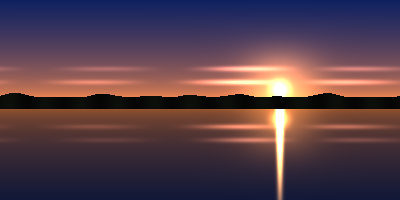
- A sunset sky panorama we drew in code and saved as a 400 × 200 Radiance RGBE file with run-length scanlines; the sun disc is 60.0. (CC0-1.0). How it was made
- Made by
- 2026-11-04, API build
9eeeb0640aba
Parameters
Send these as form fields next to the file. Names are case-insensitive. If you set one of the documented options below that we don't support yet, the request fails with a 400 that names it instead of returning a file made without it.
| Parameter | What it does |
|---|---|
ImageWidthinteger | Scales the 16-bit image; ImageWidth=120 returned 120 × 60 at 43,410 bytes, still 16 bits per sample.Values: 1–20000 |
ImageHeightinteger | Height to scale to: ImageHeight=100 gave 200 × 100 (120,210 bytes).Values: 1–20000 |
ScaleProportionsboolean, default true | false and 200 × 200 squeeze the panorama into a square, 240,210 bytes. |
ScaleIfLargerboolean, default false | true avoids upscaling; ImageWidth=800 alone wrote 1,920,226 bytes. |
ScaleImageboolean, default true | false crops instead of resizing. |
ColorSpaceenum, default default | gray and monochrome write an 8-bit one-channel TIFF of 80,198 bytes.Values: default, rgb, gray, monochrome; cmyk returns 400 |
ImageResolutioninteger | Sets XResolution and YResolution in inches. Without it the tags say 1/1 with no unit.Values: 10–800 |
TransparentColorstring | Adds alpha for one exact color and drops the file to 8 bits per sample (320,214 bytes).Values: #RRGGBB, R,G,B or a color name |
FileNamestring | Output name without .tiff. |
StoreFileboolean, default false | Returns a link valid for 3 hours. |
What carries over, and what doesn't
Kept
- 16 bits per channel, the same values as the PNG route on every pixel
- Plain uncompressed strips, which need no decompression code to read
- 16-bit depth through resizing
Lost or not yet supported
- Values above 1.0. TIFF could hold floating point, but this route writes 16-bit integers (SampleFormat 1) after clipping.
- The linear-light label: no ICC profile or transfer curve is written.
- Size: 480,210 bytes, 5.2 times the .hdr, as nothing is compressed.
- Header lines such as
EXPOSURE, which are not read.
Limits
- One .hdr, one TIFF.
- Requests up to 10 MB on the Free plan or 100 MB on paid plans.
- 100,000,000 pixels at most.
- Top-down RGBE files only; others return 422.
- 120 seconds per conversion.
Where teams use it
Retouching a display copy
Photo editors and print tools that open TIFF but not Radiance files can work on a 16-bit copy of an HDR merge, with finer tonal steps than 8 bits allow.
Figures for reports and archives
Report templates and archives that require TIFF can take each lighting simulation image converted to 16-bit RGB.
Questions
Is the TIFF floating point?
No. Samples are 16-bit unsigned integers. The decoded light is clipped at 1.0 first, so the 60.0 sun is stored as 65535 like any other white.
Why is the TIFF so large?
It is uncompressed at 6 bytes per pixel, plus a short header: 480,210 bytes for 400 × 200. RGBE packs a pixel into 4 bytes and run-length codes them.
Does ColorSpace=gray work?
Yes. Because a Radiance image has no alpha, gray gives an 8-bit grayscale TIFF of 80,198 bytes with one sample per pixel. (An EXR render with transparency gets an 8-bit RGBA TIFF with gray values instead.)
Convert your first HDR file in a minute.