GIF to ICO API
POST a GIF to /v2/convert/gif/to/ico and get back an .ico file with one 32-bit entry made from frame 1. Anything larger than 256 px on a side is scaled down to fit, keeping its shape and its transparent pixels.
- Endpoint
- POST /v2/
convert/ gif/ to/ ico - Accepts
- gif
- Sample timing
- 3 ms median of 5 runsHow we measure
- Request size
- Up to 10 MB on the Free plan or 100 MB on paid plans, all files together
Request and response
Every sample below ran against the API before this page was published. Set PDFCONVERSIONAPI_KEY to your key and run it as is.
curl -sS -X POST \
  https://api.pdfconversionapi.com/v2/convert/gif/to/ico \
  -H "Authorization: Bearer $PDFCONVERSIONAPI_KEY" \
  -F File=@parcel-tracker.gif \
  -o response.json

# FileData is base64. Save the first file in converted/,
# or print the JSON error.
if jq -e '.Files' response.json > /dev/null; then
  mkdir -p converted
  name=$(jq -r '.Files[0].FileName' response.json)
  jq -r '.Files[0].FileData' response.json \
    | base64 --decode > "converted/$name"
else
  cat response.json
fi
import base64
import os
import requests
key = os.environ["PDFCONVERSIONAPI_KEY"]
response = requests.post(
"https://api.pdfconversionapi.com/v2/convert/gif/to/ico",
headers={"Authorization": f"Bearer {key}"},
files=[("File", open("parcel-tracker.gif", "rb"))],
timeout=180,
)
result = response.json()
if not response.ok:
raise SystemExit(f"{result['Code']}: {result['Message']}")
os.makedirs("converted", exist_ok=True)
for file in result["Files"]:
path = os.path.join("converted", file["FileName"])
with open(path, "wb") as out:
out.write(base64.b64decode(file["FileData"]))
print(path, file["FileSize"], "bytes")
import { mkdir, readFile, writeFile } from "node:fs/promises";
import { join } from "node:path";

const form = new FormData();
const file = "parcel-tracker.gif";
form.append("File", new Blob([await readFile(file)]), file);

const url = "https://api.pdfconversionapi.com/v2/convert/gif/to/ico";
const key = process.env.PDFCONVERSIONAPI_KEY;
const response = await fetch(url, {
  method: "POST",
  headers: { Authorization: `Bearer ${key}` },
  body: form,
});
const result = await response.json();
if (!response.ok) {
  throw new Error(`${result.Code}: ${result.Message}`);
}

await mkdir("converted", { recursive: true });
for (const file of result.Files) {
  const path = join("converted", file.FileName);
  await writeFile(path, Buffer.from(file.FileData, "base64"));
  console.log(path, file.FileSize, "bytes");
}
{
  "ConversionCost": 1,
  "ConversionTime": 0.003,
  "Files": [
    {
      "FileName": "parcel-tracker.ico",
      "FileExt": "ico",
      "FileSize": 22770,
      "FileData": "AAABAAEAAGYAAAAAIADcWAAA…"
    }
  ]
}
Response from our test run on 2026-11-03. ConversionTime shows the median of 5 runs. FileData is shortened here; the real response carries the whole file as base64.
The sample, converted
The same file the code sends. Download the input and the output and compare them yourself.
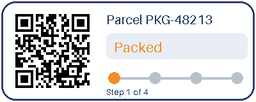
- Input
- parcel-tracker.gif (8.7 KB)
- Output
- parcel-tracker.ico (22 KB)
- Source
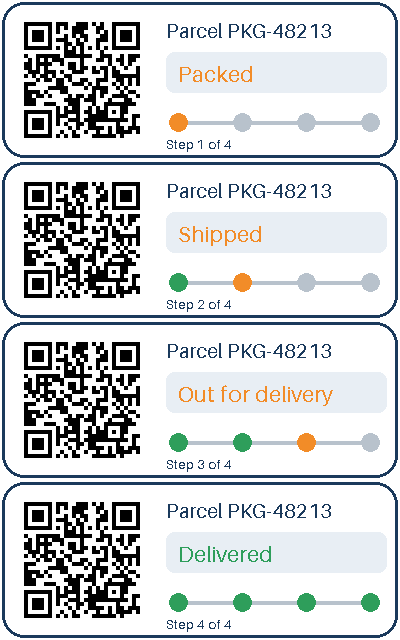
- A four-frame animated parcel-tracking card with a transparent outside and a QR code, drawn by us for this page. (CC0-1.0). How it was made
- Made by
- 2026-11-04, API build
9eeeb0640aba
Parameters
Send these as form fields next to the file. Names are case-insensitive. If you set one of the documented options below that we don't support yet, the request fails with a 400 that names it instead of returning a file made without it.
| Parameter | What it does |
|---|---|
ImageWidthinteger | Width of the icon before the 256 px cap. 200 gave a 200 × 80 icon; 800 still ends at 256 × 102, because the cap applies after your resize.Values: 1–20000 |
ImageHeightinteger | Height before the cap; 100 returned 250 × 100. Send both values with ScaleProportions=false to force a square.Values: 1–20000 |
ScaleProportionsboolean, default true | false with a width and a height gives exactly that shape. 300 × 300 became a 256 × 256 square icon, squashed horizontally. |
ScaleIfLargerboolean, default false | true stops your width or height from enlarging the GIF. The 256 px cap still applies. |
ScaleImageboolean, default true | false crops to ImageWidth × ImageHeight from the top-left corner. A 150 × 100 crop of the card (its QR code) made a 1,601-byte icon. |
ColorSpaceenum, default default | Gray or black-and-white icon pixels; the icon stays 32-bit with alpha. monochrome is applied after the fit to 256 × 102, so only pure black and white remain, with the same alpha as the color icon (3,431 bytes).Values: default, rgb, gray, monochrome |
FileNamestring | File name for the .ico, without extension. |
StoreFileboolean, default false | URL to the icon for 3 hours instead of base64. |
What carries over, and what doesn't
Kept
- Transparency: the card's clear corners are alpha 0 in the icon
- The GIF's shape: a 400 × 160 card becomes a 256 × 102 icon
- Full 32-bit color in the icon entry, stored as a compressed PNG inside the .ico
Lost or not yet supported
- Animation: only frame 1 is used.
- Detail above 256 px. The sample's QR code no longer scanned after being shrunk into the 256 × 102 icon.
- Clean edges. Scaling blends the magenta stored under the clear pixels into the card's outline: in the sample, 628 edge pixels that are at least half opaque come out purple, such as (85, 46, 133) where the same resize with navy under the clear pixels gives (29, 60, 94).
- Multiple sizes. The .ico holds one entry, not a 16, 32 and 48 px set.
Limits
- One GIF per request, one icon entry per file.
- Icon entries are at most 256 × 256; larger images are scaled down to fit.
- Requests up to 10 MB on the Free plan or 100 MB on paid plans, all files and fields together.
- Input images over 100,000,000 pixels: 413.
- 120 seconds per conversion, then 504.
Where teams use it
Favicons and app icons from GIF artwork
A logo kept as a small GIF can become the .ico a site or a Windows shortcut asks for. Crop or stretch to a square in the same call, as icons are usually square.
Desktop shortcuts for internal tools
A shortcut or installer often needs a .ico file. A GIF logo becomes one in a single call, with its transparent background intact.
Questions
What sizes are inside the .ico?
Exactly one: frame 1, fitted into 256 × 256 with its aspect ratio kept unless you change it. Without options the sample gave a single 256 × 102 entry.
How do I get a square icon from a wide GIF?
Either crop with ScaleImage=false and a square ImageWidth and ImageHeight, or stretch with ScaleProportions=false. Cropping keeps the artwork undistorted.
Is the icon entry PNG or BMP inside?
PNG. The single entry is a 32-bit PNG stream rather than an uncompressed bitmap, which keeps the sample icon at 22,770 bytes.
Are other options refused?
No. ConvertAPI documents no options for GIF to ICO, so parameters this route does not read, such as ImageQuality, are ignored and the icon is unchanged.
Convert your first GIF file in a minute.