GIF to TGA API
POST a GIF to /v2/convert/gif/to/tga to receive frame 1 as an uncompressed 32-bit Targa file (image type 2) with a top-left origin. The GIF's transparency is carried into the TGA's 8-bit alpha channel.
- Endpoint
- POST /v2/
convert/ gif/ to/ tga - Accepts
- gif
- Sample timing
- 1 ms median of 5 runsHow we measure
- Request size
- Up to 10 MB on the Free plan or 100 MB on paid plans, all files together
Request and response
Every sample below ran against the API before this page was published. Set PDFCONVERSIONAPI_KEY to your key and run it as is.
curl -sS -X POST \
  https://api.pdfconversionapi.com/v2/convert/gif/to/tga \
  -H "Authorization: Bearer $PDFCONVERSIONAPI_KEY" \
  -F File=@parcel-tracker.gif \
  -o response.json

# FileData is base64. Save the first file in converted/,
# or print the JSON error.
if jq -e '.Files' response.json > /dev/null; then
  mkdir -p converted
  name=$(jq -r '.Files[0].FileName' response.json)
  jq -r '.Files[0].FileData' response.json \
    | base64 --decode > "converted/$name"
else
  cat response.json
fi
import base64
import os
import requests
key = os.environ["PDFCONVERSIONAPI_KEY"]
response = requests.post(
"https://api.pdfconversionapi.com/v2/convert/gif/to/tga",
headers={"Authorization": f"Bearer {key}"},
files=[("File", open("parcel-tracker.gif", "rb"))],
timeout=180,
)
result = response.json()
if not response.ok:
raise SystemExit(f"{result['Code']}: {result['Message']}")
os.makedirs("converted", exist_ok=True)
for file in result["Files"]:
path = os.path.join("converted", file["FileName"])
with open(path, "wb") as out:
out.write(base64.b64decode(file["FileData"]))
print(path, file["FileSize"], "bytes")
import { mkdir, readFile, writeFile } from "node:fs/promises";
import { join } from "node:path";

const form = new FormData();
const file = "parcel-tracker.gif";
form.append("File", new Blob([await readFile(file)]), file);

const url = "https://api.pdfconversionapi.com/v2/convert/gif/to/tga";
const key = process.env.PDFCONVERSIONAPI_KEY;
const response = await fetch(url, {
  method: "POST",
  headers: { Authorization: `Bearer ${key}` },
  body: form,
});
const result = await response.json();
if (!response.ok) {
  throw new Error(`${result.Code}: ${result.Message}`);
}

await mkdir("converted", { recursive: true });
for (const file of result.Files) {
  const path = join("converted", file.FileName);
  await writeFile(path, Buffer.from(file.FileData, "base64"));
  console.log(path, file.FileSize, "bytes");
}
{
  "ConversionCost": 1,
  "ConversionTime": 0.001,
  "Files": [
    {
      "FileName": "parcel-tracker.tga",
      "FileExt": "tga",
      "FileSize": 256018,
      "FileData": "AAACAAAAAAAAAAAAkAGgACAo…"
    }
  ]
}
Response from our test run on 2026-11-03. ConversionTime shows the median of 5 runs. FileData is shortened here; the real response carries the whole file as base64.
The sample, converted
The same file the code sends. Download the input and the output and compare them yourself.
- Input
- parcel-tracker.gif (8.7 KB)
- Output
- parcel-tracker.tga (250 KB)
- Source
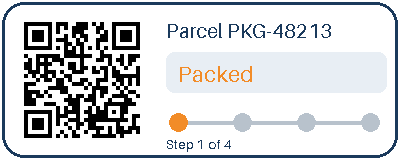
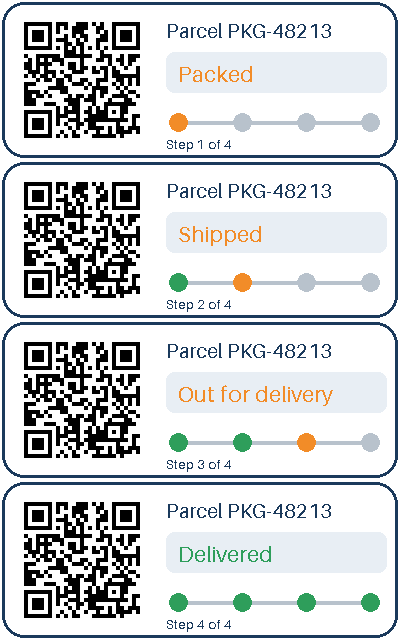
- A four-frame animated parcel-tracking card with a transparent outside and a QR code, drawn by us for this page. (CC0-1.0). How it was made
- Made by
- 2026-11-04, API build
9eeeb0640aba
Parameters
Send these as form fields next to the file. Names are case-insensitive. If you set one of the documented options below that we don't support yet, the request fails with a 400 that names it instead of returning a file made without it.
| Parameter | What it does |
|---|---|
ImageWidthinteger | Width of the Targa in pixels. The 200 × 80 version took 64,018 bytes: 4 bytes per pixel plus the 18-byte header.Values: 1–20000 |
ImageHeightinteger | Height in pixels. Combined with ImageWidth, the card is fitted inside that box.Values: 1–20000 |
ScaleProportionsboolean, default true | false stretches to the exact box. |
ScaleIfLargerboolean, default false | true keeps GIFs smaller than the target at their own size. |
ScaleImageboolean, default true | false crops the top-left area: 150 × 100 gave 60,018 bytes. |
TransparentColorstring | Sets alpha to 0 for one more exact color. With #FFFFFF the white face of the card turned clear in the alpha channel.Values: Color name, #RRGGBB or R,G,B |
ColorSpaceenum, default default | Gray or black-and-white pixel values in the same 32-bit layout and size, 256,018 bytes; monochrome left only black, white and the clear corners.Values: default, rgb, gray, monochrome |
FileNamestring | Output file name, .tga added. |
StoreFileboolean, default false | Return a URL valid for 3 hours. |
What carries over, and what doesn't
Kept
- Every pixel of frame 1, including alpha: the raw pixel data matched the GIF frame with no difference
- Transparency as 8 alpha bits per pixel, so the card's corners stay clear
- Top-left row order (image descriptor 0x28), so the image is not flipped
Lost or not yet supported
- Frames after the first; the tracker shows Packed only.
- No TGA 2.0 footer or extension area, so there is no author, date or gamma field.
- Size compared with the GIF: 256,018 bytes against 8,956, since nothing is compressed: 4 bytes for each of the 64,000 pixels plus an 18-byte header.
Limits
- One GIF per request.
- Requests up to 10 MB on the Free plan or 100 MB on paid plans, all files and fields together.
- 413 above 100,000,000 pixels, before decoding.
- Resize sides from 1 to 20,000 px.
- Conversions that pass 120 seconds return 504.
Where teams use it
Textures and sprites for game tools
Many game engines, modding tools and texture pipelines accept Targa with alpha. A GIF sprite or UI element becomes a TGA with its transparent pixels already in the alpha channel.
Video and compositing software
Video editors and compositing tools that import Targa stills can use a converted GIF badge as an overlay, with its cut-out corners already transparent.
Questions
Is the TGA compressed?
No. It is image type 2, uncompressed true color at 32 bits per pixel, so the sample is 256,018 bytes. There is no option to switch run-length coding on.
Which programs can open the TGA?
All three readers we tried, the image tools built into macOS among them, decoded the sample exactly, alpha included. The rows are stored plain, with no run-length packets, so readers without run-length support load it too.
Does it keep the transparent background?
Yes. The alpha byte is 0 for the GIF's transparent pixels and 255 elsewhere, and the header declares 8 alpha bits.
Are unknown parameters rejected?
No. ConvertAPI documents no options for GIF to TGA, so names this route doesn't read are ignored and the file comes back unchanged.
Convert your first GIF file in a minute.