JPG to JXL API
POST a JPEG to /v2/convert/jpg/to/jxl and get a JPEG XL file encoded from the decoded photo at the ImageQuality you set (75 unless you send one). The sample uses 90 and drops from 25,110 to 16,627 bytes; quality 100 is lossless.
- Endpoint
- POST /v2/
convert/ jpg/ to/ jxl - Accepts
- jpg
- Sample timing
- 67 ms median of 5 runsHow we measure
- Request size
- Up to 10 MB on the Free plan or 100 MB on paid plans, all files together
Request and response
Every sample below ran against the API before this page was published. Set PDFCONVERSIONAPI_KEY to your key and run it as is.
curl -sS -X POST \
  https://api.pdfconversionapi.com/v2/convert/jpg/to/jxl \
  -H "Authorization: Bearer $PDFCONVERSIONAPI_KEY" \
  -F File=@trailhead-sign.jpg \
  --form-string ImageQuality=90 \
  -o response.json

# FileData is base64. Save the first file in converted/,
# or print the JSON error.
if jq -e '.Files' response.json > /dev/null; then
  mkdir -p converted
  name=$(jq -r '.Files[0].FileName' response.json)
  jq -r '.Files[0].FileData' response.json \
    | base64 --decode > "converted/$name"
else
  cat response.json
fi
import base64
import os
import requests
key = os.environ["PDFCONVERSIONAPI_KEY"]
response = requests.post(
"https://api.pdfconversionapi.com/v2/convert/jpg/to/jxl",
headers={"Authorization": f"Bearer {key}"},
files=[("File", open("trailhead-sign.jpg", "rb"))],
data={
"ImageQuality": "90",
},
timeout=180,
)
result = response.json()
if not response.ok:
raise SystemExit(f"{result['Code']}: {result['Message']}")
os.makedirs("converted", exist_ok=True)
for file in result["Files"]:
path = os.path.join("converted", file["FileName"])
with open(path, "wb") as out:
out.write(base64.b64decode(file["FileData"]))
print(path, file["FileSize"], "bytes")
import { mkdir, readFile, writeFile } from "node:fs/promises";
import { join } from "node:path";

const form = new FormData();
const file = "trailhead-sign.jpg";
form.append("File", new Blob([await readFile(file)]), file);
form.append("ImageQuality", "90");

const url = "https://api.pdfconversionapi.com/v2/convert/jpg/to/jxl";
const key = process.env.PDFCONVERSIONAPI_KEY;
const response = await fetch(url, {
  method: "POST",
  headers: { Authorization: `Bearer ${key}` },
  body: form,
});
const result = await response.json();
if (!response.ok) {
  throw new Error(`${result.Code}: ${result.Message}`);
}

await mkdir("converted", { recursive: true });
for (const file of result.Files) {
  const path = join("converted", file.FileName);
  await writeFile(path, Buffer.from(file.FileData, "base64"));
  console.log(path, file.FileSize, "bytes");
}
{
  "ConversionCost": 1,
  "ConversionTime": 0.067,
  "Files": [
    {
      "FileName": "trailhead-sign.jxl",
      "FileExt": "jxl",
      "FileSize": 16627,
      "FileData": "/wpYuQEAE4gCACTTeQKpRTaB…"
    }
  ]
}
Response from our test run on 2026-11-03. ConversionTime shows the median of 5 runs. FileData is shortened here; the real response carries the whole file as base64.
The sample, converted
The same file the code sends. Download the input and the output and compare them yourself.
- Input
- trailhead-sign.jpg (25 KB)
- Output
- trailhead-sign.jxl (16 KB)
- Source
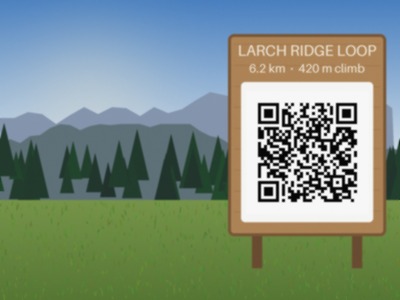
- A drawn mountain trailhead with a wooden sign and a QR code, made by us for these pages and saved at JPEG quality 92 with an EXIF block, an sRGB color profile and 300 dpi. (CC0-1.0). How it was made
- Made by
- 2026-11-04, API build
9eeeb0640aba
Parameters
Send these as form fields next to the file. Names are case-insensitive. If you set one of the documented options below that we don't support yet, the request fails with a 400 that names it instead of returning a file made without it.
| Parameter | What it does |
|---|---|
ImageQualityinteger, default 75 | JPEG XL visual quality; 100 is lossless. The sample at 1, 50, 75, 90 and 100: 2,848, 6,636, 10,165, 16,627 and 51,232 bytes. 75 matches ConvertAPI's documented default.Values: 1–100 |
ColorSpaceenum, default default | gray encodes a one-channel grayscale JPEG XL (8,765 bytes at quality 75).Values: default, rgb, gray, monochrome; cmyk returns 400 |
ImageWidthinteger | Scale before encoding; 200 px wide came to 4,694 bytes at the default quality.Values: 1–20000 |
ImageHeightinteger | Height to scale to, or a box with the width.Values: 1–20000 |
ScaleProportionsboolean, default true | false stretches to the given width and height. |
ScaleIfLargerboolean, default false | true won't enlarge; an 800 px request otherwise gave 20,906 bytes. |
ScaleImageboolean, default true | false crops the requested size from the top left. |
ImageInterpolationboolean, default false | Accepted, no effect; resizing is Lanczos3. |
ImageResolutioninteger | Accepted for compatibility; nothing is recorded, and the bytes are identical.Values: 10–800 |
FileNamestring | Output name; trailhead-sign.jxl by default. |
StoreFileboolean, default false | true returns a link valid for 3 hours. |
What carries over, and what doesn't
Kept
- At quality 100, every decoded pixel exactly
- At 90, close detail: average difference about 1 level in 255 per channel, peak signal-to-noise 43.9 dB against the decoded JPEG
- 8-bit sRGB color, stated in the file's header
- The upright view of phone photos: the EXIF orientation is applied to the pixels, so a 300 × 200 test photo tagged Orientation 6 came back as a 200 × 300 JPEG XL
- The QR code and lettering on the sign at the sample's quality
Lost or not yet supported
- The original JPEG. The file is encoded from decoded pixels, without the reconstruction data that would let a JPEG be rebuilt byte for byte; a reversible transcode of the same JPEG measures 20,559 bytes elsewhere, but this route doesn't make one.
- A generation of quality below 100: it is a lossy encode on top of the JPEG's.
- EXIF, the sRGB ICC profile and the 300 dpi value.
- A preview on this site: our API reads no JPEG XL, so the sample shows the input and a download only.
Limits
- One JPEG per request; JPG and HEIC are the only inputs with a JPEG XL route.
- Uploads up to 10 MB on the Free plan or 100 MB on paid plans.
- 100,000,000 pixels per image.
- Resize range 1 to 20,000 px.
- 120 seconds per conversion.
Where teams use it
Smaller copies of a photo library
At the default quality the sample is 40% of the JPEG's size (10,165 bytes); at 90 it is 66%. Keep the JPEGs as originals and serve or archive the JPEG XL copies where your viewers support the format.
A lossless master in a newer format
ImageQuality=100 stores the decoded pixels exactly. It is larger than the JPEG (51,232 bytes for the sample), but every pixel matches.
Questions
Is this lossless JPEG recompression?
No. JPEG XL can repack a JPEG's own data so the original can be restored exactly, but this route decodes the photo first and encodes the pixels. Choose ImageQuality=100 for pixel-exact output; it won't be smaller than a typical JPEG.
What quality should I pick?
For the sample, 90 gave 16,627 bytes with a peak signal-to-noise ratio of 43.9 dB against the decoded JPEG; the default 75 gave 10,165 bytes at 38.8 dB. Compare a few of your own photos before converting a library.
Does the output keep EXIF?
No. The JPEG XL is a bare codestream with no EXIF, XMP or ICC boxes; its header records sRGB color.
Can I convert PNG to JPEG XL?
Not today. JPEG XL output is offered from JPG and HEIC only. Convert the PNG to JPG first if you accept the extra loss.
Convert your first JPG file in a minute.