ODF to PNG API
POST /v2/convert/odf/to/png draws an OpenDocument formula file as a PNG of its A4 print page: title row, typeset formula and source text, each in a frame. At the default 150 DPI our loan formula comes back as a 1,240 × 1,753 RGB image of 168,178 bytes.
- Endpoint
- POST /v2/
convert/ odf/ to/ png - Accepts
- odf
- Sample timing
- 0.533 s median of 5 runsHow we measure
- Request size
- Up to 10 MB on the Free plan or 100 MB on paid plans, all files together
Request and response
Every sample below ran against the API before this page was published. Set PDFCONVERSIONAPI_KEY to your key and run it as is.
curl -sS -X POST \
  https://api.pdfconversionapi.com/v2/convert/odf/to/png \
  -H "Authorization: Bearer $PDFCONVERSIONAPI_KEY" \
  -F File=@loan-payment-formula.odf \
  -o response.json

# FileData is base64. Save the first file in converted/,
# or print the JSON error.
if jq -e '.Files' response.json > /dev/null; then
  mkdir -p converted
  name=$(jq -r '.Files[0].FileName' response.json)
  jq -r '.Files[0].FileData' response.json \
    | base64 --decode > "converted/$name"
else
  cat response.json
fi
import base64
import os
import requests
key = os.environ["PDFCONVERSIONAPI_KEY"]
response = requests.post(
"https://api.pdfconversionapi.com/v2/convert/odf/to/png",
headers={"Authorization": f"Bearer {key}"},
files=[("File", open("loan-payment-formula.odf", "rb"))],
timeout=180,
)
result = response.json()
if not response.ok:
raise SystemExit(f"{result['Code']}: {result['Message']}")
os.makedirs("converted", exist_ok=True)
for file in result["Files"]:
path = os.path.join("converted", file["FileName"])
with open(path, "wb") as out:
out.write(base64.b64decode(file["FileData"]))
print(path, file["FileSize"], "bytes")
import { mkdir, readFile, writeFile } from "node:fs/promises";
import { join } from "node:path";

const form = new FormData();
const file = "loan-payment-formula.odf";
form.append("File", new Blob([await readFile(file)]), file);

const url = "https://api.pdfconversionapi.com/v2/convert/odf/to/png";
const key = process.env.PDFCONVERSIONAPI_KEY;
const response = await fetch(url, {
  method: "POST",
  headers: { Authorization: `Bearer ${key}` },
  body: form,
});
const result = await response.json();
if (!response.ok) {
  throw new Error(`${result.Code}: ${result.Message}`);
}

await mkdir("converted", { recursive: true });
for (const file of result.Files) {
  const path = join("converted", file.FileName);
  await writeFile(path, Buffer.from(file.FileData, "base64"));
  console.log(path, file.FileSize, "bytes");
}
{
  "ConversionCost": 1,
  "ConversionTime": 0.533,
  "Files": [
    {
      "FileName": "loan-payment-formula-1.png",
      "FileExt": "png",
      "FileSize": 168178,
      "FileData": "iVBORw0KGgoAAAANSUhEUgAA…"
    }
  ]
}
Response from our test run on 2026-11-03. ConversionTime shows the median of 5 runs. FileData is shortened here; the real response carries the whole file as base64.
The sample, converted
The same file the code sends. Download the input and the output and compare them yourself.
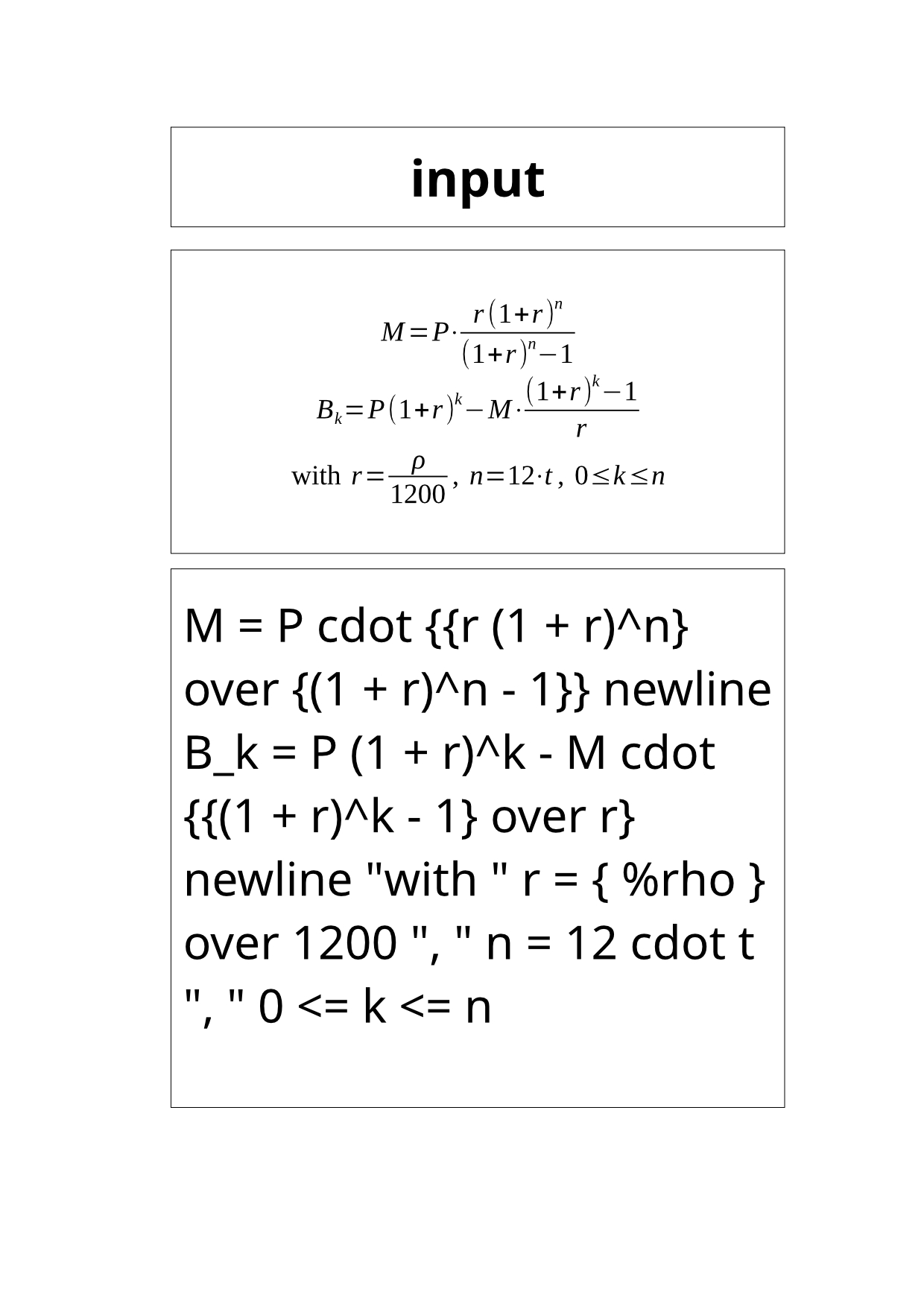
- Input
- loan-payment-formula.odf (1.8 KB)
- Output
- loan-payment-formula-1.png (164 KB)
- Source
- Two loan payment formulas with their variables, which we wrote as an OpenDocument formula by hand (CC0-1.0). How it was made
- Made by
- 2026-11-04, API build
9eeeb0640aba
Parameters
Send these as form fields next to the file. Names are case-insensitive. If you set one of the documented options below that we don't support yet, the request fails with a 400 that names it instead of returning a file made without it.
| Parameter | What it does |
|---|---|
ImageResolutioninteger, default 150 | DPI of the A4 page, also stored in the PNG when sent: 72 gives 595 × 841, 300 gives 2,480 × 3,507 at 388,784 bytes.Values: 36–600 |
ImageWidthinteger | Width in pixels, height to match the page: 600 gave 600 × 849.Values: 1–20000 |
ImageHeightinteger | Height in pixels; both together give a box the page fits into.Values: 1–20000 |
ScaleProportionsboolean, default true | false stretches the page to exactly ImageWidth × ImageHeight. |
ScaleImageboolean, default true | false crops a region of that size from the top-left corner of the 150 DPI page instead of scaling it; 600 × 300 returned the top-left corner: the corner of the title frame's border and the first letters of the bold title "input", with the rest white. |
ScaleIfLargerboolean, default false | true keeps the page from being enlarged. |
BackgroundColorstring, default white | Paints the page behind the formula. This page has no fill of its own, so #fff8e1 turned every background pixel, inside the frames too, to that color. ConvertAPI documents White as the default here.Values: color name, #RRGGBB or R,G,B |
TransparentColorstring | Clears one exact color: white made 2,088,260 of the 2,173,720 pixels transparent, leaving the frames, formula and text.Values: color name, #RRGGBB or R,G,B |
ColorSpaceenum, default default | monochrome keeps black and white only, in one channel: 26,708 bytes. gray stores the grays in one channel: 68,067 bytes. rgb gives the same three-channel 168,178-byte file as the default.Values: default, rgb, gray, monochrome |
FileNamestring | Stem of the name; the page comes back as <stem>-1.png. |
StoreFileboolean, default false | Return a link to the stored PNG, kept for 3 hours. |
Not supported yet
Setting one of these to anything but its default returns 400.
| Option | What to do instead |
|---|---|
PageSize | The page is A4: 400 "PageSize is not supported yet for ODF files". |
What carries over, and what doesn't
Kept
- The whole A4 print page, 1,240 × 1,753 pixels at 150 DPI
- The typeset formula at its file's 18 pt base size, with fractions, powers and ρ
- The title row and the source text box that the formula printer adds
- Neutral grays only: the page holds 256 shades from black to white, all with equal red, green and blue, and stays opaque unless
TransparentColoris set
Lost or not yet supported
- A tight crop around the formula: it fills a box in the upper half of a mostly white page.
- Your file name: the title row reads "input".
- The DPI in the file, unless
ImageResolutionis sent.
Limits
- One page per formula;
PageRangeaccepts only1. - 100,000,000 pixels and 16,000 pixels per side; larger sizes return 413.
- Password-protected formulas can't be drawn yet: 422 "the input file is password-protected" without
Password, 400 "password-protected ODF files are not supported yet" with it. With an unprotected file,Passwordmakes no difference (168,178 bytes either way). - Up to 10 MB on the Free plan or 100 MB on paid plans per request and 120 seconds per conversion.
Where teams use it
Previews of formula files
A file library or course platform can show what an uploaded .odf contains without a formula editor. The preview shows the typeset formula and its source together.
Checking formula files in bulk
Render each file in a folder of formulas and compare the images, for example after fonts or templates changed.
Formula images on a colored page
TransparentColor=white leaves only the frames, formula and text, so the page can be laid over a colored background.
Questions
Can I get just the formula, without the page?
Not with an option yet. The PNG is the full print page. Crop the middle frame on your side; at 150 DPI it runs from about pixel 229 to 1,053 across.
Why does `BackgroundColor` work here when it does nothing for drawings?
Formula pages carry no white fill of their own, so the color we paint behind the page shows through everywhere, even inside the frames. Drawing and chart pages come with a white fill that covers it.
What does the title row show?
"input", the name of the working copy we convert, in bold. It isn't your file name or the document title.
Convert your first ODF file in a minute.