ODF to PDF API
POST /v2/convert/odf/to/pdf prints an OpenDocument formula file onto an A4 PDF page. Our 1,892-byte loan payment formula comes back as a 34,781-byte PDF with three framed boxes: a title row, the typeset formula and the formula's source text.
- Endpoint
- POST /v2/
convert/ odf/ to/ pdf - Accepts
- odf
- Sample timing
- 0.514 s median of 5 runsHow we measure
- Request size
- Up to 10 MB on the Free plan or 100 MB on paid plans, all files together
Request and response
Every sample below ran against the API before this page was published. Set PDFCONVERSIONAPI_KEY to your key and run it as is.
curl -sS -X POST \
  https://api.pdfconversionapi.com/v2/convert/odf/to/pdf \
  -H "Authorization: Bearer $PDFCONVERSIONAPI_KEY" \
  -F File=@loan-payment-formula.odf \
  -o response.json

# FileData is base64. Save the first file in converted/,
# or print the JSON error.
if jq -e '.Files' response.json > /dev/null; then
  mkdir -p converted
  name=$(jq -r '.Files[0].FileName' response.json)
  jq -r '.Files[0].FileData' response.json \
    | base64 --decode > "converted/$name"
else
  cat response.json
fi
import base64
import os
import requests
key = os.environ["PDFCONVERSIONAPI_KEY"]
response = requests.post(
"https://api.pdfconversionapi.com/v2/convert/odf/to/pdf",
headers={"Authorization": f"Bearer {key}"},
files=[("File", open("loan-payment-formula.odf", "rb"))],
timeout=180,
)
result = response.json()
if not response.ok:
raise SystemExit(f"{result['Code']}: {result['Message']}")
os.makedirs("converted", exist_ok=True)
for file in result["Files"]:
path = os.path.join("converted", file["FileName"])
with open(path, "wb") as out:
out.write(base64.b64decode(file["FileData"]))
print(path, file["FileSize"], "bytes")
import { mkdir, readFile, writeFile } from "node:fs/promises";
import { join } from "node:path";

const form = new FormData();
const file = "loan-payment-formula.odf";
form.append("File", new Blob([await readFile(file)]), file);

const url = "https://api.pdfconversionapi.com/v2/convert/odf/to/pdf";
const key = process.env.PDFCONVERSIONAPI_KEY;
const response = await fetch(url, {
  method: "POST",
  headers: { Authorization: `Bearer ${key}` },
  body: form,
});
const result = await response.json();
if (!response.ok) {
  throw new Error(`${result.Code}: ${result.Message}`);
}

await mkdir("converted", { recursive: true });
for (const file of result.Files) {
  const path = join("converted", file.FileName);
  await writeFile(path, Buffer.from(file.FileData, "base64"));
  console.log(path, file.FileSize, "bytes");
}
{
  "ConversionCost": 1,
  "ConversionTime": 0.514,
  "Files": [
    {
      "FileName": "loan-payment-formula.pdf",
      "FileExt": "pdf",
      "FileSize": 34781,
      "FileData": "JVBERi0xLjcKJcOkw7zDtsOf…"
    }
  ]
}
Response from our test run on 2026-11-03. ConversionTime shows the median of 5 runs. FileData is shortened here; the real response carries the whole file as base64.
The sample, converted
The same file the code sends. Download the input and the output and compare them yourself.
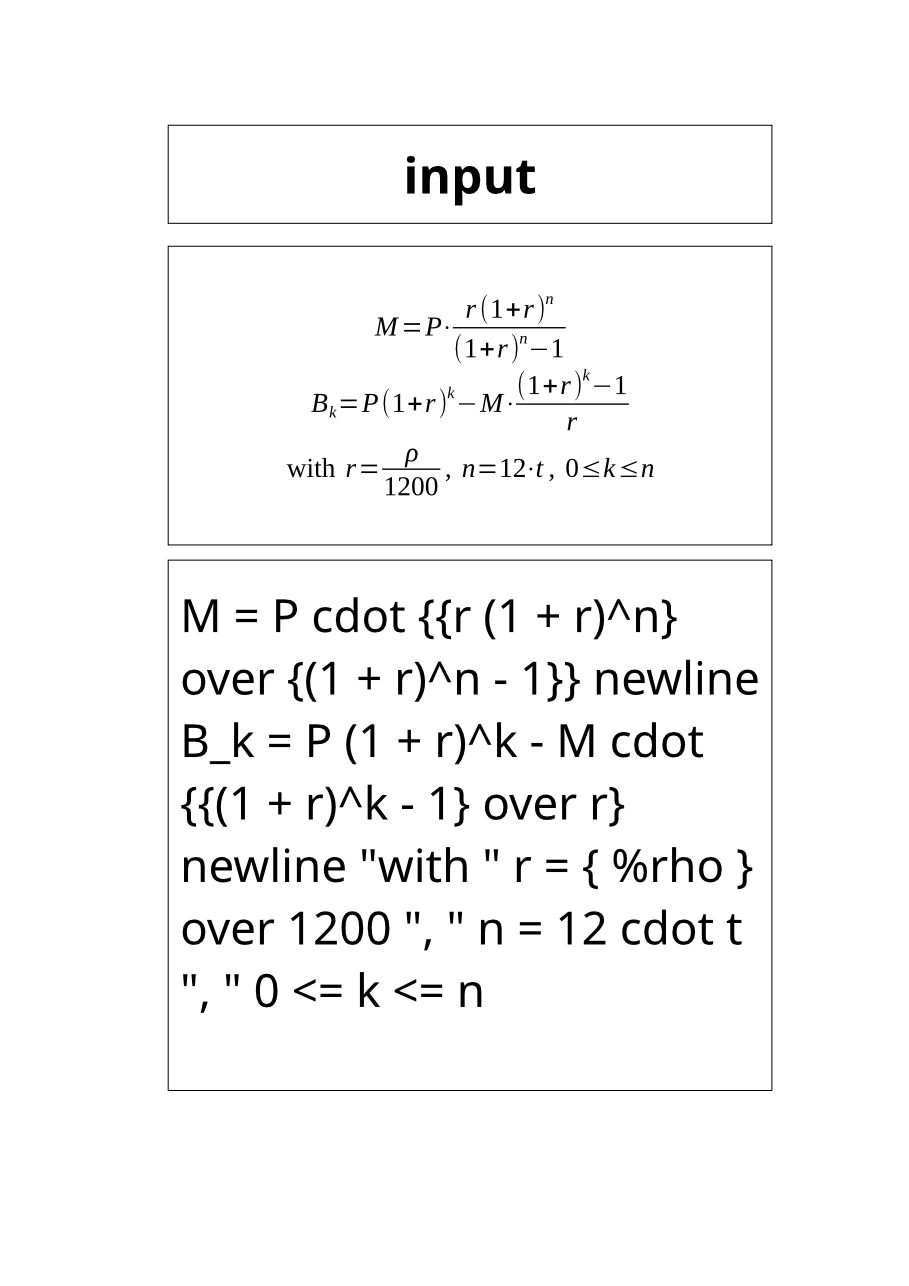
- Input
- loan-payment-formula.odf (1.8 KB)
- Output
- loan-payment-formula.pdf (34 KB)
- Source
- Two loan payment formulas with their variables, which we wrote as an OpenDocument formula by hand (CC0-1.0). How it was made
- Made by
- 2026-11-04, API build
9eeeb0640aba
Parameters
Send these as form fields next to the file. Names are case-insensitive. If you set one of the documented options below that we don't support yet, the request fails with a 400 that names it instead of returning a file made without it.
| Parameter | What it does |
|---|---|
PdfaVersionenum, default none | PDF/A level: pdfA2b made the formula page a PDF/A-2b file of 43,724 bytes.Values: none, pdfA1b, pdfA2b, pdfA3b |
Pdfaboolean, default false | true gives PDF/A-1b (43,717 bytes for the sample). |
PageRangestring | A formula prints on a single page, so only 1 is accepted; 2 returns 400 "PageRange asks for page 2, but the document has 1 page". |
FileNamestring | Base name of the PDF: FileName=payment returns payment.pdf. |
StoreFileboolean, default false | Return a download link instead of the file; it expires after 3 hours. |
Not supported yet
Setting one of these to anything but its default returns 400.
| Option | What to do instead |
|---|---|
PageSize | The page is A4; the request returns 400 "PageSize is not supported yet for ODF files". |
Also refused when set: PageOrientation.
What carries over, and what doesn't
Kept
- The formula's layout: fractions, powers, the subscript k under B and the Greek ρ, centered as the file asks
- The base size set in the file, 18 pt in the sample, with indices at 10.8 pt
- The fonts named in the file when the server has them: Liberation Serif for letters and numbers, and the symbol font the file names for operators
- Selectable text for both the typeset formula and its source
- The file's title, "Loan payment formulas", as the PDF title
Lost or not yet supported
- A page of your choice: the formula is printed on A4 (595.28 × 841.89 pt) with framed boxes around it.
- Your file name in the title row: it always reads "input", the name of our working copy.
- Fonts the server lacks: a formula set in STIX Two Text printed in Noto Sans.
- Reading order in extracted text: the formula comes out in pieces, such as "M=P⋅r(1+r)" and "n" on separate lines.
Limits
- One formula file per request, up to 10 MB on the Free plan or 100 MB on paid plans, and 120 seconds per conversion.
PageRangeplus PDF/A returns 400 only when the range drops pages, which a one-page formula never does.- Formula files only: an OpenDocument text file sent here returns 422 "the input file could not be read: it could not be opened as ODF".
- A protected formula returns 422 "the input file is password-protected" without
Passwordand 400 "password-protected ODF files are not supported yet" with it.Passwordsent with an unprotected file is ignored; the PDF is the same 34,781 bytes.
Where teams use it
Formula sheets for a course
Teachers who keep formulas as .odf files can hand students a PDF that opens anywhere. The loan sample's three lines print as one centered block.
Proofreading a formula against its source
The PDF shows the typeset formula with its source text in the box below it, so a reviewer can check {(1 + r)^n - 1} against the fraction it produced.
Keeping formulas with documentation
PdfaVersion=pdfA2b gives a PDF/A copy of the formula for a records system alongside the report that uses it.
Questions
Is .odf the same as an OpenDocument text file?
No. The .odf extension is for formulas made in a formula editor. A word processing file is .odt and has its own route, odt/to/pdf; sent here, our .odt returned 422 "it could not be opened as ODF".
Why does the top of the page say "input"?
The formula printer adds a title row with the file name, and we convert a working copy named input.odf. There is no option to turn the title row, the frames or the source text off yet.
Can I get the formula on a small page of its own?
Not yet. Our formula files all printed on A4, and PageSize returns 400. For an image of the formula, convert to PNG and crop the middle box on your side.
Can I send .odf files to file/to/pdf?
Yes. /v2/convert/file/to/pdf returned the same 34,781-byte PDF. office/to/pdf doesn't take them and answers 400 with this route's address.
Convert your first ODF file in a minute.