ODT to PDF API
Send an OpenDocument text file to POST /v2/convert/odt/to/pdf and the PDF comes back in the response: the file's own page size and margins, selectable text with the fonts embedded, and a bookmark for every heading.
- Endpoint
- POST /v2/
convert/ odt/ to/ pdf - Accepts
- odt
- Sample timing
- 22 ms median of 5 runsHow we measure
- Request size
- Up to 10 MB on the Free plan or 100 MB on paid plans, all files together
Request and response
Every sample below ran against the API before this page was published. Set PDFCONVERSIONAPI_KEY to your key and run it as is.
curl -sS -X POST \
  https://api.pdfconversionapi.com/v2/convert/odt/to/pdf \
  -H "Authorization: Bearer $PDFCONVERSIONAPI_KEY" \
  -F File=@garden-plot-guide.odt \
  -o response.json

# FileData is base64. Save the first file in converted/,
# or print the JSON error.
if jq -e '.Files' response.json > /dev/null; then
  mkdir -p converted
  name=$(jq -r '.Files[0].FileName' response.json)
  jq -r '.Files[0].FileData' response.json \
    | base64 --decode > "converted/$name"
else
  cat response.json
fi
import base64
import os
import requests
key = os.environ["PDFCONVERSIONAPI_KEY"]
response = requests.post(
"https://api.pdfconversionapi.com/v2/convert/odt/to/pdf",
headers={"Authorization": f"Bearer {key}"},
files=[("File", open("garden-plot-guide.odt", "rb"))],
timeout=180,
)
result = response.json()
if not response.ok:
raise SystemExit(f"{result['Code']}: {result['Message']}")
os.makedirs("converted", exist_ok=True)
for file in result["Files"]:
path = os.path.join("converted", file["FileName"])
with open(path, "wb") as out:
out.write(base64.b64decode(file["FileData"]))
print(path, file["FileSize"], "bytes")
import { mkdir, readFile, writeFile } from "node:fs/promises";
import { join } from "node:path";

const form = new FormData();
const file = "garden-plot-guide.odt";
form.append("File", new Blob([await readFile(file)]), file);

const url = "https://api.pdfconversionapi.com/v2/convert/odt/to/pdf";
const key = process.env.PDFCONVERSIONAPI_KEY;
const response = await fetch(url, {
  method: "POST",
  headers: { Authorization: `Bearer ${key}` },
  body: form,
});
const result = await response.json();
if (!response.ok) {
  throw new Error(`${result.Code}: ${result.Message}`);
}

await mkdir("converted", { recursive: true });
for (const file of result.Files) {
  const path = join("converted", file.FileName);
  await writeFile(path, Buffer.from(file.FileData, "base64"));
  console.log(path, file.FileSize, "bytes");
}
{
  "ConversionCost": 1,
  "ConversionTime": 0.022,
  "Files": [
    {
      "FileName": "garden-plot-guide.pdf",
      "FileExt": "pdf",
      "FileSize": 82688,
      "FileData": "JVBERi0xLjcKJYCAgIAKMSAw…"
    }
  ]
}
Response from our test run on 2026-11-03. ConversionTime shows the median of 5 runs. FileData is shortened here; the real response carries the whole file as base64.
The sample, converted
The same file the code sends. Download the input and the output and compare them yourself.
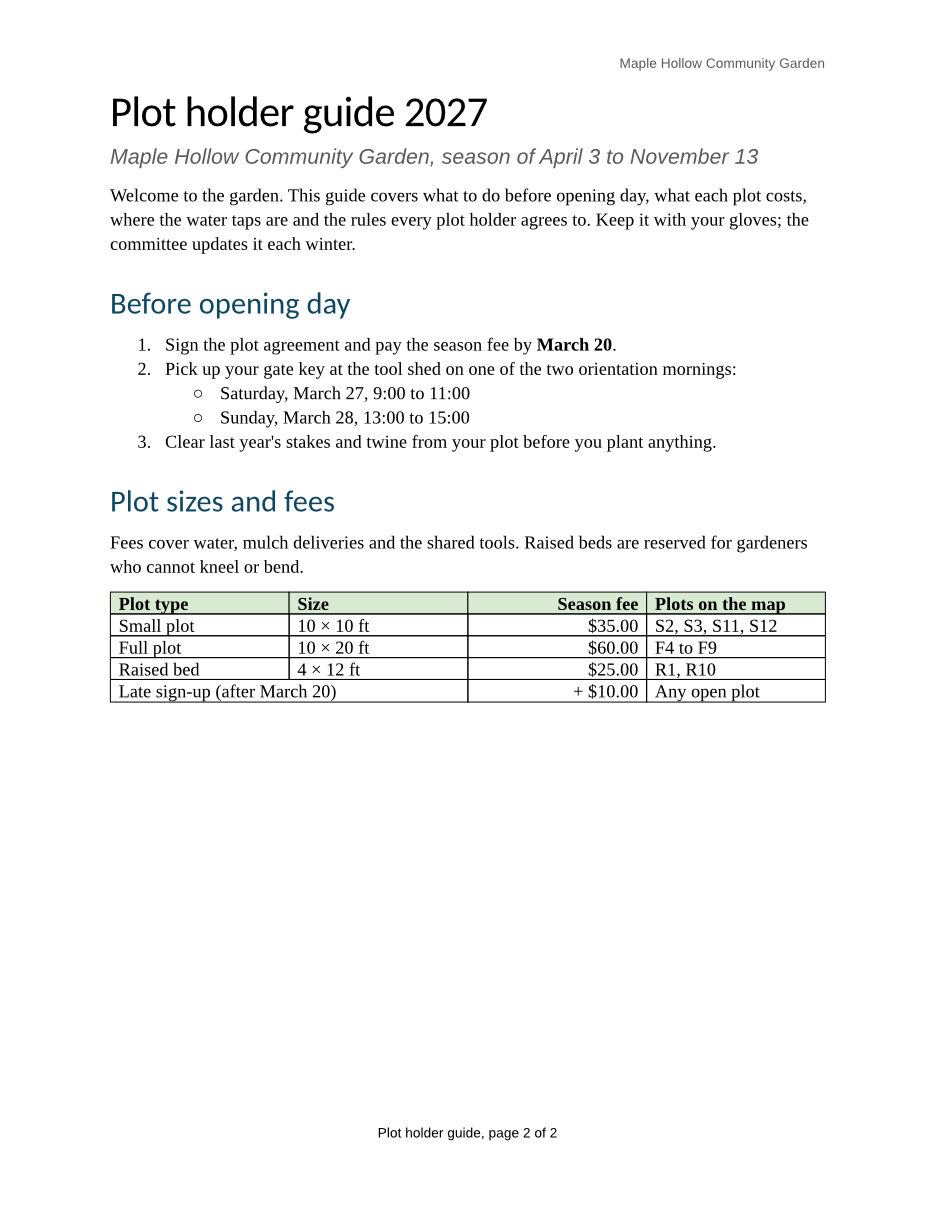
- Input
- garden-plot-guide.odt (35 KB)
- Output
- garden-plot-guide.pdf (81 KB)
- Source
- A two-page plot holder guide for a fictional community garden, with a fee table, a plot map, lists, a footnote and a page-numbered footer. We wrote it for these pages as an OpenDocument text file. (CC0-1.0). How it was made
- Made by
- 2026-11-04, API build
9eeeb0640aba
Parameters
Send these as form fields next to the file. Names are case-insensitive. If you set one of the documented options below that we don't support yet, the request fails with a 400 that names it instead of returning a file made without it.
| Parameter | What it does |
|---|---|
IncludeMarkupboolean, default false | Print tracked changes as a reviewer sees them: deleted words struck through, inserted words underlined in color, with a change bar in the left margin. Without it the PDF shows the text as if every change were accepted. Comments in an ODT are not printed either way. |
UpdateFieldsboolean, default false | Accepted, but it changes nothing for ODT input, because fields are read as the text the file stores. In our test, a table of contents saved with an out-of-date entry and a page reference saved as 99 printed exactly as saved with UpdateFields=true. |
FileNamestring | Base name of the PDF. The sample garden-plot-guide.odt comes back as garden-plot-guide.pdf; FileName=plots-2027 returns plots-2027.pdf. |
StoreFileboolean, default false | Answer with a download link instead of the PDF bytes. The stored file is deleted 3 hours after the conversion. |
Not supported yet
Setting one of these to anything but its default returns 400.
| Option | What to do instead |
|---|---|
PdfaVersion | Returns 400 "PdfaVersion is not supported yet for ODT → PDF". Convert first, then send the PDF to /v2/convert/pdf/to/pdfa, which returned PDF/A-2b for the sample. |
What carries over, and what doesn't
Kept
- Paper and page breaks: the sample prints on 2 US Letter pages (612 × 792 points), and page 2 starts at the plot map, where the file has a manual break
- The fee table, with its shaded header row, right-aligned fees and the late sign-up cell that spans two columns
- The plot map at its placed size of 6 × 3 inches, embedded as the original 600 × 300 pixel picture
- Numbered steps, the bulleted sub-list under step 2, and bold, italic, red and highlighted words
- The watering-schedule link, as a link you can click in the PDF
- A bookmark for each heading (6 in the sample) and a tagged PDF whose language is set to en-US
- Title, subject, author and keywords from the file's properties
- Text you can select and search, embedded as font subsets: Liberation Serif and Liberation Sans, plus Carlito for the title and headings
Lost or not yet supported
- Footnotes. The sample's note about reduced fees and its reference mark after "shared tools." are both missing from the PDF.
- Live page numbers in headers and footers. Each page prints the number stored in the file, so both pages of the sample say "page 2 of 2".
UpdateFields=truedoes not change this. - The file's heading and title styles. The 24 pt bold green title prints as 28 pt regular black, and headings take a dark blue (#0F4761) look in Carlito instead of bold green Liberation Sans. Body text is set at 12 pt instead of the file's 11 pt, so lines break in different places.
- Table column widths: the four columns come out equal, about 1.63 inches each, instead of the 2.2, 1.3, 1.3 and 1.7 inches in the file.
- Centering of the map: the picture sits at the left margin although its paragraph is centered.
- Comments, with or without
IncludeMarkup.
Limits
- Requests up to 10 MB on the Free plan or 100 MB on paid plans, all files and fields together.
- A conversion can run for up to 120 seconds; after that the API returns 504.
- A password-protected ODT returns 422 "the input file is password-protected" when
Passwordis left out, and 400 "password-protected ODT files can't be converted to PDF yet" when it is sent. PageRangeandPdfaare not read for ODT files and are ignored: the whole document comes back as an ordinary PDF. Cut pages afterwards with/v2/convert/pdf/to/extract.
Where teams use it
Handouts written in OpenDocument editors
When a club, school or small office keeps its forms and guides as .odt files, convert each upload to PDF. Members get a file their phone or browser opens without an office suite, laid out on the same pages.
Reports filled from an ODT template
If your code fills an ODT template (odfpy, relatorio, or plain XML edits to content.xml), add this call as the last step. Headings become PDF bookmarks, so a long generated report can be navigated from the sidebar.
A fixed copy for review or records
Send the PDF to people who should read the text but not edit it, or keep it next to the source file. Add /v2/convert/pdf/to/pdfa when the copy has to meet an archiving rule.
Questions
Why does every page of my PDF show the same page number?
An ODT stores the text of each page-number field as its editor last laid it out; in the files we saved with a desktop office suite, that was the number of the last page. The converter prints that stored text instead of counting pages, so the sample's footer reads "page 2 of 2" on page 1 as well. Until this is fixed, leave page numbers out of the footer, or add them to the finished PDF.
Can I get PDF/A from an ODT file?
Not in this request: PdfaVersion returns 400 and Pdfa=true is ignored. Send the PDF on to /v2/convert/pdf/to/pdfa. For the sample that second call returned a PDF/A-2b file of 83,496 bytes, slightly larger than the 82,688-byte original.
Where did my footnotes go?
The ODT reader skips footnotes and endnotes for now, together with their reference marks, so the text around them closes up. If the notes matter, move them into the body or an appendix before converting, or check the result before you publish it.
Do I need an office suite on my server?
No. Your code sends the file over HTTPS and gets the PDF back; the ODT is read and laid out on our side by our own document engine. Any language that can make a multipart POST request works.
Can I convert only some pages?
Not in this request. PageRange is ignored for ODT input and the full document comes back. Pick pages from the result with /v2/convert/pdf/to/extract, or render the pages you need as images with /v2/convert/odt/to/png, which does read PageRange.
Convert your first ODT file in a minute.